Top 5 Moving your WooCommerce store Shopify Apps in November 2026

Check out all Moving your WooCommerce store apps tailor-made for your Shopify store. Whether you are seeking free or paid solutions, Shopify offers a diverse range of 5 top-notch apps catering to businesses of all sizes. These apps are designed to boost your Shopify store's performance and make managing your business a breeze. Explore the collection and discover how these Moving your WooCommerce store apps can take your Shopify store to the next level! We meticulously handpicked these top Moving your WooCommerce store apps by evaluating various parameters, including ratings, reviews, price, popularity, launch date, and best matches, to ensure they offer the best value and experience to our users. Read full information here. Check out all Moving your WooCommerce store apps tailor-made for your Shopify store. Whether you're seeking free plans or premium solutions, Shopify offers a diverse range of 5 top-notch apps catering to businesses of all sizes. Discover the perfect tools to elevate your' e-commerce experience today!

Matrixify: Data Export Import leads Moving your WooCommerce store apps with 99.6% market share, ahead of EZ Importer ‑ Order Importer at 0.4%. A concentrated field — one app holds most of the tracked installs.

5 apps trackedUpdated 15 November 2026

Find the right app for your store

Sign in and we shortlist the Moving your WooCommerce store apps that fit your setup.

Continue with Google
Top ranked · #1 of 5
Matrixify: Data Export Import

Matrixify: Data Export Import by ITissible

Easily transfer, update or move large data amounts.

Pros
  • Enables quick and seamless bulk updates for large product catalogs.
  • Highly responsive and helpful support team, often praised for quick resolutions.
  • Significantly reduces manual work, saving hours or even days on tasks.
Cons
  • Basic tier may be slow for extensive data, requiring a pricier plan.

What merchants said

“Bei unserem Wechsel von Woocommerce zu Shopify hat die App ihren Job sehr sauber gemacht - gerade die automatische Fehlerprüfung und -behebung ist extrem gut!”
Kiezhund Hundeshop · Germany · ★ 5.0 · 11/13/2026

Summary

Starting PriceFree
Free TrialFree plan
Launch Date07 Jul 2017
DeveloperITissible
Ratings4.9 ★ (1,897)
Install NowView charts
About the App

Matrixify: Data Export Import, a Moving your WooCommerce store Shopify app, has achieved 1775 reviews and an average rating of 4.9 stars since its launch 9 years ago. Designed to assist Shopify merchants with - "The Matrixify app lets you handle large amounts of store data by allowing you to import, export, update, and transfer it." it is a valuable addition to the Moving your WooCommerce store app lineup.

Top Features:

Moving your WooCommerce store Shopify apps can help elevate your e-commerce game. Matrixify: Data Export Import offers a host of key features, including:

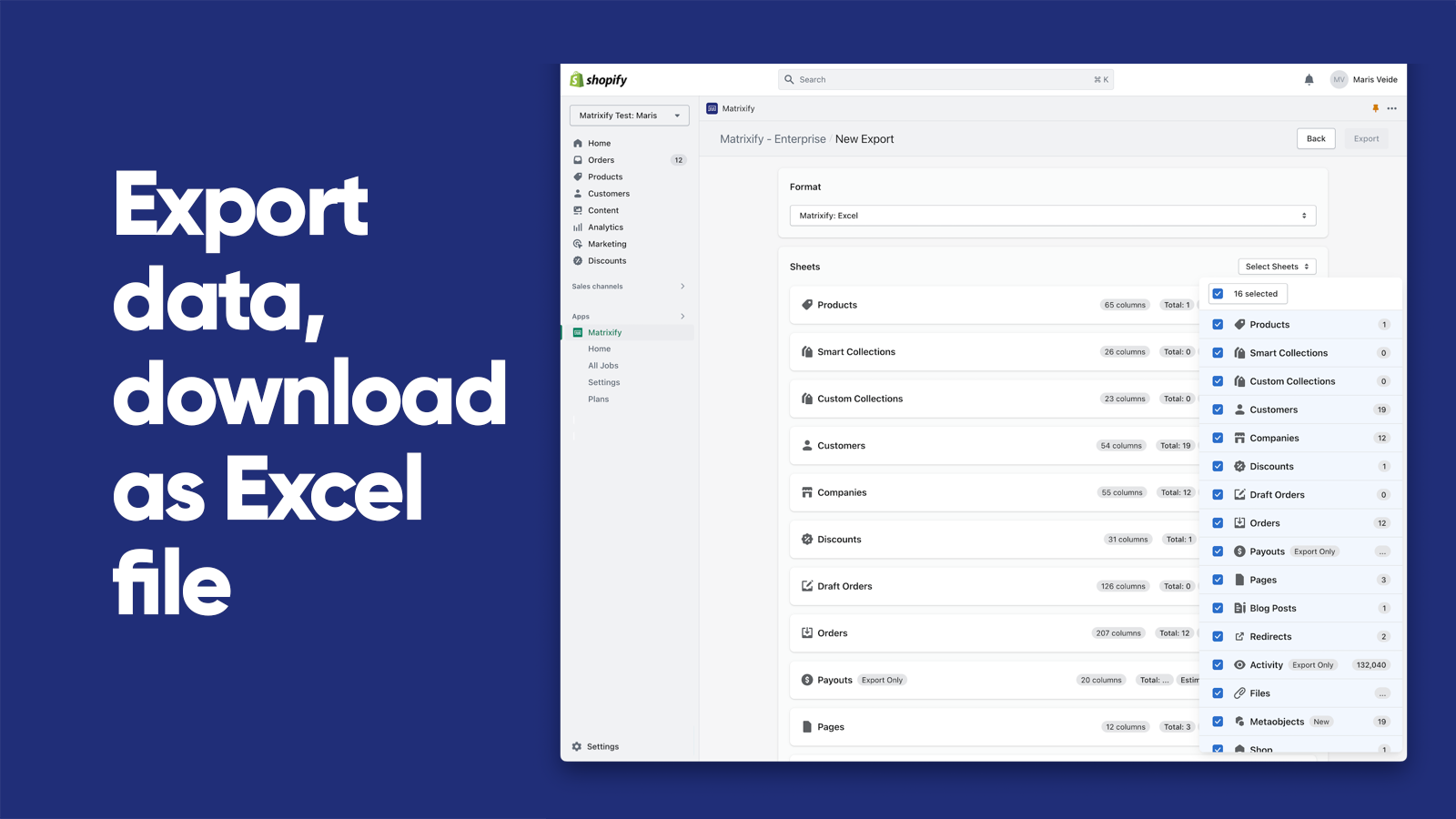
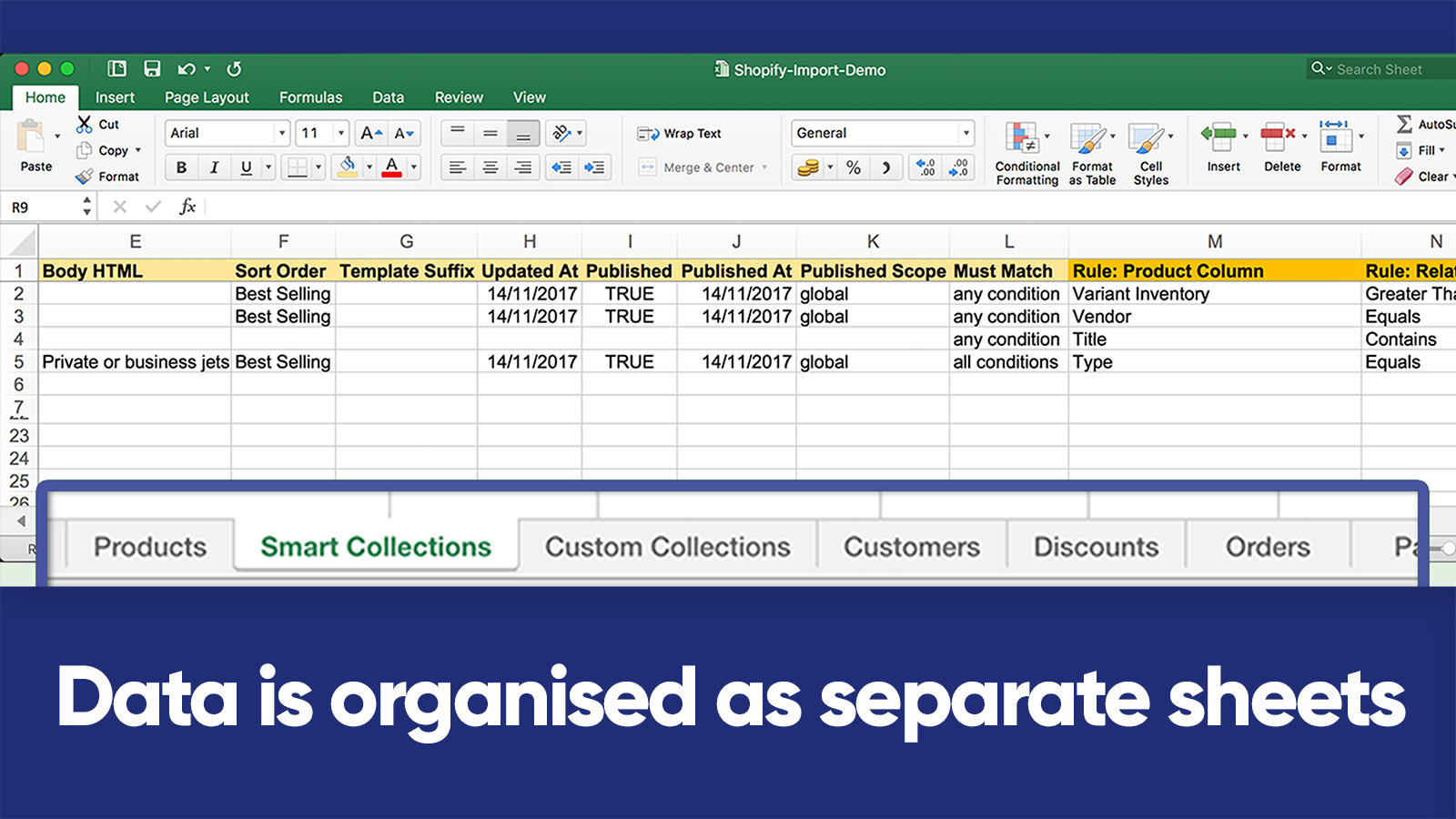
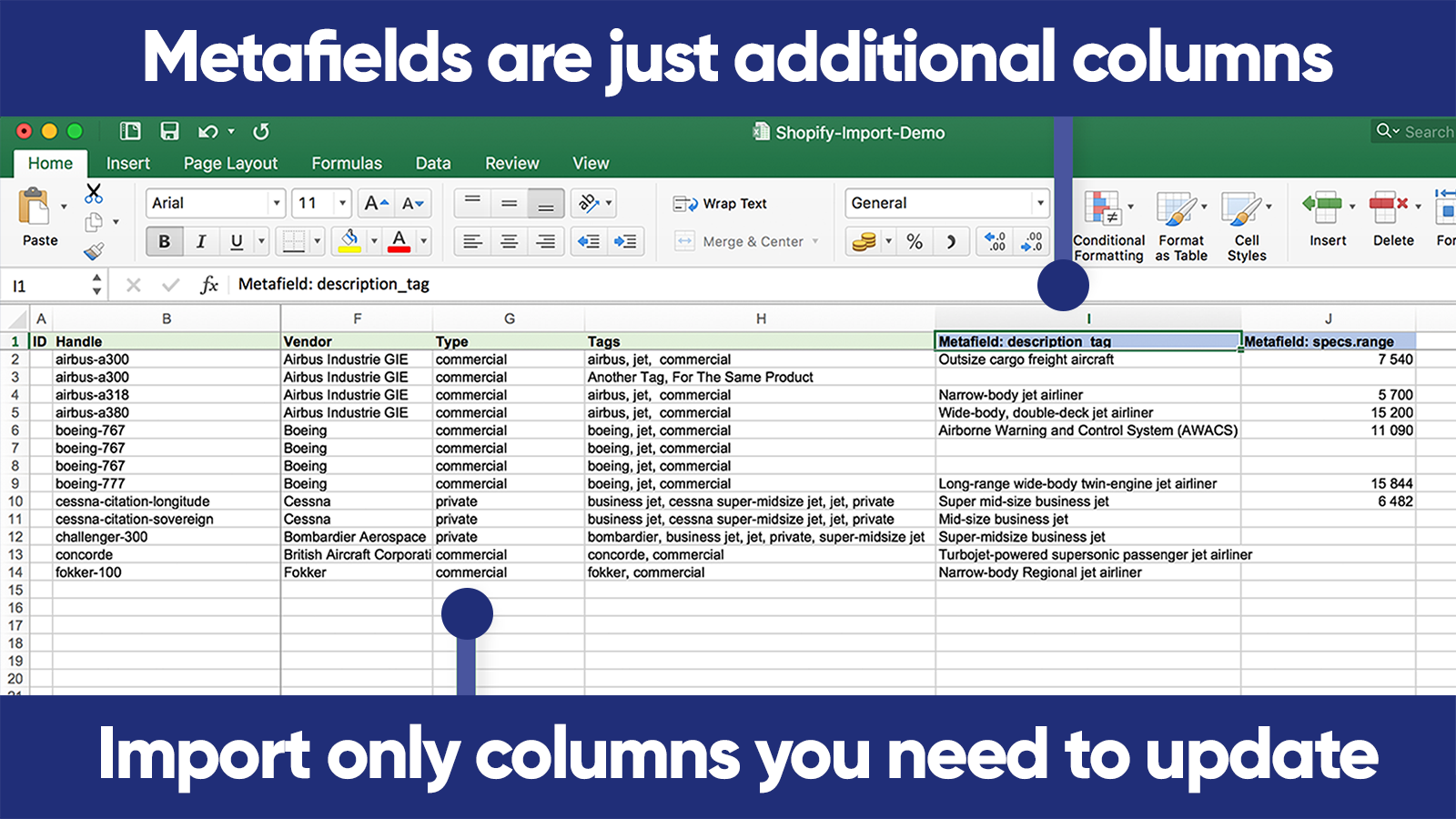
  • Data Import/Export:Use Excel, Google Sheets or CSV files to import and export data.
  • E-commerce platform migration:Switch from platforms like Magento, WordPress/WooCommerce, BigCommerce, Lightspeed etc.
  • Data Recovery:Save and retrieve your information.
  • Automated data transfer:Set up automatic recurring import and export jobs.
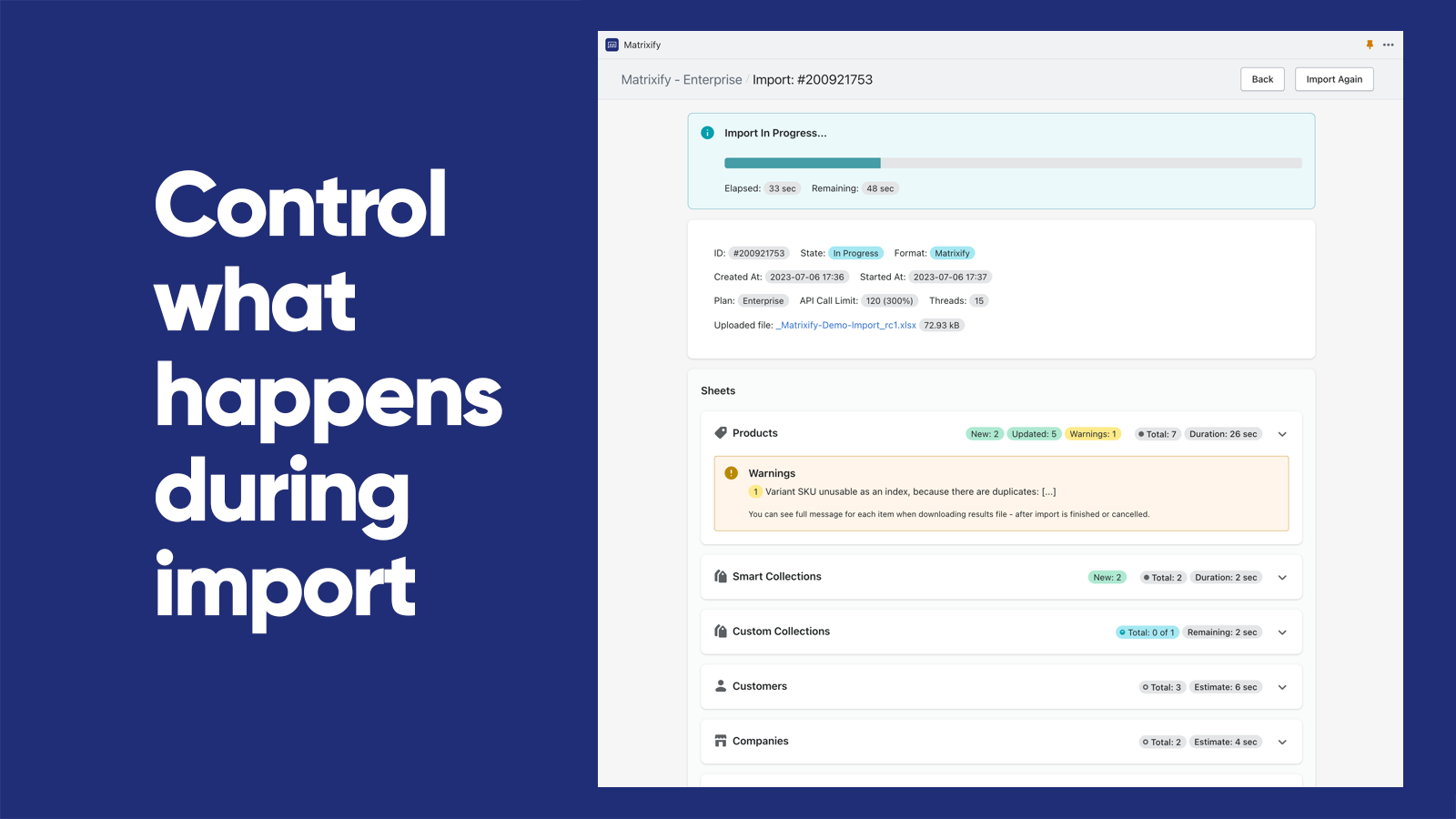
  • Export/Import Management:Track and manage export and import jobs in real-time and view their history.
Pricing Details

Matrixify: Data Export Import offers 1 free plan and 3 paid plans.

Considering installing this Moving your WooCommerce store Shopify app? Explore the pricing details and discover if they align with your budget and needs.

  1. Demo · $0/month

    Included features: Per file:, 10 Products, 10 Collections, 10 Customers, 10 Companies, 10 Discounts, 10 Translations, 10 Orders & Draft Orders, 10 Payouts, 10 Pages, 10 Blog Posts, 10 Redirects, 2 Menus, 10 Activity, 10 Files, 10 Metaobjects, ∞ Metafields

  2. Basic · $20/month

    Included features: Per file:, 5K Products, 300 Collections, 2K Customers, 50 Companies, 300 Discounts, 10k Translations, 1K Orders & Draft Orders, 366 Payouts, 50 Pages, 50 Blog Posts, 10K Redirects, ∞ Menus, 10K Activity, 10K Files, 50 Metaobjects, ∞ Metafields

  3. Big · $50/month

    Included features: Per file:, 50K Products, 3K Collections, 20K Customers, 500 Companies, 3K Discounts, 100k Translations, 10K Orders & Draft Orders, 3660 Payouts, 500 Pages, 500 Blog Posts, 100K Redirects, ∞ Menus, 100K Activity, 100K Files, 500 Metaobjects,∞ Metafields

  4. Enterprise · $200/month

    Included features: Everything Unlimited, Batch import, Parallel threads in each job: 10+, Parallel manual jobs: 2

Pros and Cons

Delve into ShopDigest's expert insights on Matrixify: Data Export Import - a Moving your WooCommerce store Shopify app. Our analysis of Shopify app store reviews presents unique pros and cons, allowing you to make informed decisions for your business. Read our full Matrixify: Data Export Import Moving your WooCommerce store App review.

Pros
  • Enables quick and seamless bulk updates for large product catalogs.
  • Highly responsive and helpful support team, often praised for quick resolutions.
  • Significantly reduces manual work, saving hours or even days on tasks.
  • Clear tutorials and guides that assist users in navigating the app’s features.
  • Simplifies complex migrations from other platforms to Shopify.
  • Intuitive design that makes bulk operations straightforward.
  • Consistently delivers fast and error-free imports/exports.
  • Supports a wide range of data manipulations, including metafields and custom exports.
  • Regular improvements and new features added without price hikes.
  • Convenient communication channel for real-time support.
Cons
  • Basic tier may be slow for extensive data, requiring a pricier plan.
  • Initial setup and feature mastery can be overwhelming for new users.
Talk to the developer

Install in Your Store Now

Your request goes to the team that built Matrixify: Data Export Import, not a support queue.

#2 of 5
EZ Importer ‑ Order Importer

EZ Importer ‑ Order Importer by Highview Apps LLC

Import or transfer orders from a CSV file in bulk.

Pricing Plans: Free
Pros
  • The app excels at handling large-scale order imports, saving significant time for businesses with high-volume needs.
  • Users appreciate the affordable credit system and value for money compared to alternatives.
Cons
  • Initial setup and data mapping require significant time investment and technical understanding.

What merchants said

“Their customer service is amazing! Had some questions and they got right back to us, and even followed up to make sure everything was working well for us. Their app was amazingly simple to use to migrate our orders from a different platform to Shopify. ”
Harbor Candy Shop · United States · ★ 5.0 · 11/5/2026

Summary

Starting PriceFree
Free TrialFree plan
Launch Date21 Jun 2017
Ratings4.5 ★ (79)
Install NowView charts
About the App

EZ Importer ‑ Order Importer, a Moving your WooCommerce store Shopify app, has achieved 78 reviews and an average rating of 4.5 stars since its launch 9 years ago. Designed to assist Shopify merchants with - "Transfer large orders from other platforms to save time on manual data entry." it is a valuable addition to the Moving your WooCommerce store app lineup.

Top Features:

Moving your WooCommerce store Shopify apps can help elevate your e-commerce game. EZ Importer ‑ Order Importer offers a host of key features, including:

  • Import Management:Import orders in large quantities from any source using our incorporated data mapper.
  • Data Importation:Upload several items per order, client information, transactions, and taxes.
  • Inventory Reduction:Lower the amount of product stock during import with our setting choices.
  • Migration Templates:Pre-made templates for transferring from a different Shopify store or other platforms.
  • Platform Migration:Switch from platforms like Magento, Wix, Kickstarter, 3dart, Squarespace, etc.
Pricing Details

EZ Importer ‑ Order Importer offers 1 free plan and 0 paid plans.

Considering installing this Moving your WooCommerce store Shopify app? Explore the pricing details and discover if they align with your budget and needs.

  1. Free · $0/month

Pros and Cons

Delve into ShopDigest's expert insights on EZ Importer ‑ Order Importer - a Moving your WooCommerce store Shopify app. Our analysis of Shopify app store reviews presents unique pros and cons, allowing you to make informed decisions for your business. Read our full EZ Importer ‑ Order Importer Moving your WooCommerce store App review.
Pros
  • The app excels at handling large-scale order imports, saving significant time for businesses with high-volume needs.
  • Users appreciate the affordable credit system and value for money compared to alternatives.
  • Repeated praise for responsive, patient, and hands-on assistance from support staff like Elizabeth and Ralph.
  • The ability to customize CSV templates and test imports allows precise control over data migration.
  • Successfully imports orders from diverse platforms (Shopify-to-Shopify, WooCommerce, Magento, Kickstarter, etc.).
  • Users value the ability to run trial imports without losing credits, enabling error correction.
  • Significantly reduces manual data entry for recurring bulk order processing.
  • Clear tutorials and help resources aid the setup process.
  • Deleting mistaken imports refunds credits, reducing financial risk.
  • Consistently handles high-order volumes without technical issues.
Cons
  • Initial setup and data mapping require significant time investment and technical understanding.
  • Some users noted the lack of automated scheduling for recurring imports.
  • The interface can feel overwhelming or unintuitive for first-time users.
  • Challenges with non-standard currency formats (e.g., comma-separated decimals) during imports.
Talk to the developer

Install in Your Store Now

Your request goes to the team that built EZ Importer ‑ Order Importer, not a support queue.

#3 of 5
Products import Wizard

Products import Wizard by Dalibor Stojcevski

Will load products from a file and update if the product already exists.

Pricing Plans: Free, $19/month, $49/month, $99/month
Pros
  • Handles large product catalogs smoothly and integrates well with platforms like Shopify.
  • Multiple users highlight responsive, helpful, and friendly customer support.
  • Offers extensive functionality, including complex field mapping and metafield transfers.
Cons
  • Users report restrictions on product quantities, with some hitting unexpected caps.

What merchants said

“I am happy with the app and support so far! Miroslav Bochev”
ALLPOWERBG · Bulgaria · ★ 5.0 · 6/11/2024

Summary

Starting PriceFree
Free TrialFree plan
Launch Date13 Nov 2019
Ratings3.7 ★ (9)
View on ShopifyView charts
About the App

Products import Wizard, a Moving your WooCommerce store Shopify app, has achieved 9 reviews and an average rating of 3.7 stars since its launch 7 years ago. Designed to assist Shopify merchants with - "This app allows you to import products into your store from xml, cvs, json and Excel files." it is a valuable addition to the Moving your WooCommerce store app lineup.

Top Features:

Moving your WooCommerce store Shopify apps can help elevate your e-commerce game. Products import Wizard offers a host of key features, including:

  • Automated product updates:Automatic product updates and imports (not included in all plans)
  • Import/Update Preview:Select what to import/update and preview it before importing.
  • Product Filtering:Sort products based on brand, tags, amount, and so on.
  • File Modification:Change the original file's text, adjust the price, and establish rules for modifications.
  • Data Extraction:It can extract product information from certain websites.
Pricing Details

Products import Wizard offers 1 free plan and 3 paid plans.

Considering installing this Moving your WooCommerce store Shopify app? Explore the pricing details and discover if they align with your budget and needs.

  1. Free · $0/month

    Included features: 10 file sources, Import 20 products, Import unlimited categories, variants, Constant app updates

  2. Basic · $19/month

    Included features: 20 file sources, Import 10 000 products, Import unlimited categories, variants, Products will stay if you delete app

  3. Professional · $49/month

    Included features: 30 file sources, Automatic import/update for all files, Import 40 000 products, Import unlimited categories, variant

  4. Ultra · $99/month

    Included features: Unlimited file sources, Automatic import/update for all files, Import 100 000 products

Pros and Cons

Delve into ShopDigest's expert insights on Products import Wizard - a Moving your WooCommerce store Shopify app. Our analysis of Shopify app store reviews presents unique pros and cons, allowing you to make informed decisions for your business.

Pros
  • Handles large product catalogs smoothly and integrates well with platforms like Shopify.
  • Multiple users highlight responsive, helpful, and friendly customer support.
  • Offers extensive functionality, including complex field mapping and metafield transfers.
  • The app is praised for its speed and stability during product imports.
  • Many users describe it as the best tool in its category, with intuitive setup for some.
Cons
  • Users report restrictions on product quantities, with some hitting unexpected caps.
  • Several reviews mention difficulty in configuration due to limited documentation or tutorials.
  • Some users faced problems with bulk imports, requiring manual uploads instead.
Talk to the developer

Install in Your Store Now

Your request goes to the team that built Products import Wizard, not a support queue.

Collection ranking

Top three ranked in Shopify App Store

Matrixify: Data Export Import

The Matrixify app lets you handle large amounts of store data by allowing you to import, export, update, and transfer it.

4.9 ★ (1,897)$20/mo onwards
View app data →
EZ Importer ‑ Order Importer

Transfer large orders from other platforms to save time on manual data entry.

4.5 ★ (79)Free
View app data →
Products import Wizard

This app allows you to import products into your store from xml, cvs, json and Excel files.

3.7 ★ (9)$19/mo onwards
View app data →
#4 of 5
Ablestar WooCommerce Importer

Ablestar WooCommerce Importer by Ablestar

Transfer products, orders, and customers from WooCommerce.

Pricing Plans: Free
Pros
  • The app successfully handles large-scale migrations, including complex data like products, orders, and customer information, with minimal errors.
  • Support teams, particularly Alison and Daniel, are frequently praised for their quick, helpful, and personalized assistance.
  • The app’s UI is intuitive and well-documented, making it easy for users to navigate and complete migrations.
Cons
  • Some users find the pricing structure, particularly for per-product imports, to be expensive or unclear.

What merchants said

“I had to migrate years of orders to Shopify and Ablestar was easy and clear to use.Their support team are responsive and really helped any issues we were having. Would reccomend!”
thegiftofoil · United Kingdom · ★ 5.0 · 9/26/2024

Summary

Starting PriceFree
Free TrialFree plan
Launch Date20 Dec 2016
DeveloperAblestar
Ratings4.9 ★ (27)
Install NowView charts
About the App

Ablestar WooCommerce Importer, a Moving your WooCommerce store Shopify app, has achieved 27 reviews and an average rating of 4.9 stars since its launch 10 years ago. Designed to assist Shopify merchants with - "Transfer your product, order, and customer data from WooCommerce quicker and easier than ever before." it is a valuable addition to the Moving your WooCommerce store app lineup.

Top Features:

Moving your WooCommerce store Shopify apps can help elevate your e-commerce game. Ablestar WooCommerce Importer offers a host of key features, including:

  • Order Migration:Transfer orders associated with the right products and customers.
  • Data Migration:Reload data as needed throughout the transfer process.
  • Data Import Assistance:We can assist in importing data that other tools fail to migrate automatically.
Pricing Details

Ablestar WooCommerce Importer offers 1 free plan and 0 paid plans.

Considering installing this Moving your WooCommerce store Shopify app? Explore the pricing details and discover if they align with your budget and needs.

  1. Free · $0/month

Pros and Cons

Delve into ShopDigest's expert insights on Ablestar WooCommerce Importer - a Moving your WooCommerce store Shopify app. Our analysis of Shopify app store reviews presents unique pros and cons, allowing you to make informed decisions for your business. Read our full Ablestar WooCommerce Importer Moving your WooCommerce store App review.

Pros
  • The app successfully handles large-scale migrations, including complex data like products, orders, and customer information, with minimal errors.
  • Support teams, particularly Alison and Daniel, are frequently praised for their quick, helpful, and personalized assistance.
  • The app’s UI is intuitive and well-documented, making it easy for users to navigate and complete migrations.
  • Users highlight significant reductions in manual effort, with migrations completing in minutes or hours instead of days or weeks.
  • The app consistently performs as expected, even with large datasets, and is noted for its smooth operation.
  • Users appreciate the flexibility to tailor imports, such as mapping specific fields or handling unique data requirements.
  • Many users find the app’s pricing reasonable compared to competitors, especially given the time and effort saved.
Cons
  • Some users find the pricing structure, particularly for per-product imports, to be expensive or unclear.
  • A few reviews mention minor issues like incomplete imports or mismatched data (e.g., product tags, MailChimp subscribers).
  • Certain users note the inability to filter imports (e.g., only new products) or import specific content types like pages.
Talk to the developer

Install in Your Store Now

Your request goes to the team that built Ablestar WooCommerce Importer, not a support queue.

#5 of 5
WTE ‑ WOO Migrator

WTE ‑ WOO Migrator by webTecheasy FZCO

Transfer data from one online store to another.

Pricing Plans: Free, $15.45/month
Pros
  • The app offers cost-effective solutions compared to competitors.
  • Users report successful and precise transfers of products, orders, and other data.
  • The developer, Raman, is frequently praised for quick and helpful assistance.
Cons
  • Some users encountered bugs, particularly with image syncing and variants.

What merchants said

“Raman was absolutely outstanding to work with. I ran into a few issues with my WooCommerce to Shopify import, and Raman took full ownership of the problem and made sure everything was sorted.Communication was clear, timeframes were well explained, and I always knew what was happening.Successfully imported over 600 products and over 1400 online orders. So grateful for the support — easily worth (and more!).”
Love Shack Giftware · Australia · ★ 5.0 · 1/23/2026

Summary

Starting PriceFree
Free TrialFree plan
Launch Date20 Sep 2017
Ratings5.0 ★ (14)
View on ShopifyView charts
About the App

WTE ‑ WOO Migrator, a Moving your WooCommerce store Shopify app, has achieved 14 reviews and an average rating of 5 stars since its launch 9 years ago. Designed to assist Shopify merchants with - "Transfer data from one eShop to another using this app. You don't need to know how to code to use it." it is a valuable addition to the Moving your WooCommerce store app lineup.

Top Features:

Moving your WooCommerce store Shopify apps can help elevate your e-commerce game. WTE ‑ WOO Migrator offers a host of key features, including:

  • Data Migration:Transfer data from one online store to another.
  • Pre-Payment Migration:You can test the migration before starting the payments.
  • Data Migration Support:Complete help is provided to transfer data.
Pricing Details

WTE ‑ WOO Migrator offers 1 free plan and 1 paid plan.

Considering installing this Moving your WooCommerce store Shopify app? Explore the pricing details and discover if they align with your budget and needs.

  1. Free Plan · $0/month

    Included features: Migrate 25 products / 30 days., Migrate 25 orders & customers / 30 day, Migrate 25 posts / 30 days.

  2. Basic Plan · $15.45/month

    Included features: Migrate products (Unlimited), Migrate orders & customers (Unlimited), Migrate posts (Unlimited), Use our IDs Exporter app free, Use our Duplicate Finder app free

Pros and Cons

Delve into ShopDigest's expert insights on WTE ‑ WOO Migrator - a Moving your WooCommerce store Shopify app. Our analysis of Shopify app store reviews presents unique pros and cons, allowing you to make informed decisions for your business.

Pros
  • The app offers cost-effective solutions compared to competitors.
  • Users report successful and precise transfers of products, orders, and other data.
  • The developer, Raman, is frequently praised for quick and helpful assistance.
  • Many users highlight the speed and ease of migration.
  • Capability to migrate blogs, domains, and vouchers beyond standard product transfers.
  • Personalized and patient support enhances user satisfaction.
Cons
  • Some users encountered bugs, particularly with image syncing and variants.
  • "Learning Curve" was removed as the sentiment was neutral/resolved with support, and "Minor Technical Issues" was retained due to recurring mentions, though overshadowed by positive support resolution.)
Talk to the developer

Install in Your Store Now

Your request goes to the team that built WTE ‑ WOO Migrator, not a support queue.

Showing 1-5 out of 5

Best Moving your WooCommerce store Apps in Shopify

Moving your WooCommerce store apps are designed to address specific needs and challenges faced by Shopify store merchants. Whether you're looking to optimize your store's SEO, improve customer support, enhance product listings, or streamline your inventory management, there's an app for that.

Discover a wealth of cutting-edge tools and features offered by these remarkable Moving your WooCommerce store Shopify apps, including Matrixify: Data Export Import, EZ Importer ‑ Order Importer, Products import Wizard, and many more. Our app collection provides a comprehensive overview of the top apps in the Moving your WooCommerce store category, enabling you to select the ones that will take your e-commerce venture to new heights.

Empower your Shopify store with the best Moving your WooCommerce store apps the platform has to offer and elevate your online business.

Explore Apps by Criteria:

  1. Most Popular Moving your WooCommerce store Apps
  2. Highest Reviewed Moving your WooCommerce store Apps
  3. Top Rated Moving your WooCommerce store Apps
  4. Newly Launched Moving your WooCommerce store Apps

Overview of the Above Top Moving your WooCommerce store Shopify Apps in November 2026

There are a number of Moving your WooCommerce store apps in the Shopify app store designed to supercharge your e-commerce success. Whether you're a seasoned entrepreneur or just starting your online journey, the right apps can make all the difference. We have listed the top Shopify apps in the Moving your WooCommerce store category, based on their popularity and average rating, to help you make informed decisions.

App NameCategoryDeveloperStarting PriceFree PlanReviews
Matrixify: Data Export ImportMatrixify: Data Export ImportBuilt for ShopifyMoving your WooCommerce storeITissible$0/month● Available4.9 ★ (1775)
EZ Importer ‑ Order ImporterEZ Importer ‑ Order ImporterMoving your WooCommerce storeHighview Apps LLC$0/month● Available4.5 ★ (78)
Products import WizardProducts import WizardMoving your WooCommerce storeDalibor Stojcevski$0/month● Available3.7 ★ (9)
Ablestar WooCommerce ImporterAblestar WooCommerce ImporterBuilt for ShopifyMoving your WooCommerce storeAblestar$0/month● Available4.9 ★ (27)
WTE ‑ WOO MigratorWTE ‑ WOO MigratorMoving your WooCommerce storewebTecheasy FZCO$0/month● Available5.0 ★ (14)

Have a Closer Look at the Best Moving your WooCommerce store Apps

Now let us jump in and check out these Top 5 Moving your WooCommerce store Shopify apps.
Matrixify: Data Export Import screenshot 1
Matrixify: Data Export Import screenshot 2
Matrixify: Data Export Import screenshot 3
Matrixify: Data Export Import screenshot 4

Reviews

Most Recent Review

5.0 ★Amazing

Bei unserem Wechsel von Woocommerce zu Shopify hat die App ihren Job sehr sauber gemacht - gerade die automatische Fehlerprüfung und -behebung ist extrem gut!

Kiezhund Hundeshop · Germany · 13 Nov 2026

Recent Review

5.0 ★Amazing

muy bueno gracias me es demasiado util para agilizar el tema de envío de pedidos

#2 · Honduras · 13 Nov 2026
Why is Matrixify: Data Export Import a top Moving your WooCommerce store Shopify app?
With an impressive overall rating of 4.9 stars and 1,897 reviews, Matrixify: Data Export Import stands out as one of the top Moving your WooCommerce store Shopify apps. The main objective of the app is - The Matrixify app lets you handle large amounts of store data by allowing you to import, export, update, and transfer it. Its purpose underscores its significance in enhancing your Shopify store experience.
ShopDigest selects the top Shopify apps in the Moving your WooCommerce store category based on various parameters, including the number of installations across Shopify stores, the app's ranking in the Shopify App Store, the number of merchants' reviews, and its overall customer rating, among other factors.
Why integrate Matrixify: Data Export Import with your Shopify store?
By integrating a Moving your WooCommerce store app with your Shopify store, you unlock a range of benefits. Matrixify: Data Export Import, a popular Moving your WooCommerce store Shopify app, brings the following functionalities and value to a Shopify store, including:
  • Data Import/Export: Use Excel, Google Sheets or CSV files to import and export data.
  • E-commerce platform migration: Switch from platforms like Magento, WordPress/WooCommerce, BigCommerce, Lightspeed etc.
  • Data Recovery: Save and retrieve your information.
  • Automated data transfer: Set up automatic recurring import and export jobs.
  • Export/Import Management: Track and manage export and import jobs in real-time and view their history.
Learn more about the Matrixify: Data Export Import features in detail.

Shopify merchants highlight key advantages, such as Import and Export data using Excel, Google Sheets or CSV files., Migrate from Magento, WordPress/WooCommerce, BigCommerce, Lightspeed and others., and more,
What are some of the top alternatives for Matrixify: Data Export Import?
Looking for options? Dive into a selection of Moving your WooCommerce store apps that rival Matrixify: Data Export Import, each offering unique features to enhance your Shopify store. Consider these top alternatives: which can match or even surpass the offerings of Matrixify: Data Export Import, giving you flexibility and choice.
profile picture 1profile picture 2profile picture 3profile picture 4

Install Now

Our experts are here to help you.

EZ Importer ‑ Order Importer screenshot 1
EZ Importer ‑ Order Importer screenshot 2
EZ Importer ‑ Order Importer screenshot 3
EZ Importer ‑ Order Importer screenshot 4
EZ Importer ‑ Order Importer screenshot 5
EZ Importer ‑ Order Importer screenshot 6
EZ Importer ‑ Order Importer screenshot 7

Reviews

Most Recent Review

5.0 ★Amazing

Their customer service is amazing! Had some questions and they got right back to us, and even followed up to make sure everything was working well for us. Their app was amazingly simple to use to migrate our orders from a different platform to Shopify.

Harbor Candy Shop · United States · 05 Nov 2026

Recent Review

5.0 ★Amazing

Really helpful team, comprehensive documentation and import capabilities. Takes a reasonable degree of learning to understand how it all works, but Highview offer all the support needed. Highly recommend for historical order importing/migrations.

OpenGround · Australia · 25 Aug 2026
Why is EZ Importer ‑ Order Importer a top Moving your WooCommerce store Shopify app?
With an impressive overall rating of 4.5 stars and 79 reviews, EZ Importer ‑ Order Importer stands out as one of the top Moving your WooCommerce store Shopify apps. The main objective of the app is - Transfer large orders from other platforms to save time on manual data entry. Its purpose underscores its significance in enhancing your Shopify store experience.
ShopDigest selects the top Shopify apps in the Moving your WooCommerce store category based on various parameters, including the number of installations across Shopify stores, the app's ranking in the Shopify App Store, the number of merchants' reviews, and its overall customer rating, among other factors.
Why integrate EZ Importer ‑ Order Importer with your Shopify store?
By integrating a Moving your WooCommerce store app with your Shopify store, you unlock a range of benefits. EZ Importer ‑ Order Importer, a popular Moving your WooCommerce store Shopify app, brings the following functionalities and value to a Shopify store, including:
  • Import Management: Import orders in large quantities from any source using our incorporated data mapper.
  • Data Importation: Upload several items per order, client information, transactions, and taxes.
  • Inventory Reduction: Lower the amount of product stock during import with our setting choices.
  • Migration Templates: Pre-made templates for transferring from a different Shopify store or other platforms.
  • Platform Migration: Switch from platforms like Magento, Wix, Kickstarter, 3dart, Squarespace, etc.
Learn more about the EZ Importer ‑ Order Importer features in detail.

Shopify merchants highlight key advantages, such as Bulk import orders from any source using our built-in data mapper., Import multiple line items per order, customer data, transactions, and taxes, and more,
What are some of the top alternatives for EZ Importer ‑ Order Importer?
Looking for options? Dive into a selection of Moving your WooCommerce store apps that rival EZ Importer ‑ Order Importer, each offering unique features to enhance your Shopify store. Consider these top alternatives: which can match or even surpass the offerings of EZ Importer ‑ Order Importer, giving you flexibility and choice.
profile picture 1profile picture 2profile picture 3profile picture 4

Install Now

Our experts are here to help you.

Products import Wizard

3. Products import Wizard

3.7 ★ (9)
Products import Wizard screenshot 1
Products import Wizard screenshot 2
Products import Wizard screenshot 3
Products import Wizard screenshot 4
Products import Wizard screenshot 5

Reviews

Most Recent Review

5.0 ★Amazing

I am happy with the app and support so far! Miroslav Bochev

ALLPOWERBG · Bulgaria · 11 Jun 2024

Recent Review

5.0 ★Amazing

It transfers categories and metafields very successfully. They are helpful even though it is difficult to communicate when there is a problem.

Samsuns Group · Germany · 13 Mar 2022
Why is Products import Wizard a top Moving your WooCommerce store Shopify app?
With an impressive overall rating of 3.7 stars and 9 reviews, Products import Wizard stands out as one of the top Moving your WooCommerce store Shopify apps. The main objective of the app is - This app allows you to import products into your store from xml, cvs, json and Excel files. Its purpose underscores its significance in enhancing your Shopify store experience.
ShopDigest selects the top Shopify apps in the Moving your WooCommerce store category based on various parameters, including the number of installations across Shopify stores, the app's ranking in the Shopify App Store, the number of merchants' reviews, and its overall customer rating, among other factors.
Why integrate Products import Wizard with your Shopify store?
By integrating a Moving your WooCommerce store app with your Shopify store, you unlock a range of benefits. Products import Wizard, a popular Moving your WooCommerce store Shopify app, brings the following functionalities and value to a Shopify store, including:
  • Automated product updates: Automatic product updates and imports (not included in all plans)
  • Import/Update Preview: Select what to import/update and preview it before importing.
  • Product Filtering: Sort products based on brand, tags, amount, and so on.
  • File Modification: Change the original file's text, adjust the price, and establish rules for modifications.
  • Data Extraction: It can extract product information from certain websites.
Learn more about the Products import Wizard features in detail.

Shopify merchants highlight key advantages, such as Automated update and import new products ( not available for all plans ), Choose what to import / update, preview before import, and more,
What are some of the top alternatives for Products import Wizard?
Looking for options? Dive into a selection of Moving your WooCommerce store apps that rival Products import Wizard, each offering unique features to enhance your Shopify store. Consider these top alternatives: which can match or even surpass the offerings of Products import Wizard, giving you flexibility and choice.
profile picture 1profile picture 2profile picture 3profile picture 4

Install Now

Our experts are here to help you.

Ablestar WooCommerce Importer screenshot 1
Ablestar WooCommerce Importer screenshot 2
Ablestar WooCommerce Importer screenshot 3
Ablestar WooCommerce Importer screenshot 4
Ablestar WooCommerce Importer screenshot 5

Reviews

Most Recent Review

5.0 ★Amazing

I had to migrate years of orders to Shopify and Ablestar was easy and clear to use.Their support team are responsive and really helped any issues we were having. Would reccomend!

thegiftofoil · United Kingdom · 26 Sep 2024

Recent Review

5.0 ★Amazing

I had a huge WooCommerce site to migrate over to Shopify and the Ablestar importer successfully did the migration with ease and without error. I also reached out to their support team multiple times and received quick and helpful responses. This app was definitely worth the money invested.

All Good Body Care · United States · 09 Apr 2024
Why is Ablestar WooCommerce Importer a top Moving your WooCommerce store Shopify app?
With an impressive overall rating of 4.9 stars and 27 reviews, Ablestar WooCommerce Importer stands out as one of the top Moving your WooCommerce store Shopify apps. The main objective of the app is - Transfer your product, order, and customer data from WooCommerce quicker and easier than ever before. Its purpose underscores its significance in enhancing your Shopify store experience.

ShopDigest selects the top Shopify apps in the Moving your WooCommerce store category based on various parameters, including the number of installations across Shopify stores, the app's ranking in the Shopify App Store, the number of merchants' reviews, and its overall customer rating, among other factors.
Why integrate Ablestar WooCommerce Importer with your Shopify store?
By integrating a Moving your WooCommerce store app with your Shopify store, you unlock a range of benefits. Ablestar WooCommerce Importer, a popular Moving your WooCommerce store Shopify app, brings the following functionalities and value to a Shopify store, including:
  • Order Migration: Transfer orders associated with the right products and customers.
  • Data Migration: Reload data as needed throughout the transfer process.
  • Data Import Assistance: We can assist in importing data that other tools fail to migrate automatically.
Learn more about the Ablestar WooCommerce Importer features in detail.

Shopify merchants highlight key advantages, such as Migrate orders that are linked to the correct products and customers, Re-import data as necessary during the migration process, and more,
What are some of the top alternatives for Ablestar WooCommerce Importer?
Looking for options? Dive into a selection of Moving your WooCommerce store apps that rival Ablestar WooCommerce Importer, each offering unique features to enhance your Shopify store. Consider these top alternatives: which can match or even surpass the offerings of Ablestar WooCommerce Importer, giving you flexibility and choice.
profile picture 1profile picture 2profile picture 3profile picture 4

Install Now

Our experts are here to help you.

WTE ‑ WOO Migrator

5. WTE ‑ WOO Migrator

5.0 ★ (14)
WTE ‑ WOO Migrator screenshot 1
WTE ‑ WOO Migrator screenshot 2
WTE ‑ WOO Migrator screenshot 3

Reviews

Most Recent Review

5.0 ★Amazing

Raman was absolutely outstanding to work with. I ran into a few issues with my WooCommerce to Shopify import, and Raman took full ownership of the problem and made sure everything was sorted.Communication was clear, timeframes were well explained, and I always knew what was happening.Successfully imported over 600 products and over 1400 online orders. So grateful for the support — easily worth (and more!).

Love Shack Giftware · Australia · 23 Jan 2026

Recent Review

5.0 ★Amazing

App does exactly what they say, migrates data accurately and efficiently. Fantastic value and Raman was super helpful assisting me with testing and configuration. Fast response and great service. Definitely would recommend.

River City Coffee Roasters · Australia · 20 Mar 2023
Why is WTE ‑ WOO Migrator a top Moving your WooCommerce store Shopify app?
With an impressive overall rating of 5 stars and 14 reviews, WTE ‑ WOO Migrator stands out as one of the top Moving your WooCommerce store Shopify apps. The main objective of the app is - Transfer data from one eShop to another using this app. You don't need to know how to code to use it. Its purpose underscores its significance in enhancing your Shopify store experience.

ShopDigest selects the top Shopify apps in the Moving your WooCommerce store category based on various parameters, including the number of installations across Shopify stores, the app's ranking in the Shopify App Store, the number of merchants' reviews, and its overall customer rating, among other factors.
Why integrate WTE ‑ WOO Migrator with your Shopify store?
By integrating a Moving your WooCommerce store app with your Shopify store, you unlock a range of benefits. WTE ‑ WOO Migrator, a popular Moving your WooCommerce store Shopify app, brings the following functionalities and value to a Shopify store, including:
  • Data Migration: Transfer data from one online store to another.
  • Pre-Payment Migration: You can test the migration before starting the payments.
  • Data Migration Support: Complete help is provided to transfer data.
Learn more about the WTE ‑ WOO Migrator features in detail.

Shopify merchants highlight key advantages, such as Migrate data from one eShop to another., Demo migration allowed before activation of payments., and more,
What are some of the top alternatives for WTE ‑ WOO Migrator?
Looking for options? Dive into a selection of Moving your WooCommerce store apps that rival WTE ‑ WOO Migrator, each offering unique features to enhance your Shopify store. Consider these top alternatives: which can match or even surpass the offerings of WTE ‑ WOO Migrator, giving you flexibility and choice.
profile picture 1profile picture 2profile picture 3profile picture 4

Install Now

Our experts are here to help you.

How We Selected the Top Shopify Apps in Moving your WooCommerce store

Our team employs a comprehensive evaluation process that takes into account various factors to ensure you are presented with only the best options. Here's how we do it:

  • By Reviews: We understand the value of peer recommendations, and that's why we've sorted these top Shopify apps in Moving your WooCommerce store based on the highest praise received from users, ensuring you get tried-and-tested solutions. The top listed apps here have earned the trust of fellow Shopify merchants. Jump to Highest Reviewed Moving your WooCommerce store Shopify Apps.
  • By Price: Budget consideration is important while choosing a Shopify app for your store. That's why we have also categorized these top Shopify apps in Moving your WooCommerce store by price, enabling you to find the perfect solutions that align with your financial goals without compromising on quality. Jump to Top Paid Moving your WooCommerce store Shopify Apps.
  • By Launch Date: To keep you updated about the latest innovations, we've organized these Shopify apps based on their launch date. You can check the list of recently launched top apps in Moving your WooCommerce store that could bring innovative solutions to your Shopify store. Jump to Newly Launched Moving your WooCommerce store Shopify Apps.
  • By Popularity: We feature the Moving your WooCommerce store apps that are making waves among Shopify store owners, helping you stay ahead of the curve. These apps have captured the attention of ecommerce owners and are listed as the top in the popularity section of the Shopify app store. Jump to Most Popular Moving your WooCommerce store Shopify Apps.
  • By Ratings: We prioritize apps that have consistently earned high ratings, reflecting their impact and user satisfaction. These Moving your WooCommerce store apps with excellent ratings stand out from their competitors, making them a solid choice for your business needs. Jump to Top Rated Moving your WooCommerce store Shopify Apps.
  • By Best Match: We harness the power of Shopify's own recommendations! Our selection considers apps that Shopify suggests as a strong fit for Moving your WooCommerce store, ensuring you access the platform's expert insights. Jump to Best Match Moving your WooCommerce store Shopify Apps.

With these criteria in mind, we strive to present you with a diverse and well-rounded selection of the top Moving your WooCommerce store Shopify apps in 2026. Rest assured, our selection process is designed to assist you in finding the most suitable solutions for your Shopify store needs.

How to Choose the Best Moving your WooCommerce store Shopify App For Your Store

Choosing the right Moving your WooCommerce store Shopify App for your store depends on various factors specific to your business goals. To make an informed decision, follow these steps:

  • Identify Your Requirements: Begin by understanding the specific goals and challenges your store faces. List the key features and functionalities you need in a Moving your WooCommerce store app to address these requirements effectively.
  • Read User Reviews: Explore user reviews and ratings for the Moving your WooCommerce store apps you are considering. Real-hand experiences from other Shopify merchants can provide valuable insights into how each app performs.
  • Compare Features: Use our app comparison page, where you can add the Moving your WooCommerce store apps of your choice and perform a side-by-side comparison. This page allows you to evaluate each app's features, pricing, support, and other essential factors to help you find the best fit for your store.
  • Consider Budget: While some apps offer free plans with basic functionalities, others may require a paid subscription for access to advanced features. You can check out our complete list of Top Paid Moving your WooCommerce store Shopify apps, and choose an app that aligns with your budget and can grow with your store as it expands.
  • Support and Documentation: Check the documentation and customer support resources of the app. A well-supported Moving your WooCommerce store app that offers comprehensive documentation can help you implement and use it more effectively.
  • Integration Compatibity: Ensure that the Moving your WooCommerce store app you choose can seamlessly integrate with your existing apps and theme to avoid compatibility issues.
  • Trial Periods: Some Moving your WooCommerce store apps offer a free trial period that enables you to test the app's capabilities before purchasing a subscription.

Each Shopify store is different, and the best Moving your WooCommerce store app for your store will be one that aligns closely with your specific business requirements.

More Information on Moving your WooCommerce store Shopify Apps

Now let us jump in and check out these Top 10 Moving your WooCommerce store Shopify apps.

In this comprehensive guide, we've provided you with a complete collection of Moving your WooCommerce store Shopify apps that can help streamline your ecommerce journey. These Moving your WooCommerce store Shopify apps cover a wide spectrum of needs to take your store forward. From 5 outstanding apps, we've covered every facet of Moving your WooCommerce store, ensuring you have access to a vast range of tools to enhance your Shopify store.

However, choosing the perfect Moving your WooCommerce store app for your specific requirements is key. Consider your specific goals, read user reviews, and compare features to find the ideal match for your Shopify store. Our Shopify app comparison page simplifies this process by allowing you to create side-by-side comparisons for any Moving your WooCommerce store apps of your choice. ShopDigest guides you through the selection process, making it easier to find and install the perfect Moving your WooCommerce store app that aligns with your goals.

Shopify Moving your WooCommerce store App Installation

There are thousands of Moving your WooCommerce store Shopify apps with different installation instructions, integration complexities, and customization levels. Our team at ShopDigest is here to assist you every step of the way. Installing your chosen app is a breeze with our service, ensuring a seamless integration into your store's ecosystem.

What's included

  • Safely install/uninstall Shopify app of your choice
  • App integration with any theme as per specification
  • Configurations & setup
  • Assured support and guidance
  • Get discount offers (not guaranteed)

What's not included

  • Shopify app subscription cost
Collection charts

Explore key insights for Moving your WooCommerce store apps

Market share, rank movement, install geography and review pace — tracked across all 5 apps. Open the full charts for history and app-level detail.

Open Moving your WooCommerce store charts

Market share leaders

Nov 2026
Matrixify: Data Export Import99.6%
EZ Importer ‑ Order Importer0.4%

The top two apps hold 100.0% of tracked installs.

Where installs come from

Collection-wide
🇺🇸United States43.1%
🇬🇧United Kingdom9.2%
🇦🇺Australia6.3%
🇨🇦Canada6.0%
🇩🇪Germany4.0%

United States and United Kingdom merchants drive 52.3% of installs.

Reviews added, 30 days

Top tracked apps
Matrixify: Data Export Import+119
EZ Importer ‑ Order Importer+1

120 new reviews across the top 5 tracked apps in the last 30 days.

Key Insights:
  • Matrixify: Data Export Import commands 99.6% market share, 99.1pp ahead of EZ Importer ‑ Order Importer — a concentrated moving your woocommerce store category.
  • All 5 top-ranked moving your woocommerce store apps held their positions stable this period — a settled market.
  • Matrixify: Data Export Import added the most new reviews this month (+119) — strong adoption momentum.

Frequently Asked Questions for Moving your WooCommerce store Shopify Apps

1. What are some of the top Shopify apps under the Moving your WooCommerce store category?

Here are some of the top Shopify apps under the Moving your WooCommerce store category:

Each of these apps offers unique features and functionalities tailored to boost your Moving your WooCommerce store efforts and optimize your store's performance. Explore these top choices and find the perfect fit for your business needs.

2. How do I install a Moving your WooCommerce store Shopify app?

Installing a Moving your WooCommerce store Shopify app is simple. Navigate to the Shopify App Store, search for the specific app you want to install, and click on the "Install Now" button. Follow the on-screen instructions to integrate the app seamlessly into your Shopify store. If you need our expert guidance to help you install Moving your WooCommerce store apps on your Shopify store, feel free to contact us now.

3. Are there free apps available in the Moving your WooCommerce store category?

Yes, the Moving your WooCommerce store category offers a variety of free apps that can be integrated into your Shopify store at no cost. These free apps come with a range of basic features and functionalities to assist you in managing various aspects of your ecommerce business.

4. Are there any trial options available for paid apps in the Moving your WooCommerce store category?

Many paid apps in the Moving your WooCommerce store category offer free trial periods, allowing you to explore their features and assess their compatibility for your business. Take advantage of these trial periods to determine if the app aligns with your needs before opting for a paid plan.

5. How can I determine which Moving your WooCommerce store Shopify app is best for my store?

Determining the best Moving your WooCommerce store Shopify app for your store requires careful consideration of your business requirements and goals. To make an informed decision, we recommend visiting our App Comparison Page. There, you can easily add the apps of your choice and conduct a side-by-side comparison of their features, functionalities, pricing, and user reviews.

Some popular Moving your WooCommerce store Shopify apps are:

6. Can I use multiple Moving your WooCommerce store Shopify apps simultaneously?

You can use multiple Moving your WooCommerce store Shopify apps at the same time to create a powerful ecosystem for your store. Just ensure that the apps complement each other and do not conflict in their functionalities.

7. How can I find the latest and trending Shopify apps in the Moving your WooCommerce store category?

To discover the latest and trending Shopify apps in the Moving your WooCommerce store category, visit:

Newly launched Moving your WooCommerce store Shopify apps
Most popular Moving your WooCommerce store Shopify apps

These lists showcase recently added Shopify apps and those gaining popularity among users.

8. Are there any discounts or promotions available for Moving your WooCommerce store Shopify apps?

At times, app developers may offer special promotions or discounts. Keep an eye on the app details and the Shopify app store for any ongoing deals or exclusive offers.

Alternatively, contact our team if you're looking for discounts on Moving your WooCommerce store app pricing plans, we can help secure better deals on the Moving your WooCommerce store app exclusively for you.

*Disclaimer: Please note that ShopDigest doesn't guarantee discounts on the apps as any changes to the pricing plans are ultimately up to the discretion of the developer.

Products import Wizard
by Dalibor Stojcevski

Will load products from a file and update if the product already exists.

Free plan · From $19/mo
★ 3.7 (9)
About ShopDigest

The Shopify ecosystem, shown through the work

ShopDigest is an independent directory of Shopify work. Developers, agencies and experts publish the projects they’ve actually shipped — migrations, rebuilds, custom apps, headless storefronts — with the results attached.

For merchants, that means judging a partner on evidence instead of a sales page: browse real builds in your category and budget, then reach out directly. For builders, it means one profile that keeps working after the project ships.

No commissions, no pay-to-rank placements. The best work rises because people save and follow it.

More about ShopDigest
About ShopDigest

Show the work.
Win the work.

A portfolio directory for the Shopify ecosystem — builders publish, merchants browse, nobody buys a better position.

More about ShopDigest