Partner with us

Grow with ShopDigest. Programs for experts, developers and store owners.

Top 95 Mega menu Shopify Apps in October 2026

Check out all mega menu apps tailor-made for your Shopify store. Whether you are seeking free or paid solutions, Shopify offers a diverse range of 95 top-notch apps catering to businesses of all sizes. These apps are designed to boost your Shopify store's performance and make managing your business a breeze. Explore the collection and discover how these mega menu apps can take your Shopify store to the next level! We meticulously handpicked these top mega menu apps by evaluating various parameters, including ratings, reviews, price, popularity, launch date, and best matches, to ensure they offer the best value and experience to our users. Read full information here. Check out all mega menu apps tailor-made for your Shopify store. Whether you're seeking free plans or premium solutions, Shopify offers a diverse range of 95 top-notch apps catering to businesses of all sizes. Discover the perfect tools to elevate your' e-commerce experience today!

Globo Mega Menu, Navigation leads mega menu apps with 81.8% market share, ahead of Qikify Mega Menu & Navigation at 9.9%. A concentrated field — one app holds most of the tracked installs.

95 apps trackedUpdated 23 October 2026

Find the right app for your store

Sign in and we shortlist the mega menu apps that fit your setup.

Continue with Google

Top ranked · #1 of 95
Globo Mega Menu, Navigation

Globo Mega Menu, Navigation by Globo.io

Large Menu with pictures, Collapsible Menu, Directional Menu

Pricing Plans: Free, $12.90/month, $17.90/month
Free Trial: 7 days
Pros
  • Consistently praised for being fast, responsive, and highly effective in resolving issues.
  • The app is frequently described as intuitive and straightforward, with a user-friendly interface.
  • Users appreciate the flexibility and extensive customization features available.
Cons
  • Some users encountered compatibility issues with certain themes, requiring fixes.

What merchants said

“I just installed the app and I had numerous questions before proceeding and Nora was patient and outstanding. The app id top notch as well as support.”
Montclair & Vale · United States · ★ 5.0 · 10/20/2026

Summary

Starting PriceFree
Free Trial7 days
Launch Date11 Aug 2017
DeveloperGlobo.io
Ratings4.9 ★ (1,707)
View on ShopifyView charts
About the App

Globo Mega Menu, Navigation, a Mega menu Shopify app, has achieved 1690 reviews and an average rating of 4.9 stars since its launch 9 years ago. Designed to assist Shopify merchants with - "The Globo Mega Menu app is a great tool for creating your menu without needing to code." it is a valuable addition to the Mega menu app lineup.

Top Features:

Mega menu Shopify apps can help elevate your e-commerce game. Globo Mega Menu, Navigation offers a host of key features, including:

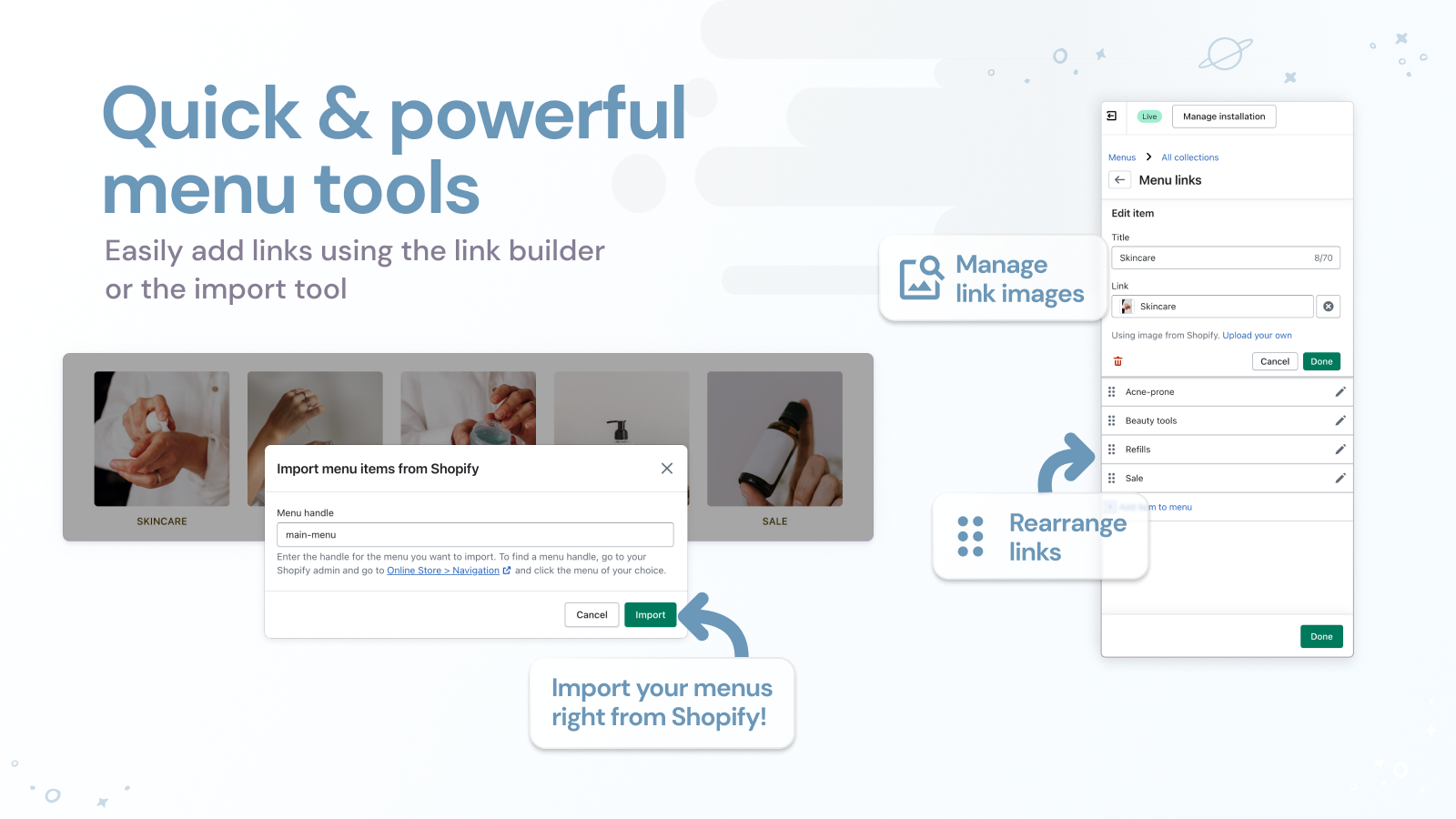
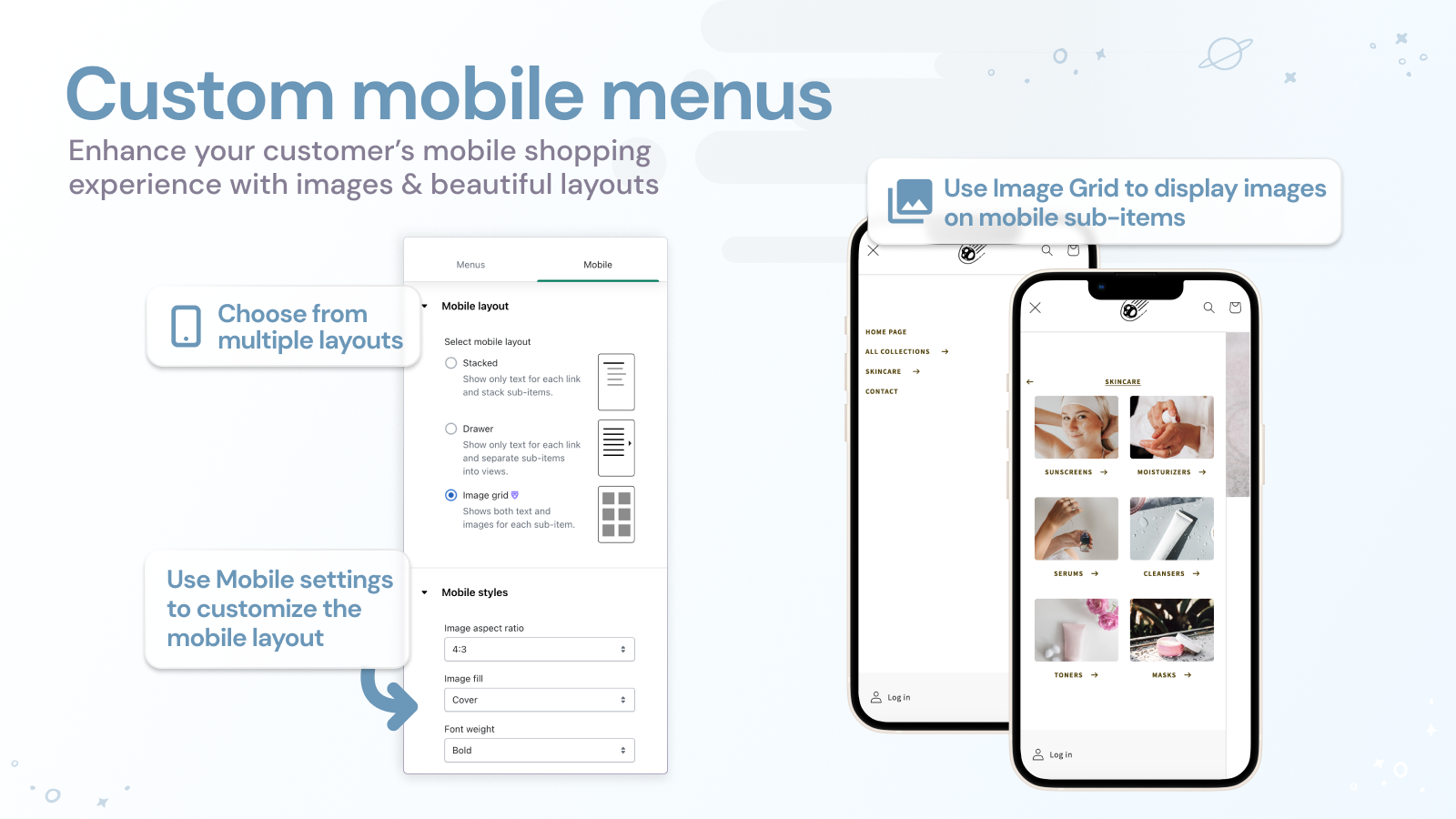
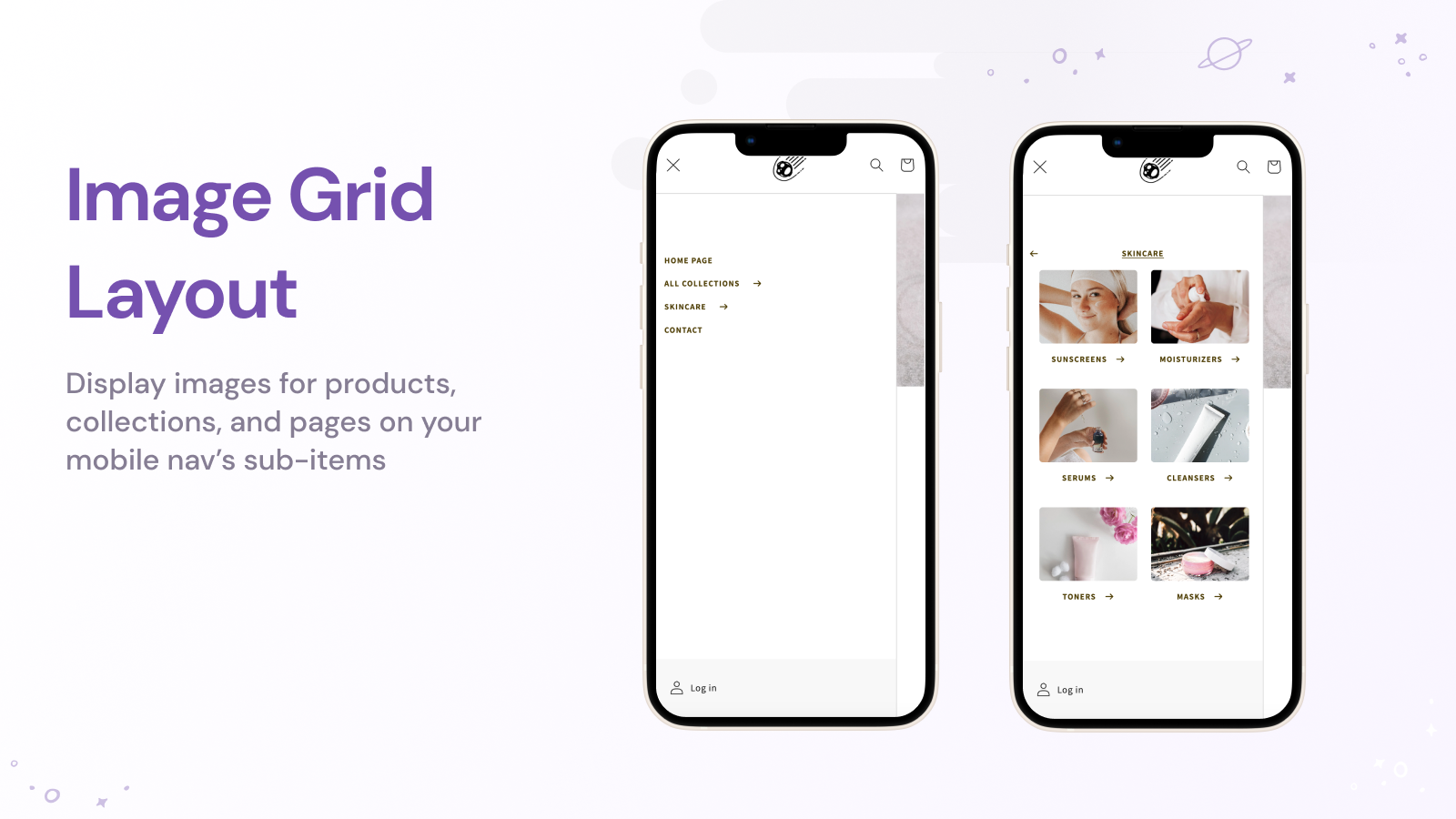
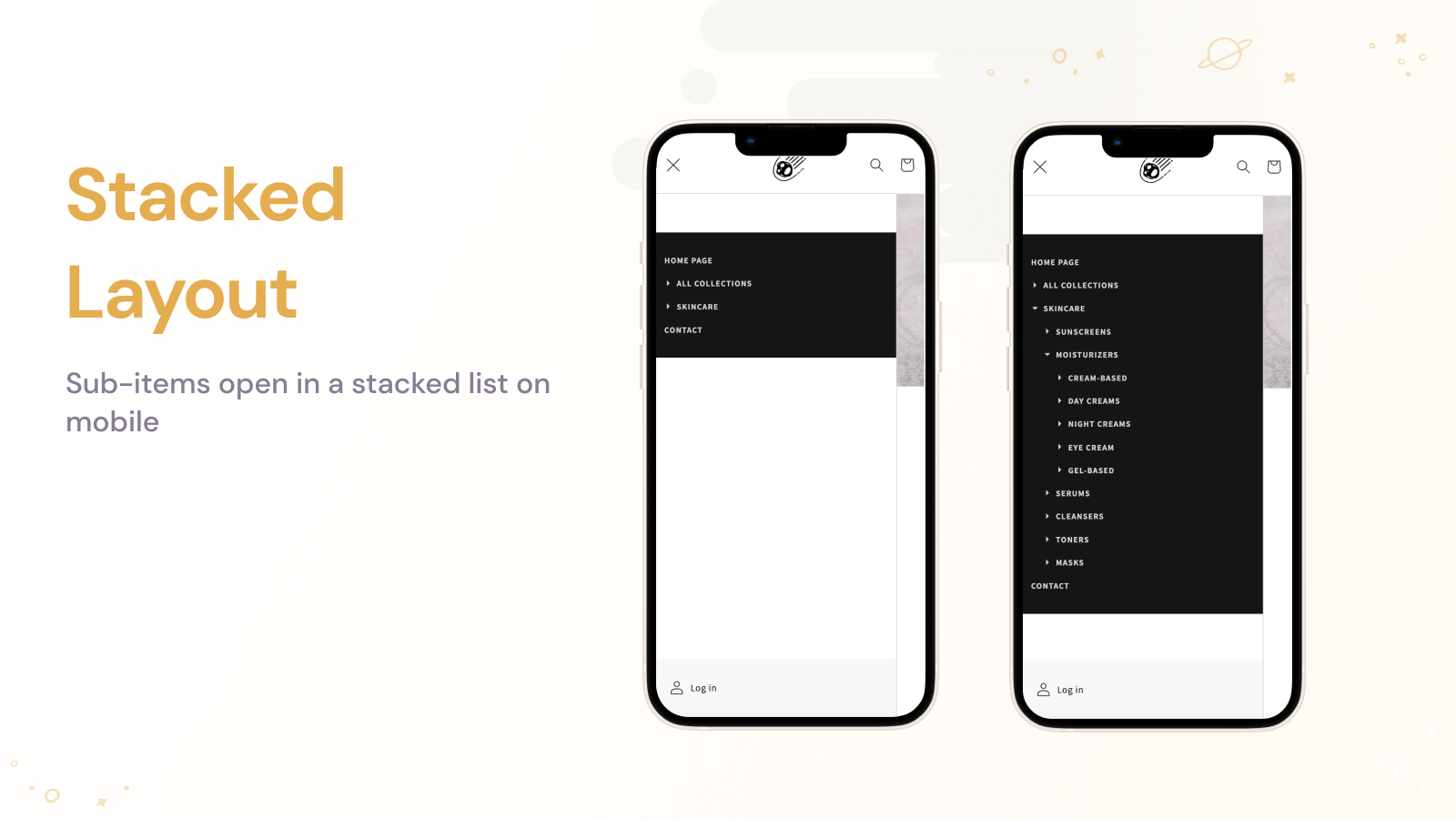
  • Multi-level dropdown menu:Multilevel dropdown menu, tabs, link blocks, and menu pictures.
  • Website Content Categories:HTML block, Highlighted products, Latest products, Featured blog articles, New blog articles
  • Customized menu bar:Create a menu bar that includes a contact form, search box, theme-matching font, icons, and more.
  • Website Features:"New" label, highlighted menu item, works well on all devices including mobiles.
  • Menu builder:Simple to construct your primary, filter, smart, and food menus.
Pricing Details

Globo Mega Menu, Navigation offers 1 free plan and 2 paid plans.

Considering installing this Mega menu Shopify app? Explore the pricing details and discover if they align with your budget and needs.

  1. Basic Navigation · $0/month

    Included features: Unlimited menu items, Mega Menu, Dropdown menu (Flyout menu), Add product, Add custom image, Mobile Menu, Fully customize (font, color...), Build menu by drag & drop, No watermark

  2. Growth Navigation · $12.90/month

    Included features: Everything in Basic, Different menus for Shopify Markets, Product list and collection grids, Promotional images, banner, image slider, Blogs, Multi-language menus, Countdown, Menu click analytics

  3. Pro Navigation · $17.90/month

    Included features: Everything in Growth, Unlimited published menus, Desktop and mobile-specific menus, Menu versions, Tabs and masonry layouts, Badges and highlights, Add custom HTML to menu, Mobile bottom navigation bar

Pros and Cons

Delve into ShopDigest's expert insights on Globo Mega Menu, Navigation - a Mega menu Shopify app. Our analysis of Shopify app store reviews presents unique pros and cons, allowing you to make informed decisions for your business.

Pros
  • Consistently praised for being fast, responsive, and highly effective in resolving issues.
  • The app is frequently described as intuitive and straightforward, with a user-friendly interface.
  • Users appreciate the flexibility and extensive customization features available.
  • Many reviews highlight the promptness in fixing bugs or technical problems.
  • Support team members, especially Sarah, are noted for their patience and professionalism.
  • The app is valued for its robust features and seamless performance.
  • Users commend the immediate assistance provided via live chat support.
  • The app significantly improves website navigation and user experience.
  • Long-term users report consistent reliability with minimal issues.
  • Many users actively recommend the app due to its overall quality and support.
Cons
  • Some users encountered compatibility issues with certain themes, requiring fixes.
  • A few reviews mention disruptive advertisements within the app interface.
  • Limited options for mobile menu customization were noted by some users.
  • Certain features (e.g., login/logout links) were reported as not working in newer versions.
  • Issues with image scaling and responsiveness on mobile devices were highlighted.
Talk to the developer

Install in Your Store Now

Your request goes to the team that built Globo Mega Menu, Navigation, not a support queue.

#2 of 95
Qikify Mega Menu & Navigation

Qikify Mega Menu & Navigation by Qikify Design

Easily make a large menu or tab menu for navigating your store.

Pricing Plans: Free, $9.99/month, $19.99/month
Free Trial: 7 days
Pros
  • Fast, responsive, and knowledgeable support team consistently resolves issues promptly and provides proactive assistance.
  • Intuitive interface and straightforward setup make it accessible even for beginners.
  • Offers extensive options and flexibility to personalize menu design, including custom HTML and advanced styling features.
Cons
  • Some users experience a minor adjustment period when exploring all available options and customizations.

What merchants said

“Arian 在協助處理問題時非常有幫助也很有耐心,說明很清楚,最後也順利解決了我的問題。謝謝你提供這麼好的客服協助!”
DAEBAC 官方網站 · Taiwan · ★ 5.0 · 10/5/2026

Summary

Starting PriceFree
Free Trial7 days
Launch Date26 Sep 2018
DeveloperQikify Design
Ratings4.9 ★ (1,081)
View on ShopifyView charts
About the App

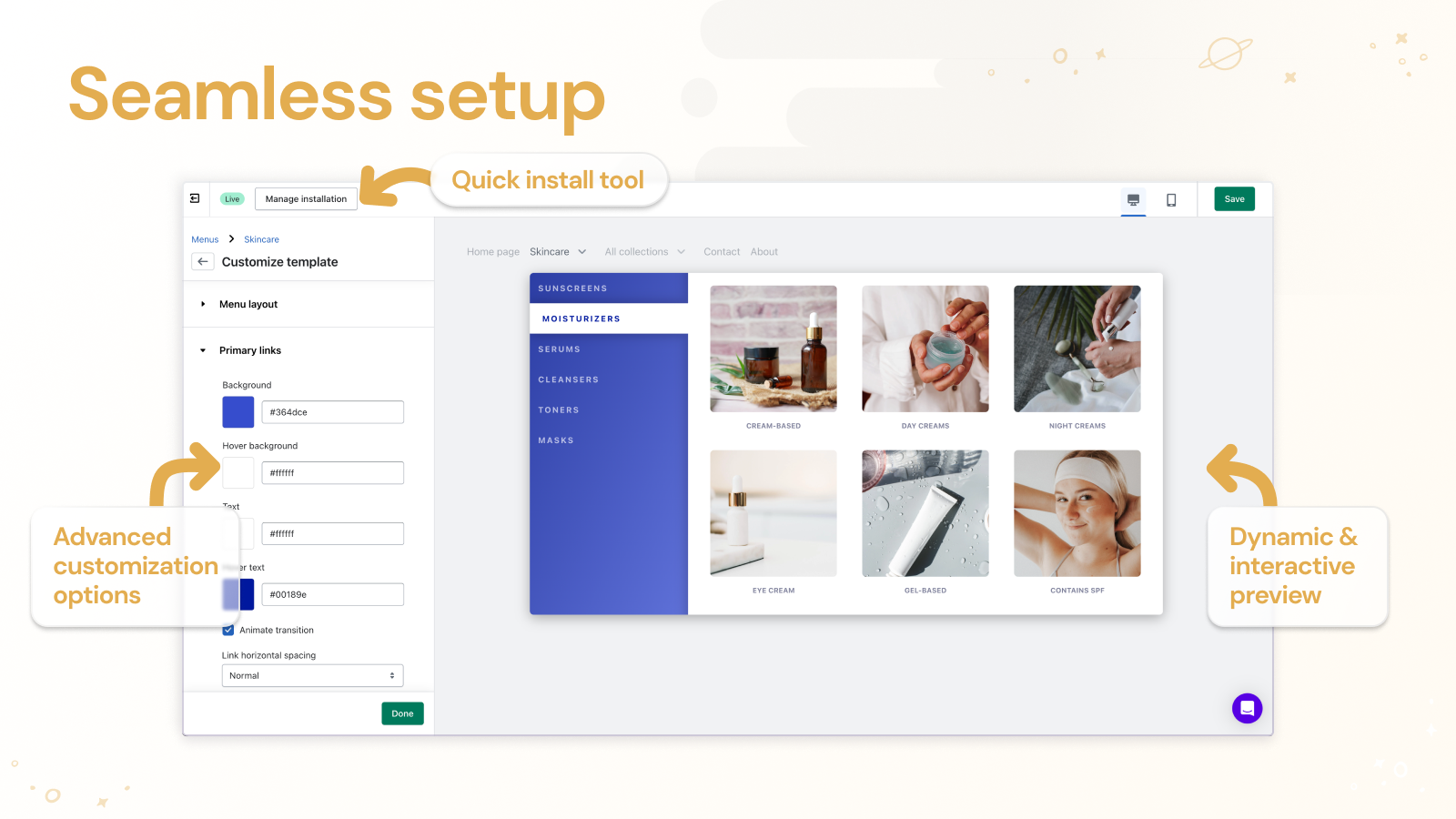
Qikify Mega Menu & Navigation, a Mega menu Shopify app, has achieved 1085 reviews and an average rating of 4.9 stars since its launch 8 years ago. Designed to assist Shopify merchants with - "You can easily make a large menu for your store without coding. We offer ready-made templates." it is a valuable addition to the Mega menu app lineup.

Top Features:

Mega menu Shopify apps can help elevate your e-commerce game. Qikify Mega Menu & Navigation offers a host of key features, including:

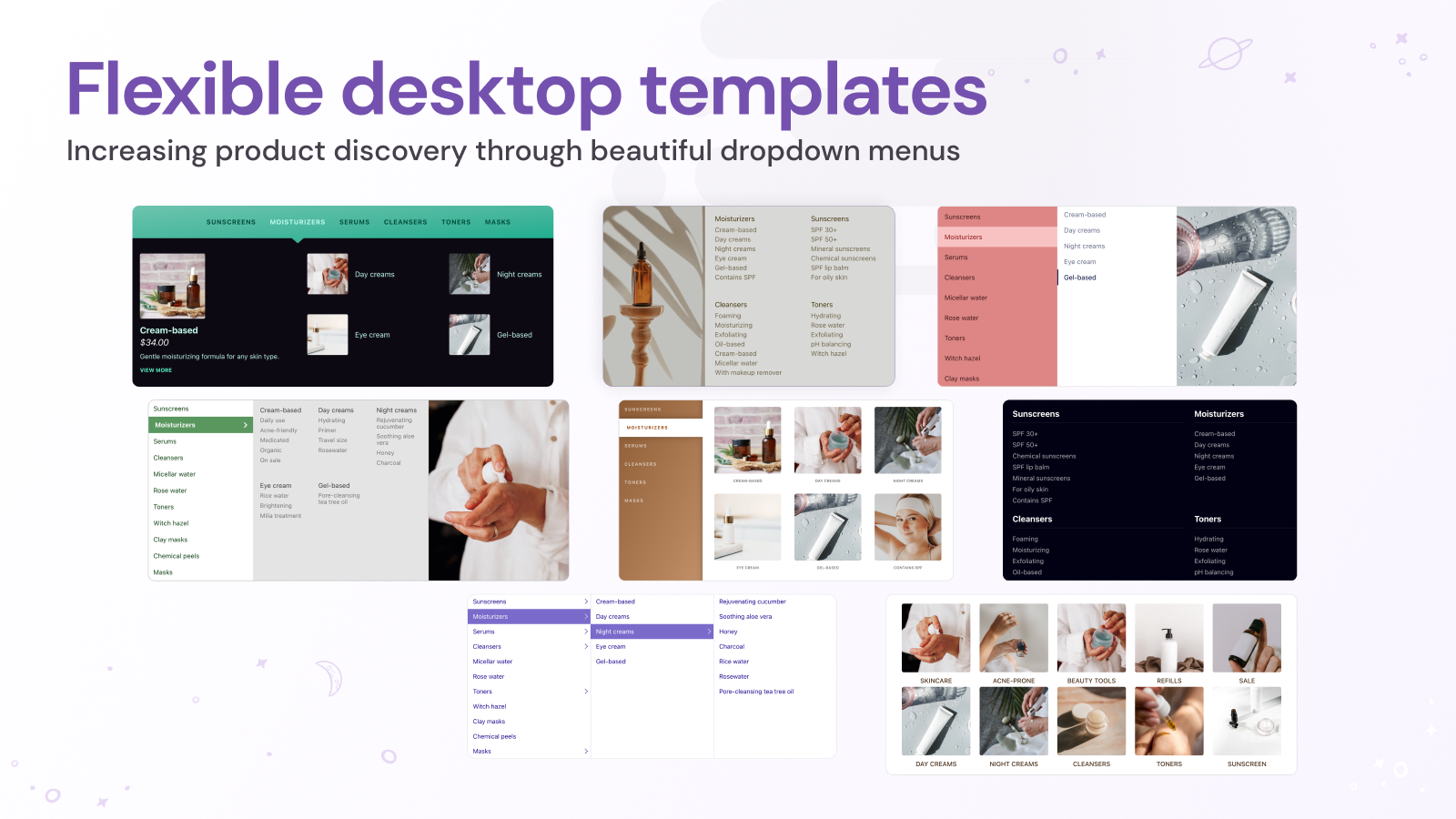
  • Menu Customization:Include products, collections (with tag filters), pages, and personalized links in the menu.
  • Website Development:Design a menu that includes block items, a contact form, a Google map, and customized HTML.
  • Promotional Designing:Put on attractive tags, icons, and badges to draw customers to special offers.
  • Menu Customization:Customize your menu items without limit, including font, color, and size.
  • Multi-level menu templates:Make various types of menus using templates such as mega menu, tabs menu, and tree menu.
Pricing Details

Qikify Mega Menu & Navigation offers 1 free plan and 2 paid plans.

Considering installing this Mega menu Shopify app? Explore the pricing details and discover if they align with your budget and needs.

  1. Free Forever · $0/month

    Included features: Unlimited menu items, Flyout menu, Mega menu, Add Product, Add Image, Mobile Menu, Fully customize (font, color...), Real-time preview

  2. Basic · $9.99/month

    Included features: Everything in Free plan, Free for development store, Remove watermark, Menu animation, Translations

  3. Premium · $19.99/month

    Included features: Everything in Basic, Add badge, Tabs menu, Contact form, Google maps, Masonry grid, Custom HTML, Multiple menus

Pros and Cons

Delve into ShopDigest's expert insights on Qikify Mega Menu & Navigation - a Mega menu Shopify app. Our analysis of Shopify app store reviews presents unique pros and cons, allowing you to make informed decisions for your business.

Pros
  • Fast, responsive, and knowledgeable support team consistently resolves issues promptly and provides proactive assistance.
  • Intuitive interface and straightforward setup make it accessible even for beginners.
  • Offers extensive options and flexibility to personalize menu design, including custom HTML and advanced styling features.
  • Enhances website appearance with visually appealing, modern, and professional-looking menus.
  • Effectively organizes categories and products, leading to easier and clearer navigation for users and customers.
  • Delivers consistent results and integrates smoothly with various Shopify themes.
  • Reduces the need for developer intervention, enabling users to implement complex menu structures affordably and quickly.
  • Adapts to growing product catalogs and supports various menu types suitable for different business needs.
  • Contributes to a more organized and user-friendly shopping experience, potentially aiding in conversions.
  • Provides a rich feature set for menu creation, including templates, image options, and flyout menus.
Cons
  • Some users experience a minor adjustment period when exploring all available options and customizations.
  • Occasional difficulties arise when integrating with heavily customized or non-standard Shopify themes, requiring additional support intervention.
Talk to the developer

Install in Your Store Now

Your request goes to the team that built Qikify Mega Menu & Navigation, not a support queue.

#3 of 95
Meteor Mega Menu & Navigation

Meteor Mega Menu & Navigation by Helium

Make beautiful multi-level dropdown menus for your shop.

Pricing Plans: Free, $8/month, $14/month
Free Trial: 7 days
Pros
  • Highly responsive and helpful support team, frequently praised for quick resolutions and personalized assistance.
  • Simple installation process and intuitive interface, often highlighted as user-friendly even for beginners.
  • Wide range of customizable features, allowing users to tailor menus to their brand and needs.
Cons
  • Some users reported clipping or display issues on mobile devices without easy fixes.

What merchants said

“Customer service is exceptional. I had some issues with the app, the response was immediate, both Brett and Jakin sent very clear instructions and even did some of the work themselves. Also this menu is ADA compliant which is important. I highly recommend this app.”
Flooring Supply Shop · United States · ★ 5.0 · 10/9/2026

Summary

Starting PriceFree
Free Trial7 days
Launch Date20 Apr 2015
DeveloperHelium
Ratings4.7 ★ (361)
View on ShopifyView charts
About the App

Meteor Mega Menu & Navigation, a Mega menu Shopify app, has achieved 356 reviews and an average rating of 4.7 stars since its launch 11 years ago. Designed to assist Shopify merchants with - "Make beautiful layered dropdown menus. Include product specifics and pictures in website navigation." it is a valuable addition to the Mega menu app lineup.

Top Features:

Mega menu Shopify apps can help elevate your e-commerce game. Meteor Mega Menu & Navigation offers a host of key features, including:

  • Template Selection:Choose from 8 beautifully crafted templates.
  • Shopify Resource Links:Connect any Shopify resource: items, groups, blogs, or web pages.
  • Menu images:Show product or collection photos right in your store's main menu.
  • Menu Streamlining:Use your shop's existing menus to simplify your setup.
  • Customer-friendly UX:A user-friendly interface helps customers navigate through various menu levels with ease.
Pricing Details

Meteor Mega Menu & Navigation offers 1 free plan and 2 paid plans.

Considering installing this Mega menu Shopify app? Explore the pricing details and discover if they align with your budget and needs.

  1. Free · $0/month

    Included features: Unlimited Mega Menus, Auto-populate products from Collections, 2 desktop menu templates, 2 mobile templates, Chat/email support (US - Pacific Time)

  2. Pro · $8/month

    Included features: Everything in Free, plus:, 6 desktop menu templates, 3 mobile templates, Images in menus, Free for Partner Development stores

  3. Premium · $14/month

    Included features: Everything in Pro, plus:, 9 desktop menu templates, 3 mobile templates, CSS Editor, Free for Partner dev stores

Pros and Cons

Delve into ShopDigest's expert insights on Meteor Mega Menu & Navigation - a Mega menu Shopify app. Our analysis of Shopify app store reviews presents unique pros and cons, allowing you to make informed decisions for your business.

Pros
  • Highly responsive and helpful support team, frequently praised for quick resolutions and personalized assistance.
  • Simple installation process and intuitive interface, often highlighted as user-friendly even for beginners.
  • Wide range of customizable features, allowing users to tailor menus to their brand and needs.
  • Clean, aesthetically pleasing menus that enhance site navigation and appearance.
  • Reliable and smooth operation with minimal lag or technical issues.
  • A functional free version appreciated by users for basic needs.
  • Seamless compatibility with Shopify themes and existing navigation structures.
  • Improved user experience leading to better customer engagement and sales.
  • Quick fixes and updates from the team when issues arise.
Cons
  • Some users reported clipping or display issues on mobile devices without easy fixes.
  • Incompatibility with certain translation apps, restricting multilingual support.
  • Occasional difficulties integrating with specific Shopify themes, requiring manual adjustments.
  • Delays in support responses noted by users outside the US.
  • Isolated reports of glitches, such as menu reverting to default or unresponsive updates.
Talk to the developer

Install in Your Store Now

Your request goes to the team that built Meteor Mega Menu & Navigation, not a support queue.

Keyword ranking

Top three ranked in Shopify App Store

Globo Mega Menu, Navigation

The Globo Mega Menu app is a great tool for creating your menu without needing to code.

4.9 ★ (1,707)$12.9/mo onwards
View app data →
Qikify Mega Menu & Navigation

You can easily make a large menu for your store without coding. We offer ready-made templates.

4.9 ★ (1,081)$9.99/mo onwards
View app data →
Meteor Mega Menu & Navigation

Make beautiful layered dropdown menus. Include product specifics and pictures in website navigation.

4.7 ★ (361)$8/mo onwards
View app data →
#4 of 95
Buddha Mega Menu & Navigation

Buddha Mega Menu & Navigation by Buddha Apps (Zero Carbon)

Mega Menu: stylish layout, simple to make a dropdown menu.

Pricing Plans: Free, $9.95/month
Free Trial: 14 days
Pros
  • The app is consistently described as intuitive and straightforward, with quick setup and minimal learning curve.
  • Support teams are praised for their responsiveness, professionalism, and ability to resolve issues promptly.
  • Users highlight the flexibility to personalize menus and settings to fit their specific needs.
Cons
  • Some users express a desire for additional features (e.g., image support) in the free version.

What merchants said

“Un service exceptionnel et une application remarquable!Ça fait plusieurs années que je travaille avec Budha Mega Menu et je suis toujours aussi satisfait de leur service! Une équipe professionnelle, efficace, rapide et toujours disponible pour répondre à mes questions ou régler les petits problèmes.Et que dire de l'application elle-même! Elle est tout simplement excellente, complète, facile à utiliser et offre énormément de possibilités pour personnaliser et améliorer la navigation d'une boutique Shopify. C'est vraiment un outil que j'apprécie au quotidien.Le service est impeccable, les suivis sont toujours excellents et c'est un vrai plaisir de travailler avec une équipe aussi compétente et fiable.Voilà!”
Balance Bike · Canada · ★ 5.0 · 10/15/2026

Summary

Starting PriceFree
Free Trial14 days
Launch Date19 Aug 2016
Ratings4.8 ★ (617)
View on ShopifyView charts
About the App

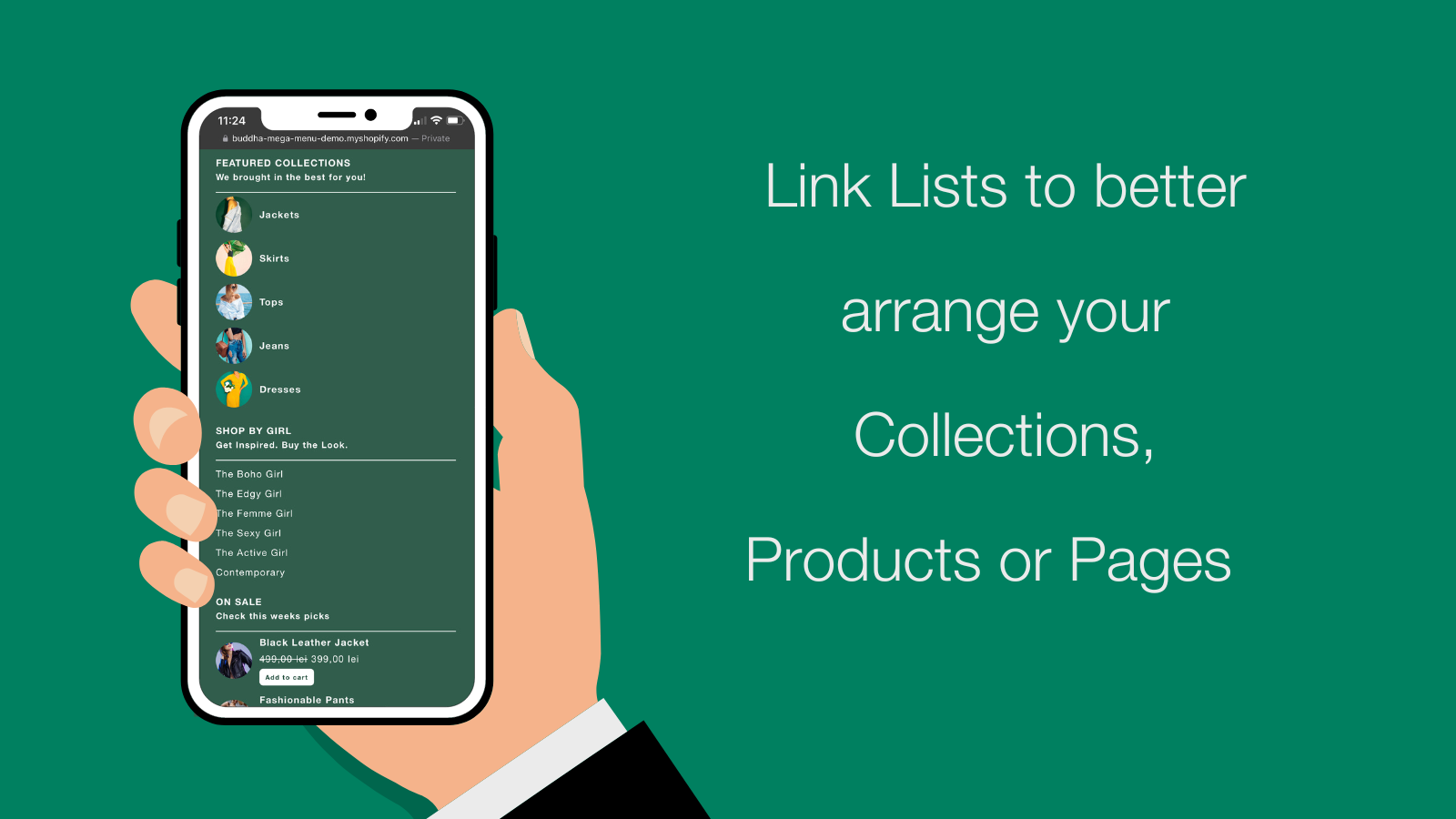
Buddha Mega Menu & Navigation, a Mega menu Shopify app, has achieved 616 reviews and an average rating of 4.8 stars since its launch 10 years ago. Designed to assist Shopify merchants with - "Create a stunning dropdown menu quickly. Easily browse through Products, Collections, and Pages." it is a valuable addition to the Mega menu app lineup.

Top Features:

Mega menu Shopify apps can help elevate your e-commerce game. Buddha Mega Menu & Navigation offers a host of key features, including:

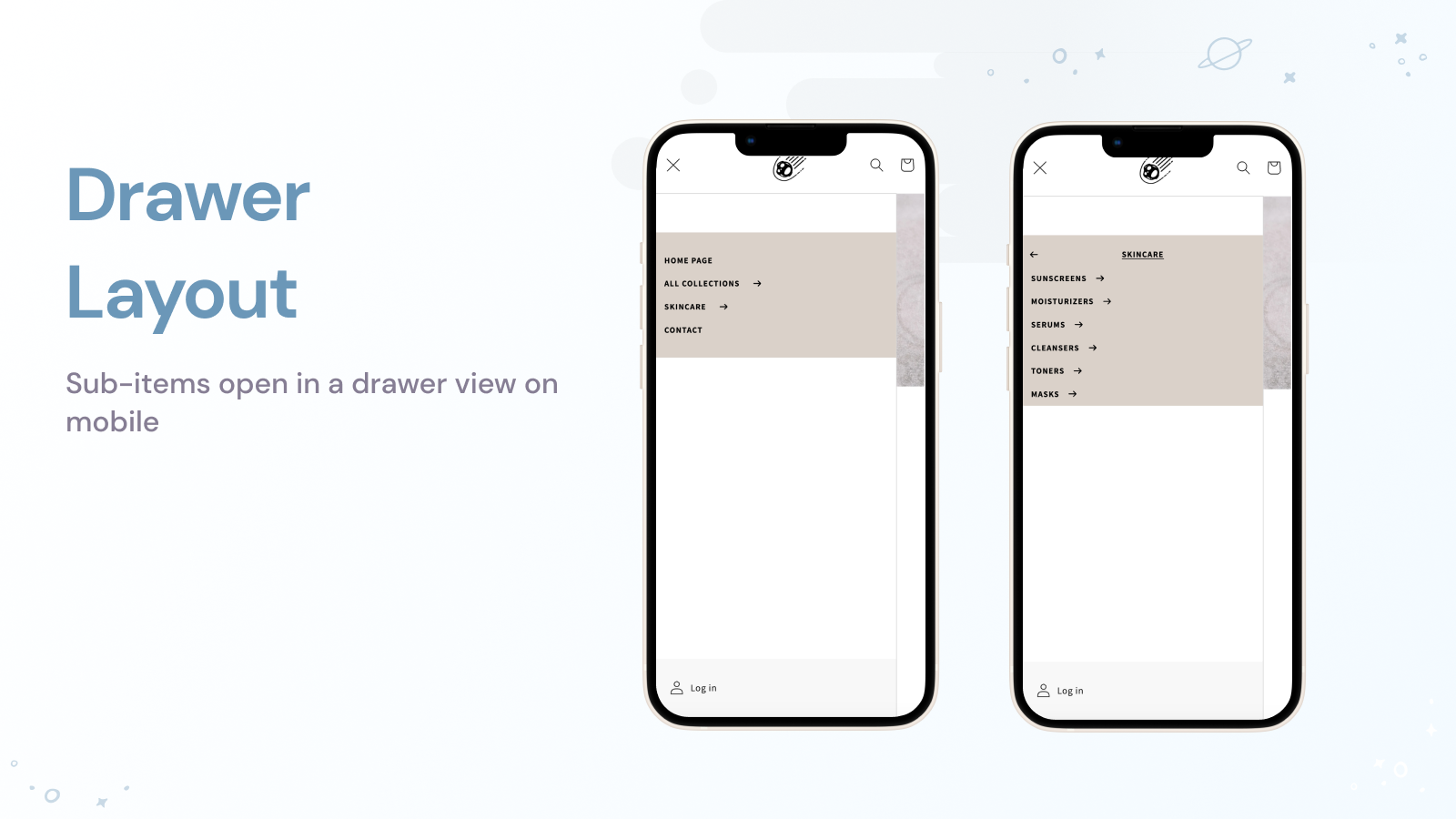
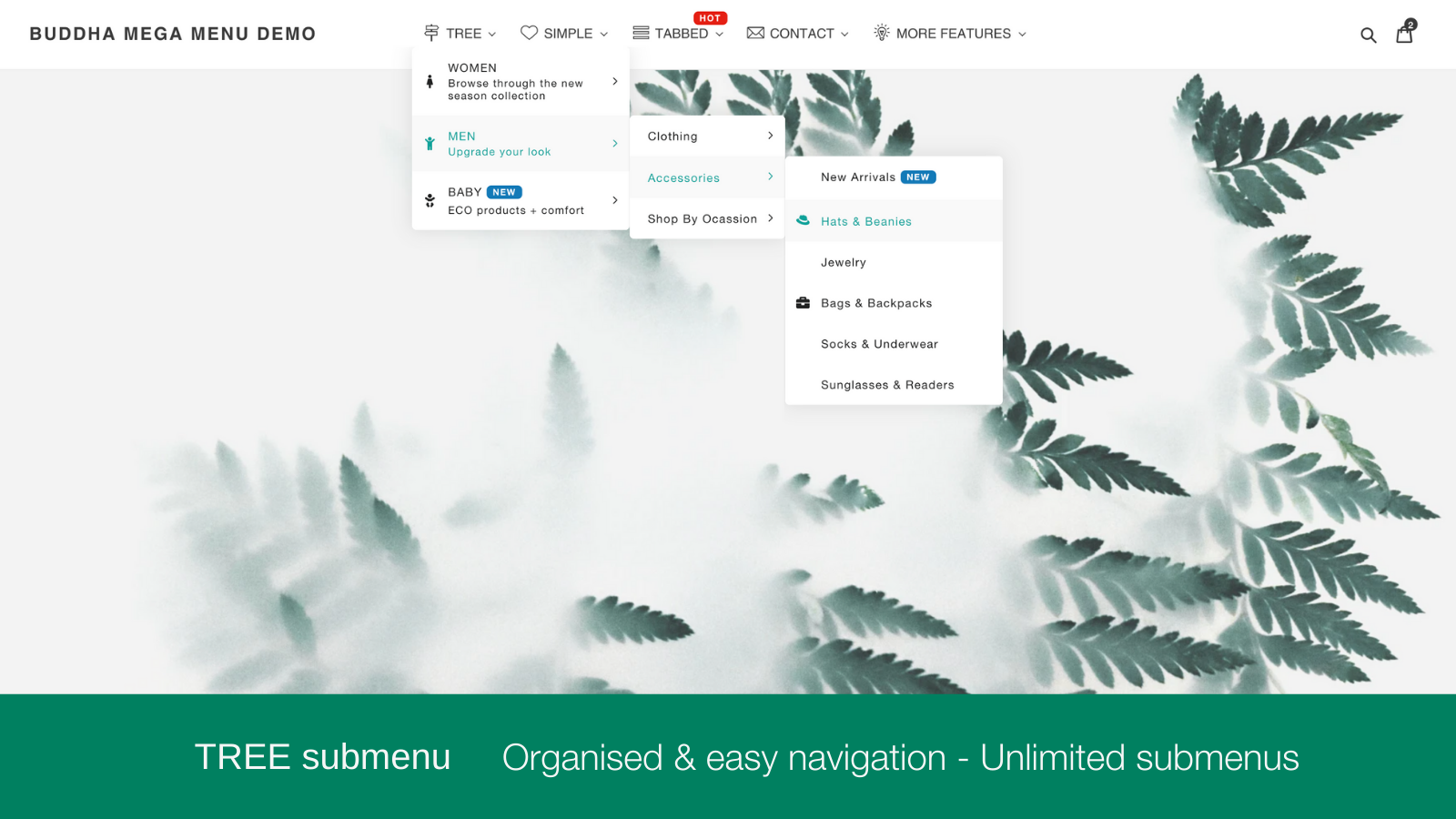
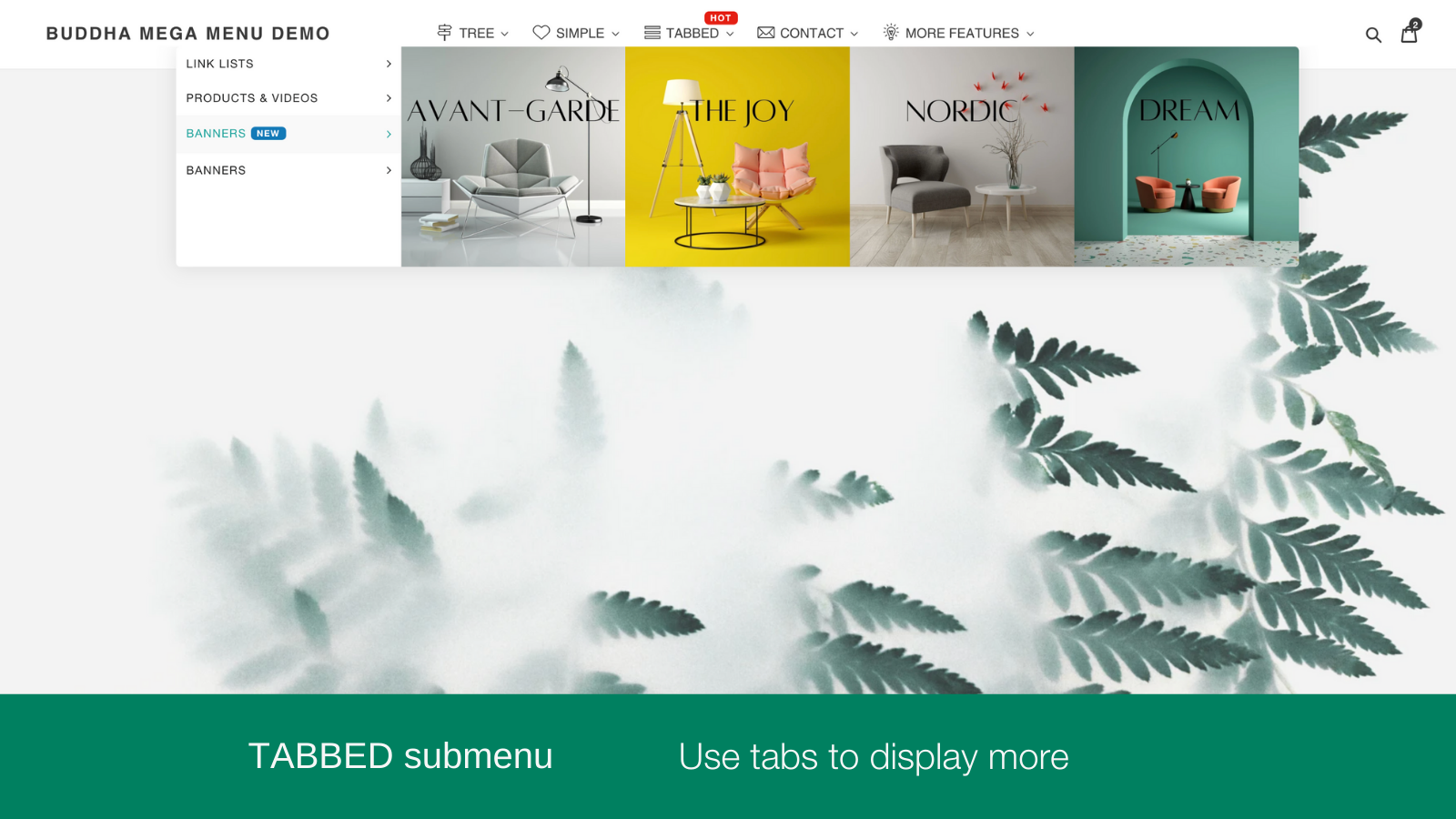
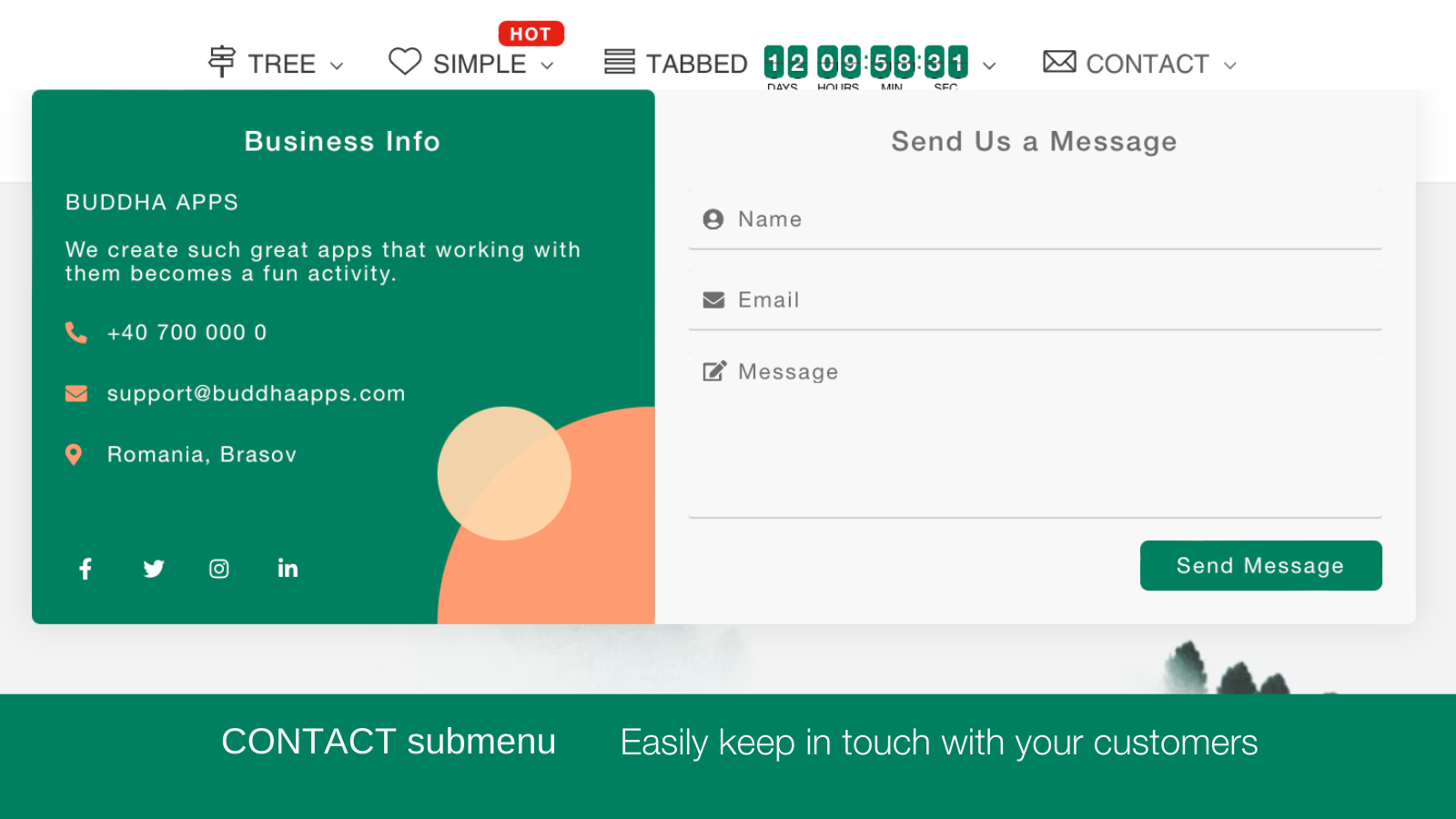
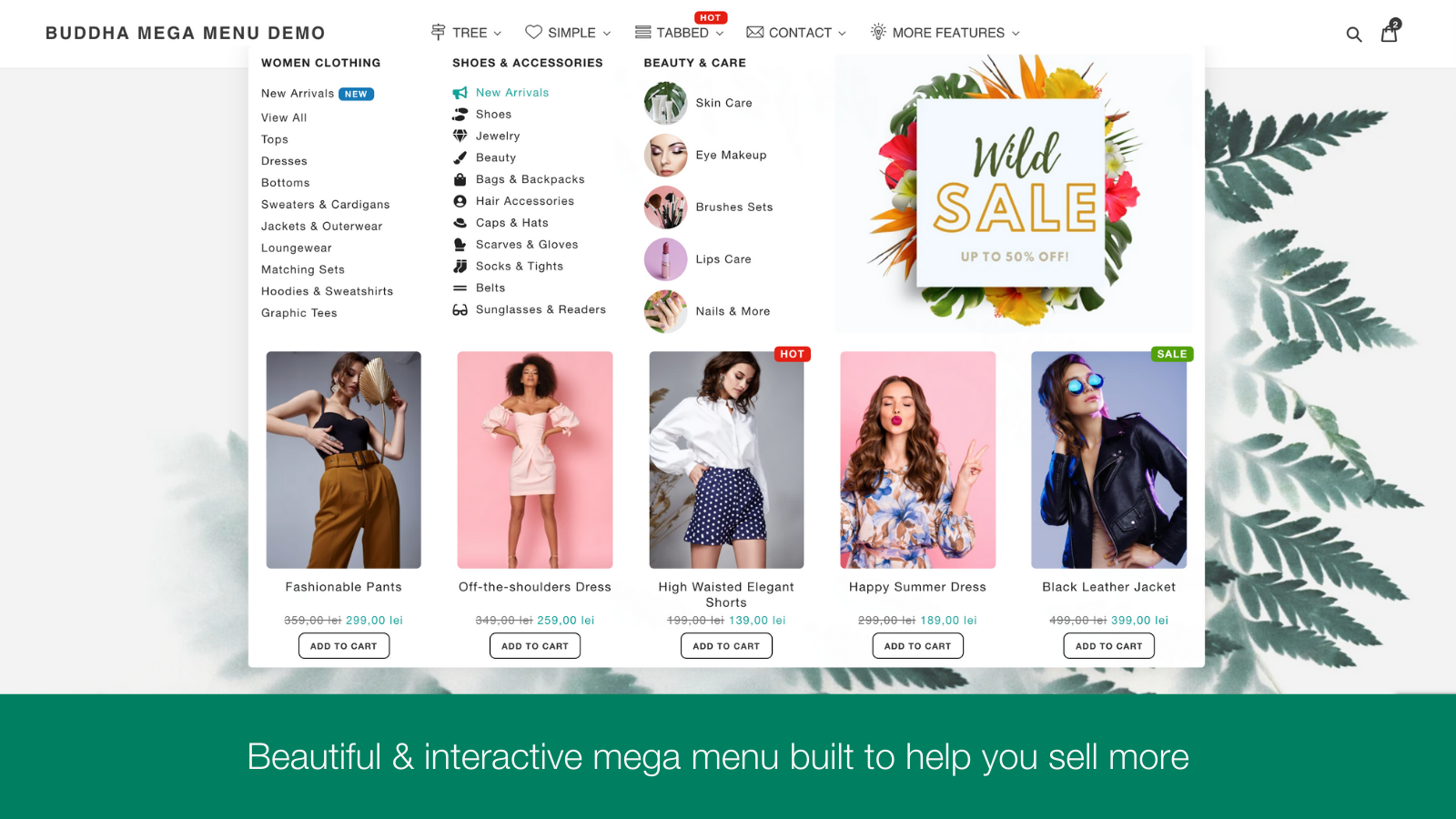
  • Submenu Designs:4 types of submenu designs: Tree, Simple, Tabbed, and Contact.
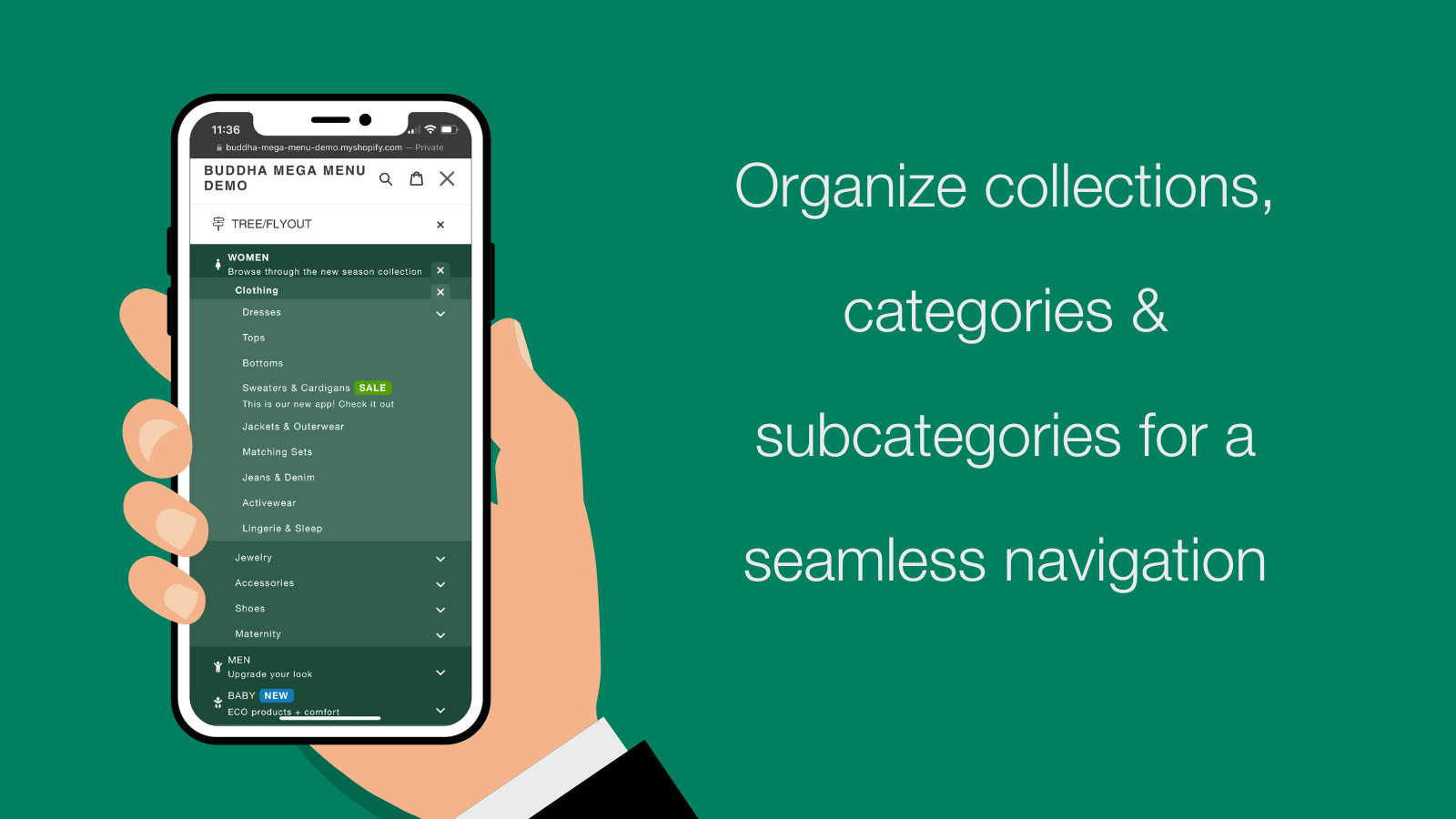
  • Convenient Store Menus:Basic menu options or lists connected to any item, group, or page of your shop.
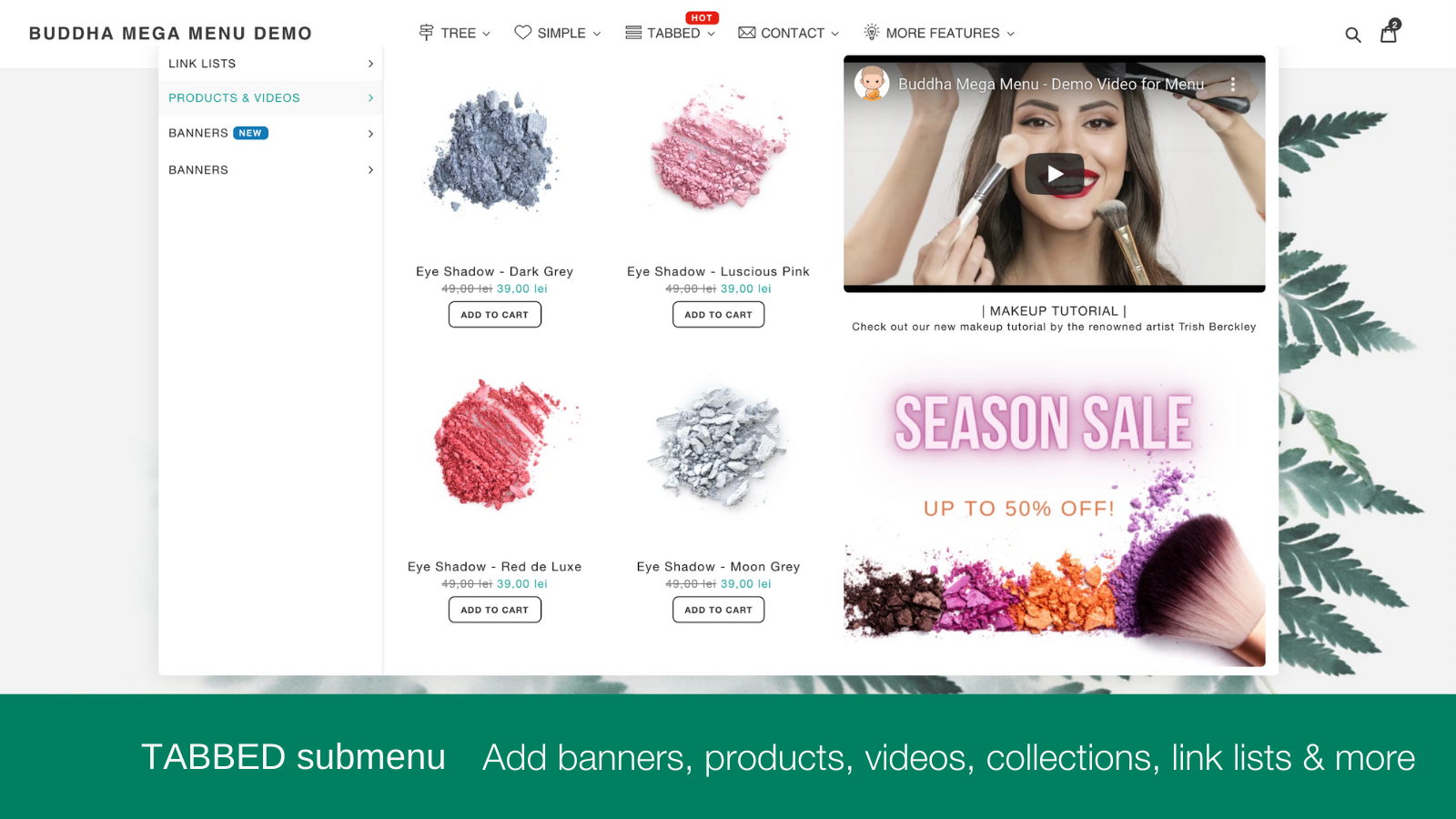
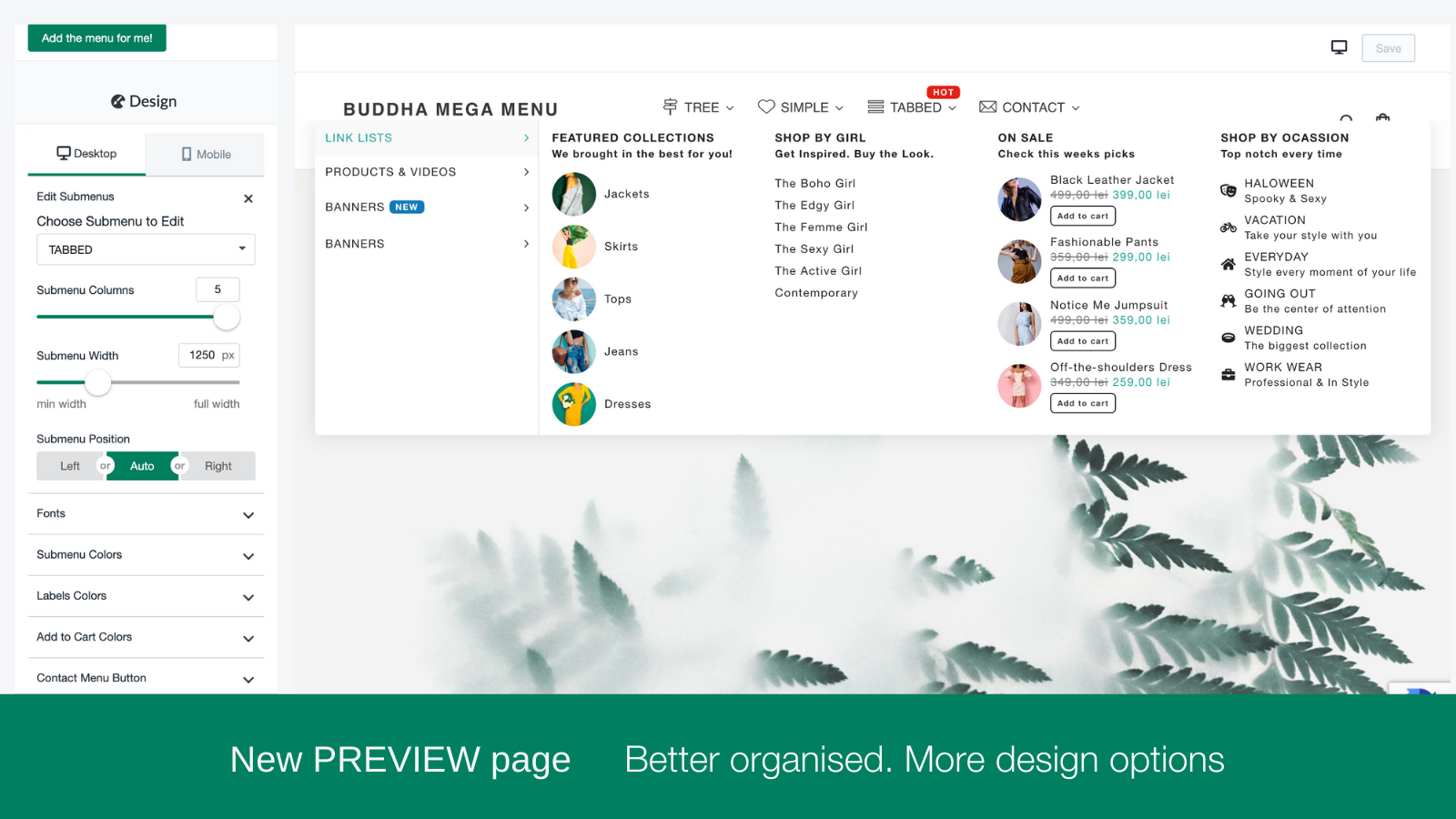
  • Categorized Images:Collections, Products, Blogs, Pages, Custom Images, Banners
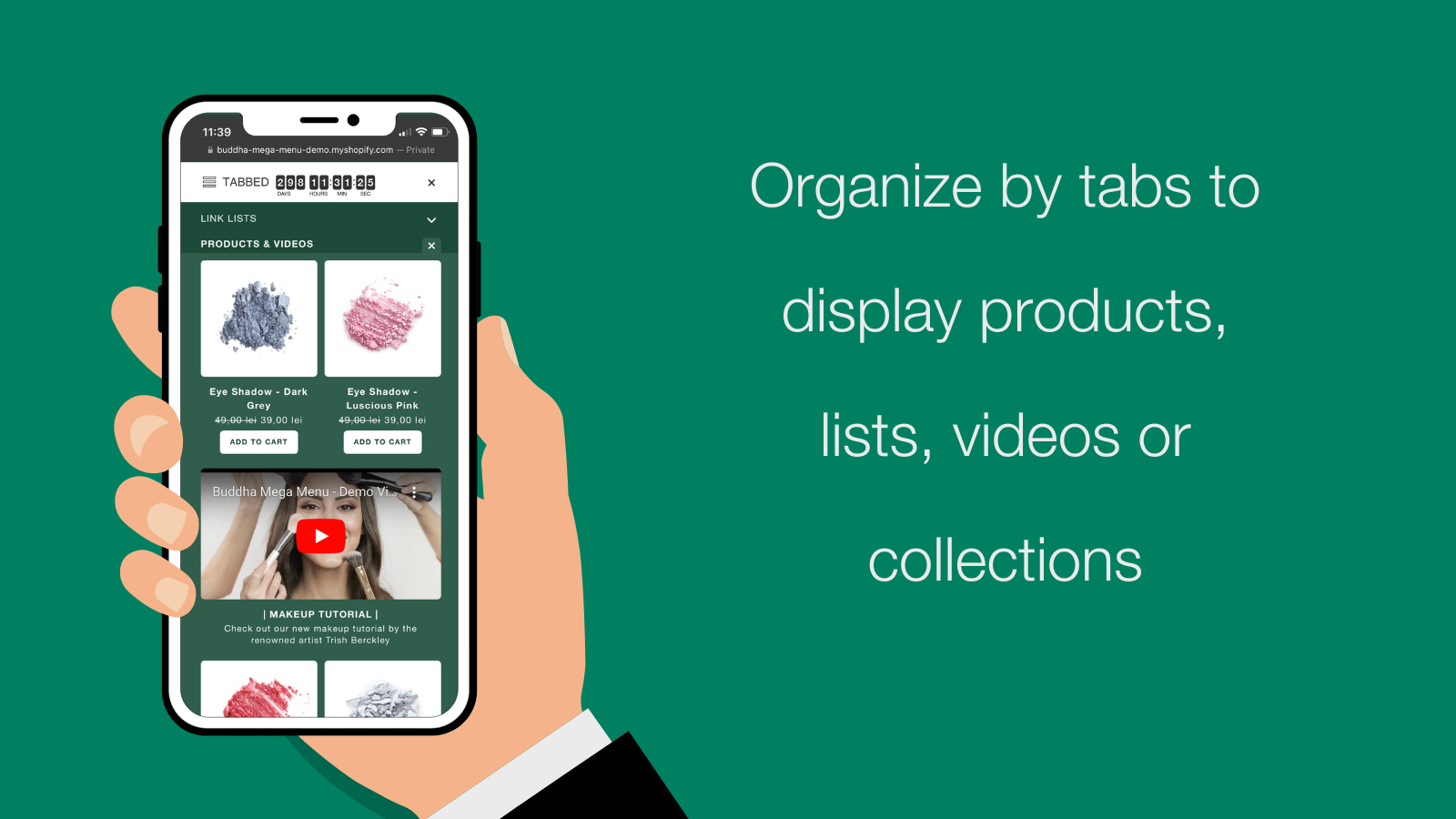
  • Promotional Multimedia Toolkit:Timer, tags, badges, symbols, and videos to display your deals.
  • One-click menu translation:Multi-language: Click once to translate your shop's menu into any language.
Pricing Details

Buddha Mega Menu & Navigation offers 1 free plan and 1 paid plan.

Considering installing this Mega menu Shopify app? Explore the pricing details and discover if they align with your budget and needs.

  1. Free · $0/month

    Included features: 2 Mega Menu types Tree (Flyout) · Simple, Unlimited Mega Menus, Unlimited menu items & Link Lists, 5 Featured Collections, 5 Featured Products, Icons Library, Customizable Mobile / Desktop Design, No watermark & FREE Tech Support

  2. Mega Zen · $9.95/month

    Included features: Everything in Free + Tabbed · Contact, Featured Images & Add-to-cart buttons, FREE for dev. stores, Embed videos directly in menus, Animated Icons Library + Labels / Badges, Sales Banners & Promotional blocks, Countdown timers for promotions, 1-Click Menu translation

Pros and Cons

Delve into ShopDigest's expert insights on Buddha Mega Menu & Navigation - a Mega menu Shopify app. Our analysis of Shopify app store reviews presents unique pros and cons, allowing you to make informed decisions for your business.

Pros
  • The app is consistently described as intuitive and straightforward, with quick setup and minimal learning curve.
  • Support teams are praised for their responsiveness, professionalism, and ability to resolve issues promptly.
  • Users highlight the flexibility to personalize menus and settings to fit their specific needs.
  • The app functions smoothly and as advertised, with minimal technical issues.
  • The free version offers robust functionality, making it accessible and useful for many users.
  • The app enhances website aesthetics with clean, modern, and visually appealing menu layouts.
  • Navigation and configuration are simple, even for non-technical users.
  • The app provides a wide range of useful features beyond basic menu functionality.
  • Improves customer experience by making website navigation more intuitive and organized.
Cons
  • Some users express a desire for additional features (e.g., image support) in the free version.
  • A few reports of minor bugs or compatibility issues, though quickly resolved.
  • Users note potential issues when using the app simultaneously across multiple shops in the same browser.
  • A few users request more granular control over design elements (e.g., padding, image sizing).
Talk to the developer

Install in Your Store Now

Your request goes to the team that built Buddha Mega Menu & Navigation, not a support queue.

#5 of 95
Navi+ Tab Bar & Mega Menu

Navi+ Tab Bar & Mega Menu by Navi+

Make mobile browsing faster with tab bars and mega menus

Free Trial: 14 days
Pros
  • The intuitive drag-and-drop editor simplifies menu creation and customization without requiring coding skills.
  • Users highlight the app’s cost-effectiveness compared to similar solutions, offering premium features at a competitive price.
  • The support team, especially Khoi, is frequently praised for responsiveness, expertise, and going above and beyond to resolve issues.
Cons
  • Some users note the app’s advanced features require initial time investment to master.

What merchants said

“We were looking for a simple way to make our store easier to navigate, and Navi+ has been a nice option so far. The setup was quite straightforward, and we like that we can adjust the menu to better match our store's look. There are still a few things we're figuring out, but overall, we're happy with how it works. Thanks to the team!”
Flora Fuse Beauty · United States · ★ 5.0 · 10/16/2026

Summary

Starting PriceFree
Free Trial14 days
Launch Date03 Nov 2023
DeveloperNavi+
Ratings5.0 ★ (41)
View on ShopifyView charts
About the App

Navi+ Tab Bar & Mega Menu, a Mega menu Shopify app, has achieved 38 reviews and an average rating of 5 stars since its launch 3 years ago. Designed to assist Shopify merchants with - "Create app-like mobile navigation and flexible mega menus to help shoppers find products faster." it is a valuable addition to the Mega menu app lineup.

Top Features:

Mega menu Shopify apps can help elevate your e-commerce game. Navi+ Tab Bar & Mega Menu offers a host of key features, including:

  • Add sticky bottom tab bars with icons and labels for app-like mobile navigation
  • Build mega menus with products, collections, images, icons, and flexible layouts
  • Create mobile menus, drawer menus, and hamburger menus for easier store browsing
  • Add icon menus and floating buttons linking to products, collections, and pages
  • Generate menus with AI, templates, drag-and-drop editing, and no coding required
Pricing Details

Navi+ Tab Bar & Mega Menu offers 1 free plan and 3 paid plans.

Considering installing this Mega menu Shopify app? Explore the pricing details and discover if they align with your budget and needs.

  1. Starter · $0/month

    Included features: Free forever, 1 menu, Up to 20K menu views/month, Ready-made templates, No coding required, Works with every Shopify theme, Built-in icons included, Email support

  2. Business · $6.25/month

    Included features: Everything in Starter, Up to 4 menus, Use your own images & icons, Replace theme menu icons, SEO-friendly menu links, Multi-language menus, 12 months of analytics, Up to 500K views/month

  3. Elite · $15/month

    Included features: Everything in Business, Unlimited menus, Unlimited menu views, Done-for-you expert setup, Free old menu migration, Advanced customization, Full analytics history, Priority support

  4. Navi+ Care · $39/month

    Included features: Everything in Elite, Done-for-you menu management, We migrate your existing menus, Menu structure & UX consulting, Up to 5 edit requests/month, Ongoing menu maintenance, Reply within 24 hours, Your own menu consultant

Pros and Cons

Delve into ShopDigest's expert insights on Navi+ Tab Bar & Mega Menu - a Mega menu Shopify app. Our analysis of Shopify app store reviews presents unique pros and cons, allowing you to make informed decisions for your business.

Pros
  • The intuitive drag-and-drop editor simplifies menu creation and customization without requiring coding skills.
  • Users highlight the app’s cost-effectiveness compared to similar solutions, offering premium features at a competitive price.
  • The support team, especially Khoi, is frequently praised for responsiveness, expertise, and going above and beyond to resolve issues.
  • The app provides extensive navigation options (e.g., mega menus, floating buttons) with high flexibility to match brand aesthetics.
  • Consolidates multiple navigation tools into one, streamlining workflow and reducing reliance on other apps.
  • The clean, intuitive design makes setup and editing accessible even for beginners.
  • Operates smoothly with no lag, even under high traffic, and integrates seamlessly with Shopify themes.
  • Transforms store navigation to feel like a native app, improving customer browsing and conversion rates.
  • Users appreciate continuous improvements and added features over time.
  • Works flawlessly across desktop and mobile, with responsive design adjustments.
Cons
  • Some users note the app’s advanced features require initial time investment to master.
  • Occasional issues like menu display glitches or theme conflicts are reported, though quickly resolved by support.
  • A few users feel overwhelmed by the extensive customization options, suggesting simplified workflows for basic needs.
  • Rare cases require CSS tweaks for full compatibility with certain Shopify themes.
  • While praised, the free version’s restrictions prompt some users to upgrade for full functionality.
Talk to the developer

Install in Your Store Now

Your request goes to the team that built Navi+ Tab Bar & Mega Menu, not a support queue.

#6 of 95
Hukify ‑ Mega Menu Creator Pro

Hukify ‑ Mega Menu Creator Pro by HukCommerce Agency

Create menu items and manage them easily by using the drag and drop feature.

Pricing Plans: Free, $9.99/month
Free Trial: 3 days
Pros
  • Consistently praised for quick, efficient, and friendly assistance, often resolving issues within minutes.
  • Offers extensive menu customization options, allowing users to tailor menus to their specific needs.
  • Intuitive design and easy setup make it accessible even for non-technical users.
Cons
  • Some users report issues like menus not displaying correctly or app crashes.

What merchants said

“We love the customization options! Adding images, banners, and custom content to the menu helped improve our store experience.”
luxoraas · France · ★ 5.0 · 5/7/2026

Summary

Starting PriceFree
Free Trial3 days
Launch Date04 Nov 2021
Ratings4.8 ★ (99)
View on ShopifyView charts
About the App

Hukify ‑ Mega Menu Creator Pro, a Mega menu Shopify app, has achieved 99 reviews and an average rating of 4.8 stars since its launch 5 years ago. Designed to assist Shopify merchants with - "Create menu items and manage them easily using drag and drop." it is a valuable addition to the Mega menu app lineup.

Top Features:

Mega menu Shopify apps can help elevate your e-commerce game. Hukify ‑ Mega Menu Creator Pro offers a host of key features, including:

  • Menu Builder:Menu creator with a simple drag & drop builder, doesn't refresh the page.
  • Web Customization:Include any HTML, shortcode, maps, contact forms, or widget you prefer in the menu and more.
  • Mobile Optimization:Improved for mobile/tablet use with touch and responsiveness features.
  • Menu Customization:Easily adjust the menu layout and immediately change the order of items.
  • Optimized Caching:Caching is optimized for top speed loading and SEO performance.
Pricing Details

Hukify ‑ Mega Menu Creator Pro offers 1 free plan and 1 paid plan.

Considering installing this Mega menu Shopify app? Explore the pricing details and discover if they align with your budget and needs.

  1. FREE · $0/month

    Included features: Limit of 2 published mega menus, Limited menu customizations, Real-time preview, Import & Export

  2. UNLIMITED · $9.99/month

    Included features: Unlimited published mega menus, Unlimited menu customizations, Pre-made menu templates, Multi languages support, 24/7 tech support

Pros and Cons

Delve into ShopDigest's expert insights on Hukify ‑ Mega Menu Creator Pro - a Mega menu Shopify app. Our analysis of Shopify app store reviews presents unique pros and cons, allowing you to make informed decisions for your business.

Pros
  • Consistently praised for quick, efficient, and friendly assistance, often resolving issues within minutes.
  • Offers extensive menu customization options, allowing users to tailor menus to their specific needs.
  • Intuitive design and easy setup make it accessible even for non-technical users.
  • The app runs smoothly without slowing down the website, enhancing user experience.
  • Works well across desktop and mobile devices, ensuring a consistent experience.
  • Includes numerous advanced features even in the free version, providing great value.
  • Adapts to various themes and integrates seamlessly with Shopify.
  • Improves site usability and aesthetics, leading to better customer engagement.
Cons
  • Some users report issues like menus not displaying correctly or app crashes.
  • A few users noted the mobile version lacks design options compared to desktop.
  • Integration problems arise with certain themes, requiring support intervention.
  • A rare complaint about support insisting on positive reviews before assisting.
  • Isolated reports of being charged despite app malfunctions.
Talk to the developer

Install in Your Store Now

Your request goes to the team that built Hukify ‑ Mega Menu Creator Pro, not a support queue.

#7 of 95
Wixpa Mega Menu

Wixpa Mega Menu by Wixpa Ai 🤖

Pricing Plans: Free
Key Features
  • 45+ drag-and-drop templates — simple nav to full mega menus
  • Live preview on desktop, tablet, and mobile as you design
  • Auto-imports your existing Shopify navigation links
  • Publish in one click — no theme code edits required
  • Multi-placement: header, footer, and mobile bottom bar

Summary

Starting PriceFree
Free TrialFree plan
Launch Date24 Aug 2026
DeveloperWixpa Ai 🤖
Ratings- (0)
View on ShopifyView charts
About the App

Wixpa Mega Menu, a Mega menu Shopify app, has achieved 0 reviews and an average rating of 0 stars since its launch this year. Designed to assist Shopify merchants with - "Build beautiful mega menus for your store — drag, drop, and go live in minutes without any code." it is a valuable addition to the Mega menu app lineup.

Top Features:

Mega menu Shopify apps can help elevate your e-commerce game. Wixpa Mega Menu offers a host of key features, including:

  • 45+ drag-and-drop templates — simple nav to full mega menus
  • Live preview on desktop, tablet, and mobile as you design
  • Auto-imports your existing Shopify navigation links
  • Publish in one click — no theme code edits required
  • Multi-placement: header, footer, and mobile bottom bar
Pricing Details

Wixpa Mega Menu offers 0 free plans and 0 paid plans.

Considering installing this Mega menu Shopify app? Explore the pricing details and discover if they align with your budget and needs.

  1. · $0/month

Talk to the developer

Install in Your Store Now

Your request goes to the team that built Wixpa Mega Menu, not a support queue.

#8 of 95
C: Mega Menu

C: Mega Menu by Capacity Web Solutions Pvt Ltd

Pricing Plans: $3.99/month, $6.99/month
Free Trial: 7 days
Pros
  • High-quality assistance with quick resolution times, including weekend availability.
  • The app is straightforward and user-friendly, particularly for Shopify integrations.
  • Demonstrated expertise and fast execution with minimal need for detailed instructions.
Cons
  • Absence of accessible chat support and unclear post-uninstallation instructions.

What merchants said

“Amazing response and service from the support team! I find this app very easy to use and set up and the results are great. Needed some assistance from the team who helped without any hesitation and plenty of professionalism. Would highly recommend this app to anyone wanting to improve there menu and navigation.”
Propus Packaging · United Kingdom · ★ 5.0 · 7/16/2026

Summary

Starting Price$3.99/mo
Free Trial7 days
Launch Date27 Apr 2023
Ratings5.0 ★ (7)
View on ShopifyView charts
About the App

C: Mega Menu, a Mega menu Shopify app, has achieved 7 reviews and an average rating of 5 stars since its launch 3 years ago. Designed to assist Shopify merchants with - "The Mega Menu app lets you make attractive multi-level dropdown menus without needing any coding skills." it is a valuable addition to the Mega menu app lineup.

Top Features:

Mega menu Shopify apps can help elevate your e-commerce game. C: Mega Menu offers a host of key features, including:

  • Customizable menu design:Enables endless customized menu groups for improved navigation.
  • Unlimited Menu Hierarchy:Lets you add as many menu items as you want with up to five levels.
  • Customizable Navigation Menu:You can promote products, blogs, and collections in the navigation menu.
  • Customized Menu Icons:You can add a unique icon or badge to distinguish menu items for users.
  • Multilingual Market Support:Available in various languages and supported by markets.
Pricing Details

C: Mega Menu offers 0 free plans and 2 paid plans.

Considering installing this Mega menu Shopify app? Explore the pricing details and discover if they align with your budget and needs.

  1. Standard · $3.99/month

    Included features: Unlimited multi-level menus, Mega, tab & flyout layouts, Drag-and-drop menu builder, Products & images inside menus, Design, animations & hover effects, 7 mobile menu layout options, Badges, icons & featured sections, Multi-language, import/export

  2. Shopify Plus · $6.99/month

    Included features: Unlimited multi-level menus, Mega, tab & flyout layouts, Drag-and-drop menu builder, Products & images inside menus, Design, animations & hover effects, 7 mobile menu layout options, Badges, icons & featured sections, Multi-language, import/export

Pros and Cons

Delve into ShopDigest's expert insights on C: Mega Menu - a Mega menu Shopify app. Our analysis of Shopify app store reviews presents unique pros and cons, allowing you to make informed decisions for your business.

Pros
  • High-quality assistance with quick resolution times, including weekend availability.
  • The app is straightforward and user-friendly, particularly for Shopify integrations.
  • Demonstrated expertise and fast execution with minimal need for detailed instructions.
Cons
  • Absence of accessible chat support and unclear post-uninstallation instructions.
  • Requires coding knowledge, making it difficult for users without technical skills.
Talk to the developer

Install in Your Store Now

Your request goes to the team that built C: Mega Menu, not a support queue.

#9 of 95
MegaShelf | Visual Mega Menu

MegaShelf | Visual Mega Menu by ECOM APPS LAB

Sidebar-tab mega menus with image grids and live preview edit

Pricing Plans: Free, $4.99/month, $4.17/month
Free Trial: 7 days
Key Features
  • Sidebar tabs with collection grids, 10 templates, and 10 color palettes
  • Live desktop and mobile preview in the editor — see changes before publishing
  • Featured products, video embeds with autoplay, contact forms, and badges
  • Adjustable menu width, 7 hover effects, 4 animation styles, and scheduling
  • Click analytics with top tabs, top items, device split, and 30-day trends

Summary

Starting PriceFree
Free Trial7 days
Launch Date06 May 2026
DeveloperECOM APPS LAB
Ratings- (0)
View on ShopifyView charts
About the App

MegaShelf | Visual Mega Menu, a Mega menu Shopify app, has achieved 0 reviews and an average rating of 0 stars since its launch this year. Designed to assist Shopify merchants with - "Build sidebar-tab mega menus with image grids, live preview, and mobile accordion — no code needed." it is a valuable addition to the Mega menu app lineup.

Top Features:

Mega menu Shopify apps can help elevate your e-commerce game. MegaShelf | Visual Mega Menu offers a host of key features, including:

  • Sidebar tabs with collection grids, 10 templates, and 10 color palettes
  • Live desktop and mobile preview in the editor — see changes before publishing
  • Featured products, video embeds with autoplay, contact forms, and badges
  • Adjustable menu width, 7 hover effects, 4 animation styles, and scheduling
  • Click analytics with top tabs, top items, device split, and 30-day trends
Pricing Details

MegaShelf | Visual Mega Menu offers 1 free plan and 2 paid plans.

Considering installing this Mega menu Shopify app? Explore the pricing details and discover if they align with your budget and needs.

  1. Free · $0/month

    Included features: Up to 3 mega menus, 3 templates + 3 color palettes, Sidebar tabs + collection image grid, Mobile accordion auto-inject, Featured product & collection buttons, Standalone navigation bar block, Adjustable menu width (full to 1/3), Live desktop & mobile preview

  2. Pro · $4.99/month

    Included features: Everything in Free, plus, Unlimited mega menus, All 10 templates + 10 color palettes, Click analytics & device reports, Custom CSS injection per menu, Video embed with autoplay control, Scheduled menu display (start/end), Multi-language & breadcrumbs

  3. Annual Pro · $4.17/month

    Included features: Everything in Free, plus, Unlimited mega menus, All 10 templates + 10 color palettes, Click analytics & device reports, Custom CSS injection per menu, Video embed with autoplay control, Scheduled menu display (start/end), Multi-language & breadcrumbs

Talk to the developer

Install in Your Store Now

Your request goes to the team that built MegaShelf | Visual Mega Menu, not a support queue.

#10 of 95
ANG Extra menu

ANG Extra menu by Nx8Apps

Large drop-down, tab, and tree menu available in various languages.

Pricing Plans: Free, $5.99/month, $7.99/month
Free Trial: 14 days
Pros
  • Highly responsive, solution-oriented, and friendly support team that resolves issues quickly.
  • Intuitive and easy-to-navigate design, suitable for users of all technical levels.
  • Extensive options for personalizing menus, including animations and layout adjustments.
Cons
  • Some advanced functionalities, like image uploads, require a paid plan.

What merchants said

“Definitely THE BEST app for mega menus in your store. Fully customizable, intuitive, easy to install—and if that weren’t enough, Max helps you create exactly what you need, tailoring everything to your preferences. It really is a must-have app if you use a mega menu. After trying more than five apps, this one is definitely the best—in terms of design, installation, customization, and customer service. I can’t thank you enough—I know Max will be there to help me whenever I need to make any adjustments. I was using the free version, which is already a huge help to get started, but the Premium version gives you the edge you need to take your store to the next level and make it even more professional. Look no further—this is the app you’ve been searching for!”
Crearten · Spain · ★ 5.0 · 9/14/2026

Summary

Starting PriceFree
Free Trial14 days
Launch Date25 Oct 2022
DeveloperNx8Apps
Ratings5.0 ★ (75)
View on ShopifyView charts
About the App

ANG Extra menu, a Mega menu Shopify app, has achieved 76 reviews and an average rating of 5 stars since its launch 4 years ago. Designed to assist Shopify merchants with - "An easy way to create a large-scale menu, tab menu, or tree menu for your store." it is a valuable addition to the Mega menu app lineup.

Top Features:

Mega menu Shopify apps can help elevate your e-commerce game. ANG Extra menu offers a host of key features, including:

  • Creating Menu Templates:Make a mega menu, tab menu, and tree menu using a template.
  • Quick Customization:Easy and quick personalization.
  • Vertical menu.:Up and down menu.
  • Multilingual.:Different languages.
  • Mobile Adaptability:Easy to use on a phone.
Pricing Details

ANG Extra menu offers 1 free plan and 2 paid plans.

Considering installing this Mega menu Shopify app? Explore the pricing details and discover if they align with your budget and needs.

  1. Free · $0/month

    Included features: Mega menu, Tree menu - Dropdown menu, Add Product to menu, Image menu, Menu effect & animation, Menu on mobile, Breadcrumbs base on menu, Email support

  2. Premium · $5.99/month

    Included features: Tab menu + Custom HTML + Contact form, Upload image to cloud server & optimized, Image effects, Add bubble, Multiple languages, Multiple menus - multiple markets, Separate design for mobile menu, Live chat support

  3. VIP · $7.99/month

    Included features: Everything in Premium plan, List products from collection, Add collection tags, Product + image slider, Multi-menu design + markets, CTR stats menu links – Menu analytics, Prioritize live chat support

Pros and Cons

Delve into ShopDigest's expert insights on ANG Extra menu - a Mega menu Shopify app. Our analysis of Shopify app store reviews presents unique pros and cons, allowing you to make informed decisions for your business.

Pros
  • Highly responsive, solution-oriented, and friendly support team that resolves issues quickly.
  • Intuitive and easy-to-navigate design, suitable for users of all technical levels.
  • Extensive options for personalizing menus, including animations and layout adjustments.
  • Smooth and bug-free operation, with noticeable speed compared to competitors.
  • Competitive pricing with a free plan that covers basic needs and attractive paid options.
  • Comprehensive functionality, including unique features like breadcrumb replacement and scrolling image menus.
  • Consistently praised for delivering professional and visually appealing menu designs.
Cons
  • Some advanced functionalities, like image uploads, require a paid plan.
Talk to the developer

Install in Your Store Now

Your request goes to the team that built ANG Extra menu, not a support queue.

Showing 1-10 out of 95

Best mega menu Apps in Shopify

mega menu apps are designed to address specific needs and challenges faced by Shopify store merchants. Whether you're looking to optimize your store's SEO, improve customer support, enhance product listings, or streamline your inventory management, there's an app for that.

Discover a wealth of cutting-edge tools and features offered by these remarkable mega menu Shopify apps, including Globo Mega Menu, Navigation, Qikify Mega Menu & Navigation, Meteor Mega Menu & Navigation, and many more. Our app collection provides a comprehensive overview of the top apps in the mega menu category, enabling you to select the ones that will take your e-commerce venture to new heights.

Empower your Shopify store with the best mega menu apps the platform has to offer and elevate your online business.

Explore Apps by Criteria:

  1. Most Popular mega menu Apps
  2. Highest Reviewed mega menu Apps
  3. Top Rated mega menu Apps
  4. Newly Launched mega menu Apps

Overview of the Above Top Mega menu Shopify Apps in October 2026

There are a number of mega menu apps in the Shopify app store designed to supercharge your e-commerce success. Whether you're a seasoned entrepreneur or just starting your online journey, the right apps can make all the difference. We have listed the top Shopify apps in the mega menu category, based on their popularity and average rating, to help you make informed decisions.

App NameCategoryDeveloperStarting PriceFree PlanReviews
Globo Mega Menu, NavigationGlobo Mega Menu, NavigationBuilt for ShopifyMega menuGlobo.io$0/month● Available4.9 ★ (1690)
Qikify Mega Menu & NavigationQikify Mega Menu & NavigationMega menuQikify Design$0/month● Available4.9 ★ (1085)
Meteor Mega Menu & NavigationMeteor Mega Menu & NavigationMega menuHelium$0/month● Available4.7 ★ (356)
Buddha Mega Menu & NavigationBuddha Mega Menu & NavigationMega menuBuddha Apps (Zero Carbon)$0/month● Available4.8 ★ (616)
Navi+ Tab Bar & Mega MenuNavi+ Tab Bar & Mega MenuBuilt for ShopifyMega menuNavi+$0/month● Available5.0 ★ (38)
Hukify ‑ Mega Menu Creator ProHukify ‑ Mega Menu Creator ProMega menuHukCommerce Agency$0/month● Available4.8 ★ (99)
Wixpa Mega MenuWixpa Mega MenuMega menuWixpa Ai 🤖$0/month● Unavailable- (0)
C: Mega MenuC: Mega MenuMega menuCapacity Web Solutions Pvt Ltd$3.99/month● Unavailable5.0 ★ (7)
MegaShelf | Visual Mega MenuMegaShelf | Visual Mega MenuMega menuECOM APPS LAB$0/month● Available- (0)
ANG Extra menuANG Extra menuBuilt for ShopifyMega menuNx8Apps$0/month● Available5.0 ★ (76)

Have a Closer Look at the Best Mega menu Apps

Now let us jump in and check out these Top 5 Mega menu Shopify apps.

Globo Mega Menu, Navigation

1. Globo Mega Menu, Navigation

4.9 ★ (1,707)
Globo Mega Menu, Navigation screenshot 1
Globo Mega Menu, Navigation screenshot 2
Globo Mega Menu, Navigation screenshot 3
Globo Mega Menu, Navigation screenshot 4
Globo Mega Menu, Navigation screenshot 5
Globo Mega Menu, Navigation screenshot 6
Globo Mega Menu, Navigation screenshot 7
Globo Mega Menu, Navigation screenshot 8
Globo Mega Menu, Navigation screenshot 9

Reviews

Most Recent Review

5.0 ★Amazing

I just installed the app and I had numerous questions before proceeding and Nora was patient and outstanding. The app id top notch as well as support.

Montclair & Vale · United States · 20 Oct 2026

Recent Review

5.0 ★Amazing

Nora and the development team were absolute stars. They fixed my challenge without raising a sweat--well done team!!!

Timeless Collectible Books · South Africa · 20 Oct 2026
Why is Globo Mega Menu, Navigation a top Mega menu Shopify app?
With an impressive overall rating of 4.9 stars and 1,707 reviews, Globo Mega Menu, Navigation stands out as one of the top Mega menu Shopify apps. The main objective of the app is - The Globo Mega Menu app is a great tool for creating your menu without needing to code. Its purpose underscores its significance in enhancing your Shopify store experience.

ShopDigest selects the top Shopify apps in the Mega menu category based on various parameters, including the number of installations across Shopify stores, the app's ranking in the Shopify App Store, the number of merchants' reviews, and its overall customer rating, among other factors.
Why integrate Globo Mega Menu, Navigation with your Shopify store?
By integrating a Mega menu app with your Shopify store, you unlock a range of benefits. Globo Mega Menu, Navigation, a popular Mega menu Shopify app, brings the following functionalities and value to a Shopify store, including:
  • Multi-level dropdown menu: Multilevel dropdown menu, tabs, link blocks, and menu pictures.
  • Website Content Categories: HTML block, Highlighted products, Latest products, Featured blog articles, New blog articles
  • Customized menu bar: Create a menu bar that includes a contact form, search box, theme-matching font, icons, and more.
  • Website Features: "New" label, highlighted menu item, works well on all devices including mobiles.
  • Menu builder: Simple to construct your primary, filter, smart, and food menus.
Learn more about the Globo Mega Menu, Navigation features in detail.

Shopify merchants highlight key advantages, such as Dropdown menu with multiple levels, Tab, Block links, menu images., Block HTML, Featured products, New products, Featured blog posts, New blog posts, and more,
What are some of the top alternatives for Globo Mega Menu, Navigation?
Looking for options? Dive into a selection of Mega menu apps that rival Globo Mega Menu, Navigation, each offering unique features to enhance your Shopify store. Consider these top alternatives: which can match or even surpass the offerings of Globo Mega Menu, Navigation, giving you flexibility and choice.
profile picture 1profile picture 2profile picture 3profile picture 4

Install Now

Our experts are here to help you.

Qikify Mega Menu & Navigation

2. Qikify Mega Menu & Navigation

4.9 ★ (1,081)
Qikify Mega Menu & Navigation screenshot 1
Qikify Mega Menu & Navigation screenshot 2
Qikify Mega Menu & Navigation screenshot 3
Qikify Mega Menu & Navigation screenshot 4
Qikify Mega Menu & Navigation screenshot 5
Qikify Mega Menu & Navigation screenshot 6
Qikify Mega Menu & Navigation screenshot 7
Qikify Mega Menu & Navigation screenshot 8
Qikify Mega Menu & Navigation screenshot 9

Reviews

Most Recent Review

5.0 ★Amazing

Arian 在協助處理問題時非常有幫助也很有耐心,說明很清楚,最後也順利解決了我的問題。謝謝你提供這麼好的客服協助!

DAEBAC 官方網站 · Taiwan · 05 Oct 2026

Recent Review

5.0 ★Amazing

Great products and their customer service is always able to get me up and running if I run into an issue.
Custom Works Performance · United States · 05 Oct 2026
Why is Qikify Mega Menu & Navigation a top Mega menu Shopify app?
With an impressive overall rating of 4.9 stars and 1,081 reviews, Qikify Mega Menu & Navigation stands out as one of the top Mega menu Shopify apps. The main objective of the app is - You can easily make a large menu for your store without coding. We offer ready-made templates. Its purpose underscores its significance in enhancing your Shopify store experience.

ShopDigest selects the top Shopify apps in the Mega menu category based on various parameters, including the number of installations across Shopify stores, the app's ranking in the Shopify App Store, the number of merchants' reviews, and its overall customer rating, among other factors.
Why integrate Qikify Mega Menu & Navigation with your Shopify store?
By integrating a Mega menu app with your Shopify store, you unlock a range of benefits. Qikify Mega Menu & Navigation, a popular Mega menu Shopify app, brings the following functionalities and value to a Shopify store, including:
  • Menu Customization: Include products, collections (with tag filters), pages, and personalized links in the menu.
  • Website Development: Design a menu that includes block items, a contact form, a Google map, and customized HTML.
  • Promotional Designing: Put on attractive tags, icons, and badges to draw customers to special offers.
  • Menu Customization: Customize your menu items without limit, including font, color, and size.
  • Multi-level menu templates: Make various types of menus using templates such as mega menu, tabs menu, and tree menu.
Learn more about the Qikify Mega Menu & Navigation features in detail.

Shopify merchants highlight key advantages, such as Add Product, Collection (support filter by tags), Pages and custom links in menu, Create menu with block items, contact form, google map and custom HTML, and more,
What are some of the top alternatives for Qikify Mega Menu & Navigation?
Looking for options? Dive into a selection of Mega menu apps that rival Qikify Mega Menu & Navigation, each offering unique features to enhance your Shopify store. Consider these top alternatives: which can match or even surpass the offerings of Qikify Mega Menu & Navigation, giving you flexibility and choice.
profile picture 1profile picture 2profile picture 3profile picture 4

Install Now

Our experts are here to help you.

Meteor Mega Menu & Navigation

3. Meteor Mega Menu & Navigation

4.7 ★ (361)
Meteor Mega Menu & Navigation screenshot 1
Meteor Mega Menu & Navigation screenshot 2
Meteor Mega Menu & Navigation screenshot 3
Meteor Mega Menu & Navigation screenshot 4
Meteor Mega Menu & Navigation screenshot 5
Meteor Mega Menu & Navigation screenshot 6
Meteor Mega Menu & Navigation screenshot 7
Meteor Mega Menu & Navigation screenshot 8
Meteor Mega Menu & Navigation screenshot 9
Meteor Mega Menu & Navigation screenshot 10

Reviews

Most Recent Review

5.0 ★Amazing

Customer service is exceptional. I had some issues with the app, the response was immediate, both Brett and Jakin sent very clear instructions and even did some of the work themselves. Also this menu is ADA compliant which is important. I highly recommend this app.

Flooring Supply Shop · United States · 09 Oct 2026

Recent Review

5.0 ★Amazing

Love this app, it allows for all the features I need and ore!
Lulubell Candle Co. · Australia · 18 Aug 2026
Why is Meteor Mega Menu & Navigation a top Mega menu Shopify app?
With an impressive overall rating of 4.7 stars and 361 reviews, Meteor Mega Menu & Navigation stands out as one of the top Mega menu Shopify apps. The main objective of the app is - Make beautiful layered dropdown menus. Include product specifics and pictures in website navigation. Its purpose underscores its significance in enhancing your Shopify store experience.

ShopDigest selects the top Shopify apps in the Mega menu category based on various parameters, including the number of installations across Shopify stores, the app's ranking in the Shopify App Store, the number of merchants' reviews, and its overall customer rating, among other factors.
Why integrate Meteor Mega Menu & Navigation with your Shopify store?
By integrating a Mega menu app with your Shopify store, you unlock a range of benefits. Meteor Mega Menu & Navigation, a popular Mega menu Shopify app, brings the following functionalities and value to a Shopify store, including:
  • Template Selection: Choose from 8 beautifully crafted templates.
  • Shopify Resource Links: Connect any Shopify resource: items, groups, blogs, or web pages.
  • Menu images: Show product or collection photos right in your store's main menu.
  • Menu Streamlining: Use your shop's existing menus to simplify your setup.
  • Customer-friendly UX: A user-friendly interface helps customers navigate through various menu levels with ease.
Learn more about the Meteor Mega Menu & Navigation features in detail.

Shopify merchants highlight key advantages, such as 8 beautifully designed templates to choose from, Link any resource from Shopify: products, collections, blogs, or pages, and more,
What are some of the top alternatives for Meteor Mega Menu & Navigation?
Looking for options? Dive into a selection of Mega menu apps that rival Meteor Mega Menu & Navigation, each offering unique features to enhance your Shopify store. Consider these top alternatives: which can match or even surpass the offerings of Meteor Mega Menu & Navigation, giving you flexibility and choice.
profile picture 1profile picture 2profile picture 3profile picture 4

Install Now

Our experts are here to help you.

Buddha Mega Menu & Navigation

4. Buddha Mega Menu & Navigation

4.8 ★ (617)
Buddha Mega Menu & Navigation screenshot 1
Buddha Mega Menu & Navigation screenshot 2
Buddha Mega Menu & Navigation screenshot 3
Buddha Mega Menu & Navigation screenshot 4
Buddha Mega Menu & Navigation screenshot 5
Buddha Mega Menu & Navigation screenshot 6
Buddha Mega Menu & Navigation screenshot 7
Buddha Mega Menu & Navigation screenshot 8
Buddha Mega Menu & Navigation screenshot 9
Buddha Mega Menu & Navigation screenshot 10
Buddha Mega Menu & Navigation screenshot 11
Buddha Mega Menu & Navigation screenshot 12

Reviews

Most Recent Review

5.0 ★Amazing

Un service exceptionnel et une application remarquable!Ça fait plusieurs années que je travaille avec Budha Mega Menu et je suis toujours aussi satisfait de leur service! Une équipe professionnelle, efficace, rapide et toujours disponible pour répondre à mes questions ou régler les petits problèmes.Et que dire de l'application elle-même! Elle est tout simplement excellente, complète, facile à utiliser et offre énormément de possibilités pour personnaliser et améliorer la navigation d'une boutique Shopify. C'est vraiment un outil que j'apprécie au quotidien.Le service est impeccable, les suivis sont toujours excellents et c'est un vrai plaisir de travailler avec une équipe aussi compétente et fiable.Voilà!

Balance Bike · Canada · 15 Oct 2026

Recent Review

5.0 ★Amazing

We have used the app for two years now and it is simple APP to use and it creates fantastically rich menus. Very easy to make changes and reorganise the content. Fast support when needed.

Autorack Products Ltd · United Kingdom · 07 Oct 2026
Why is Buddha Mega Menu & Navigation a top Mega menu Shopify app?
With an impressive overall rating of 4.8 stars and 617 reviews, Buddha Mega Menu & Navigation stands out as one of the top Mega menu Shopify apps. The main objective of the app is - Create a stunning dropdown menu quickly. Easily browse through Products, Collections, and Pages. Its purpose underscores its significance in enhancing your Shopify store experience.

ShopDigest selects the top Shopify apps in the Mega menu category based on various parameters, including the number of installations across Shopify stores, the app's ranking in the Shopify App Store, the number of merchants' reviews, and its overall customer rating, among other factors.
Why integrate Buddha Mega Menu & Navigation with your Shopify store?
By integrating a Mega menu app with your Shopify store, you unlock a range of benefits. Buddha Mega Menu & Navigation, a popular Mega menu Shopify app, brings the following functionalities and value to a Shopify store, including:
  • Submenu Designs: 4 types of submenu designs: Tree, Simple, Tabbed, and Contact.
  • Convenient Store Menus: Basic menu options or lists connected to any item, group, or page of your shop.
  • Categorized Images: Collections, Products, Blogs, Pages, Custom Images, Banners
  • Promotional Multimedia Toolkit: Timer, tags, badges, symbols, and videos to display your deals.
  • One-click menu translation: Multi-language: Click once to translate your shop's menu into any language.
Learn more about the Buddha Mega Menu & Navigation features in detail.

Shopify merchants highlight key advantages, such as 4 submenu designs: Tree, Simple, Tabbed, Contact, Simple menu items or lists linked to any product, collection, page of your store, and more,
What are some of the top alternatives for Buddha Mega Menu & Navigation?
Looking for options? Dive into a selection of Mega menu apps that rival Buddha Mega Menu & Navigation, each offering unique features to enhance your Shopify store. Consider these top alternatives: which can match or even surpass the offerings of Buddha Mega Menu & Navigation, giving you flexibility and choice.
profile picture 1profile picture 2profile picture 3profile picture 4

Install Now

Our experts are here to help you.

Navi+ Tab Bar & Mega Menu

5. Navi+ Tab Bar & Mega Menu

5.0 ★ (41)
Navi+ Tab Bar & Mega Menu screenshot 1
Navi+ Tab Bar & Mega Menu screenshot 2
Navi+ Tab Bar & Mega Menu screenshot 3
Navi+ Tab Bar & Mega Menu screenshot 4
Navi+ Tab Bar & Mega Menu screenshot 5
Navi+ Tab Bar & Mega Menu screenshot 6
Navi+ Tab Bar & Mega Menu screenshot 7
Navi+ Tab Bar & Mega Menu screenshot 8

Reviews

Most Recent Review

5.0 ★Amazing

We were looking for a simple way to make our store easier to navigate, and Navi+ has been a nice option so far. The setup was quite straightforward, and we like that we can adjust the menu to better match our store's look. There are still a few things we're figuring out, but overall, we're happy with how it works. Thanks to the team!

Flora Fuse Beauty · United States · 16 Oct 2026

Recent Review

5.0 ★Amazing

Navi+ is a useful app for creating a clean and organized navigation menu. We like the customization options and how well it fits our store’s design. The setup is fairly straightforward, and the overall experience has been positive so far.

BinJavedCollection · United States · 13 Oct 2026
Why is Navi+ Tab Bar & Mega Menu a top Mega menu Shopify app?
With an impressive overall rating of 5 stars and 41 reviews, Navi+ Tab Bar & Mega Menu stands out as one of the top Mega menu Shopify apps. The main objective of the app is - Create app-like mobile navigation and flexible mega menus to help shoppers find products faster. Its purpose underscores its significance in enhancing your Shopify store experience.

ShopDigest selects the top Shopify apps in the Mega menu category based on various parameters, including the number of installations across Shopify stores, the app's ranking in the Shopify App Store, the number of merchants' reviews, and its overall customer rating, among other factors.
Why integrate Navi+ Tab Bar & Mega Menu with your Shopify store?
By integrating a Mega menu app with your Shopify store, you unlock a range of benefits. Navi+ Tab Bar & Mega Menu, a popular Mega menu Shopify app, brings the following functionalities and value to a Shopify store, including:
  • Add sticky bottom tab bars with icons and labels for app-like mobile navigation
  • Build mega menus with products, collections, images, icons, and flexible layouts
  • Create mobile menus, drawer menus, and hamburger menus for easier store browsing
  • Add icon menus and floating buttons linking to products, collections, and pages
  • Generate menus with AI, templates, drag-and-drop editing, and no coding required
Learn more about the Navi+ Tab Bar & Mega Menu features in detail.

Shopify merchants highlight key advantages, such as Add sticky bottom tab bars with icons and labels for app-like mobile navigation, Build mega menus with products, collections, images, icons, and flexible layouts, and more,
What are some of the top alternatives for Navi+ Tab Bar & Mega Menu?
Looking for options? Dive into a selection of Mega menu apps that rival Navi+ Tab Bar & Mega Menu, each offering unique features to enhance your Shopify store. Consider these top alternatives: which can match or even surpass the offerings of Navi+ Tab Bar & Mega Menu, giving you flexibility and choice.
profile picture 1profile picture 2profile picture 3profile picture 4

Install Now

Our experts are here to help you.

How We Selected the Top Shopify Apps in mega menu

Our team employs a comprehensive evaluation process that takes into account various factors to ensure you are presented with only the best options. Here's how we do it:

  • By Reviews: We understand the value of peer recommendations, and that's why we've sorted these top Shopify apps in mega menu based on the highest praise received from users, ensuring you get tried-and-tested solutions. The top listed apps here have earned the trust of fellow Shopify merchants. Jump to Highest Reviewed mega menu Shopify Apps.
  • By Price: Budget consideration is important while choosing a Shopify app for your store. That's why we have also categorized these top Shopify apps in mega menu by price, enabling you to find the perfect solutions that align with your financial goals without compromising on quality. Jump to Top Paid mega menu Shopify Apps.
  • By Launch Date: To keep you updated about the latest innovations, we've organized these Shopify apps based on their launch date. You can check the list of recently launched top apps in mega menu that could bring innovative solutions to your Shopify store. Jump to Newly Launched mega menu Shopify Apps.
  • By Popularity: We feature the mega menu apps that are making waves among Shopify store owners, helping you stay ahead of the curve. These apps have captured the attention of ecommerce owners and are listed as the top in the popularity section of the Shopify app store. Jump to Most Popular mega menu Shopify Apps.
  • By Ratings: We prioritize apps that have consistently earned high ratings, reflecting their impact and user satisfaction. These mega menu apps with excellent ratings stand out from their competitors, making them a solid choice for your business needs. Jump to Top Rated mega menu Shopify Apps.
  • By Best Match: We harness the power of Shopify's own recommendations! Our selection considers apps that Shopify suggests as a strong fit for mega menu, ensuring you access the platform's expert insights. Jump to Best Match mega menu Shopify Apps.

With these criteria in mind, we strive to present you with a diverse and well-rounded selection of the top mega menu Shopify apps in 2026. Rest assured, our selection process is designed to assist you in finding the most suitable solutions for your Shopify store needs.

How to Choose the Best mega menu Shopify App For Your Store

Choosing the right mega menu Shopify App for your store depends on various factors specific to your business goals. To make an informed decision, follow these steps:

  • Identify Your Requirements: Begin by understanding the specific goals and challenges your store faces. List the key features and functionalities you need in a mega menu app to address these requirements effectively.
  • Read User Reviews: Explore user reviews and ratings for the mega menu apps you are considering. Real-hand experiences from other Shopify merchants can provide valuable insights into how each app performs.
  • Compare Features: Use our app comparison page, where you can add the mega menu apps of your choice and perform a side-by-side comparison. This page allows you to evaluate each app's features, pricing, support, and other essential factors to help you find the best fit for your store.
  • Consider Budget: While some apps offer free plans with basic functionalities, others may require a paid subscription for access to advanced features. You can check out our complete list of Top Paid mega menu Shopify apps, and choose an app that aligns with your budget and can grow with your store as it expands.
  • Support and Documentation: Check the documentation and customer support resources of the app. A well-supported mega menu app that offers comprehensive documentation can help you implement and use it more effectively.
  • Integration Compatibity: Ensure that the mega menu app you choose can seamlessly integrate with your existing apps and theme to avoid compatibility issues.
  • Trial Periods: Some mega menu apps offer a free trial period that enables you to test the app's capabilities before purchasing a subscription.

Each Shopify store is different, and the best mega menu app for your store will be one that aligns closely with your specific business requirements.

More Information on mega menu Shopify Apps

Now let us jump in and check out these Top 10 mega menu Shopify apps.

In this comprehensive guide, we've provided you with a complete collection of mega menu Shopify apps that can help streamline your ecommerce journey. These mega menu Shopify apps cover a wide spectrum of needs to take your store forward. From 95 outstanding apps, we've covered every facet of mega menu, ensuring you have access to a vast range of tools to enhance your Shopify store.

However, choosing the perfect mega menu app for your specific requirements is key. Consider your specific goals, read user reviews, and compare features to find the ideal match for your Shopify store. Our Shopify app comparison page simplifies this process by allowing you to create side-by-side comparisons for any mega menu apps of your choice. ShopDigest guides you through the selection process, making it easier to find and install the perfect mega menu app that aligns with your goals.

Shopify mega menu App Installation

There are thousands of mega menu Shopify apps with different installation instructions, integration complexities, and customization levels. Our team at ShopDigest is here to assist you every step of the way. Installing your chosen app is a breeze with our service, ensuring a seamless integration into your store's ecosystem.

What's included

  • Safely install/uninstall Shopify app of your choice
  • App integration with any theme as per specification
  • Configurations & setup
  • Assured support and guidance
  • Get discount offers (not guaranteed)

What's not included

  • Shopify app subscription cost
Keyword charts

Explore key insights for mega menu apps

Market share, rank movement, install geography and review pace — tracked across all 95 apps. Open the full charts for history and app-level detail.

Open mega menu charts

Market share leaders

Oct 2026
Globo Mega Menu, Navigation81.8%
Qikify Mega Menu & Navigation9.9%
Meteor Mega Menu & Navigation7.1%
Buddha Mega Menu & Navigation0.5%
Navi+ Tab Bar & Mega Menu0.3%

The top two apps hold 91.7% of tracked installs.

Rank movers, 30 days

Top 10 tracked
Wixpa Mega MenuWixpa Mega Menu▲ 2#7
Buddha Mega Menu & NavigationBuddha Mega Menu & Navigation▲ 1#4
Navi+ Tab Bar & Mega MenuNavi+ Tab Bar & Mega Menu▼ 1#5
C: Mega MenuC: Mega Menu▼ 1#8
MegaShelf | Visual Mega MenuMegaShelf | Visual Mega Menu▼ 1#9

2 apps climbed and 3 dropped among the top 10 tracked.

Where installs come from

Keyword-wide
🇺🇸United States23.4%
🇬🇧United Kingdom14.7%
🇦🇺Australia8.4%
🇩🇪Germany4.5%
🇮🇳India4.3%

United States and United Kingdom merchants drive 38.1% of installs.

Reviews added, 30 days

Top tracked apps
Globo Mega Menu, Navigation+43
Meteor Mega Menu & Navigation+11
Qikify Mega Menu & Navigation+9
Buddha Mega Menu & Navigation+3
Navi+ Tab Bar & Mega Menu+3

69 new reviews across the top 10 tracked apps in the last 30 days.

Key Insights:
  • Globo Mega Menu, Navigation commands 81.8% market share, 71.9pp ahead of Qikify Mega Menu & Navigation — a concentrated mega menu category.
  • In the last 30 days, 2 apps climbed and 3 dropped in ranking among the top 10 tracked mega menu apps.
  • Globo Mega Menu, Navigation added the most new reviews this month (+43) — strong adoption momentum.

Frequently Asked Questions for mega menu Shopify Apps

1. What are some of the top Shopify apps under the mega menu category?

Here are some of the top Shopify apps under the mega menu category:

  • Globo Mega Menu, Navigation
  • Qikify Mega Menu & Navigation
  • Meteor Mega Menu & Navigation
  • Buddha Mega Menu & Navigation
  • Navi+ Tab Bar & Mega Menu
  • Hukify ‑ Mega Menu Creator Pro
  • Wixpa Mega Menu
  • C: Mega Menu
  • MegaShelf | Visual Mega Menu
  • ANG Extra menu

Each of these apps offers unique features and functionalities tailored to boost your mega menu efforts and optimize your store's performance. Explore these top choices and find the perfect fit for your business needs.

2. How do I install a mega menu Shopify app?

Installing a mega menu Shopify app is simple. Navigate to the Shopify App Store, search for the specific app you want to install, and click on the "Install Now" button. Follow the on-screen instructions to integrate the app seamlessly into your Shopify store. If you need our expert guidance to help you install mega menu apps on your Shopify store, feel free to contact us now.

3. Are there free apps available in the mega menu category?

Yes, the mega menu category offers a variety of free apps that can be integrated into your Shopify store at no cost. These free apps come with a range of basic features and functionalities to assist you in managing various aspects of your ecommerce business.

4. Are there any trial options available for paid apps in the mega menu category?

Many paid apps in the mega menu category offer free trial periods, allowing you to explore their features and assess their compatibility for your business. Take advantage of these trial periods to determine if the app aligns with your needs before opting for a paid plan.

5. How can I determine which mega menu Shopify app is best for my store?

Determining the best mega menu Shopify app for your store requires careful consideration of your business requirements and goals. To make an informed decision, we recommend visiting our App Comparison Page. There, you can easily add the apps of your choice and conduct a side-by-side comparison of their features, functionalities, pricing, and user reviews.

Some popular mega menu Shopify apps are:

  • Globo Mega Menu, Navigation
  • Qikify Mega Menu & Navigation
  • Meteor Mega Menu & Navigation
  • Buddha Mega Menu & Navigation
  • Navi+ Tab Bar & Mega Menu
  • Hukify ‑ Mega Menu Creator Pro
  • Wixpa Mega Menu
  • C: Mega Menu
  • MegaShelf | Visual Mega Menu
  • ANG Extra menu
6. Can I use multiple mega menu Shopify apps simultaneously?

You can use multiple mega menu Shopify apps at the same time to create a powerful ecosystem for your store. Just ensure that the apps complement each other and do not conflict in their functionalities.

7. How can I find the latest and trending Shopify apps in the mega menu category?

To discover the latest and trending Shopify apps in the mega menu category, visit:

Newly launched mega menu Shopify apps
Most popular mega menu Shopify apps

These lists showcase recently added Shopify apps and those gaining popularity among users.

8. Are there any discounts or promotions available for mega menu Shopify apps?

At times, app developers may offer special promotions or discounts. Keep an eye on the app details and the Shopify app store for any ongoing deals or exclusive offers.

Alternatively, contact our team if you're looking for discounts on mega menu app pricing plans, we can help secure better deals on the mega menu app exclusively for you.

*Disclaimer: Please note that ShopDigest doesn't guarantee discounts on the apps as any changes to the pricing plans are ultimately up to the discretion of the developer.

About ShopDigest

The Shopify ecosystem, shown through the work

ShopDigest is an independent directory of Shopify work. Developers, agencies and experts publish the projects they’ve actually shipped — migrations, rebuilds, custom apps, headless storefronts — with the results attached.

For merchants, that means judging a partner on evidence instead of a sales page: browse real builds in your category and budget, then reach out directly. For builders, it means one profile that keeps working after the project ships.

No commissions, no pay-to-rank placements. The best work rises because people save and follow it.

More about ShopDigest
About ShopDigest

Show the work.
Win the work.

A portfolio directory for the Shopify ecosystem — builders publish, merchants browse, nobody buys a better position.

More about ShopDigest