Top 80 Thumbnail Shopify Apps in November 2026

Check out all Thumbnail apps tailor-made for your Shopify store. Whether you are seeking free or paid solutions, Shopify offers a diverse range of 80 top-notch apps catering to businesses of all sizes. These apps are designed to boost your Shopify store's performance and make managing your business a breeze. Explore the collection and discover how these Thumbnail apps can take your Shopify store to the next level! We meticulously handpicked these top Thumbnail apps by evaluating various parameters, including ratings, reviews, price, popularity, launch date, and best matches, to ensure they offer the best value and experience to our users. Read full information here. Check out all Thumbnail apps tailor-made for your Shopify store. Whether you're seeking free plans or premium solutions, Shopify offers a diverse range of 80 top-notch apps catering to businesses of all sizes. Discover the perfect tools to elevate your' e-commerce experience today!

Globo Mega Menu, Navigation leads Thumbnail apps with 88.8% market share, ahead of QuickFiles — File Uploads at 5.6%. A concentrated field — one app holds most of the tracked installs.

80 apps trackedUpdated 1 November 2026

Find the right app for your store

Sign in and we shortlist the Thumbnail apps that fit your setup.

Continue with Google
Top ranked · #1 of 80
Globo Mega Menu, Navigation

Globo Mega Menu, Navigation by Globo.io

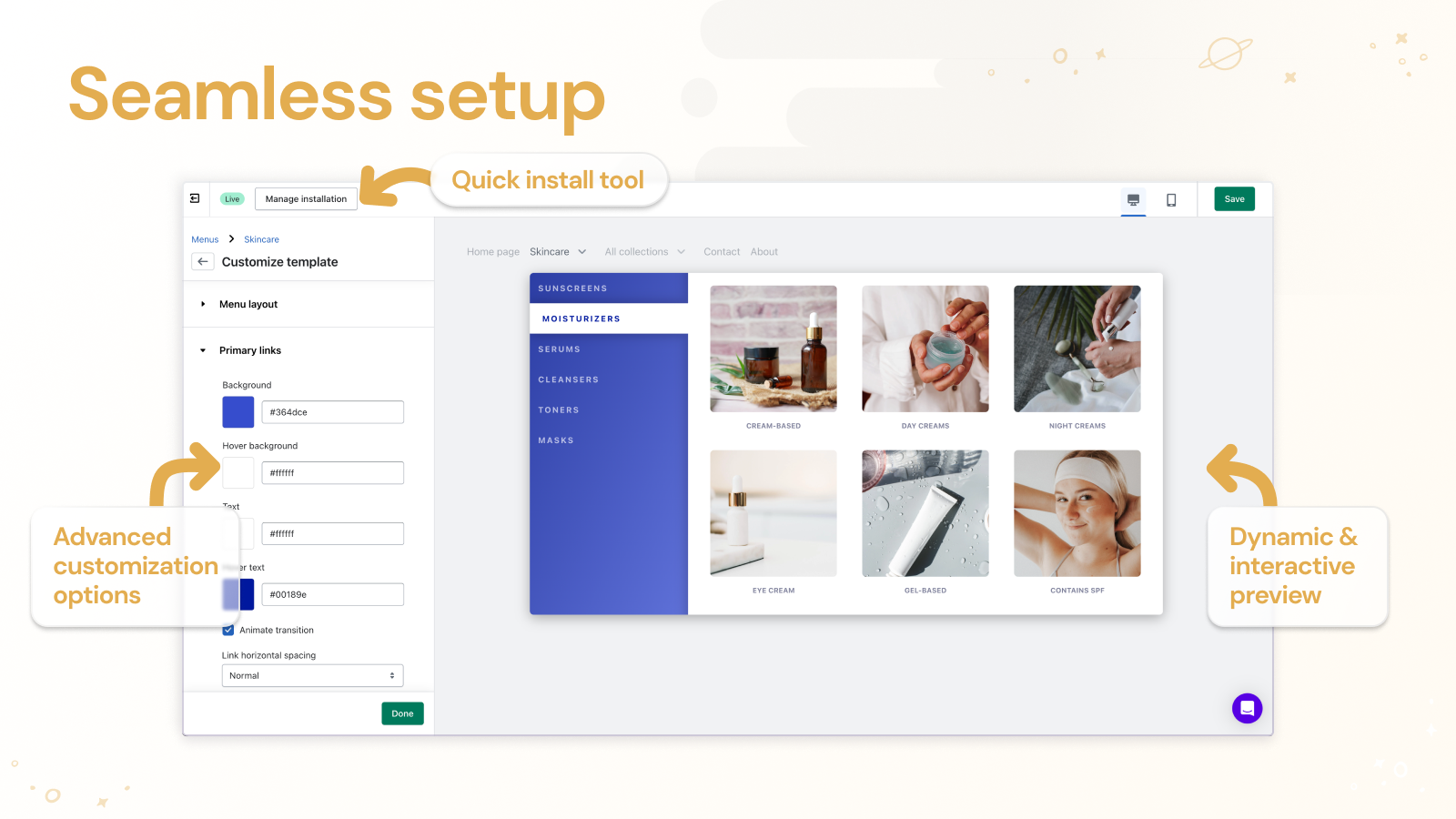
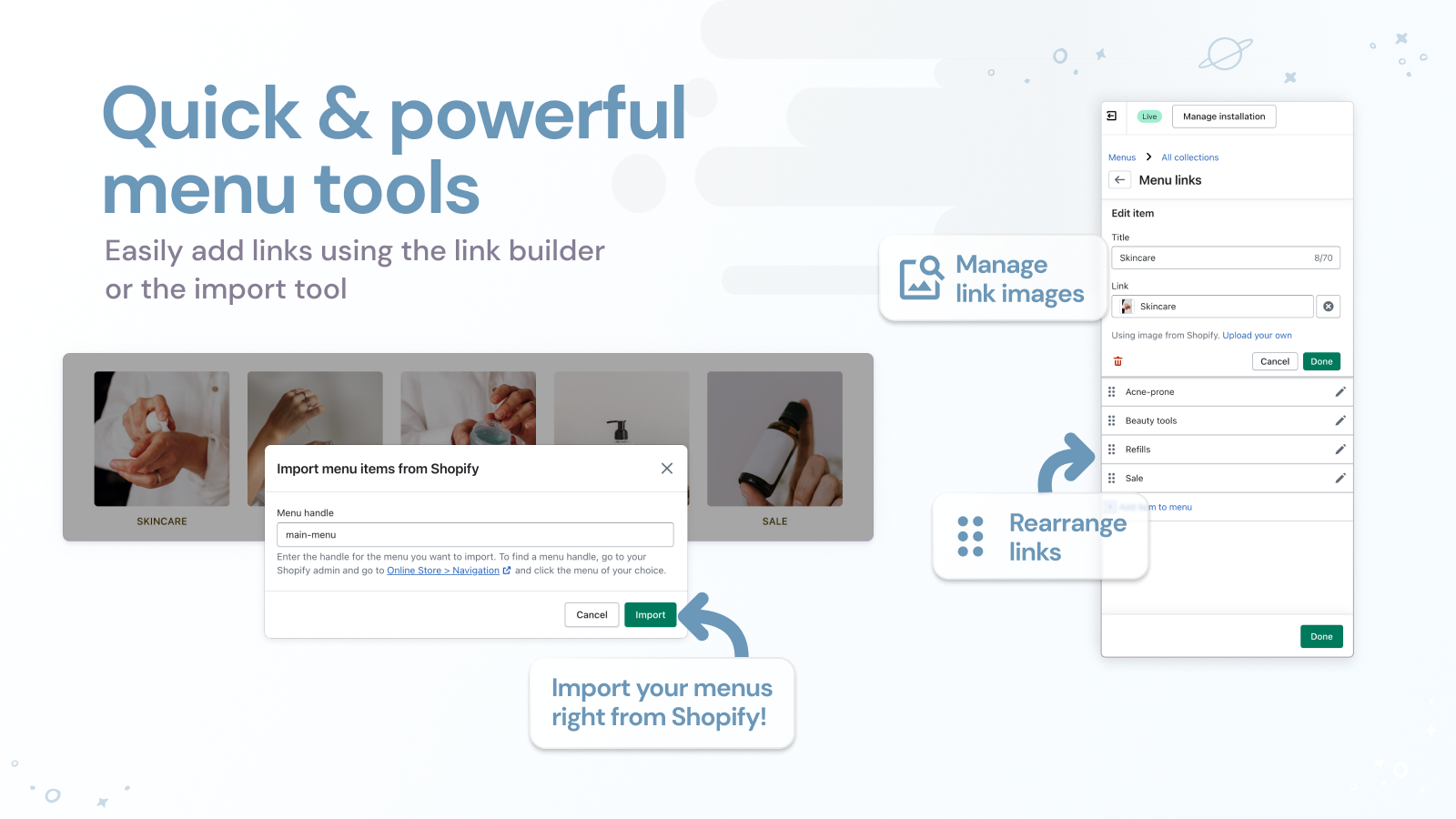
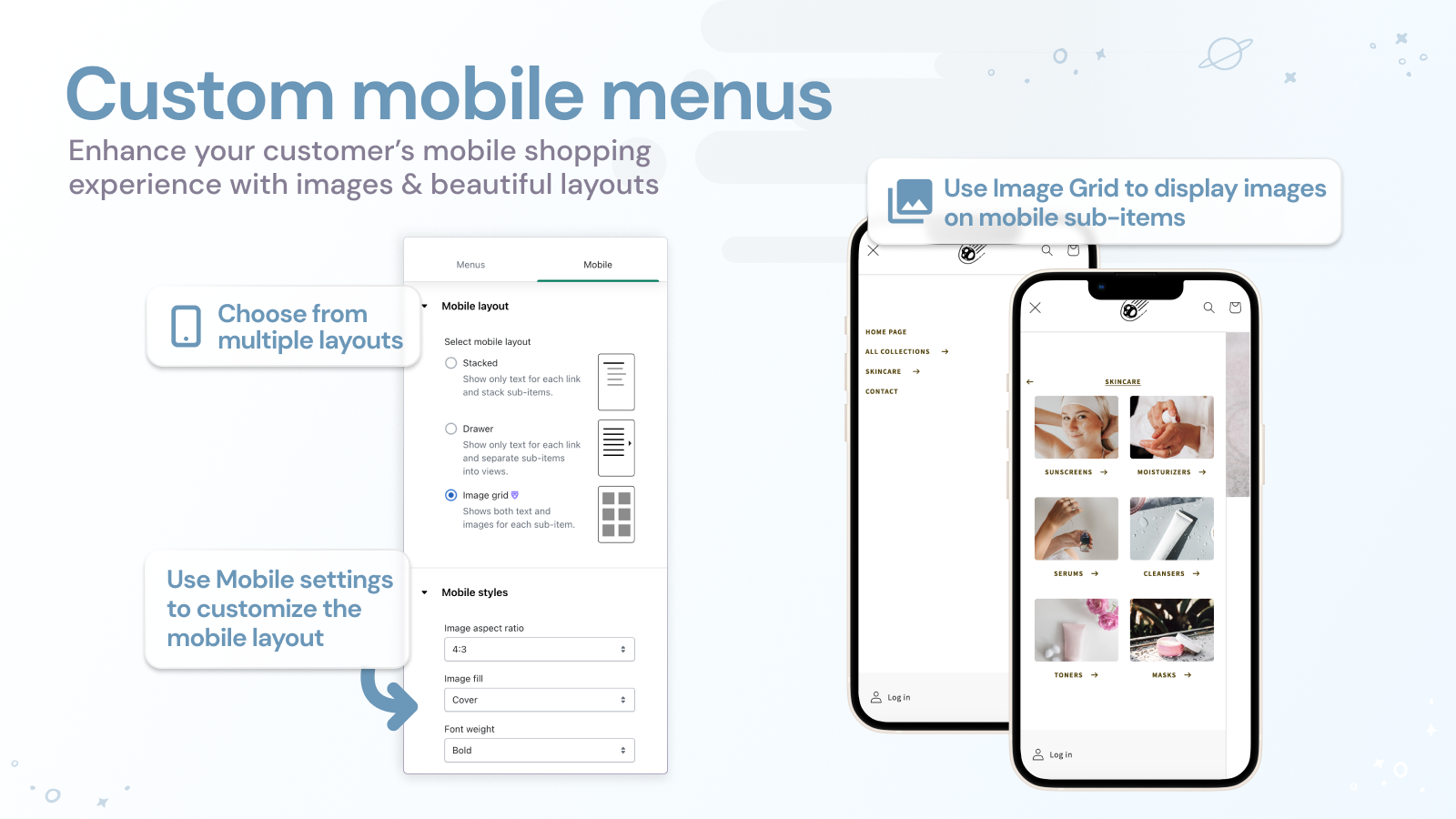
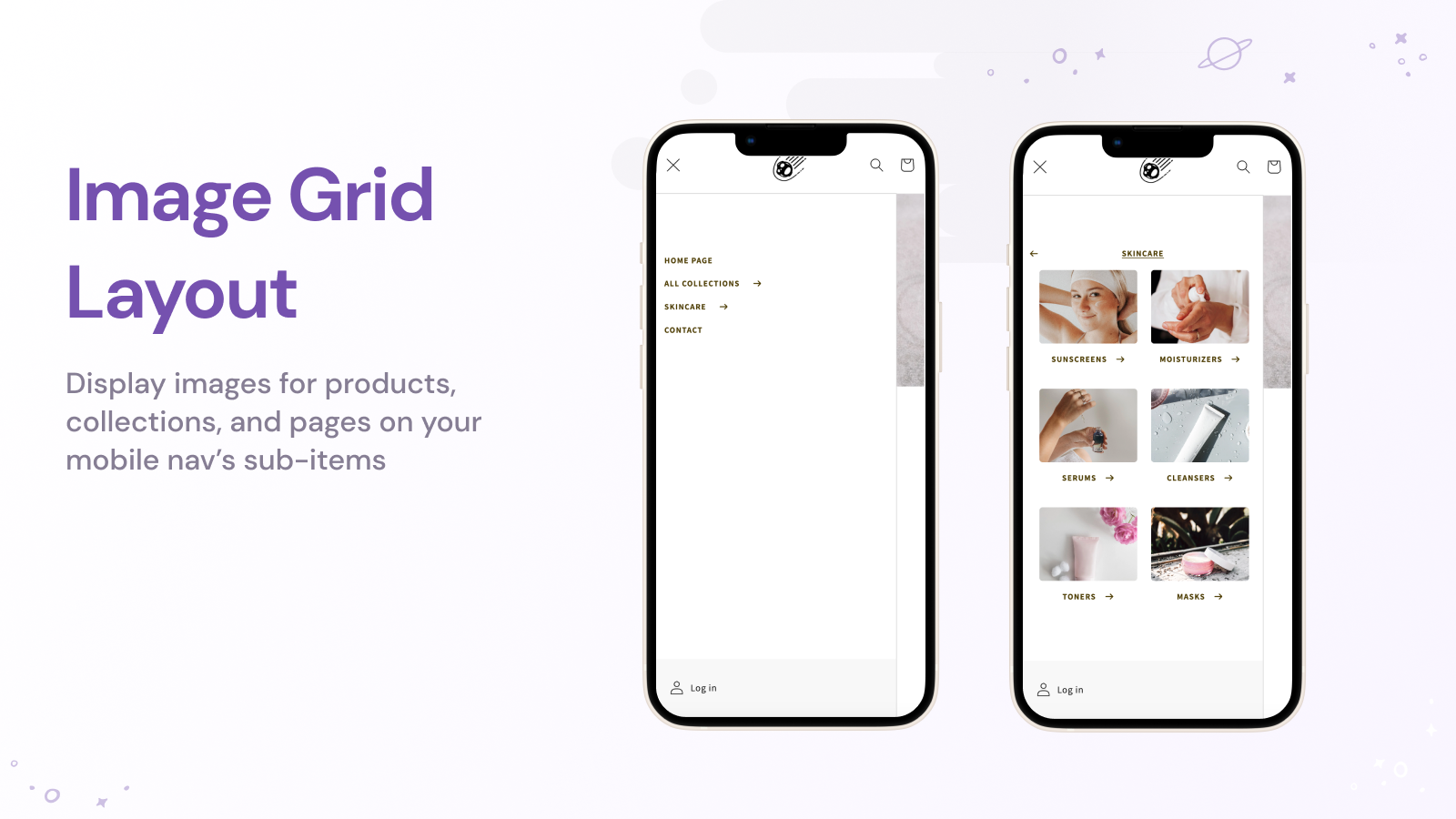
Large Menu with pictures, Collapsible Menu, Directional Menu

Pricing Plans: Free, $12.90/month, $17.90/month
Free Trial: 7 days
Pros
  • Consistently praised for being fast, responsive, and highly effective in resolving issues.
  • The app is frequently described as intuitive and straightforward, with a user-friendly interface.
  • Users appreciate the flexibility and extensive customization features available.
Cons
  • Some users encountered compatibility issues with certain themes, requiring fixes.

What merchants said

“It works very well and solves problems very quickly. Great!”
SUNLU IT STORE · Hong Kong SAR · ★ 5.0 · 10/30/2026

Summary

Starting PriceFree
Free Trial7 days
Launch Date11 Aug 2017
DeveloperGlobo.io
Ratings4.9 ★ (1,730)
Install NowView charts
About the App

Globo Mega Menu, Navigation, a Thumbnail Shopify app, has achieved 1690 reviews and an average rating of 4.9 stars since its launch 9 years ago. Designed to assist Shopify merchants with - "The Globo Mega Menu app is a great tool for creating your menu without needing to code." it is a valuable addition to the Thumbnail app lineup.

Top Features:

Thumbnail Shopify apps can help elevate your e-commerce game. Globo Mega Menu, Navigation offers a host of key features, including:

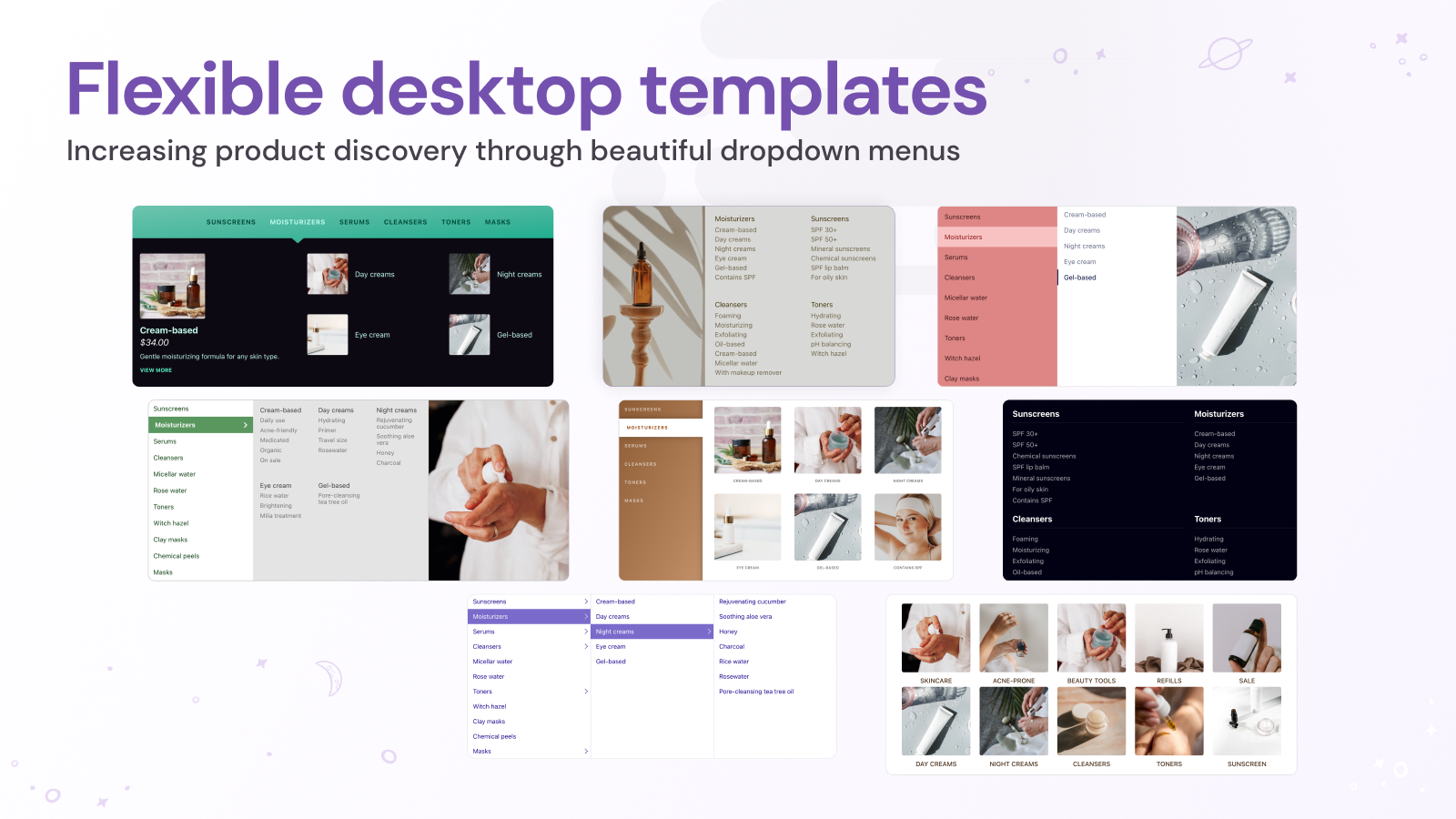
  • Multi-level dropdown menu:Multilevel dropdown menu, tabs, link blocks, and menu pictures.
  • Website Content Categories:HTML block, Highlighted products, Latest products, Featured blog articles, New blog articles
  • Customized menu bar:Create a menu bar that includes a contact form, search box, theme-matching font, icons, and more.
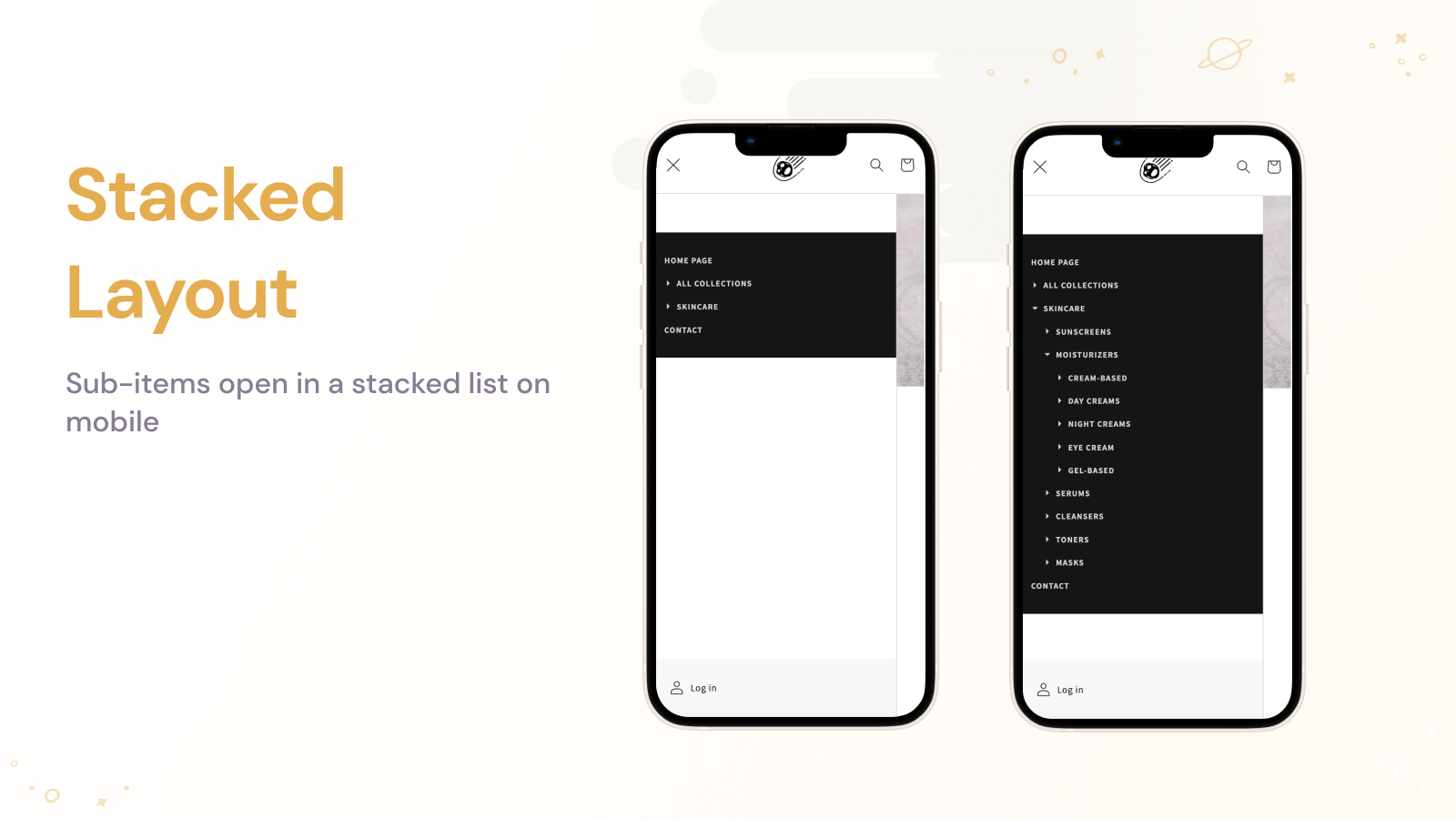
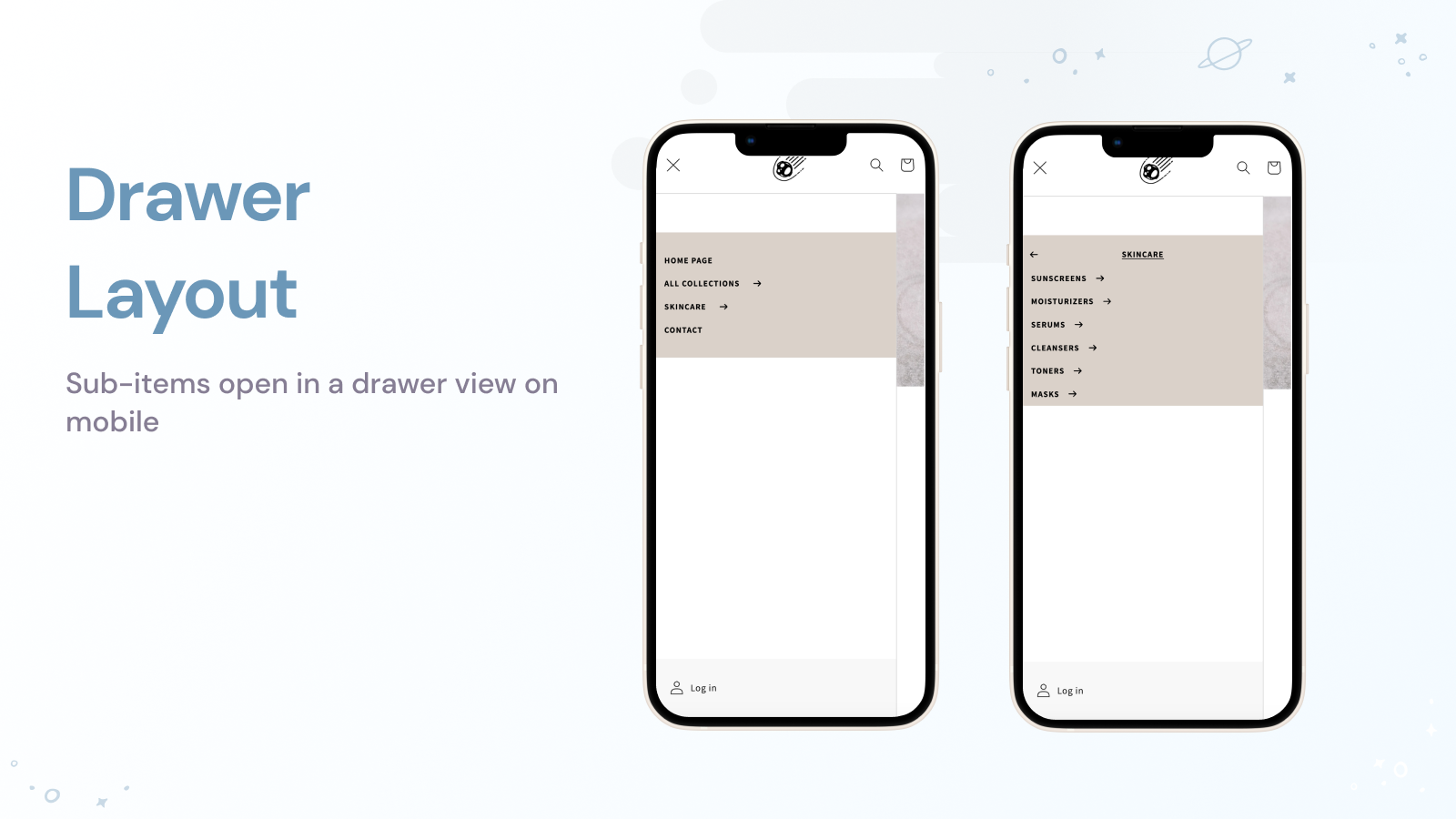
  • Website Features:"New" label, highlighted menu item, works well on all devices including mobiles.
  • Menu builder:Simple to construct your primary, filter, smart, and food menus.
Pricing Details

Globo Mega Menu, Navigation offers 1 free plan and 2 paid plans.

Considering installing this Thumbnail Shopify app? Explore the pricing details and discover if they align with your budget and needs.

  1. Basic Navigation · $0/month

    Included features: Unlimited menu items, Mega Menu, Dropdown menu (Flyout menu), Add product, Add custom image, Mobile Menu, Fully customize (font, color...), Build menu by drag & drop, No watermark

  2. Growth Navigation · $12.90/month

    Included features: Everything in Basic, Different menus for Shopify Markets, Product list and collection grids, Promotional images, banner, image slider, Blogs, Multi-language menus, Countdown, Menu click analytics

  3. Pro Navigation · $17.90/month

    Included features: Everything in Growth, Unlimited published menus, Desktop and mobile-specific menus, Menu versions, Tabs and masonry layouts, Badges and highlights, Add custom HTML to menu, Mobile bottom navigation bar

Pros and Cons

Delve into ShopDigest's expert insights on Globo Mega Menu, Navigation - a Thumbnail Shopify app. Our analysis of Shopify app store reviews presents unique pros and cons, allowing you to make informed decisions for your business. Read our full Globo Mega Menu, Navigation Thumbnail App review.

Pros
  • Consistently praised for being fast, responsive, and highly effective in resolving issues.
  • The app is frequently described as intuitive and straightforward, with a user-friendly interface.
  • Users appreciate the flexibility and extensive customization features available.
  • Many reviews highlight the promptness in fixing bugs or technical problems.
  • Support team members, especially Sarah, are noted for their patience and professionalism.
  • The app is valued for its robust features and seamless performance.
  • Users commend the immediate assistance provided via live chat support.
  • The app significantly improves website navigation and user experience.
  • Long-term users report consistent reliability with minimal issues.
  • Many users actively recommend the app due to its overall quality and support.
Cons
  • Some users encountered compatibility issues with certain themes, requiring fixes.
  • A few reviews mention disruptive advertisements within the app interface.
  • Limited options for mobile menu customization were noted by some users.
  • Certain features (e.g., login/logout links) were reported as not working in newer versions.
  • Issues with image scaling and responsiveness on mobile devices were highlighted.
Talk to the developer

Install in Your Store Now

Your request goes to the team that built Globo Mega Menu, Navigation, not a support queue.

#2 of 80
QuickFiles — File Uploads

QuickFiles — File Uploads by Nerd Labs

Add drag & drop file uploads to any product with built-in imag

Free Trial: 7 days
Key Features
  • Drag & drop uploads with progress bar, thumbnails, and file preview
  • Built-in image cropping with aspect ratio lock (1:1, 4:3, 16:9)
  • Secure cloud storage — download links appear on every order

What merchants said

“I was looking for a straightforward Shopify product upload option where buyers could send their artwork before placing an order. QuickFiles was easy to configure and worked nicely with our product pages. Very happy with it so far. Setup took 2 minutes.”
Bunat · Pakistan · ★ 5.0 · 8/29/2026

Summary

Starting PriceFree
Free Trial7 days
Launch Date06 Apr 2026
DeveloperNerd Labs
Ratings4.9 ★ (46)
View on ShopifyView charts
About the App

QuickFiles — File Uploads, a Thumbnail Shopify app, has achieved 47 reviews and an average rating of 4.9 stars since its launch this year. Designed to assist Shopify merchants with - "Let customers upload custom designs, documents, and images on product pages. Drag & drop files." it is a valuable addition to the Thumbnail app lineup.

Top Features:

Thumbnail Shopify apps can help elevate your e-commerce game. QuickFiles — File Uploads offers a host of key features, including:

  • Drag & drop uploads with progress bar, thumbnails, and file preview
  • Built-in image cropping with aspect ratio lock (1:1, 4:3, 16:9)
  • Secure cloud storage — download links appear on every order
Pricing Details

QuickFiles — File Uploads offers 1 free plan and 3 paid plans.

Considering installing this Thumbnail Shopify app? Explore the pricing details and discover if they align with your budget and needs.

  1. Free · $0/month

    Included features: 1 upload field, 10 customer uploads per month, 25 MB max file size, 1 GB secure file storage, Images, PDFs & all file types, Files linked to their orders, Drag-and-drop storefront widget, 3+ month of file storage

  2. Micro · $3.99/month

    Included features: 500 uploads per month, 50 MB max file size, 5 GB storage, Image & document uploads, Image cropping, Custom styling, 12+ month of file storage

  3. Starter · $7.99/month

    Included features: Unlimited upload fields, 1,000 customer uploads per month, 200 MB max file size, 50 GB secure file storage, Image cropping, Custom widget styling, Files linked to their orders, 12+ month of file storage

  4. Pro · $14.99/month

    Included features: Everything in Starter, Unlimited customer uploads, Unlimited file storage, 500 MB max file size, Priority support, 24+ month of file storage

Talk to the developer

Install in Your Store Now

Your request goes to the team that built QuickFiles — File Uploads, not a support queue.

#3 of 80
Navi+ Tab Bar & Mega Menu

Navi+ Tab Bar & Mega Menu by Navi+

Make mobile browsing faster with tab bars and mega menus

Free Trial: 14 days
Pros
  • The intuitive drag-and-drop editor simplifies menu creation and customization without requiring coding skills.
  • Users highlight the app’s cost-effectiveness compared to similar solutions, offering premium features at a competitive price.
  • The support team, especially Khoi, is frequently praised for responsiveness, expertise, and going above and beyond to resolve issues.
Cons
  • Some users note the app’s advanced features require initial time investment to master.

What merchants said

“Navi+ is a great app for improving Shopify store navigation. It makes it easy to create stylish menus, mobile tab bars, and mega menus without coding. I especially like the drag-and-drop editor and customization options. It helps customers find products quickly and makes browsing smoother.”
pavortyy · United Kingdom · ★ 5.0 · 10/28/2026

Summary

Starting PriceFree
Free Trial14 days
Launch Date03 Nov 2023
DeveloperNavi+
Ratings5.0 ★ (43)
Install NowView charts
About the App

Navi+ Tab Bar & Mega Menu, a Thumbnail Shopify app, has achieved 38 reviews and an average rating of 5 stars since its launch 3 years ago. Designed to assist Shopify merchants with - "Create app-like mobile navigation and flexible mega menus to help shoppers find products faster." it is a valuable addition to the Thumbnail app lineup.

Top Features:

Thumbnail Shopify apps can help elevate your e-commerce game. Navi+ Tab Bar & Mega Menu offers a host of key features, including:

  • Add sticky bottom tab bars with icons and labels for app-like mobile navigation
  • Build mega menus with products, collections, images, icons, and flexible layouts
  • Create mobile menus, drawer menus, and hamburger menus for easier store browsing
  • Add icon menus and floating buttons linking to products, collections, and pages
  • Generate menus with AI, templates, drag-and-drop editing, and no coding required
Pricing Details

Navi+ Tab Bar & Mega Menu offers 1 free plan and 3 paid plans.

Considering installing this Thumbnail Shopify app? Explore the pricing details and discover if they align with your budget and needs.

  1. Starter · $0/month

    Included features: Free forever, 1 menu, Up to 20K menu views/month, Ready-made templates, No coding required, Works with every Shopify theme, Built-in icons included, Email support

  2. Business · $6.25/month

    Included features: Everything in Starter, Up to 4 menus, Use your own images & icons, Replace theme menu icons, SEO-friendly menu links, Multi-language menus, 12 months of analytics, Up to 500K views/month

  3. Elite · $15/month

    Included features: Everything in Business, Unlimited menus, Unlimited menu views, Done-for-you expert setup, Free old menu migration, Advanced customization, Full analytics history, Priority support

  4. Navi+ Care · $39/month

    Included features: Everything in Elite, Done-for-you menu management, We migrate your existing menus, Menu structure & UX consulting, Up to 5 edit requests/month, Ongoing menu maintenance, Reply within 24 hours, Your own menu consultant

Pros and Cons

Delve into ShopDigest's expert insights on Navi+ Tab Bar & Mega Menu - a Thumbnail Shopify app. Our analysis of Shopify app store reviews presents unique pros and cons, allowing you to make informed decisions for your business. Read our full Navi+ Tab Bar & Mega Menu Thumbnail App review.

Pros
  • The intuitive drag-and-drop editor simplifies menu creation and customization without requiring coding skills.
  • Users highlight the app’s cost-effectiveness compared to similar solutions, offering premium features at a competitive price.
  • The support team, especially Khoi, is frequently praised for responsiveness, expertise, and going above and beyond to resolve issues.
  • The app provides extensive navigation options (e.g., mega menus, floating buttons) with high flexibility to match brand aesthetics.
  • Consolidates multiple navigation tools into one, streamlining workflow and reducing reliance on other apps.
  • The clean, intuitive design makes setup and editing accessible even for beginners.
  • Operates smoothly with no lag, even under high traffic, and integrates seamlessly with Shopify themes.
  • Transforms store navigation to feel like a native app, improving customer browsing and conversion rates.
  • Users appreciate continuous improvements and added features over time.
  • Works flawlessly across desktop and mobile, with responsive design adjustments.
Cons
  • Some users note the app’s advanced features require initial time investment to master.
  • Occasional issues like menu display glitches or theme conflicts are reported, though quickly resolved by support.
  • A few users feel overwhelmed by the extensive customization options, suggesting simplified workflows for basic needs.
  • Rare cases require CSS tweaks for full compatibility with certain Shopify themes.
  • While praised, the free version’s restrictions prompt some users to upgrade for full functionality.
Talk to the developer

Install in Your Store Now

Your request goes to the team that built Navi+ Tab Bar & Mega Menu, not a support queue.

Keyword ranking

Top three ranked in Shopify App Store

Globo Mega Menu, Navigation

The Globo Mega Menu app is a great tool for creating your menu without needing to code.

4.9 ★ (1,730)$12.9/mo onwards
View app data →
QuickFiles — File Uploads

Let customers upload custom designs, documents, and images on product pages. Drag & drop files.

4.9 ★ (46)$3.99/mo onwards
View app data →
Navi+ Tab Bar & Mega Menu

Create app-like mobile navigation and flexible mega menus to help shoppers find products faster.

5.0 ★ (43)$6.25/mo onwards
View app data →
#4 of 80
PAI: Auto AI Blog, AI SEO, AEO

PAI: Auto AI Blog, AI SEO, AEO by PieLab

Pricing Plans: Free
Key Features
  • Autopilot AI Blog builder: find topics, write & publish SEO blogs on a schedule
  • Track AI Readiness Score, AI visibility & schema coverage to prioritize products
  • Create AI FAQs that answer buyer questions; remove robotic AI writing from blogs
  • Optimize AI product descriptions; generate AI blog thumbnails & product images
  • Add Product Schema JSON-LD, Merchant Listing data, shipping & return details

What merchants said

“the best app ever I found for the integration in the Shopify for the SEO. great jo JANE”
Cosmeio · United Kingdom · ★ 5.0 · 10/5/2026

Summary

Starting PriceFree
Free TrialFree plan
Launch Date02 Jul 2026
DeveloperPieLab
Ratings5.0 ★ (15)
View on ShopifyView charts
About the App

PAI: Auto AI Blog, AI SEO, AEO, a Thumbnail Shopify app, has achieved 14 reviews and an average rating of 5 stars since its launch this year. Designed to assist Shopify merchants with - "Build SEO AI blogs on autopilot, AI images & schema JSON-LD to get higher AI Readiness Score" it is a valuable addition to the Thumbnail app lineup.

Top Features:

Thumbnail Shopify apps can help elevate your e-commerce game. PAI: Auto AI Blog, AI SEO, AEO offers a host of key features, including:

  • Autopilot AI Blog builder: find topics, write & publish SEO blogs on a schedule
  • Track AI Readiness Score, AI visibility & schema coverage to prioritize products
  • Create AI FAQs that answer buyer questions; remove robotic AI writing from blogs
  • Optimize AI product descriptions; generate AI blog thumbnails & product images
  • Add Product Schema JSON-LD, Merchant Listing data, shipping & return details
Pricing Details

PAI: Auto AI Blog, AI SEO, AEO offers 0 free plans and 0 paid plans.

Considering installing this Thumbnail Shopify app? Explore the pricing details and discover if they align with your budget and needs.

  1. · $0/month

Talk to the developer

Install in Your Store Now

Your request goes to the team that built PAI: Auto AI Blog, AI SEO, AEO, not a support queue.

#5 of 80
Meteor Mega Menu & Navigation

Meteor Mega Menu & Navigation by Helium

Make beautiful multi-level dropdown menus for your shop.

Pricing Plans: Free, $8/month, $14/month
Free Trial: 7 days
Pros
  • Highly responsive and helpful support team, frequently praised for quick resolutions and personalized assistance.
  • Simple installation process and intuitive interface, often highlighted as user-friendly even for beginners.
  • Wide range of customizable features, allowing users to tailor menus to their brand and needs.
Cons
  • Some users reported clipping or display issues on mobile devices without easy fixes.

What merchants said

“Customer service is exceptional. I had some issues with the app, the response was immediate, both Brett and Jakin sent very clear instructions and even did some of the work themselves. Also this menu is ADA compliant which is important. I highly recommend this app.”
Flooring Supply Shop · United States · ★ 5.0 · 10/9/2026

Summary

Starting PriceFree
Free Trial7 days
Launch Date20 Apr 2015
DeveloperHelium
Ratings4.7 ★ (364)
Install NowView charts
About the App

Meteor Mega Menu & Navigation, a Thumbnail Shopify app, has achieved 356 reviews and an average rating of 4.7 stars since its launch 11 years ago. Designed to assist Shopify merchants with - "Make beautiful layered dropdown menus. Include product specifics and pictures in website navigation." it is a valuable addition to the Thumbnail app lineup.

Top Features:

Thumbnail Shopify apps can help elevate your e-commerce game. Meteor Mega Menu & Navigation offers a host of key features, including:

  • Template Selection:Choose from 8 beautifully crafted templates.
  • Shopify Resource Links:Connect any Shopify resource: items, groups, blogs, or web pages.
  • Menu images:Show product or collection photos right in your store's main menu.
  • Menu Streamlining:Use your shop's existing menus to simplify your setup.
  • Customer-friendly UX:A user-friendly interface helps customers navigate through various menu levels with ease.
Pricing Details

Meteor Mega Menu & Navigation offers 1 free plan and 2 paid plans.

Considering installing this Thumbnail Shopify app? Explore the pricing details and discover if they align with your budget and needs.

  1. Free · $0/month

    Included features: Unlimited Mega Menus, Auto-populate products from Collections, 2 desktop menu templates, 2 mobile templates, Chat/email support (US - Pacific Time)

  2. Pro · $8/month

    Included features: Everything in Free, plus:, 6 desktop menu templates, 3 mobile templates, Images in menus, Free for Partner Development stores

  3. Premium · $14/month

    Included features: Everything in Pro, plus:, 9 desktop menu templates, 3 mobile templates, CSS Editor, Free for Partner dev stores

Pros and Cons

Delve into ShopDigest's expert insights on Meteor Mega Menu & Navigation - a Thumbnail Shopify app. Our analysis of Shopify app store reviews presents unique pros and cons, allowing you to make informed decisions for your business. Read our full Meteor Mega Menu & Navigation Thumbnail App review.

Pros
  • Highly responsive and helpful support team, frequently praised for quick resolutions and personalized assistance.
  • Simple installation process and intuitive interface, often highlighted as user-friendly even for beginners.
  • Wide range of customizable features, allowing users to tailor menus to their brand and needs.
  • Clean, aesthetically pleasing menus that enhance site navigation and appearance.
  • Reliable and smooth operation with minimal lag or technical issues.
  • A functional free version appreciated by users for basic needs.
  • Seamless compatibility with Shopify themes and existing navigation structures.
  • Improved user experience leading to better customer engagement and sales.
  • Quick fixes and updates from the team when issues arise.
Cons
  • Some users reported clipping or display issues on mobile devices without easy fixes.
  • Incompatibility with certain translation apps, restricting multilingual support.
  • Occasional difficulties integrating with specific Shopify themes, requiring manual adjustments.
  • Delays in support responses noted by users outside the US.
  • Isolated reports of glitches, such as menu reverting to default or unresponsive updates.
Talk to the developer

Install in Your Store Now

Your request goes to the team that built Meteor Mega Menu & Navigation, not a support queue.

#6 of 80
EasySearch YMM Year Make Model

EasySearch YMM Year Make Model by NexusMedia

Search multiple dropdowns. Look up by Model. Find car parts.

Pricing Plans: $19/month, $75/month
Free Trial: 14 days
Pros
  • Consistently praised for responsiveness, knowledge, and willingness to go above and beyond to resolve issues.
  • Intuitive setup and user-friendly interface, often highlighted as straightforward for both beginners and advanced users.
  • Ability to tailor the app’s appearance and functionality to match specific store needs, including CSS adjustments.
Cons
  • Issues with overwriting existing data during CSV uploads and proprietary export formats complicating external use.

What merchants said

“EasySearch has worked very well for us for multiple years. In the very few cases of needed support, their team has been very responsive and quick in finding a solution. Manages our large database with ease and make it easy for customer to use the tools. ”
Niche Industries · United States · ★ 5.0 · 10/30/2026

Summary

Starting Price$19/mo
Free Trial14 days
Launch Date12 Apr 2016
DeveloperNexusMedia
Ratings4.9 ★ (172)
Install NowView charts
About the App

EasySearch YMM Year Make Model, a Thumbnail Shopify app, has achieved 169 reviews and an average rating of 4.9 stars since its launch 10 years ago. Designed to assist Shopify merchants with - "Search for parts by multiple dropdowns. Look up by car model. Search for auto parts. Search by the car's year, make, and model." it is a valuable addition to the Thumbnail app lineup.

Top Features:

Thumbnail Shopify apps can help elevate your e-commerce game. EasySearch YMM Year Make Model offers a host of key features, including:

  • Search Optimization:Enhance your search using the Year Make Model search part finder.
  • Product Compatibility:Product page widget to ensure the product fits the customer's vehicle.
  • Automotive parts database:Ready-made car database for stores that sell spare automotive parts.
  • Form Customization:Adjust the format and design of the search form- switch between horizontal or vertical layout.
Pricing Details

EasySearch YMM Year Make Model offers 0 free plans and 2 paid plans.

Considering installing this Thumbnail Shopify app? Explore the pricing details and discover if they align with your budget and needs.

  1. BASIC PLAN · $19/month

    Included features: Year Make Model search form, Fitment widget for product page, Unlimited: fields, rows, users & product, Import & Export of YMM database, Basic layout customization, 24/7 support

  2. PREMIUM PLAN · $75/month

    Included features: Everything in Basic, plus:, Fitment table, Universal products, My Garage feature, Personalized app layout customization, Priority 24/7 support

Pros and Cons

Delve into ShopDigest's expert insights on EasySearch YMM Year Make Model - a Thumbnail Shopify app. Our analysis of Shopify app store reviews presents unique pros and cons, allowing you to make informed decisions for your business. Read our full EasySearch YMM Year Make Model Thumbnail App review.

Pros
  • Consistently praised for responsiveness, knowledge, and willingness to go above and beyond to resolve issues.
  • Intuitive setup and user-friendly interface, often highlighted as straightforward for both beginners and advanced users.
  • Ability to tailor the app’s appearance and functionality to match specific store needs, including CSS adjustments.
  • Smooth operation with minimal lag, particularly for vehicle part searches and large catalogs.
  • Fast and seamless installation process, often requiring minimal technical intervention.
  • Efficient CSV uploads and database management for large product inventories.
  • Works flawlessly on mobile devices, adapting well to different screen sizes.
  • Frequently mentioned as cost-effective compared to competitors with similar features.
  • Adaptable beyond automotive use (e.g., fiber arts, RV furniture) with flexible filtering options.
  • Regular updates and willingness to implement user-requested features or fixes.
Cons
  • Issues with overwriting existing data during CSV uploads and proprietary export formats complicating external use.
  • Some users struggled initially with adapting the app for non-automotive applications.
  • A few users felt the monthly cost was high for stores with limited product ranges or unused features.
  • Rare reports of mismatched vehicle-product associations in search results.
  • Shopify’s 5,000 smart collection limit posed challenges for large catalogs, requiring manual workarounds.
Talk to the developer

Install in Your Store Now

Your request goes to the team that built EasySearch YMM Year Make Model, not a support queue.

#7 of 80
ANG Extra menu

ANG Extra menu by Nx8Apps

Large drop-down, tab, and tree menu available in various languages.

Pricing Plans: Free, $5.99/month, $7.99/month
Free Trial: 14 days
Pros
  • Highly responsive, solution-oriented, and friendly support team that resolves issues quickly.
  • Intuitive and easy-to-navigate design, suitable for users of all technical levels.
  • Extensive options for personalizing menus, including animations and layout adjustments.
Cons
  • Some advanced functionalities, like image uploads, require a paid plan.

What merchants said

“Definitely THE BEST app for mega menus in your store. Fully customizable, intuitive, easy to install—and if that weren’t enough, Max helps you create exactly what you need, tailoring everything to your preferences. It really is a must-have app if you use a mega menu. After trying more than five apps, this one is definitely the best—in terms of design, installation, customization, and customer service. I can’t thank you enough—I know Max will be there to help me whenever I need to make any adjustments. I was using the free version, which is already a huge help to get started, but the Premium version gives you the edge you need to take your store to the next level and make it even more professional. Look no further—this is the app you’ve been searching for!”
Crearten · Spain · ★ 5.0 · 9/14/2026

Summary

Starting PriceFree
Free Trial14 days
Launch Date25 Oct 2022
DeveloperNx8Apps
Ratings5.0 ★ (75)
Install NowView charts
About the App

ANG Extra menu, a Thumbnail Shopify app, has achieved 76 reviews and an average rating of 5 stars since its launch 4 years ago. Designed to assist Shopify merchants with - "An easy way to create a large-scale menu, tab menu, or tree menu for your store." it is a valuable addition to the Thumbnail app lineup.

Top Features:

Thumbnail Shopify apps can help elevate your e-commerce game. ANG Extra menu offers a host of key features, including:

  • Creating Menu Templates:Make a mega menu, tab menu, and tree menu using a template.
  • Quick Customization:Easy and quick personalization.
  • Vertical menu.:Up and down menu.
  • Multilingual.:Different languages.
  • Mobile Adaptability:Easy to use on a phone.
Pricing Details

ANG Extra menu offers 1 free plan and 2 paid plans.

Considering installing this Thumbnail Shopify app? Explore the pricing details and discover if they align with your budget and needs.

  1. Free · $0/month

    Included features: Mega menu, Tree menu - Dropdown menu, Add Product to menu, Image menu, Menu effect & animation, Menu on mobile, Breadcrumbs base on menu, Email support

  2. Premium · $5.99/month

    Included features: Tab menu + Custom HTML + Contact form, Upload image to cloud server & optimized, Image effects, Add bubble, Multiple languages, Multiple menus - multiple markets, Separate design for mobile menu, Live chat support

  3. VIP · $7.99/month

    Included features: Everything in Premium plan, List products from collection, Add collection tags, Product + image slider, Multi-menu design + markets, CTR stats menu links – Menu analytics, Prioritize live chat support

Pros and Cons

Delve into ShopDigest's expert insights on ANG Extra menu - a Thumbnail Shopify app. Our analysis of Shopify app store reviews presents unique pros and cons, allowing you to make informed decisions for your business. Read our full ANG Extra menu Thumbnail App review.

Pros
  • Highly responsive, solution-oriented, and friendly support team that resolves issues quickly.
  • Intuitive and easy-to-navigate design, suitable for users of all technical levels.
  • Extensive options for personalizing menus, including animations and layout adjustments.
  • Smooth and bug-free operation, with noticeable speed compared to competitors.
  • Competitive pricing with a free plan that covers basic needs and attractive paid options.
  • Comprehensive functionality, including unique features like breadcrumb replacement and scrolling image menus.
  • Consistently praised for delivering professional and visually appealing menu designs.
Cons
  • Some advanced functionalities, like image uploads, require a paid plan.
Talk to the developer

Install in Your Store Now

Your request goes to the team that built ANG Extra menu, not a support queue.

#8 of 80
Tuck AI Virtual Try On & Size

Tuck AI Virtual Try On & Size by Xapien Innovatus Private Limited

Try-ons that converts, reduces returns, and stays brand-safe.

Free Trial: 7 days
Key Features
  • Photoreal try-on on the shopper's own photo — fabric, drape & lighting intact
  • Size suggestions from height, weight, age & fit preference, vs YOUR size chart
  • Scans your catalog; try-on appears only on SKUs where results are reliable
  • Picks the sharpest of your product photos per render, not just the thumbnail
  • Data Privacy: Zero third-party data transfer policy to protect your brand.

What merchants said

“I’d tried a few try-on apps before, and pricing was always the problem until I settled on tuck. It costs nearly half of what other try-on apps on Shopify charge, and the results still hold up. It doesn’t feel like they’ve cut corners to get there, just smart engineering.”
SAFEBUY · United States · ★ 5.0 · 10/31/2026

Summary

Starting Price$14.99/mo
Free Trial7 days
Launch Date21 May 2026
Ratings5.0 ★ (16)
View on ShopifyView charts
About the App

Tuck AI Virtual Try On & Size, a Thumbnail Shopify app, has achieved 4 reviews and an average rating of 5 stars since its launch this year. Designed to assist Shopify merchants with - "Photoreal try-on, size suggestions, quality guardrails. Auto-enabled, no code, live in minutes." it is a valuable addition to the Thumbnail app lineup.

Top Features:

Thumbnail Shopify apps can help elevate your e-commerce game. Tuck AI Virtual Try On & Size offers a host of key features, including:

  • Photoreal try-on on the shopper's own photo — fabric, drape & lighting intact
  • Size suggestions from height, weight, age & fit preference, vs YOUR size chart
  • Scans your catalog; try-on appears only on SKUs where results are reliable
  • Picks the sharpest of your product photos per render, not just the thumbnail
  • Data Privacy: Zero third-party data transfer policy to protect your brand.
Pricing Details

Tuck AI Virtual Try On & Size offers 0 free plans and 3 paid plans.

Considering installing this Thumbnail Shopify app? Explore the pricing details and discover if they align with your budget and needs.

  1. Starter Plan · $14.99/month

    Included features: $0.075 per VTON, Up to 200 try-ons, +50 extra try-ons available, $0.079 per extra try-on, Analytics Dashboard

  2. Growth Plan · $49.99/month

    Included features: $0.0625 per VTON, Up to 800 try-ons, +200 extra try-ons available, $0.066 per extra try-on, Analytics Dashboard

  3. Scale Plan · $129/month

    Included features: $0.043 per VTON, Up to 3000 try-ons, +500 extra try-ons available, $0.045 per extra try-on, Analytics Dashboard

Talk to the developer

Install in Your Store Now

Your request goes to the team that built Tuck AI Virtual Try On & Size, not a support queue.

#9 of 80
GG Product Page Image Slider

GG Product Page Image Slider by Gigilabs

Product Picture Display, Enlarge, Different Versions, Rotating/Sliding Show

Free Trial: 7 days
Pros
  • Consistently praised for fast, responsive, and helpful service, often resolving issues promptly.
  • Offers extensive customization for layouts, zoom, and appearance, catering to diverse user needs.
  • Frequently highlighted for its quick, intuitive setup without requiring technical expertise.
Cons
  • Some users expressed a desire for additional free-tier functionalities like zoom.

What merchants said

“This app is easy to use and the support is top notch. They even helped me implement a change just for mobile. Support is responsive and extremely helpful! It has been a great experience working with this app.”
MySide Bedding · United States · ★ 5.0 · 10/19/2026

Summary

Starting PriceFree
Free Trial7 days
Launch Date21 Apr 2021
DeveloperGigilabs
Ratings4.8 ★ (177)
Install NowView charts
About the App

GG Product Page Image Slider, a Thumbnail Shopify app, has achieved 177 reviews and an average rating of 4.8 stars since its launch 5 years ago. Designed to assist Shopify merchants with - "Improve your product page with a high-quality image gallery. Use best practices to boost your sales!" it is a valuable addition to the Thumbnail app lineup.

Top Features:

Thumbnail Shopify apps can help elevate your e-commerce game. GG Product Page Image Slider offers a host of key features, including:

  • Multimedia Display:Several gallery designs - Photos & videos of products in a slideshow.
  • Carousel Customization:Simple setup - Select from Carousel with Arrows, Thumbnail Images and Zoom options!
  • Mobile Image Slider:Designed for mobile - swipe through product photos and videos in a slider.
Pricing Details

GG Product Page Image Slider offers 1 free plan and 3 paid plans.

Considering installing this Thumbnail Shopify app? Explore the pricing details and discover if they align with your budget and needs.

  1. Free · $0/month

    Included features: Just the basic Slider, No thumbnails (images below), No configuration options, No zoom, No video

  2. Basic · $5.99/month

    Included features: For stores on the Shopify Basic plan, Unlock all configuration options, Zoom & Magnify, Play video slides, Multiple images per variant, Show thumbnails (images below)

  3. Grow · $9.99/month

    Included features: For stores on the Shopify Grow plan, Unlock all configuration options, Zoom & Magnify, Play video slides, Multiple images per variant, Show thumbnails (images below)

  4. Advanced & Plus · $17.99/month

    Included features: For Shopify Advanced and Plus stores, Unlock all configuration options, Zoom & Magnify, Play video slides, Multiple images per variant, Show thumbnails (images below)

Pros and Cons

Delve into ShopDigest's expert insights on GG Product Page Image Slider - a Thumbnail Shopify app. Our analysis of Shopify app store reviews presents unique pros and cons, allowing you to make informed decisions for your business. Read our full GG Product Page Image Slider Thumbnail App review.

Pros
  • Consistently praised for fast, responsive, and helpful service, often resolving issues promptly.
  • Offers extensive customization for layouts, zoom, and appearance, catering to diverse user needs.
  • Frequently highlighted for its quick, intuitive setup without requiring technical expertise.
  • Works smoothly across devices, with minimal impact on page load times.
  • Improves product page aesthetics with clean sliders, transitions, and mobile-friendly designs.
  • Provides a functional free tier, allowing users to test core features before upgrading.
  • Adapts well to various Shopify themes, including older or heavily customized ones.
  • Effectively handles variant-specific images, particularly useful for apparel stores.
  • Developers quickly address bugs or theme conflicts, often within hours.
  • Delivers a polished, user-friendly interface that elevates store presentation.
Cons
  • Some users expressed a desire for additional free-tier functionalities like zoom.
  • Occasional conflicts with certain themes require developer intervention to resolve.
  • Minor requests (e.g., desktop/mobile toggle) occasionally require custom coding.
Talk to the developer

Install in Your Store Now

Your request goes to the team that built GG Product Page Image Slider, not a support queue.

#10 of 80
Key Features
  • Show menu on mobile, desktop, or both. Provide mobile menu navigation bar support.
  • Make separate menu groups for various types of products or collections.
  • Wide-ranging design choices to modify menu space, width, margin and custom css.
  • Two main shapes: circle and square, but the square can have rounded corners.
  • Accommodate various languages

What merchants said

“I've been using KOBU Menu for our Shopify store, and it's been a great experience. The app is very easy to use, intuitive, and makes it simple to build and manage complex navigation menus. What impressed me the most is the support team-they respond very quickly and always help find a solution to any issue or customization request. Excellent app with outstanding customer service. Highly recommended!”
DSI Podo · Israel · ★ 5.0 · 7/29/2026

Summary

Starting PriceFree
Free TrialFree plan
Launch Date26 Dec 2022
DeveloperActivory
Ratings4.9 ★ (28)
Install NowView charts
About the App

KOBU ‑ Menu Highlight & Quiz, a Thumbnail Shopify app, has achieved 27 reviews and an average rating of 4.9 stars since its launch 4 years ago. Designed to assist Shopify merchants with - "Menu to display products, collections or links for better visibility and easy access." it is a valuable addition to the Thumbnail app lineup.

Top Features:

Thumbnail Shopify apps can help elevate your e-commerce game. KOBU ‑ Menu Highlight & Quiz offers a host of key features, including:

  • Menu Display Options:Show menu on mobile, desktop, or both. Provide mobile menu navigation bar support.
  • Menu Grouping:Make separate menu groups for various types of products or collections.
  • Design Customization:Wide-ranging design choices to modify menu space, width, margin and custom css.
  • Shape Variations:Two main shapes: circle and square, but the square can have rounded corners.
  • Multilingual Support:Accommodate various languages
Pricing Details

KOBU ‑ Menu Highlight & Quiz offers 1 free plan and 1 paid plan.

Considering installing this Thumbnail Shopify app? Explore the pricing details and discover if they align with your budget and needs.

  1. Lite · $0/month

    Included features: Up to 4 highlights, Custom designs, Menu groups, Translations, Display by collection or product tag, Unlimited views

  2. Pro · $4/month

    Included features: Everything in basic plan, Unlimited highlights, Gradient border type, Menu badge, Product Quizzes, Advance settings, Email support

Pros and Cons

Delve into ShopDigest's expert insights on KOBU ‑ Menu Highlight & Quiz - a Thumbnail Shopify app. Our analysis of Shopify app store reviews presents unique pros and cons, allowing you to make informed decisions for your business. Read our full KOBU ‑ Menu Highlight & Quiz Thumbnail App review.

Pros
  • Fast, friendly, and highly responsive assistance, often going above and beyond to resolve issues.
  • Intuitive setup and easy navigation, making the app accessible for all users.
  • Ability to tailor features and design to meet specific user needs, including custom CSS and translations.
  • Smooth operation with no reported technical issues or bugs.
  • Visually appealing layout that enhances user experience and store presentation.
  • Effortless installation and configuration, often requiring minimal time.
  • Fair pricing combined with high-quality features and support.
Talk to the developer

Install in Your Store Now

Your request goes to the team that built KOBU ‑ Menu Highlight & Quiz, not a support queue.

Showing 1-10 out of 80

Best Thumbnail Apps in Shopify

Thumbnail apps are designed to address specific needs and challenges faced by Shopify store merchants. Whether you're looking to optimize your store's SEO, improve customer support, enhance product listings, or streamline your inventory management, there's an app for that.

Discover a wealth of cutting-edge tools and features offered by these remarkable Thumbnail Shopify apps, including Globo Mega Menu, Navigation, QuickFiles — File Uploads, Navi+ Tab Bar & Mega Menu, and many more. Our app collection provides a comprehensive overview of the top apps in the Thumbnail category, enabling you to select the ones that will take your e-commerce venture to new heights.

Empower your Shopify store with the best Thumbnail apps the platform has to offer and elevate your online business.

Explore Apps by Criteria:

  1. Most Popular Thumbnail Apps
  2. Highest Reviewed Thumbnail Apps
  3. Top Rated Thumbnail Apps
  4. Newly Launched Thumbnail Apps

Overview of the Above Top Thumbnail Shopify Apps in November 2026

There are a number of Thumbnail apps in the Shopify app store designed to supercharge your e-commerce success. Whether you're a seasoned entrepreneur or just starting your online journey, the right apps can make all the difference. We have listed the top Shopify apps in the Thumbnail category, based on their popularity and average rating, to help you make informed decisions.

App NameCategoryDeveloperStarting PriceFree PlanReviews
Globo Mega Menu, NavigationGlobo Mega Menu, NavigationBuilt for ShopifyThumbnailGlobo.io$0/month● Available4.9 ★ (1690)
QuickFiles — File UploadsQuickFiles — File UploadsBuilt for ShopifyThumbnailNerd Labs$0/month● Available4.9 ★ (47)
Navi+ Tab Bar & Mega MenuNavi+ Tab Bar & Mega MenuBuilt for ShopifyThumbnailNavi+$0/month● Available5.0 ★ (38)
PAI: Auto AI Blog, AI SEO, AEOPAI: Auto AI Blog, AI SEO, AEOBuilt for ShopifyThumbnailPieLab$0/month● Unavailable5.0 ★ (14)
Meteor Mega Menu & NavigationMeteor Mega Menu & NavigationThumbnailHelium$0/month● Available4.7 ★ (356)
EasySearch YMM Year Make ModelEasySearch YMM Year Make ModelBuilt for ShopifyThumbnailNexusMedia$19/month● Unavailable4.9 ★ (169)
ANG Extra menuANG Extra menuBuilt for ShopifyThumbnailNx8Apps$0/month● Available5.0 ★ (76)
Tuck AI Virtual Try On & SizeTuck AI Virtual Try On & SizeThumbnailXapien Innovatus Private Limited$14.99/month● Unavailable5.0 ★ (4)
GG Product Page Image SliderGG Product Page Image SliderBuilt for ShopifyThumbnailGigilabs$0/month● Available4.8 ★ (177)
KOBU ‑ Menu Highlight & QuizKOBU ‑ Menu Highlight & QuizBuilt for ShopifyThumbnailActivory$0/month● Available4.9 ★ (27)

Have a Closer Look at the Best Thumbnail Apps

Now let us jump in and check out these Top 5 Thumbnail Shopify apps.

Globo Mega Menu, Navigation screenshot 1
Globo Mega Menu, Navigation screenshot 2
Globo Mega Menu, Navigation screenshot 3
Globo Mega Menu, Navigation screenshot 4
Globo Mega Menu, Navigation screenshot 5
Globo Mega Menu, Navigation screenshot 6
Globo Mega Menu, Navigation screenshot 7
Globo Mega Menu, Navigation screenshot 8
Globo Mega Menu, Navigation screenshot 9

Reviews

Most Recent Review

5.0 ★Amazing

It works very well and solves problems very quickly. Great!

SUNLU IT STORE · Hong Kong SAR · 30 Oct 2026

Recent Review

5.0 ★Amazing

Very Good customer service, they helped me fix a lots of styling problems

Eilleo Bike · Hong Kong SAR · 30 Oct 2026
Why is Globo Mega Menu, Navigation a top Thumbnail Shopify app?
With an impressive overall rating of 4.9 stars and 1,730 reviews, Globo Mega Menu, Navigation stands out as one of the top Thumbnail Shopify apps. The main objective of the app is - The Globo Mega Menu app is a great tool for creating your menu without needing to code. Its purpose underscores its significance in enhancing your Shopify store experience.

ShopDigest selects the top Shopify apps in the Thumbnail category based on various parameters, including the number of installations across Shopify stores, the app's ranking in the Shopify App Store, the number of merchants' reviews, and its overall customer rating, among other factors.
Why integrate Globo Mega Menu, Navigation with your Shopify store?
By integrating a Thumbnail app with your Shopify store, you unlock a range of benefits. Globo Mega Menu, Navigation, a popular Thumbnail Shopify app, brings the following functionalities and value to a Shopify store, including:
  • Multi-level dropdown menu: Multilevel dropdown menu, tabs, link blocks, and menu pictures.
  • Website Content Categories: HTML block, Highlighted products, Latest products, Featured blog articles, New blog articles
  • Customized menu bar: Create a menu bar that includes a contact form, search box, theme-matching font, icons, and more.
  • Website Features: "New" label, highlighted menu item, works well on all devices including mobiles.
  • Menu builder: Simple to construct your primary, filter, smart, and food menus.
Learn more about the Globo Mega Menu, Navigation features in detail.

Shopify merchants highlight key advantages, such as Dropdown menu with multiple levels, Tab, Block links, menu images., Block HTML, Featured products, New products, Featured blog posts, New blog posts, and more,
What are some of the top alternatives for Globo Mega Menu, Navigation?
Looking for options? Dive into a selection of Thumbnail apps that rival Globo Mega Menu, Navigation, each offering unique features to enhance your Shopify store. Consider these top alternatives: which can match or even surpass the offerings of Globo Mega Menu, Navigation, giving you flexibility and choice.
profile picture 1profile picture 2profile picture 3profile picture 4

Install Now

Our experts are here to help you.

QuickFiles — File Uploads

2. QuickFiles — File Uploads

4.9 ★ (46)
QuickFiles — File Uploads screenshot 1
QuickFiles — File Uploads screenshot 2
QuickFiles — File Uploads screenshot 3

Reviews

Most Recent Review

5.0 ★Amazing

I was looking for a straightforward Shopify product upload option where buyers could send their artwork before placing an order. QuickFiles was easy to configure and worked nicely with our product pages. Very happy with it so far. Setup took 2 minutes.

Bunat · Pakistan · 29 Aug 2026

Recent Review

5.0 ★Amazing

QuickFiles solved a very specific problem for our store. We needed customers to upload custom designs, photos and documents from the product page without making the ordering process complicated. The upload widget is easy to use, files are organized with orders, and overall it has made handling personalized products much simpler. Handles really large files well.

Omvex · United Kingdom · 29 Aug 2026
Why is QuickFiles — File Uploads a top Thumbnail Shopify app?
With an impressive overall rating of 4.9 stars and 46 reviews, QuickFiles — File Uploads stands out as one of the top Thumbnail Shopify apps. The main objective of the app is - Let customers upload custom designs, documents, and images on product pages. Drag & drop files. Its purpose underscores its significance in enhancing your Shopify store experience.

ShopDigest selects the top Shopify apps in the Thumbnail category based on various parameters, including the number of installations across Shopify stores, the app's ranking in the Shopify App Store, the number of merchants' reviews, and its overall customer rating, among other factors.
Why integrate QuickFiles — File Uploads with your Shopify store?
By integrating a Thumbnail app with your Shopify store, you unlock a range of benefits. QuickFiles — File Uploads, a popular Thumbnail Shopify app, brings the following functionalities and value to a Shopify store, including:
  • Drag & drop uploads with progress bar, thumbnails, and file preview
  • Built-in image cropping with aspect ratio lock (1:1, 4:3, 16:9)
  • Secure cloud storage — download links appear on every order
Learn more about the QuickFiles — File Uploads features in detail.

Shopify merchants highlight key advantages, such as Drag & drop uploads with progress bar, thumbnails, and file preview, Built-in image cropping with aspect ratio lock (1:1, 4:3, 16:9), and more,
What are some of the top alternatives for QuickFiles — File Uploads?
Looking for options? Dive into a selection of Thumbnail apps that rival QuickFiles — File Uploads, each offering unique features to enhance your Shopify store. Consider these top alternatives: which can match or even surpass the offerings of QuickFiles — File Uploads, giving you flexibility and choice.
profile picture 1profile picture 2profile picture 3profile picture 4

Install Now

Our experts are here to help you.

Navi+ Tab Bar & Mega Menu screenshot 1
Navi+ Tab Bar & Mega Menu screenshot 2
Navi+ Tab Bar & Mega Menu screenshot 3
Navi+ Tab Bar & Mega Menu screenshot 4
Navi+ Tab Bar & Mega Menu screenshot 5
Navi+ Tab Bar & Mega Menu screenshot 6
Navi+ Tab Bar & Mega Menu screenshot 7
Navi+ Tab Bar & Mega Menu screenshot 8

Reviews

Most Recent Review

5.0 ★Amazing

Navi+ is a great app for improving Shopify store navigation. It makes it easy to create stylish menus, mobile tab bars, and mega menus without coding. I especially like the drag-and-drop editor and customization options. It helps customers find products quickly and makes browsing smoother.

pavortyy · United Kingdom · 28 Oct 2026

Recent Review

5.0 ★Amazing

We wanted to make browsing our store a little easier, and Navi+ seems to be a good fit. The menu looks clean, and we appreciate being able to customize it to match our store's style. It took a little time to explore the settings, but nothing too complicated. Overall, we're pleased with the experience so far and appreciate the effort behind this app.

Thrift store · United States · 26 Oct 2026
Why is Navi+ Tab Bar & Mega Menu a top Thumbnail Shopify app?
With an impressive overall rating of 5 stars and 43 reviews, Navi+ Tab Bar & Mega Menu stands out as one of the top Thumbnail Shopify apps. The main objective of the app is - Create app-like mobile navigation and flexible mega menus to help shoppers find products faster. Its purpose underscores its significance in enhancing your Shopify store experience.

ShopDigest selects the top Shopify apps in the Thumbnail category based on various parameters, including the number of installations across Shopify stores, the app's ranking in the Shopify App Store, the number of merchants' reviews, and its overall customer rating, among other factors.
Why integrate Navi+ Tab Bar & Mega Menu with your Shopify store?
By integrating a Thumbnail app with your Shopify store, you unlock a range of benefits. Navi+ Tab Bar & Mega Menu, a popular Thumbnail Shopify app, brings the following functionalities and value to a Shopify store, including:
  • Add sticky bottom tab bars with icons and labels for app-like mobile navigation
  • Build mega menus with products, collections, images, icons, and flexible layouts
  • Create mobile menus, drawer menus, and hamburger menus for easier store browsing
  • Add icon menus and floating buttons linking to products, collections, and pages
  • Generate menus with AI, templates, drag-and-drop editing, and no coding required
Learn more about the Navi+ Tab Bar & Mega Menu features in detail.

Shopify merchants highlight key advantages, such as Add sticky bottom tab bars with icons and labels for app-like mobile navigation, Build mega menus with products, collections, images, icons, and flexible layouts, and more,
What are some of the top alternatives for Navi+ Tab Bar & Mega Menu?
Looking for options? Dive into a selection of Thumbnail apps that rival Navi+ Tab Bar & Mega Menu, each offering unique features to enhance your Shopify store. Consider these top alternatives: which can match or even surpass the offerings of Navi+ Tab Bar & Mega Menu, giving you flexibility and choice.
profile picture 1profile picture 2profile picture 3profile picture 4

Install Now

Our experts are here to help you.

PAI: Auto AI Blog, AI SEO, AEO

4. PAI: Auto AI Blog, AI SEO, AEO

5.0 ★ (15)
PAI: Auto AI Blog, AI SEO, AEO screenshot 1
PAI: Auto AI Blog, AI SEO, AEO screenshot 2
PAI: Auto AI Blog, AI SEO, AEO screenshot 3
PAI: Auto AI Blog, AI SEO, AEO screenshot 4
PAI: Auto AI Blog, AI SEO, AEO screenshot 5

Reviews

Most Recent Review

5.0 ★Amazing

the best app ever I found for the integration in the Shopify for the SEO. great jo JANE

Cosmeio · United Kingdom · 05 Oct 2026

Recent Review

5.0 ★Amazing

This app is great; it’s truly beneficial for growing my store.
Milana Store · Panama · 21 Sep 2026
Why is PAI: Auto AI Blog, AI SEO, AEO a top Thumbnail Shopify app?
With an impressive overall rating of 5 stars and 15 reviews, PAI: Auto AI Blog, AI SEO, AEO stands out as one of the top Thumbnail Shopify apps. The main objective of the app is - Build SEO AI blogs on autopilot, AI images & schema JSON-LD to get higher AI Readiness Score Its purpose underscores its significance in enhancing your Shopify store experience.

ShopDigest selects the top Shopify apps in the Thumbnail category based on various parameters, including the number of installations across Shopify stores, the app's ranking in the Shopify App Store, the number of merchants' reviews, and its overall customer rating, among other factors.
Why integrate PAI: Auto AI Blog, AI SEO, AEO with your Shopify store?
By integrating a Thumbnail app with your Shopify store, you unlock a range of benefits. PAI: Auto AI Blog, AI SEO, AEO, a popular Thumbnail Shopify app, brings the following functionalities and value to a Shopify store, including:
  • Autopilot AI Blog builder: find topics, write & publish SEO blogs on a schedule
  • Track AI Readiness Score, AI visibility & schema coverage to prioritize products
  • Create AI FAQs that answer buyer questions; remove robotic AI writing from blogs
  • Optimize AI product descriptions; generate AI blog thumbnails & product images
  • Add Product Schema JSON-LD, Merchant Listing data, shipping & return details
Learn more about the PAI: Auto AI Blog, AI SEO, AEO features in detail.

Shopify merchants highlight key advantages, such as Autopilot AI Blog builder: find topics, write & publish SEO blogs on a schedule, Track AI Readiness Score, AI visibility & schema coverage to prioritize products, and more,
What are some of the top alternatives for PAI: Auto AI Blog, AI SEO, AEO?
Looking for options? Dive into a selection of Thumbnail apps that rival PAI: Auto AI Blog, AI SEO, AEO, each offering unique features to enhance your Shopify store. Consider these top alternatives: which can match or even surpass the offerings of PAI: Auto AI Blog, AI SEO, AEO, giving you flexibility and choice.
profile picture 1profile picture 2profile picture 3profile picture 4

Install Now

Our experts are here to help you.

Meteor Mega Menu & Navigation screenshot 1
Meteor Mega Menu & Navigation screenshot 2
Meteor Mega Menu & Navigation screenshot 3
Meteor Mega Menu & Navigation screenshot 4
Meteor Mega Menu & Navigation screenshot 5
Meteor Mega Menu & Navigation screenshot 6
Meteor Mega Menu & Navigation screenshot 7
Meteor Mega Menu & Navigation screenshot 8
Meteor Mega Menu & Navigation screenshot 9
Meteor Mega Menu & Navigation screenshot 10

Reviews

Most Recent Review

5.0 ★Amazing

Customer service is exceptional. I had some issues with the app, the response was immediate, both Brett and Jakin sent very clear instructions and even did some of the work themselves. Also this menu is ADA compliant which is important. I highly recommend this app.

Flooring Supply Shop · United States · 09 Oct 2026

Recent Review

5.0 ★Amazing

Love this app, it allows for all the features I need and ore!

Lulubell Candle Co. · Australia · 18 Aug 2026
Why is Meteor Mega Menu & Navigation a top Thumbnail Shopify app?
With an impressive overall rating of 4.7 stars and 364 reviews, Meteor Mega Menu & Navigation stands out as one of the top Thumbnail Shopify apps. The main objective of the app is - Make beautiful layered dropdown menus. Include product specifics and pictures in website navigation. Its purpose underscores its significance in enhancing your Shopify store experience.

ShopDigest selects the top Shopify apps in the Thumbnail category based on various parameters, including the number of installations across Shopify stores, the app's ranking in the Shopify App Store, the number of merchants' reviews, and its overall customer rating, among other factors.
Why integrate Meteor Mega Menu & Navigation with your Shopify store?
By integrating a Thumbnail app with your Shopify store, you unlock a range of benefits. Meteor Mega Menu & Navigation, a popular Thumbnail Shopify app, brings the following functionalities and value to a Shopify store, including:
  • Template Selection: Choose from 8 beautifully crafted templates.
  • Shopify Resource Links: Connect any Shopify resource: items, groups, blogs, or web pages.
  • Menu images: Show product or collection photos right in your store's main menu.
  • Menu Streamlining: Use your shop's existing menus to simplify your setup.
  • Customer-friendly UX: A user-friendly interface helps customers navigate through various menu levels with ease.
Learn more about the Meteor Mega Menu & Navigation features in detail.

Shopify merchants highlight key advantages, such as 8 beautifully designed templates to choose from, Link any resource from Shopify: products, collections, blogs, or pages, and more,
What are some of the top alternatives for Meteor Mega Menu & Navigation?
Looking for options? Dive into a selection of Thumbnail apps that rival Meteor Mega Menu & Navigation, each offering unique features to enhance your Shopify store. Consider these top alternatives: which can match or even surpass the offerings of Meteor Mega Menu & Navigation, giving you flexibility and choice.
profile picture 1profile picture 2profile picture 3profile picture 4

Install Now

Our experts are here to help you.

How We Selected the Top Shopify Apps in Thumbnail

Our team employs a comprehensive evaluation process that takes into account various factors to ensure you are presented with only the best options. Here's how we do it:

  • By Reviews: We understand the value of peer recommendations, and that's why we've sorted these top Shopify apps in Thumbnail based on the highest praise received from users, ensuring you get tried-and-tested solutions. The top listed apps here have earned the trust of fellow Shopify merchants. Jump to Highest Reviewed Thumbnail Shopify Apps.
  • By Price: Budget consideration is important while choosing a Shopify app for your store. That's why we have also categorized these top Shopify apps in Thumbnail by price, enabling you to find the perfect solutions that align with your financial goals without compromising on quality. Jump to Top Paid Thumbnail Shopify Apps.
  • By Launch Date: To keep you updated about the latest innovations, we've organized these Shopify apps based on their launch date. You can check the list of recently launched top apps in Thumbnail that could bring innovative solutions to your Shopify store. Jump to Newly Launched Thumbnail Shopify Apps.
  • By Popularity: We feature the Thumbnail apps that are making waves among Shopify store owners, helping you stay ahead of the curve. These apps have captured the attention of ecommerce owners and are listed as the top in the popularity section of the Shopify app store. Jump to Most Popular Thumbnail Shopify Apps.
  • By Ratings: We prioritize apps that have consistently earned high ratings, reflecting their impact and user satisfaction. These Thumbnail apps with excellent ratings stand out from their competitors, making them a solid choice for your business needs. Jump to Top Rated Thumbnail Shopify Apps.
  • By Best Match: We harness the power of Shopify's own recommendations! Our selection considers apps that Shopify suggests as a strong fit for Thumbnail, ensuring you access the platform's expert insights. Jump to Best Match Thumbnail Shopify Apps.

With these criteria in mind, we strive to present you with a diverse and well-rounded selection of the top Thumbnail Shopify apps in 2026. Rest assured, our selection process is designed to assist you in finding the most suitable solutions for your Shopify store needs.

How to Choose the Best Thumbnail Shopify App For Your Store

Choosing the right Thumbnail Shopify App for your store depends on various factors specific to your business goals. To make an informed decision, follow these steps:

  • Identify Your Requirements: Begin by understanding the specific goals and challenges your store faces. List the key features and functionalities you need in a Thumbnail app to address these requirements effectively.
  • Read User Reviews: Explore user reviews and ratings for the Thumbnail apps you are considering. Real-hand experiences from other Shopify merchants can provide valuable insights into how each app performs.
  • Compare Features: Use our app comparison page, where you can add the Thumbnail apps of your choice and perform a side-by-side comparison. This page allows you to evaluate each app's features, pricing, support, and other essential factors to help you find the best fit for your store.
  • Consider Budget: While some apps offer free plans with basic functionalities, others may require a paid subscription for access to advanced features. You can check out our complete list of Top Paid Thumbnail Shopify apps, and choose an app that aligns with your budget and can grow with your store as it expands.
  • Support and Documentation: Check the documentation and customer support resources of the app. A well-supported Thumbnail app that offers comprehensive documentation can help you implement and use it more effectively.
  • Integration Compatibity: Ensure that the Thumbnail app you choose can seamlessly integrate with your existing apps and theme to avoid compatibility issues.
  • Trial Periods: Some Thumbnail apps offer a free trial period that enables you to test the app's capabilities before purchasing a subscription.

Each Shopify store is different, and the best Thumbnail app for your store will be one that aligns closely with your specific business requirements.

More Information on Thumbnail Shopify Apps

Now let us jump in and check out these Top 10 Thumbnail Shopify apps.

In this comprehensive guide, we've provided you with a complete collection of Thumbnail Shopify apps that can help streamline your ecommerce journey. These Thumbnail Shopify apps cover a wide spectrum of needs to take your store forward. From 80 outstanding apps, we've covered every facet of Thumbnail, ensuring you have access to a vast range of tools to enhance your Shopify store.

However, choosing the perfect Thumbnail app for your specific requirements is key. Consider your specific goals, read user reviews, and compare features to find the ideal match for your Shopify store. Our Shopify app comparison page simplifies this process by allowing you to create side-by-side comparisons for any Thumbnail apps of your choice. ShopDigest guides you through the selection process, making it easier to find and install the perfect Thumbnail app that aligns with your goals.

Shopify Thumbnail App Installation

There are thousands of Thumbnail Shopify apps with different installation instructions, integration complexities, and customization levels. Our team at ShopDigest is here to assist you every step of the way. Installing your chosen app is a breeze with our service, ensuring a seamless integration into your store's ecosystem.

What's included

  • Safely install/uninstall Shopify app of your choice
  • App integration with any theme as per specification
  • Configurations & setup
  • Assured support and guidance
  • Get discount offers (not guaranteed)

What's not included

  • Shopify app subscription cost
Keyword charts

Explore key insights for Thumbnail apps

Market share, rank movement, install geography and review pace — tracked across all 80 apps. Open the full charts for history and app-level detail.

Open Thumbnail charts

Market share leaders

Nov 2026
Globo Mega Menu, Navigation88.8%
QuickFiles — File Uploads5.6%
Meteor Mega Menu & Navigation3.2%
Navi+ Tab Bar & Mega Menu0.9%
PAI: Auto AI Blog, AI SEO, AEO0.7%

The top two apps hold 94.4% of tracked installs.

Rank movers, 30 days

Top 10 tracked
QuickFiles — File UploadsQuickFiles — File Uploads▲ 4#2
EasySearch YMM Year Make ModelEasySearch YMM Year Make Model▼ 4#6
ANG Extra menuANG Extra menu▼ 4#7
Navi+ Tab Bar & Mega MenuNavi+ Tab Bar & Mega Menu▲ 2#3
Meteor Mega Menu & NavigationMeteor Mega Menu & Navigation▼ 1#5

3 apps climbed and 4 dropped among the top 10 tracked.

Where installs come from

Keyword-wide
🇺🇸United States25.8%
🇬🇧United Kingdom14.7%
🇦🇺Australia7.9%
🇮🇳India4.3%
🇩🇪Germany4.3%

United States and United Kingdom merchants drive 40.5% of installs.

Reviews added, 30 days

Top tracked apps
Globo Mega Menu, Navigation+54
Meteor Mega Menu & Navigation+12
Tuck AI Virtual Try On & Size+12
Navi+ Tab Bar & Mega Menu+5
EasySearch YMM Year Make Model+3

90 new reviews across the top 10 tracked apps in the last 30 days.

Key Insights:
  • Globo Mega Menu, Navigation commands 88.8% market share, 83.2pp ahead of QuickFiles — File Uploads — a concentrated thumbnail category.
  • In the last 30 days, 3 apps climbed and 4 dropped in ranking among the top 10 tracked thumbnail apps.
  • Globo Mega Menu, Navigation added the most new reviews this month (+54) — strong adoption momentum.

Frequently Asked Questions for Thumbnail Shopify Apps

1. What are some of the top Shopify apps under the Thumbnail category?

Here are some of the top Shopify apps under the Thumbnail category:

Each of these apps offers unique features and functionalities tailored to boost your Thumbnail efforts and optimize your store's performance. Explore these top choices and find the perfect fit for your business needs.

2. How do I install a Thumbnail Shopify app?

Installing a Thumbnail Shopify app is simple. Navigate to the Shopify App Store, search for the specific app you want to install, and click on the "Install Now" button. Follow the on-screen instructions to integrate the app seamlessly into your Shopify store. If you need our expert guidance to help you install Thumbnail apps on your Shopify store, feel free to contact us now.

3. Are there free apps available in the Thumbnail category?

Yes, the Thumbnail category offers a variety of free apps that can be integrated into your Shopify store at no cost. These free apps come with a range of basic features and functionalities to assist you in managing various aspects of your ecommerce business.

4. Are there any trial options available for paid apps in the Thumbnail category?

Many paid apps in the Thumbnail category offer free trial periods, allowing you to explore their features and assess their compatibility for your business. Take advantage of these trial periods to determine if the app aligns with your needs before opting for a paid plan.

5. How can I determine which Thumbnail Shopify app is best for my store?

Determining the best Thumbnail Shopify app for your store requires careful consideration of your business requirements and goals. To make an informed decision, we recommend visiting our App Comparison Page. There, you can easily add the apps of your choice and conduct a side-by-side comparison of their features, functionalities, pricing, and user reviews.

Some popular Thumbnail Shopify apps are:

6. Can I use multiple Thumbnail Shopify apps simultaneously?

You can use multiple Thumbnail Shopify apps at the same time to create a powerful ecosystem for your store. Just ensure that the apps complement each other and do not conflict in their functionalities.

7. How can I find the latest and trending Shopify apps in the Thumbnail category?

To discover the latest and trending Shopify apps in the Thumbnail category, visit:

Newly launched Thumbnail Shopify apps
Most popular Thumbnail Shopify apps

These lists showcase recently added Shopify apps and those gaining popularity among users.

8. Are there any discounts or promotions available for Thumbnail Shopify apps?

At times, app developers may offer special promotions or discounts. Keep an eye on the app details and the Shopify app store for any ongoing deals or exclusive offers.

Alternatively, contact our team if you're looking for discounts on Thumbnail app pricing plans, we can help secure better deals on the Thumbnail app exclusively for you.

*Disclaimer: Please note that ShopDigest doesn't guarantee discounts on the apps as any changes to the pricing plans are ultimately up to the discretion of the developer.

QuickFiles — File UploadsBuilt for Shopify
by Nerd Labs

Add drag & drop file uploads to any product with built-in imag

Free plan · From $3.99/mo · 7d trial
★ 4.9 (47)
PAI: Auto AI Blog, AI SEO, AEOBuilt for Shopify
by PieLab

Build SEO AI blogs on autopilot, AI images & schema JSON-LD to get higher AI Readiness Score

Free
★ 5.0 (14)
About ShopDigest

The Shopify ecosystem, shown through the work

ShopDigest is an independent directory of Shopify work. Developers, agencies and experts publish the projects they’ve actually shipped — migrations, rebuilds, custom apps, headless storefronts — with the results attached.

For merchants, that means judging a partner on evidence instead of a sales page: browse real builds in your category and budget, then reach out directly. For builders, it means one profile that keeps working after the project ships.

No commissions, no pay-to-rank placements. The best work rises because people save and follow it.

More about ShopDigest
About ShopDigest

Show the work.
Win the work.

A portfolio directory for the Shopify ecosystem — builders publish, merchants browse, nobody buys a better position.

More about ShopDigest