Top 94 Auto-updates Shopify Apps in November 2026

Check out all Auto-updates apps tailor-made for your Shopify store. Whether you are seeking free or paid solutions, Shopify offers a diverse range of 94 top-notch apps catering to businesses of all sizes. These apps are designed to boost your Shopify store's performance and make managing your business a breeze. Explore the collection and discover how these Auto-updates apps can take your Shopify store to the next level! We meticulously handpicked these top Auto-updates apps by evaluating various parameters, including ratings, reviews, price, popularity, launch date, and best matches, to ensure they offer the best value and experience to our users. Read full information here. Check out all Auto-updates apps tailor-made for your Shopify store. Whether you're seeking free plans or premium solutions, Shopify offers a diverse range of 94 top-notch apps catering to businesses of all sizes. Discover the perfect tools to elevate your' e-commerce experience today!

Easify Custom Product Options leads Auto-updates apps with 46.7% market share, ahead of Matrixify: Data Export Import at 25.8%. A concentrated field — one app holds most of the tracked installs.

94 apps trackedUpdated 22 November 2026

Find the right app for your store

Sign in and we shortlist the Auto-updates apps that fit your setup.

Continue with Google
Top ranked · #1 of 94
Easify Custom Product Options

Easify Custom Product Options by Easify

Add product options variants options with product personalizer

Free Trial: 14 days
Pros
  • Consistently praised for being fast, friendly, and highly effective in resolving issues.
  • The app is frequently described as intuitive and straightforward to set up and navigate.
  • Offers extensive options for tailoring product features to user needs.
Cons
  • A few reviewers noted challenges when configuring intricate customizations.

What merchants said

“very punctual, and customer savy went above and beyond to hand a critical issue ”
Sns Designz · United States · ★ 5.0 · 11/20/2026

Summary

Starting PriceFree
Free Trial14 days
Launch Date20 Apr 2023
DeveloperEasify
Ratings4.9 ★ (3,263)
Install NowView charts
About the App

Easify Custom Product Options, a Auto-updates Shopify app, has achieved 3157 reviews and an average rating of 4.9 stars since its launch 3 years ago. Designed to assist Shopify merchants with - "Make your personalized product choices and variations 10 TIMES QUICKER with our Templates + Live Preview!" it is a valuable addition to the Auto-updates app lineup.

Top Features:

Auto-updates Shopify apps can help elevate your e-commerce game. Easify Custom Product Options offers a host of key features, including:

  • Wide-ranging options:25 Unique Option Types & Styles: An unparalleled selection not found in any other app.
  • Template Customization:20 Templates: Pick a template, personalize it, and attach it to products. That's it!
  • User-friendly Live Preview:Live Preview: It shows you the final result, ideal for users unfamiliar with tech.
  • Price add-ons:Price Add-ons: Easily add additional charges to your custom options.
  • Wholesale Incentives:Wholesale Pricing Levels: Encourage customers to purchase more by offering discounts for larger quantities.
Pricing Details

Easify Custom Product Options offers 1 free plan and 3 paid plans.

Considering installing this Auto-updates Shopify app? Explore the pricing details and discover if they align with your budget and needs.

  1. Free Forever Plan · $0/month

    Included features: 24/7 Human Live Chat, not bots, 15 Option types, 100+ Templates, Unlimited Option Sets, Products, Orders, Conditional Logic for Easify options, Flexible Option Style Customization, Option Performance Tracking, Options in Orders/ Packing slips/ Emails, No Watermark

  2. Pro Plan · $9.99/month

    Included features: [ Same price for ALL Shopify plans ], 28 Basic & Advanced Option types, Price (formula, per character, one time), Multi-file Upload (10 files, 10MB each), Conditional Logic with Shopify variants, Quantity Selector per Option value, Date Picker (blocked dates, lead time), In-cart Option Editing

  3. Premium Plan · $19.99/month

    Included features: [ Same price for ALL Shopify plans ], Product Personalizer Live Preview, FOMO Badge & Description per choice, Extra File upload (20 files, 100MB each), Various Text effects, Background removal, Image/ Color swatch sliders, Cutoff Time for Date picker, Order Exporting with Easify options

  4. Enterprise Plan · $99.99/month

    Included features: [ Same price for ALL Shopify plans ], Done-with-you Onboarding, fast start, Custom tweaks on request, More & larger file uploads, Custom Integrations, supported, Your Feature requests, moved to top, Try New features before others, VIP Priority Support with Phone Calls

Pros and Cons

Delve into ShopDigest's expert insights on Easify Custom Product Options - a Auto-updates Shopify app. Our analysis of Shopify app store reviews presents unique pros and cons, allowing you to make informed decisions for your business. Read our full Easify Custom Product Options Auto-updates App review.

Pros
  • Consistently praised for being fast, friendly, and highly effective in resolving issues.
  • The app is frequently described as intuitive and straightforward to set up and navigate.
  • Offers extensive options for tailoring product features to user needs.
  • Support team resolves problems promptly, often within minutes or hours.
  • Users find the provided guides and demos helpful for troubleshooting.
  • Works well with Shopify themes and other platforms without appearing as an add-on.
  • Considered competitively priced compared to similar apps.
  • Functions smoothly with minimal technical issues reported.
  • Specific team members (e.g., Violette, Anne, Hoa) are repeatedly highlighted for their expertise.
  • Provides a wide range of tools for product personalization and variant management.
Cons
  • A few reviewers noted challenges when configuring intricate customizations.
Talk to the developer

Install in Your Store Now

Your request goes to the team that built Easify Custom Product Options, not a support queue.

#2 of 94
Matrixify: Data Export Import

Matrixify: Data Export Import by ITissible

Easily transfer, update or move large data amounts.

Pros
  • Enables quick and seamless bulk updates for large product catalogs.
  • Highly responsive and helpful support team, often praised for quick resolutions.
  • Significantly reduces manual work, saving hours or even days on tasks.
Cons
  • Basic tier may be slow for extensive data, requiring a pricier plan.

What merchants said

“best app to import export to manage your data, including with agents :)”
Laine et Tricot · France · ★ 5.0 · 11/21/2026

Summary

Starting PriceFree
Free TrialFree plan
Launch Date07 Jul 2017
DeveloperITissible
Ratings4.9 ★ (1,923)
Install NowView charts
About the App

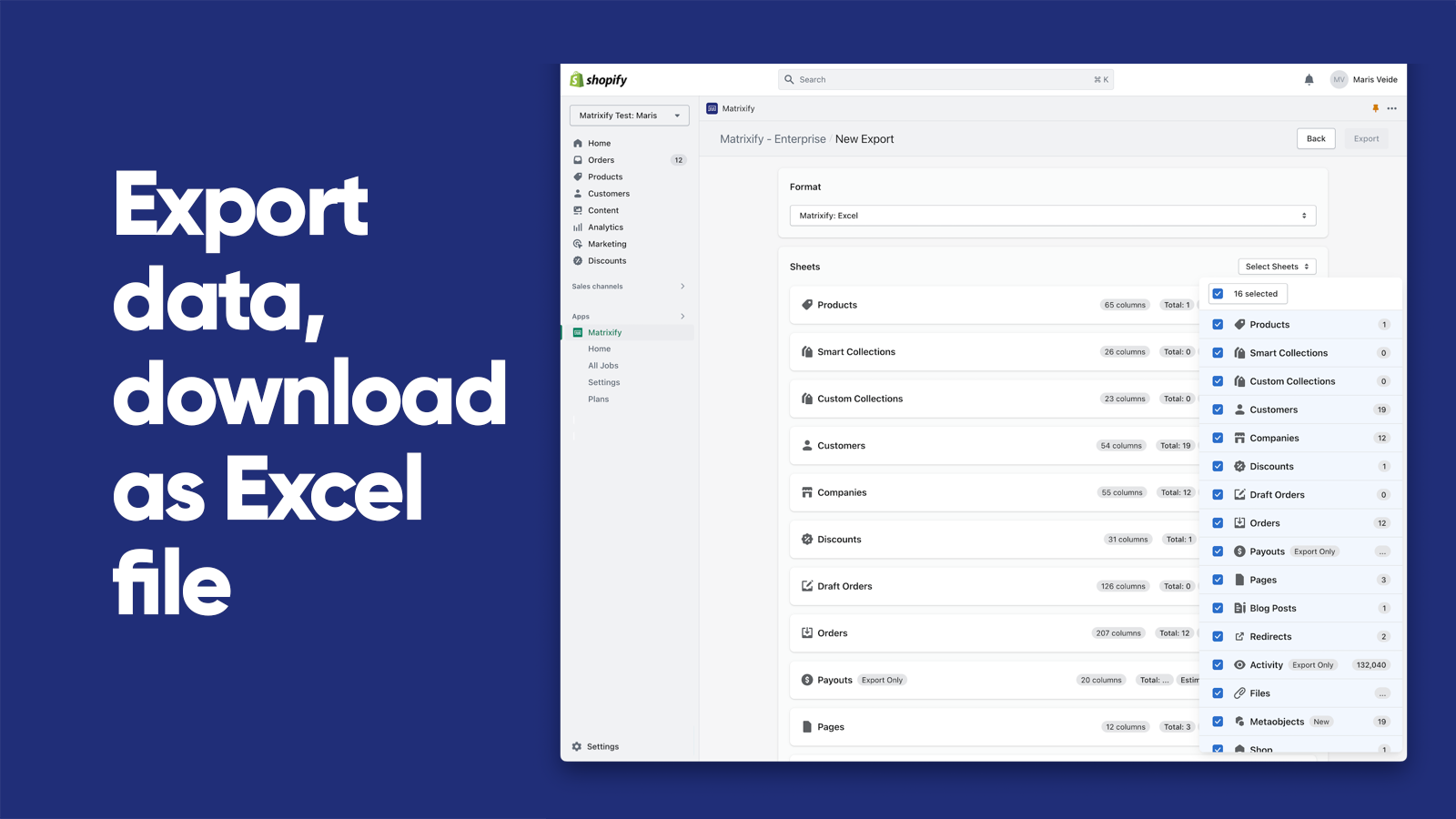
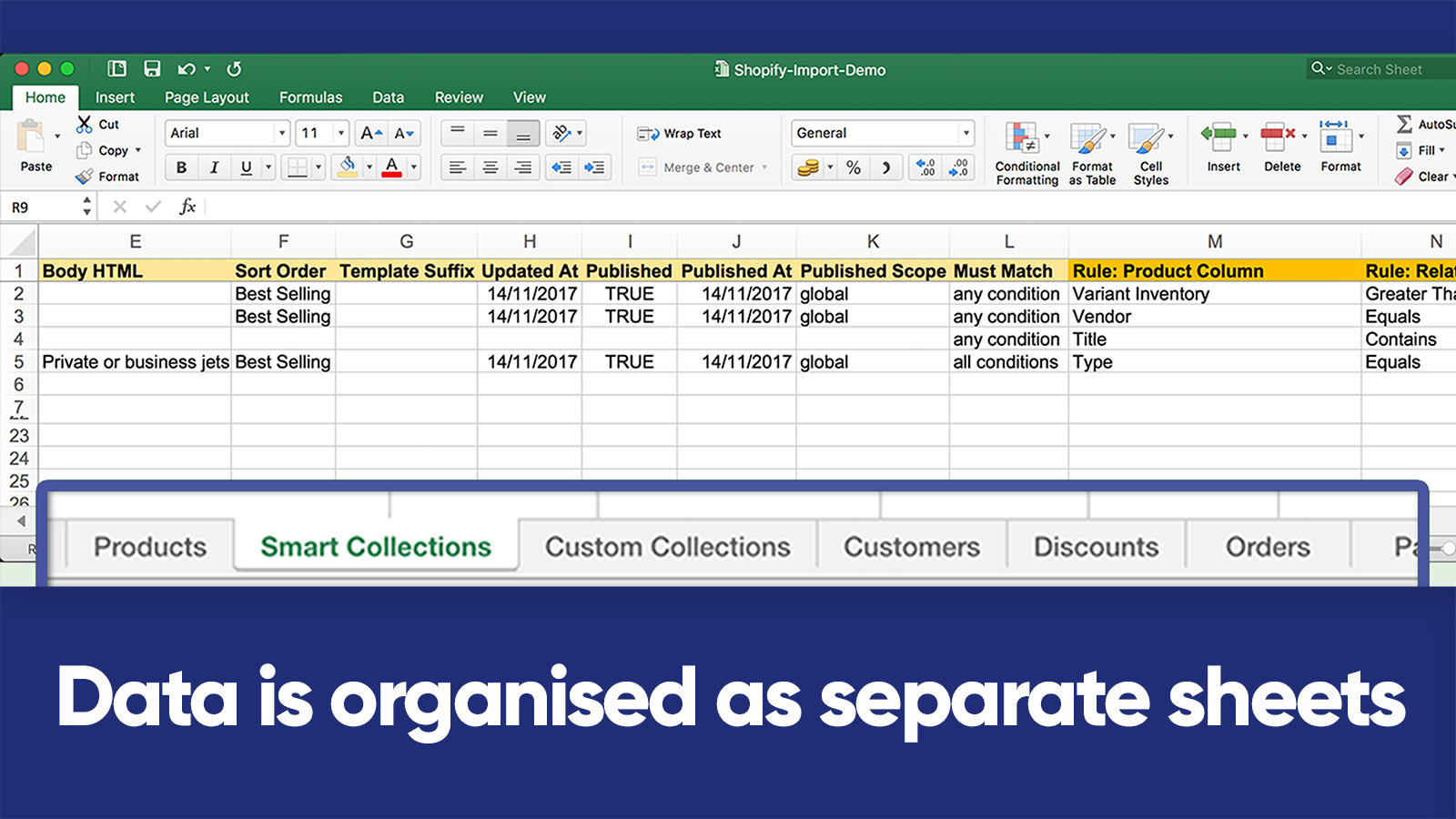
Matrixify: Data Export Import, a Auto-updates Shopify app, has achieved 1775 reviews and an average rating of 4.9 stars since its launch 9 years ago. Designed to assist Shopify merchants with - "The Matrixify app lets you handle large amounts of store data by allowing you to import, export, update, and transfer it." it is a valuable addition to the Auto-updates app lineup.

Top Features:

Auto-updates Shopify apps can help elevate your e-commerce game. Matrixify: Data Export Import offers a host of key features, including:

  • Data Import/Export:Use Excel, Google Sheets or CSV files to import and export data.
  • E-commerce platform migration:Switch from platforms like Magento, WordPress/WooCommerce, BigCommerce, Lightspeed etc.
  • Data Recovery:Save and retrieve your information.
  • Automated data transfer:Set up automatic recurring import and export jobs.
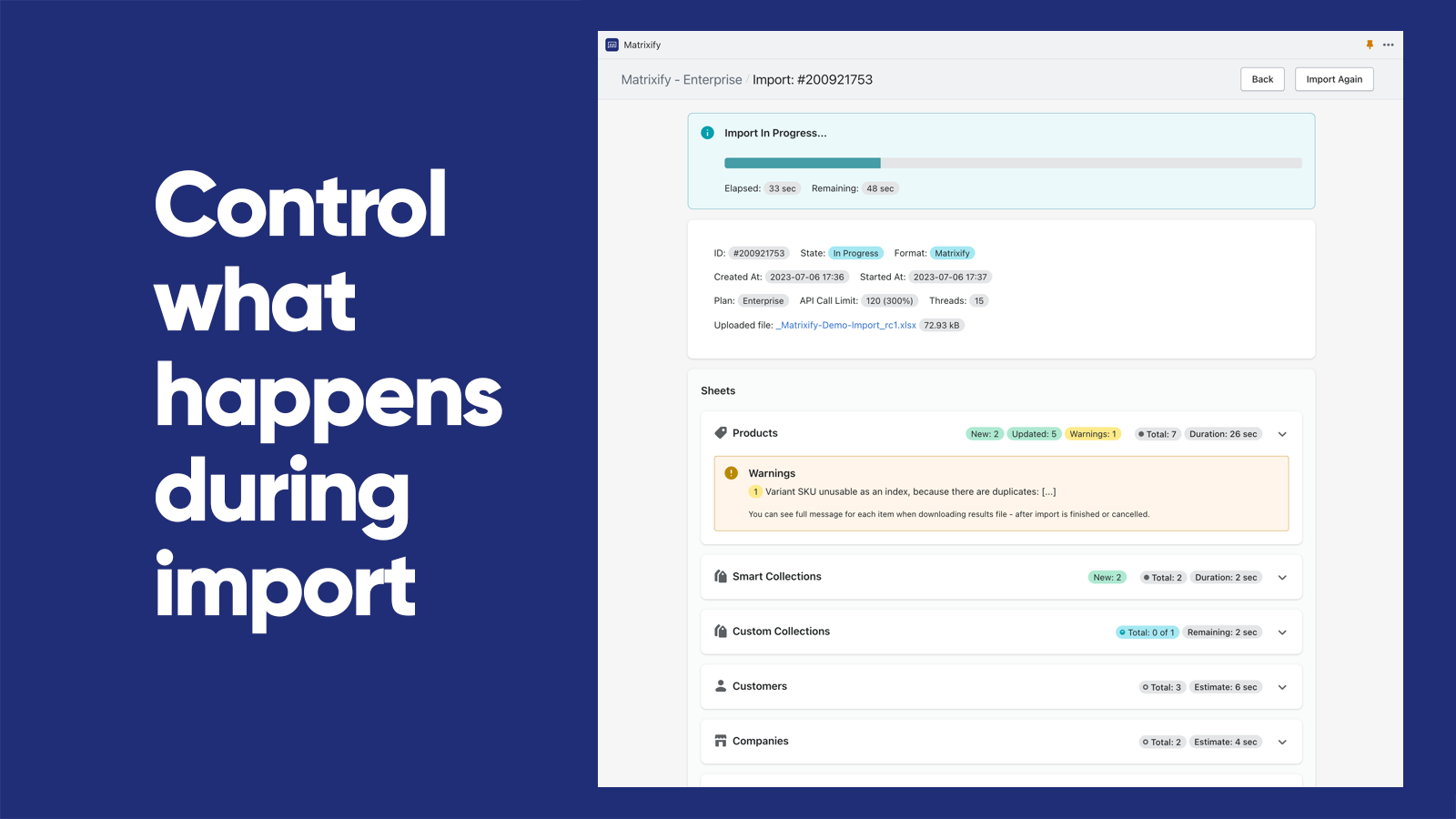
  • Export/Import Management:Track and manage export and import jobs in real-time and view their history.
Pricing Details

Matrixify: Data Export Import offers 1 free plan and 3 paid plans.

Considering installing this Auto-updates Shopify app? Explore the pricing details and discover if they align with your budget and needs.

  1. Demo · $0/month

    Included features: Per file:, 10 Products, 10 Collections, 10 Customers, 10 Companies, 10 Discounts, 10 Translations, 10 Orders & Draft Orders, 10 Payouts, 10 Pages, 10 Blog Posts, 10 Redirects, 2 Menus, 10 Activity, 10 Files, 10 Metaobjects, ∞ Metafields

  2. Basic · $20/month

    Included features: Per file:, 5K Products, 300 Collections, 2K Customers, 50 Companies, 300 Discounts, 10k Translations, 1K Orders & Draft Orders, 366 Payouts, 50 Pages, 50 Blog Posts, 10K Redirects, ∞ Menus, 10K Activity, 10K Files, 50 Metaobjects, ∞ Metafields

  3. Big · $50/month

    Included features: Per file:, 50K Products, 3K Collections, 20K Customers, 500 Companies, 3K Discounts, 100k Translations, 10K Orders & Draft Orders, 3660 Payouts, 500 Pages, 500 Blog Posts, 100K Redirects, ∞ Menus, 100K Activity, 100K Files, 500 Metaobjects,∞ Metafields

  4. Enterprise · $200/month

    Included features: Everything Unlimited, Batch import, Parallel threads in each job: 10+, Parallel manual jobs: 2

Pros and Cons

Delve into ShopDigest's expert insights on Matrixify: Data Export Import - a Auto-updates Shopify app. Our analysis of Shopify app store reviews presents unique pros and cons, allowing you to make informed decisions for your business. Read our full Matrixify: Data Export Import Auto-updates App review.

Pros
  • Enables quick and seamless bulk updates for large product catalogs.
  • Highly responsive and helpful support team, often praised for quick resolutions.
  • Significantly reduces manual work, saving hours or even days on tasks.
  • Clear tutorials and guides that assist users in navigating the app’s features.
  • Simplifies complex migrations from other platforms to Shopify.
  • Intuitive design that makes bulk operations straightforward.
  • Consistently delivers fast and error-free imports/exports.
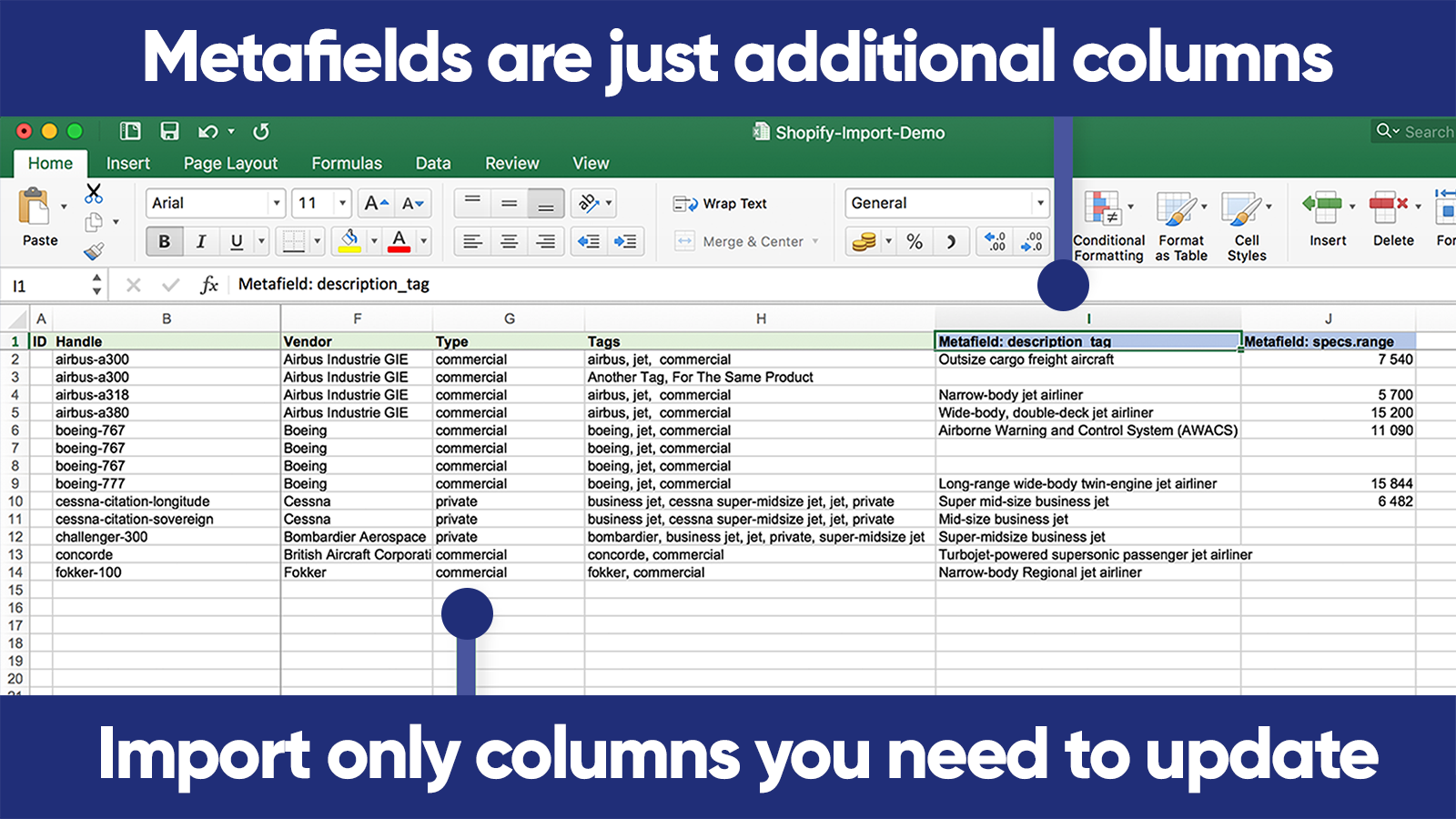
  • Supports a wide range of data manipulations, including metafields and custom exports.
  • Regular improvements and new features added without price hikes.
  • Convenient communication channel for real-time support.
Cons
  • Basic tier may be slow for extensive data, requiring a pricier plan.
  • Initial setup and feature mastery can be overwhelming for new users.
Talk to the developer

Install in Your Store Now

Your request goes to the team that built Matrixify: Data Export Import, not a support queue.

#3 of 94
Globo Product Options, Variant

Globo Product Options, Variant by Globo Options

Personalize Product, Customize Options, Select Variants.

Pricing Plans: Free, $9.90/month, $19.90/month
Free Trial: 14 days
Pros
  • Consistently praised for quick, friendly, and effective assistance, with frequent mentions of specific team members like Helen and Rosie.
  • Users highlight the straightforward installation and seamless compatibility with Shopify themes.
  • Offers extensive options for product variants, add-ons, and conditional logic, catering to diverse business needs.
Cons
  • Some users noted restrictions when applying multiple option sets to a single product.

What merchants said

“Friendly, professional and passionate service. Thank you so much Rosie!!! Provided very details guidance. ”
Optical 88 Eyecare (M) Sdn Bhd · Malaysia · ★ 5.0 · 11/20/2026

Summary

Starting PriceFree
Free Trial14 days
Launch Date16 Dec 2020
DeveloperGlobo Options
Ratings4.9 ★ (5,320)
Install NowView charts
About the App

Globo Product Options, Variant, a Auto-updates Shopify app, has achieved 5157 reviews and an average rating of 4.9 stars since its launch 6 years ago. Designed to assist Shopify merchants with - "Create countless customizable product options and variations." it is a valuable addition to the Auto-updates app lineup.

Top Features:

Auto-updates Shopify apps can help elevate your e-commerce game. Globo Product Options, Variant offers a host of key features, including:

  • Interface Elements:Input box, file attachment, color sample, alternative picture, selection list, tick box.
  • Variant Pricing:Add-on price - Extra charge when a customer selects a variant of a product.
  • Conditional Programming:Conditional logic: Display or hide suitable choices based on the prior selection.
  • Product Import & Export:Import and export different products using a CSV file. This is a comprehensive tool for product customization.
  • Product options:Apply a set of options to all products or a group of products.
Pricing Details

Globo Product Options, Variant offers 1 free plan and 2 paid plans.

Considering installing this Auto-updates Shopify app? Explore the pricing details and discover if they align with your budget and needs.

  1. FREE · $0/month

    Included features: Unlimited option sets, products, orders, 15 Option types, unlimited templates, Text box, checkbox, color/ image swatch, Radio, button, select, textarea, Condition logic for Globo options, Options in:Orders, packing slips, emails, Live chat & email support, no watermark

  2. PREMIUM · $9.90/month

    Included features: All in FREE plan, 20 Option types, import/export options, Price Add-ons (Charge extra fees), Condition logic with Shopify variants, File Upload(up to 20MB), Limit character, Datetime, email, phone, color picker, Multi-language, Style options to fit your theme

  3. ADVANCED · $19.90/month

    Included features: All in PREMIUM plan., 30+ option types, Option group, Product Personalizer - Live Preview, File Upload (Up to 20 files, 100MB/file), Edit options in Cart page, POS support, Add custom order tag, email notification, Show options by customer (login, tag...)

Pros and Cons

Delve into ShopDigest's expert insights on Globo Product Options, Variant - a Auto-updates Shopify app. Our analysis of Shopify app store reviews presents unique pros and cons, allowing you to make informed decisions for your business. Read our full Globo Product Options, Variant Auto-updates App review.

Pros
  • Consistently praised for quick, friendly, and effective assistance, with frequent mentions of specific team members like Helen and Rosie.
  • Users highlight the straightforward installation and seamless compatibility with Shopify themes.
  • Offers extensive options for product variants, add-ons, and conditional logic, catering to diverse business needs.
  • Intuitive design and navigation make it accessible even for non-technical users.
  • App runs smoothly without noticeable lag, enhancing the user experience.
  • Many appreciate the robust features available in the free version.
  • Several users reported higher upsells and improved customer experience due to the app’s functionality.
  • Quick fixes and customizations are frequently mentioned, with proactive updates based on feedback.
  • Includes advanced capabilities like image swatches, file uploads, and pricing adjustments.
  • Long-standing users commend its consistency and ongoing improvements.
Cons
  • Some users noted restrictions when applying multiple option sets to a single product.
  • A few reviews mentioned slight delays in options appearing on product pages.
  • Isolated reports of compatibility issues with certain Shopify themes.
  • A handful of users needed support to fully utilize complex functionalities.
Talk to the developer

Install in Your Store Now

Your request goes to the team that built Globo Product Options, Variant, not a support queue.

Keyword ranking

Top three ranked in Shopify App Store

Easify Custom Product Options

Make your personalized product choices and variations 10 TIMES QUICKER with our Templates + Live Preview!

4.9 ★ (3,263)$9.99/mo onwards
View app data →
Matrixify: Data Export Import

The Matrixify app lets you handle large amounts of store data by allowing you to import, export, update, and transfer it.

4.9 ★ (1,923)$20/mo onwards
View app data →
Globo Product Options, Variant

Create countless customizable product options and variations.

4.9 ★ (5,320)$9.9/mo onwards
View app data →
#4 of 94
Rubik Variant Images & Swatch

Rubik Variant Images & Swatch by Craftshift

Clean multiple variant images gallery & variant color swatches

Pricing Plans: Free, $25/month, $50/month, $75/month
Free Trial: 7 days
Pros
  • Rapid, personalized, and proactive assistance from the team, often resolving issues within minutes.
  • Effortless setup and compatibility with Shopify, including custom themes.
  • Intuitive design and straightforward configuration, requiring no coding knowledge.
Cons
  • A few users encountered minor configuration issues, often requiring brief support intervention.

What merchants said

“Great Support from Turan and really good App! I like it. ”
Vita Elements · Germany · ★ 5.0 · 11/18/2026

Summary

Starting PriceFree
Free Trial7 days
Launch Date18 Oct 2024
DeveloperCraftshift
Ratings5.0 ★ (505)
Install NowView charts
About the App

Rubik Variant Images & Swatch, a Auto-updates Shopify app, has achieved 489 reviews and an average rating of 5 stars since its launch 2 years ago. Designed to assist Shopify merchants with - "Set multiple variant images, display only correct images. Show color swatches with image variants" it is a valuable addition to the Auto-updates app lineup.

Top Features:

Auto-updates Shopify apps can help elevate your e-commerce game. Rubik Variant Images & Swatch offers a host of key features, including:

  • Assign multiple photos per variant. Auto assign variant images with AI or MCP
  • Show multiple varient images for clean variant image gallery & product swatches
  • Show variant picker with variant image swatches, color swatches, image variants
  • Works seamless with all themes & page builder apps with no impact on page speed
  • Clear product image swatch, variant photos help reduce return rates effectively.
Pricing Details

Rubik Variant Images & Swatch offers 1 free plan and 3 paid plans.

Considering installing this Auto-updates Shopify app? Explore the pricing details and discover if they align with your budget and needs.

  1. Free Plan · $0/month

    Included features: Set up total 1 product, Auto-assign with AI (50 images monthly), Variant image swatches (variant picker), Multiple variant options (color + style), Assign common images without duplication, Free setup for all themes, Live chat & email support, Video, 3D model support

  2. Starter Plan · $25/month

    Included features: Set up total 100 products, Auto-assign with AI (1k images monthly), Variant image swatches (variant picker), Multiple variant options (color + style), Assign common images without duplication, Free setup for all themes, Live chat & email support, Video, 3D model support

  3. Advanced Plan · $50/month

    Included features: Set up total 1000 products, Auto-assign with AI (5k images monthly), Variant image swatches (variant picker), Multiple variant options (color + style), Assign common images without duplication, Free setup for all themes, Live chat & email support, Video, 3D model support

  4. Premium Plan · $75/month

    Included features: Set up unlimited products, Auto-assign with AI (50k images monthly), Variant image swatches (variant picker), Multiple variant options (color + style), Assign common images without duplication, Free setup for all themes, Live chat & email support, Video, 3D model support

Pros and Cons

Delve into ShopDigest's expert insights on Rubik Variant Images & Swatch - a Auto-updates Shopify app. Our analysis of Shopify app store reviews presents unique pros and cons, allowing you to make informed decisions for your business. Read our full Rubik Variant Images & Swatch Auto-updates App review.

Pros
  • Rapid, personalized, and proactive assistance from the team, often resolving issues within minutes.
  • Effortless setup and compatibility with Shopify, including custom themes.
  • Intuitive design and straightforward configuration, requiring no coding knowledge.
  • Consistently delivers as advertised with smooth functionality and no unnecessary features.
  • Adapts to unique store needs, including custom theme adjustments and feature requests.
  • Improves product page aesthetics and functionality, boosting conversion rates.
  • Direct outreach from developers offering guidance and live support.
  • Eliminates manual work and simplifies variant image management.
  • Works with various themes and third-party apps like Instant.so and Gempages.
Cons
  • A few users encountered minor configuration issues, often requiring brief support intervention.
  • Some users needed guidance for optimal use of advanced customization options.
Talk to the developer

Install in Your Store Now

Your request goes to the team that built Rubik Variant Images & Swatch, not a support queue.

#5 of 94
Avada Accessibility ADA EAA

Avada Accessibility ADA EAA by SEA Commerce by Avada

Website Accessibility with WCAG, EAA, BFSG, ADA compliance

Pricing Plans: Free, $9/month, $14/month, $19/month
Pros
  • Quick, personalized assistance with issues like language settings and installation.
  • Straightforward installation and user-friendly interface requiring minimal technical skill.
  • Pre-integrated translations and compliance with accessibility standards.
Cons
  • Significant slowdown in website load speeds, affecting Google PageSpeed scores.

What merchants said

“Excellent support—always prompt and helpful. The Avada Accessibility ADA EAA app has been a great addition to our store!”
Mineral Tiles · United States · ★ 5.0 · 11/16/2026

Summary

Starting PriceFree
Free TrialFree plan
Launch Date08 Jan 2025
Ratings5.0 ★ (334)
Install NowView charts
About the App

Avada Accessibility ADA EAA, a Auto-updates Shopify app, has achieved 325 reviews and an average rating of 5 stars since its launch 1 years ago. Designed to assist Shopify merchants with - "An accessibility solution that helps you align with EAA, ADA, AODA, and WCAG standards." it is a valuable addition to the Auto-updates app lineup.

Top Features:

Auto-updates Shopify apps can help elevate your e-commerce game. Avada Accessibility ADA EAA offers a host of key features, including:

  • [New] Compliance issue fixing service is included with early access.
  • 25+ accessibility adjustments without changing your layout and web performance
  • Fully customizable accessibility widget to match your brand
  • Automated accessibility check with AI Scanner & auto-update audit statements
  • AI-generated image Alt Text to support Screen reader
Pricing Details

Avada Accessibility ADA EAA offers 1 free plan and 3 paid plans.

Considering installing this Auto-updates Shopify app? Explore the pricing details and discover if they align with your budget and needs.

  1. Free · $0/month

    Included features: 25+ Accessibility Features, Supports WCAG, ADA, AODA, EAA & BFSG, Text To Speech, Multiple Languages, Auto-scan and update Accessibility Audit, Full Customization, 1,000 widget impressions/ month

  2. Starter · $9/month

    Included features: 25+ Accessibility Features, Supports WCAG, ADA, AODA, EAA & BFSG, Text To Speech, Multiple Languages, Auto-scan and update Accessibility Audit, Full Customization, 3,000 widget impressions/ month

  3. Growth · $14/month

    Included features: 25+ Accessibility Features, Supports WCAG, ADA, AODA, EAA & BFSG, Text To Speech, Multiple Languages, Auto-scan and update Accessibility Audit, Full Customization, 10,000 widget impressions/ month

  4. Scale · $19/month

    Included features: 25+ Accessibility Features, Supports WCAG, ADA, AODA, EAA & BFSG, Text To Speech, Multiple Languages, Auto-scan and update Accessibility Audit, Unlimited widget impressions/ month, AI generate Alt Text for Screen reader, Headless & Hydrogen storefront support

Pros and Cons

Delve into ShopDigest's expert insights on Avada Accessibility ADA EAA - a Auto-updates Shopify app. Our analysis of Shopify app store reviews presents unique pros and cons, allowing you to make informed decisions for your business. Read our full Avada Accessibility ADA EAA Auto-updates App review.

Pros
  • Quick, personalized assistance with issues like language settings and installation.
  • Straightforward installation and user-friendly interface requiring minimal technical skill.
  • Pre-integrated translations and compliance with accessibility standards.
  • Offers valuable features without cost, unlike many paid alternatives.
Cons
  • Significant slowdown in website load speeds, affecting Google PageSpeed scores.
Talk to the developer

Install in Your Store Now

Your request goes to the team that built Avada Accessibility ADA EAA, not a support queue.

#6 of 94
FeedFix | XML Import & Export

FeedFix | XML Import & Export by Entafix

Product XML Import & Custom XML Feed Export for Marketplaces

Free Trial: 7 days
Pros
  • The app is consistently praised for its intuitive and straightforward interface.
  • Fast, responsive, and helpful customer service, often highlighted by name (e.g., Engin).
  • Users appreciate the ability to create tailored XML feeds to meet specific needs.
Cons
  • Some users noted that advanced features lack detailed guides.

What merchants said

“güzel bir uygulamaya benziyor, yükleme yapıldığı anda canlı sohbetten biri sizinle iletişime geçiyor ve destek sağlıyor. ilerleyen zamanlarda süreç ilerledikçe yorumumu güncelliyor olurum... teşekkürler”
Lalive Natural · Türkiye · ★ 5.0 · 11/10/2026

Summary

Starting PriceFree
Free Trial7 days
Launch Date21 Sep 2023
DeveloperEntafix
Ratings5.0 ★ (303)
Install NowView charts
About the App

FeedFix | XML Import & Export, a Auto-updates Shopify app, has achieved 281 reviews and an average rating of 5 stars since its launch 3 years ago. Designed to assist Shopify merchants with - "Export product feeds to Google, Meta and marketplaces. Import products from XML feeds or CSV files." it is a valuable addition to the Auto-updates app lineup.

Top Features:

Auto-updates Shopify apps can help elevate your e-commerce game. FeedFix | XML Import & Export offers a host of key features, including:

  • Build a custom product feed for any marketplace, not just the big channels.
  • Export a Google feed, Meta feed or TikTok feed from one product catalog.
  • Import CSV or XML feeds from your suppliers and keep the catalog in sync.
  • Set your own price rules and filters on every product import and export.
  • Export products in multiple languages, markets and currencies at once.
Pricing Details

FeedFix | XML Import & Export offers 1 free plan and 3 paid plans.

Considering installing this Auto-updates Shopify app? Explore the pricing details and discover if they align with your budget and needs.

  1. Export - Free · $0/month

    Included features: 1 Export Feed - 1 Import Feed, Available for stores for <500 variants, Minimum Update Frequency is 15 hours, 1-Click Update, Support with Live Chat

  2. Export - Plus · $7.99/month

    Included features: 5 Export Feeds - 3 Import Feeds, Available for stores for <5000 products, Minimum Update Frequency is 8 hours, 1-Click Update, Support with Live Chat

  3. Export - Advanced · $17.99/month

    Included features: 10 Export Feeds - 5 Import Feeds, Available for stores for <10000 products, Minimum Update Frequency is 3 hours, 1-Click Update, Personalized support

  4. Export - Unlimited · $49.99/month

    Included features: Unlimited Export & Import Feeds, Unlimited Products, Minimum Update Frequency is 2 hours, 1-Click Update, Personalized support

Pros and Cons

Delve into ShopDigest's expert insights on FeedFix | XML Import & Export - a Auto-updates Shopify app. Our analysis of Shopify app store reviews presents unique pros and cons, allowing you to make informed decisions for your business. Read our full FeedFix | XML Import & Export Auto-updates App review.

Pros
  • The app is consistently praised for its intuitive and straightforward interface.
  • Fast, responsive, and helpful customer service, often highlighted by name (e.g., Engin).
  • Users appreciate the ability to create tailored XML feeds to meet specific needs.
  • The app performs as expected, with minimal errors or disruptions.
  • Quick setup and fast feed generation, even with large product catalogs.
  • Competitive pricing and value for money compared to similar apps.
  • Capable of handling complex feed configurations beyond basic options.
  • Clean layout and simple navigation enhance the overall experience.
  • Bugs and feature requests are addressed promptly by the development team.
  • Availability of a free version or trial period is well-received.
Cons
  • Some users noted that advanced features lack detailed guides.
  • A few reviewers mentioned missing functionalities (e.g., merging fields).
Talk to the developer

Install in Your Store Now

Your request goes to the team that built FeedFix | XML Import & Export, not a support queue.

#7 of 94
Pros
  • Frequent praise for responsive, knowledgeable, and patient support, especially from Ivy and Aurora.
  • High adaptability in creating and adjusting label templates to meet specific user needs.
  • Intuitive interface and straightforward setup process, often highlighted by new users.
Cons
  • Some users expressed annoyance with persistent prompts to rate the app after multiple submissions.

What merchants said

“All is Perfect, But the app keeps stop running from time to time, please check the issue :)”
Khrabish · Lebanon · ★ 5.0 · 11/18/2026

Summary

Starting PriceFree
Free TrialFree plan
Launch Date08 May 2023
DeveloperMagestore
Ratings4.9 ★ (432)
Install NowView charts
About the App

MS Barcode Labels & Generator, a Auto-updates Shopify app, has achieved 407 reviews and an average rating of 4.9 stars since its launch 3 years ago. Designed to assist Shopify merchants with - "Easily make, print, and manage inventory barcodes to cut down mistakes and simplify processes." it is a valuable addition to the Auto-updates app lineup.

Top Features:

Auto-updates Shopify apps can help elevate your e-commerce game. MS Barcode Labels & Generator offers a host of key features, including:

  • Barcode template creation:Make barcode template: Choose from 3 standard barcode styles or design your own.
  • Barcode Creation:Barcode label maker: Produce multiple barcodes for your stock.
  • Print Barcode Labels:Print Barcode labels: Speed up your operations by printing barcode labels for your products.
  • Barcode Tracking:Manage barcodes: Monitor all warehouse barcodes from one location.
  • Barcode Overview:Barcode details for inventory: See SKU and status information for each barcode.
Pricing Details

MS Barcode Labels & Generator offers 1 free plan and 3 paid plans.

Considering installing this Auto-updates Shopify app? Explore the pricing details and discover if they align with your budget and needs.

  1. FREE · $0/month

    Included features: Print 200 labels per month, 500 gift labels, Generate unlimited barcodes & SKUs, GTIN support, Advanced/Pro label design, Stocky support, Email & chat support

  2. STANDARD · $7.99/month

    Included features: Print 2000 labels per month, 500 gift labels, Generate unlimited barcodes & SKUs, Priority Live-chat & Email support, All app features

  3. Pay as you Go · $0/month

    Included features: $11.99 for 2,000 extra labels, $22.99 for 5,000 extra labels, $44.99 for 15,000 extra labels, All app features, Email & chat support

  4. PRO · $27.99/month

    Included features: Print unlimited labels per month, Generate unlimited barcodes & SKUs, Priority Live-chat & Email support, All app features

Pros and Cons

Delve into ShopDigest's expert insights on MS Barcode Labels & Generator - a Auto-updates Shopify app. Our analysis of Shopify app store reviews presents unique pros and cons, allowing you to make informed decisions for your business. Read our full MS Barcode Labels & Generator Auto-updates App review.

Pros
  • Frequent praise for responsive, knowledgeable, and patient support, especially from Ivy and Aurora.
  • High adaptability in creating and adjusting label templates to meet specific user needs.
  • Intuitive interface and straightforward setup process, often highlighted by new users.
  • Efficient troubleshooting and prompt fixes for printing or technical problems.
  • Seamless compatibility and functionality with Shopify stores and POS systems.
  • Reliable and fast generation of barcodes and SKUs for inventory management.
  • Clean layout and simple navigation, making the app accessible to non-technical users.
  • Supports various label sizes and printer configurations, including custom setups.
  • Support staff remembered user details and followed up persistently to resolve issues.
  • Flexible plans and cost-effective solutions for small businesses.
Cons
  • Some users expressed annoyance with persistent prompts to rate the app after multiple submissions.
Talk to the developer

Install in Your Store Now

Your request goes to the team that built MS Barcode Labels & Generator, not a support queue.

#8 of 94
Shuttle ‑ Sync with Etsy

Shuttle ‑ Sync with Etsy by Illumiko

Easy synchronization of products, stocks, orders, and reviews.

Pricing Plans: Free, $12/month, $19/month, $39/month
Pros
  • Smooth and reliable syncing between Etsy and Shopify for products, inventory, and orders.
  • Extensive customization options for product transfers, including title, description, and tag adjustments.
  • Prompt, helpful, and personalized customer service with quick issue resolution.
Cons
  • Struggles with products exceeding 100 variants or complex one-of-a-kind items.

What merchants said

“Absolute must-have if you have an Etsy shop and Shopify store!Before I used Shopify, I had a website with a different provider that couldn't sync with Etsy - and I ended up closing my website because of all the doubled admin stress.But thankfully I heard about Shuttle on an Etsy sellers Facebook group - and discovered that I could have help with syncing product information and stock levels between my shops. I couldn't have created my own website again without Shuttle.Not only is it essential for maintaining stock across my shops, but Nimo at Shuttle is brilliantly responsive whenever I have queries or make requests. Etsy give us so little ability to edit in bulk, and Shuttle (although overwhelming to set up at first) gives you lots more control over your Etsy content. ”
The Student Midwife Shop · United Kingdom · ★ 5.0 · 11/19/2026

Summary

Starting PriceFree
Free TrialFree plan
Launch Date23 Aug 2017
DeveloperIllumiko
Ratings4.6 ★ (231)
Install NowView charts
About the App

Shuttle ‑ Sync with Etsy, a Auto-updates Shopify app, has achieved 226 reviews and an average rating of 4.6 stars since its launch 9 years ago. Designed to assist Shopify merchants with - "Sync your Etsy shops in real-time and on-demand. Easily automate your shop management." it is a valuable addition to the Auto-updates app lineup.

Top Features:

Auto-updates Shopify apps can help elevate your e-commerce game. Shuttle ‑ Sync with Etsy offers a host of key features, including:

  • Shop Product Management:Move and refresh products between stores, manage what and how you update.
  • Automatic Data Transfer:Transfer new products, orders, and reviews between stores automatically.
  • Real-time inventory management:Keep an up-to-date track of inventory levels, SKUs and conditions, with complete reports.
  • Etsy-Shopify Integration:Show your excellent Etsy reviews in Shopify, with automatic product linking.
  • Shopify Order Management:Handle all orders on Shopify, including automatic fulfillment and tracking information.
Pricing Details

Shuttle ‑ Sync with Etsy offers 1 free plan and 3 paid plans.

Considering installing this Auto-updates Shopify app? Explore the pricing details and discover if they align with your budget and needs.

  1. Free · $0/month

    Included features: 10 product transfers per month, 10 order transfers per month, 10 Etsy reviews stored per month, Unlimited product updates, Connect one Etsy shop, Manual transfers, you stay in control, Optional 14-day all-features trial, Bulk runs & auto-sync on paid plans

  2. Essential · $12/month

    Included features: Unlimited product & order transfers, Connect unlimited Etsy shops, Etsy reviews on your Shopify store, Full variations, images & videos, Smart SKU generator & auto-match, Auto-transfer new products, Bulk transfer runs & price rules, AI Discovery: 40 analyses/month

  3. Growth · $19/month

    Included features: Everything in Essential, plus:, Real-time stock sync (200 orders/mo), Automatic order transers, Prevent overselling instantly, Kits & Bundles inventory support, Low-stock alerts & rules, Picking list generator, AI Discovery: 100 analyses/month

  4. Scale · $39/month

    Included features: Everything in Growth, plus:, Real-time stock sync (1,000 orders/mo), Built for large catalogs & sales spikes, High-frequency inventory updates, Complex stock workflow support, Priority transfer processing, AI Discovery: 250 analyses/month

Pros and Cons

Delve into ShopDigest's expert insights on Shuttle ‑ Sync with Etsy - a Auto-updates Shopify app. Our analysis of Shopify app store reviews presents unique pros and cons, allowing you to make informed decisions for your business. Read our full Shuttle ‑ Sync with Etsy Auto-updates App review.

Pros
  • Smooth and reliable syncing between Etsy and Shopify for products, inventory, and orders.
  • Extensive customization options for product transfers, including title, description, and tag adjustments.
  • Prompt, helpful, and personalized customer service with quick issue resolution.
  • Efficiently transfers large volumes of products and reviews, reducing manual effort.
  • Effectively imports Etsy reviews to Shopify, including auto-attachment to products.
  • Intuitive interface with clear setup instructions, suitable for beginners and advanced users.
  • Frequent feature additions and improvements based on user feedback.
  • Competitive pricing with scalable plans to fit business needs.
  • Simplifies running parallel storefronts with consistent data across platforms.
Cons
  • Struggles with products exceeding 100 variants or complex one-of-a-kind items.
  • Higher-tier plans needed for businesses with large product volumes or frequent syncs.
  • Default settings may require careful adjustment for optimal performance.
Talk to the developer

Install in Your Store Now

Your request goes to the team that built Shuttle ‑ Sync with Etsy, not a support queue.

#9 of 94
GLO Color Swatch Variant Image

GLO Color Swatch Variant Image by Globo Options

Display product options as Color Samples or Variant Pictures.

Pricing Plans: Free, $9.90/month, $19.90/month
Free Trial: 7 days
Pros
  • Consistently praised for fast, friendly, and efficient assistance, often resolving issues within minutes or hours.
  • The app is intuitive and easy to set up, with a straightforward design that simplifies navigation.
  • Highly valued for seamless handling of product variants, including swatches and images, enhancing product page professionalism.
Cons
  • Some users reported difficulties during setup, particularly with custom themes, requiring support intervention.

What merchants said

“Sono molto contenta di Sahra: è stata veloce, efficiente e mi ha aiutato a risolvere il problema in modo impeccabile. Consigliatissima!”
Invertika · Italy · ★ 5.0 · 11/18/2026

Summary

Starting PriceFree
Free Trial7 days
Launch Date10 Mar 2021
DeveloperGlobo Options
Ratings5.0 ★ (1,937)
Install NowView charts
About the App

GLO Color Swatch Variant Image, a Auto-updates Shopify app, has achieved 1896 reviews and an average rating of 5 stars since its launch 5 years ago. Designed to assist Shopify merchants with - "Display product choices clearly using images, color samples, dropdown menus, or buttons." it is a valuable addition to the Auto-updates app lineup.

Top Features:

Auto-updates Shopify apps can help elevate your e-commerce game. GLO Color Swatch Variant Image offers a host of key features, including:

  • AI-based image swatch:Automated image color variant
  • Swatch Variations:Customized picture sample & Color sample
  • Swatch Placement:Color and image samples anywhere (home page, collection page, search page).
  • Bulk Upload Feature:Quickly upload numerous custom images and color swatches all at once.
  • Multilingual support:Support multiple languages
Pricing Details

GLO Color Swatch Variant Image offers 1 free plan and 2 paid plans.

Considering installing this Auto-updates Shopify app? Explore the pricing details and discover if they align with your budget and needs.

  1. FREE · $0/month

    Included features: Unlimited products, Color Swatch, Show variants on collection pages, Multi-language support, Hide out-of-stock options, 1 Product group, 1 Product bundle combo

  2. SILVER · $9.90/month

    Included features: All FREE features, Image Swatches, Variant image preview, 6+ new display styles of product option

  3. GOLD · $19.90/month

    Included features: All SILVER features, Unlimited product groups, Unlimited bundle combos

Pros and Cons

Delve into ShopDigest's expert insights on GLO Color Swatch Variant Image - a Auto-updates Shopify app. Our analysis of Shopify app store reviews presents unique pros and cons, allowing you to make informed decisions for your business. Read our full GLO Color Swatch Variant Image Auto-updates App review.

Pros
  • Consistently praised for fast, friendly, and efficient assistance, often resolving issues within minutes or hours.
  • The app is intuitive and easy to set up, with a straightforward design that simplifies navigation.
  • Highly valued for seamless handling of product variants, including swatches and images, enhancing product page professionalism.
  • Offers extensive customization features, allowing users to tailor the app to their specific needs and themes.
  • Support team is noted for rapid response times and effective problem-solving, even for complex or custom requests.
  • The free version provides substantial functionality, making it accessible and useful for businesses of all sizes.
  • Works well with other apps and Shopify themes, ensuring smooth operation without conflicts.
  • Improves the visual appeal of product pages, making them more polished and user-friendly for customers.
Cons
  • Some users reported difficulties during setup, particularly with custom themes, requiring support intervention.
Talk to the developer

Install in Your Store Now

Your request goes to the team that built GLO Color Swatch Variant Image, not a support queue.

#10 of 94
InfoShore eBay Integration

InfoShore eBay Integration by InfoShore

Import from eBay seller account with live inventory update.

Pros
  • The app handles large-scale imports (thousands of listings) quickly and accurately, saving significant manual effort.
  • Frequent praise for fast, friendly, and highly responsive support, often going above and beyond to resolve issues.
  • Real-time or near-real-time syncing of inventory, prices, and listings between eBay and Shopify.
Cons
  • Some users report delays (up to 24 hours) in syncing new listings or updates, contrary to promised real-time functionality.

What merchants said

“Wonderful, Very helpful. Had a one on one scheduled meeting that assisted me in everything I needed.”
AMC Elegant Homes · United States · ★ 5.0 · 11/11/2026

Summary

Starting PriceFree
Free TrialFree plan
Launch Date20 Oct 2017
DeveloperInfoShore
Ratings4.9 ★ (424)
Install NowView charts
About the App

InfoShore eBay Integration, a Auto-updates Shopify app, has achieved 414 reviews and an average rating of 4.9 stars since its launch 9 years ago. Designed to assist Shopify merchants with - "eBay Professional Importer helps to bring in eBay products and keeps inventory updated in real time." it is a valuable addition to the Auto-updates app lineup.

Top Features:

Auto-updates Shopify apps can help elevate your e-commerce game. InfoShore eBay Integration offers a host of key features, including:

  • Inventory Synchronization:Match the inventory and price between your eBay and Shopify store.
  • Bulk eBay listing import:Option to get all eBay listings and import them all at once
  • Auto-import eBay products to Shopify:Automatically transfer the recently added products from eBay to Shopify.
  • Shopify price markup:Create your own rules for pricing products on Shopify.
  • eBay Template Assistance:Account manager focused on helping with eBay template removal and customization.
Pricing Details

InfoShore eBay Integration offers 1 free plan and 3 paid plans.

Considering installing this Auto-updates Shopify app? Explore the pricing details and discover if they align with your budget and needs.

  1. FREE · $0/month

    Included features: Import or list up to 25 products, One-time transfer, no ongoing sync, 1 eBay account, 24/7 support

  2. Bronze · $19.99/month

    Included features: Up to 2,000 products synced, 500 eBay orders per month, 1 eBay account, Two-way inventory sync on orders, inventory & price edits sync to Shopify, 24/7 support

  3. SILVER · $29.99/month

    Included features: Up to 5,000 products synced, 2 eBay accounts, 4,000 eBay orders per month, Two-way inventory sync on orders, Inventory & price edits sync to Shopify, 24/7 support

  4. GOLD · $69.99/month

    Included features: Up to 10,000 products synced, 7,500 eBay orders per month, Unlimited eBay accounts, Two-way inventory sync on orders, Inventory & price edits sync to Shopify, AI-assisted upload & category mapping, 24/7 support

Pros and Cons

Delve into ShopDigest's expert insights on InfoShore eBay Integration - a Auto-updates Shopify app. Our analysis of Shopify app store reviews presents unique pros and cons, allowing you to make informed decisions for your business. Read our full InfoShore eBay Integration Auto-updates App review.

Pros
  • The app handles large-scale imports (thousands of listings) quickly and accurately, saving significant manual effort.
  • Frequent praise for fast, friendly, and highly responsive support, often going above and beyond to resolve issues.
  • Real-time or near-real-time syncing of inventory, prices, and listings between eBay and Shopify.
  • Intuitive navigation and ease of use, even for non-technical users.
  • Flexibility to tailor imports and settings to specific business needs, with support for custom requests.
  • Consistent and accurate imports with minimal errors, noted across long-term users.
  • Eliminates manual listing transfers, significantly reducing workload.
  • Positive mentions of cost-effectiveness relative to the value provided.
  • Many users report satisfaction over years of use, with stable performance.
  • Fast onboarding and immediate usability, often with minimal configuration.
Cons
  • Some users report delays (up to 24 hours) in syncing new listings or updates, contrary to promised real-time functionality.
  • Lack of clear instructions or guides, requiring reliance on customer support for troubleshooting.
  • Rare but notable issues like duplicate imports or incomplete transfers, especially with very large inventories.
Talk to the developer

Install in Your Store Now

Your request goes to the team that built InfoShore eBay Integration, not a support queue.

Showing 1-10 out of 94

Best Auto-updates Apps in Shopify

Auto-updates apps are designed to address specific needs and challenges faced by Shopify store merchants. Whether you're looking to optimize your store's SEO, improve customer support, enhance product listings, or streamline your inventory management, there's an app for that.

Discover a wealth of cutting-edge tools and features offered by these remarkable Auto-updates Shopify apps, including Easify Custom Product Options, Matrixify: Data Export Import, Globo Product Options, Variant, and many more. Our app collection provides a comprehensive overview of the top apps in the Auto-updates category, enabling you to select the ones that will take your e-commerce venture to new heights.

Empower your Shopify store with the best Auto-updates apps the platform has to offer and elevate your online business.

Explore Apps by Criteria:

  1. Most Popular Auto-updates Apps
  2. Highest Reviewed Auto-updates Apps
  3. Top Rated Auto-updates Apps
  4. Newly Launched Auto-updates Apps

Overview of the Above Top Auto-updates Shopify Apps in November 2026

There are a number of Auto-updates apps in the Shopify app store designed to supercharge your e-commerce success. Whether you're a seasoned entrepreneur or just starting your online journey, the right apps can make all the difference. We have listed the top Shopify apps in the Auto-updates category, based on their popularity and average rating, to help you make informed decisions.

App NameCategoryDeveloperStarting PriceFree PlanReviews
Easify Custom Product OptionsEasify Custom Product OptionsBuilt for ShopifyAuto-updatesEasify$0/month● Available4.9 ★ (3157)
Matrixify: Data Export ImportMatrixify: Data Export ImportBuilt for ShopifyAuto-updatesITissible$0/month● Available4.9 ★ (1775)
Globo Product Options, VariantGlobo Product Options, VariantBuilt for ShopifyAuto-updatesGlobo Options$0/month● Available4.9 ★ (5157)
Rubik Variant Images & SwatchRubik Variant Images & SwatchBuilt for ShopifyAuto-updatesCraftshift$0/month● Available5.0 ★ (489)
Avada Accessibility ADA EAAAvada Accessibility ADA EAABuilt for ShopifyAuto-updatesSEA Commerce by Avada$0/month● Available5.0 ★ (325)
FeedFix | XML Import & ExportFeedFix | XML Import & ExportBuilt for ShopifyAuto-updatesEntafix$0/month● Available5.0 ★ (281)
MS Barcode Labels & GeneratorMS Barcode Labels & GeneratorBuilt for ShopifyAuto-updatesMagestore$0/month● Available4.9 ★ (407)
Shuttle ‑ Sync with EtsyShuttle ‑ Sync with EtsyBuilt for ShopifyAuto-updatesIllumiko$0/month● Available4.6 ★ (226)
GLO Color Swatch Variant ImageGLO Color Swatch Variant ImageBuilt for ShopifyAuto-updatesGlobo Options$0/month● Available5.0 ★ (1896)
InfoShore eBay IntegrationInfoShore eBay IntegrationBuilt for ShopifyAuto-updatesInfoShore$0/month● Available4.9 ★ (414)

Have a Closer Look at the Best Auto-updates Apps

Now let us jump in and check out these Top 5 Auto-updates Shopify apps.

Easify Custom Product Options screenshot 1
Easify Custom Product Options screenshot 2
Easify Custom Product Options screenshot 3
Easify Custom Product Options screenshot 4
Easify Custom Product Options screenshot 5
Easify Custom Product Options screenshot 6
Easify Custom Product Options screenshot 7
Easify Custom Product Options screenshot 8
Easify Custom Product Options screenshot 9
Easify Custom Product Options screenshot 10
Easify Custom Product Options screenshot 11
Easify Custom Product Options screenshot 12
Easify Custom Product Options screenshot 13
Easify Custom Product Options screenshot 14
Easify Custom Product Options screenshot 15

Reviews

Most Recent Review

5.0 ★Amazing

very punctual, and customer savy went above and beyond to hand a critical issue

Sns Designz · United States · 20 Nov 2026

Recent Review

5.0 ★Amazing

Hannie was great and got right to the issue and got it solved quickly.

Jewelry Keepsakes · United States · 19 Nov 2026
Why is Easify Custom Product Options a top Auto-updates Shopify app?
With an impressive overall rating of 4.9 stars and 3,263 reviews, Easify Custom Product Options stands out as one of the top Auto-updates Shopify apps. The main objective of the app is - Make your personalized product choices and variations 10 TIMES QUICKER with our Templates + Live Preview! Its purpose underscores its significance in enhancing your Shopify store experience.

ShopDigest selects the top Shopify apps in the Auto-updates category based on various parameters, including the number of installations across Shopify stores, the app's ranking in the Shopify App Store, the number of merchants' reviews, and its overall customer rating, among other factors.
Why integrate Easify Custom Product Options with your Shopify store?
By integrating a Auto-updates app with your Shopify store, you unlock a range of benefits. Easify Custom Product Options, a popular Auto-updates Shopify app, brings the following functionalities and value to a Shopify store, including:
  • Wide-ranging options: 25 Unique Option Types & Styles: An unparalleled selection not found in any other app.
  • Template Customization: 20 Templates: Pick a template, personalize it, and attach it to products. That's it!
  • User-friendly Live Preview: Live Preview: It shows you the final result, ideal for users unfamiliar with tech.
  • Price add-ons: Price Add-ons: Easily add additional charges to your custom options.
  • Wholesale Incentives: Wholesale Pricing Levels: Encourage customers to purchase more by offering discounts for larger quantities.
Learn more about the Easify Custom Product Options features in detail.

Shopify merchants highlight key advantages, such as 25 Option Types & Styles: A unique selection unmatched by any other app, 20 Templates: Select a template, customize & assign it to products. You’re done!, and more,
What are some of the top alternatives for Easify Custom Product Options?
Looking for options? Dive into a selection of Auto-updates apps that rival Easify Custom Product Options, each offering unique features to enhance your Shopify store. Consider these top alternatives: which can match or even surpass the offerings of Easify Custom Product Options, giving you flexibility and choice.
profile picture 1profile picture 2profile picture 3profile picture 4

Install Now

Our experts are here to help you.

Matrixify: Data Export Import screenshot 1
Matrixify: Data Export Import screenshot 2
Matrixify: Data Export Import screenshot 3
Matrixify: Data Export Import screenshot 4

Reviews

Most Recent Review

5.0 ★Amazing

best app to import export to manage your data, including with agents :)

Laine et Tricot · France · 21 Nov 2026

Recent Review

5.0 ★Amazing

Indispensable tool for anyone managing a large Shopify website.

Alanpuri Trading · United States · 15 Nov 2026
Why is Matrixify: Data Export Import a top Auto-updates Shopify app?
With an impressive overall rating of 4.9 stars and 1,923 reviews, Matrixify: Data Export Import stands out as one of the top Auto-updates Shopify apps. The main objective of the app is - The Matrixify app lets you handle large amounts of store data by allowing you to import, export, update, and transfer it. Its purpose underscores its significance in enhancing your Shopify store experience.

ShopDigest selects the top Shopify apps in the Auto-updates category based on various parameters, including the number of installations across Shopify stores, the app's ranking in the Shopify App Store, the number of merchants' reviews, and its overall customer rating, among other factors.
Why integrate Matrixify: Data Export Import with your Shopify store?
By integrating a Auto-updates app with your Shopify store, you unlock a range of benefits. Matrixify: Data Export Import, a popular Auto-updates Shopify app, brings the following functionalities and value to a Shopify store, including:
  • Data Import/Export: Use Excel, Google Sheets or CSV files to import and export data.
  • E-commerce platform migration: Switch from platforms like Magento, WordPress/WooCommerce, BigCommerce, Lightspeed etc.
  • Data Recovery: Save and retrieve your information.
  • Automated data transfer: Set up automatic recurring import and export jobs.
  • Export/Import Management: Track and manage export and import jobs in real-time and view their history.
Learn more about the Matrixify: Data Export Import features in detail.

Shopify merchants highlight key advantages, such as Import and Export data using Excel, Google Sheets or CSV files., Migrate from Magento, WordPress/WooCommerce, BigCommerce, Lightspeed and others., and more,
What are some of the top alternatives for Matrixify: Data Export Import?
Looking for options? Dive into a selection of Auto-updates apps that rival Matrixify: Data Export Import, each offering unique features to enhance your Shopify store. Consider these top alternatives: which can match or even surpass the offerings of Matrixify: Data Export Import, giving you flexibility and choice.
profile picture 1profile picture 2profile picture 3profile picture 4

Install Now

Our experts are here to help you.

Globo Product Options, Variant screenshot 1
Globo Product Options, Variant screenshot 2
Globo Product Options, Variant screenshot 3
Globo Product Options, Variant screenshot 4
Globo Product Options, Variant screenshot 5
Globo Product Options, Variant screenshot 6
Globo Product Options, Variant screenshot 7
Globo Product Options, Variant screenshot 8
Globo Product Options, Variant screenshot 9
Globo Product Options, Variant screenshot 10
Globo Product Options, Variant screenshot 11
Globo Product Options, Variant screenshot 12
Globo Product Options, Variant screenshot 13

Reviews

Most Recent Review

5.0 ★Amazing

Friendly, professional and passionate service. Thank you so much Rosie!!! Provided very details guidance.

Optical 88 Eyecare (M) Sdn Bhd · Malaysia · 20 Nov 2026

Recent Review

5.0 ★Amazing

We were looking for a specific product option app with option for up to 176 conditional rules per product and after trialling 2-3 different apps, we found Globo. The app was from the start much closer to our needs but then the team went far and beyond to make adjustment to a fabulous app solution for $20 price tag. We recommend to use this app for complex product options.

Insight Lenses · United Kingdom · 20 Nov 2026
Why is Globo Product Options, Variant a top Auto-updates Shopify app?
With an impressive overall rating of 4.9 stars and 5,320 reviews, Globo Product Options, Variant stands out as one of the top Auto-updates Shopify apps. The main objective of the app is - Create countless customizable product options and variations. Its purpose underscores its significance in enhancing your Shopify store experience.

ShopDigest selects the top Shopify apps in the Auto-updates category based on various parameters, including the number of installations across Shopify stores, the app's ranking in the Shopify App Store, the number of merchants' reviews, and its overall customer rating, among other factors.
Why integrate Globo Product Options, Variant with your Shopify store?
By integrating a Auto-updates app with your Shopify store, you unlock a range of benefits. Globo Product Options, Variant, a popular Auto-updates Shopify app, brings the following functionalities and value to a Shopify store, including:
  • Interface Elements: Input box, file attachment, color sample, alternative picture, selection list, tick box.
  • Variant Pricing: Add-on price - Extra charge when a customer selects a variant of a product.
  • Conditional Programming: Conditional logic: Display or hide suitable choices based on the prior selection.
  • Product Import & Export: Import and export different products using a CSV file. This is a comprehensive tool for product customization.
  • Product options: Apply a set of options to all products or a group of products.
Learn more about the Globo Product Options, Variant features in detail.

Shopify merchants highlight key advantages, such as Text input field, file upload, color swatch, variant image, dropdown, checkbox, Add-on price - Additional cost when you customer choose a product variants, and more,
What are some of the top alternatives for Globo Product Options, Variant?
Looking for options? Dive into a selection of Auto-updates apps that rival Globo Product Options, Variant, each offering unique features to enhance your Shopify store. Consider these top alternatives: which can match or even surpass the offerings of Globo Product Options, Variant, giving you flexibility and choice.
profile picture 1profile picture 2profile picture 3profile picture 4

Install Now

Our experts are here to help you.

Rubik Variant Images & Swatch screenshot 1
Rubik Variant Images & Swatch screenshot 2
Rubik Variant Images & Swatch screenshot 3
Rubik Variant Images & Swatch screenshot 4
Rubik Variant Images & Swatch screenshot 5
Rubik Variant Images & Swatch screenshot 6
Rubik Variant Images & Swatch screenshot 7

Reviews

Most Recent Review

5.0 ★Amazing

Great Support from Turan and really good App! I like it.

Vita Elements · Germany · 18 Nov 2026

Recent Review

5.0 ★Amazing

Wonderful app. We had a request about an asset, started a chat and got immediate reaction from Rubik. Zulf (the agent), fixed it in just 5 minutes. Great customer service!

headfirst helmets · Netherlands · 16 Nov 2026
Why is Rubik Variant Images & Swatch a top Auto-updates Shopify app?
With an impressive overall rating of 5 stars and 505 reviews, Rubik Variant Images & Swatch stands out as one of the top Auto-updates Shopify apps. The main objective of the app is - Set multiple variant images, display only correct images. Show color swatches with image variants Its purpose underscores its significance in enhancing your Shopify store experience.

ShopDigest selects the top Shopify apps in the Auto-updates category based on various parameters, including the number of installations across Shopify stores, the app's ranking in the Shopify App Store, the number of merchants' reviews, and its overall customer rating, among other factors.
Why integrate Rubik Variant Images & Swatch with your Shopify store?
By integrating a Auto-updates app with your Shopify store, you unlock a range of benefits. Rubik Variant Images & Swatch, a popular Auto-updates Shopify app, brings the following functionalities and value to a Shopify store, including:
  • Assign multiple photos per variant. Auto assign variant images with AI or MCP
  • Show multiple varient images for clean variant image gallery & product swatches
  • Show variant picker with variant image swatches, color swatches, image variants
  • Works seamless with all themes & page builder apps with no impact on page speed
  • Clear product image swatch, variant photos help reduce return rates effectively.
Learn more about the Rubik Variant Images & Swatch features in detail.

Shopify merchants highlight key advantages, such as Assign multiple photos per variant. Auto assign variant images with AI or MCP, Show multiple varient images for clean variant image gallery & product swatches, and more,
What are some of the top alternatives for Rubik Variant Images & Swatch?
Looking for options? Dive into a selection of Auto-updates apps that rival Rubik Variant Images & Swatch, each offering unique features to enhance your Shopify store. Consider these top alternatives: which can match or even surpass the offerings of Rubik Variant Images & Swatch, giving you flexibility and choice.
profile picture 1profile picture 2profile picture 3profile picture 4

Install Now

Our experts are here to help you.

Avada Accessibility ADA EAA screenshot 1
Avada Accessibility ADA EAA screenshot 2
Avada Accessibility ADA EAA screenshot 3
Avada Accessibility ADA EAA screenshot 4
Avada Accessibility ADA EAA screenshot 5
Avada Accessibility ADA EAA screenshot 6
Avada Accessibility ADA EAA screenshot 7

Reviews

Most Recent Review

5.0 ★Amazing

Excellent support—always prompt and helpful. The Avada Accessibility ADA EAA app has been a great addition to our store!

Mineral Tiles · United States · 16 Nov 2026

Recent Review

5.0 ★Amazing

Kipuka was such a pleasure to work with! Attentive and helpful with any and every concerns as I not the best with technology

SHEEGLAMOUR · United States · 05 Nov 2026
Why is Avada Accessibility ADA EAA a top Auto-updates Shopify app?
With an impressive overall rating of 5 stars and 334 reviews, Avada Accessibility ADA EAA stands out as one of the top Auto-updates Shopify apps. The main objective of the app is - An accessibility solution that helps you align with EAA, ADA, AODA, and WCAG standards. Its purpose underscores its significance in enhancing your Shopify store experience.

ShopDigest selects the top Shopify apps in the Auto-updates category based on various parameters, including the number of installations across Shopify stores, the app's ranking in the Shopify App Store, the number of merchants' reviews, and its overall customer rating, among other factors.
Why integrate Avada Accessibility ADA EAA with your Shopify store?
By integrating a Auto-updates app with your Shopify store, you unlock a range of benefits. Avada Accessibility ADA EAA, a popular Auto-updates Shopify app, brings the following functionalities and value to a Shopify store, including:
  • [New] Compliance issue fixing service is included with early access.
  • 25+ accessibility adjustments without changing your layout and web performance
  • Fully customizable accessibility widget to match your brand
  • Automated accessibility check with AI Scanner & auto-update audit statements
  • AI-generated image Alt Text to support Screen reader
Learn more about the Avada Accessibility ADA EAA features in detail.

Shopify merchants highlight key advantages, such as [New] Compliance issue fixing service is included with early access., 25+ accessibility adjustments without changing your layout and web performance, and more,
What are some of the top alternatives for Avada Accessibility ADA EAA?
Looking for options? Dive into a selection of Auto-updates apps that rival Avada Accessibility ADA EAA, each offering unique features to enhance your Shopify store. Consider these top alternatives: which can match or even surpass the offerings of Avada Accessibility ADA EAA, giving you flexibility and choice.
profile picture 1profile picture 2profile picture 3profile picture 4

Install Now

Our experts are here to help you.

How We Selected the Top Shopify Apps in Auto-updates

Our team employs a comprehensive evaluation process that takes into account various factors to ensure you are presented with only the best options. Here's how we do it:

  • By Reviews: We understand the value of peer recommendations, and that's why we've sorted these top Shopify apps in Auto-updates based on the highest praise received from users, ensuring you get tried-and-tested solutions. The top listed apps here have earned the trust of fellow Shopify merchants. Jump to Highest Reviewed Auto-updates Shopify Apps.
  • By Price: Budget consideration is important while choosing a Shopify app for your store. That's why we have also categorized these top Shopify apps in Auto-updates by price, enabling you to find the perfect solutions that align with your financial goals without compromising on quality. Jump to Top Paid Auto-updates Shopify Apps.
  • By Launch Date: To keep you updated about the latest innovations, we've organized these Shopify apps based on their launch date. You can check the list of recently launched top apps in Auto-updates that could bring innovative solutions to your Shopify store. Jump to Newly Launched Auto-updates Shopify Apps.
  • By Popularity: We feature the Auto-updates apps that are making waves among Shopify store owners, helping you stay ahead of the curve. These apps have captured the attention of ecommerce owners and are listed as the top in the popularity section of the Shopify app store. Jump to Most Popular Auto-updates Shopify Apps.
  • By Ratings: We prioritize apps that have consistently earned high ratings, reflecting their impact and user satisfaction. These Auto-updates apps with excellent ratings stand out from their competitors, making them a solid choice for your business needs. Jump to Top Rated Auto-updates Shopify Apps.
  • By Best Match: We harness the power of Shopify's own recommendations! Our selection considers apps that Shopify suggests as a strong fit for Auto-updates, ensuring you access the platform's expert insights. Jump to Best Match Auto-updates Shopify Apps.

With these criteria in mind, we strive to present you with a diverse and well-rounded selection of the top Auto-updates Shopify apps in 2026. Rest assured, our selection process is designed to assist you in finding the most suitable solutions for your Shopify store needs.

How to Choose the Best Auto-updates Shopify App For Your Store

Choosing the right Auto-updates Shopify App for your store depends on various factors specific to your business goals. To make an informed decision, follow these steps:

  • Identify Your Requirements: Begin by understanding the specific goals and challenges your store faces. List the key features and functionalities you need in a Auto-updates app to address these requirements effectively.
  • Read User Reviews: Explore user reviews and ratings for the Auto-updates apps you are considering. Real-hand experiences from other Shopify merchants can provide valuable insights into how each app performs.
  • Compare Features: Use our app comparison page, where you can add the Auto-updates apps of your choice and perform a side-by-side comparison. This page allows you to evaluate each app's features, pricing, support, and other essential factors to help you find the best fit for your store.
  • Consider Budget: While some apps offer free plans with basic functionalities, others may require a paid subscription for access to advanced features. You can check out our complete list of Top Paid Auto-updates Shopify apps, and choose an app that aligns with your budget and can grow with your store as it expands.
  • Support and Documentation: Check the documentation and customer support resources of the app. A well-supported Auto-updates app that offers comprehensive documentation can help you implement and use it more effectively.
  • Integration Compatibity: Ensure that the Auto-updates app you choose can seamlessly integrate with your existing apps and theme to avoid compatibility issues.
  • Trial Periods: Some Auto-updates apps offer a free trial period that enables you to test the app's capabilities before purchasing a subscription.

Each Shopify store is different, and the best Auto-updates app for your store will be one that aligns closely with your specific business requirements.

More Information on Auto-updates Shopify Apps

Now let us jump in and check out these Top 10 Auto-updates Shopify apps.

In this comprehensive guide, we've provided you with a complete collection of Auto-updates Shopify apps that can help streamline your ecommerce journey. These Auto-updates Shopify apps cover a wide spectrum of needs to take your store forward. From 94 outstanding apps, we've covered every facet of Auto-updates, ensuring you have access to a vast range of tools to enhance your Shopify store.

However, choosing the perfect Auto-updates app for your specific requirements is key. Consider your specific goals, read user reviews, and compare features to find the ideal match for your Shopify store. Our Shopify app comparison page simplifies this process by allowing you to create side-by-side comparisons for any Auto-updates apps of your choice. ShopDigest guides you through the selection process, making it easier to find and install the perfect Auto-updates app that aligns with your goals.

Shopify Auto-updates App Installation

There are thousands of Auto-updates Shopify apps with different installation instructions, integration complexities, and customization levels. Our team at ShopDigest is here to assist you every step of the way. Installing your chosen app is a breeze with our service, ensuring a seamless integration into your store's ecosystem.

What's included

  • Safely install/uninstall Shopify app of your choice
  • App integration with any theme as per specification
  • Configurations & setup
  • Assured support and guidance
  • Get discount offers (not guaranteed)

What's not included

  • Shopify app subscription cost
Keyword charts

Explore key insights for Auto-updates apps

Market share, rank movement, install geography and review pace — tracked across all 94 apps. Open the full charts for history and app-level detail.

Open Auto-updates charts

Market share leaders

Nov 2026
Easify Custom Product Options46.7%
Matrixify: Data Export Import25.8%
Globo Product Options, Variant23.1%
Rubik Variant Images & Swatch2.0%
GLO Color Swatch Variant Image0.5%

The top two apps hold 72.4% of tracked installs.

Rank movers, 30 days

Top 10 tracked
InfoShore eBay IntegrationInfoShore eBay Integration▲ 6#10
Shuttle ‑ Sync with EtsyShuttle ‑ Sync with Etsy▲ 4#8
FeedFix | XML Import & ExportFeedFix | XML Import & Export▲ 3#6
Avada Accessibility ADA EAAAvada Accessibility ADA EAA▲ 1#5
GLO Color Swatch Variant ImageGLO Color Swatch Variant Image▲ 1#9

5 apps climbed and 0 dropped among the top 10 tracked.

Where installs come from

Keyword-wide
🇺🇸United States37.9%
🇬🇧United Kingdom10.2%
🇦🇺Australia6.5%
🇩🇪Germany4.5%
🇫🇷France4.5%

United States and United Kingdom merchants drive 48.1% of installs.

Reviews added, 30 days

Top tracked apps
Globo Product Options, Variant+113
Matrixify: Data Export Import+104
Easify Custom Product Options+79
GLO Color Swatch Variant Image+40
FeedFix | XML Import & Export+14

390 new reviews across the top 10 tracked apps in the last 30 days.

Key Insights:
  • Easify Custom Product Options commands 46.7% market share, 20.9pp ahead of Matrixify: Data Export Import — a concentrated auto-updates category.
  • In the last 30 days, 5 apps climbed in ranking among the top 10 tracked auto-updates apps.
  • Globo Product Options, Variant added the most new reviews this month (+113) — strong adoption momentum.

Frequently Asked Questions for Auto-updates Shopify Apps

1. What are some of the top Shopify apps under the Auto-updates category?

Here are some of the top Shopify apps under the Auto-updates category:

Each of these apps offers unique features and functionalities tailored to boost your Auto-updates efforts and optimize your store's performance. Explore these top choices and find the perfect fit for your business needs.

2. How do I install a Auto-updates Shopify app?

Installing a Auto-updates Shopify app is simple. Navigate to the Shopify App Store, search for the specific app you want to install, and click on the "Install Now" button. Follow the on-screen instructions to integrate the app seamlessly into your Shopify store. If you need our expert guidance to help you install Auto-updates apps on your Shopify store, feel free to contact us now.

3. Are there free apps available in the Auto-updates category?

Yes, the Auto-updates category offers a variety of free apps that can be integrated into your Shopify store at no cost. These free apps come with a range of basic features and functionalities to assist you in managing various aspects of your ecommerce business.

4. Are there any trial options available for paid apps in the Auto-updates category?

Many paid apps in the Auto-updates category offer free trial periods, allowing you to explore their features and assess their compatibility for your business. Take advantage of these trial periods to determine if the app aligns with your needs before opting for a paid plan.

5. How can I determine which Auto-updates Shopify app is best for my store?

Determining the best Auto-updates Shopify app for your store requires careful consideration of your business requirements and goals. To make an informed decision, we recommend visiting our App Comparison Page. There, you can easily add the apps of your choice and conduct a side-by-side comparison of their features, functionalities, pricing, and user reviews.

Some popular Auto-updates Shopify apps are:

6. Can I use multiple Auto-updates Shopify apps simultaneously?

You can use multiple Auto-updates Shopify apps at the same time to create a powerful ecosystem for your store. Just ensure that the apps complement each other and do not conflict in their functionalities.

7. How can I find the latest and trending Shopify apps in the Auto-updates category?

To discover the latest and trending Shopify apps in the Auto-updates category, visit:

Newly launched Auto-updates Shopify apps
Most popular Auto-updates Shopify apps

These lists showcase recently added Shopify apps and those gaining popularity among users.

8. Are there any discounts or promotions available for Auto-updates Shopify apps?

At times, app developers may offer special promotions or discounts. Keep an eye on the app details and the Shopify app store for any ongoing deals or exclusive offers.

Alternatively, contact our team if you're looking for discounts on Auto-updates app pricing plans, we can help secure better deals on the Auto-updates app exclusively for you.

*Disclaimer: Please note that ShopDigest doesn't guarantee discounts on the apps as any changes to the pricing plans are ultimately up to the discretion of the developer.

About ShopDigest

The Shopify ecosystem, shown through the work

ShopDigest is an independent directory of Shopify work. Developers, agencies and experts publish the projects they’ve actually shipped — migrations, rebuilds, custom apps, headless storefronts — with the results attached.

For merchants, that means judging a partner on evidence instead of a sales page: browse real builds in your category and budget, then reach out directly. For builders, it means one profile that keeps working after the project ships.

No commissions, no pay-to-rank placements. The best work rises because people save and follow it.

More about ShopDigest
About ShopDigest

Show the work.
Win the work.

A portfolio directory for the Shopify ecosystem — builders publish, merchants browse, nobody buys a better position.

More about ShopDigest