Partner with us

Grow with ShopDigest. Programs for experts, developers and store owners.

Top 96 CSV import and export Shopify Apps in October 2026

Check out all CSV import and export apps tailor-made for your Shopify store. Whether you are seeking free or paid solutions, Shopify offers a diverse range of 96 top-notch apps catering to businesses of all sizes. These apps are designed to boost your Shopify store's performance and make managing your business a breeze. Explore the collection and discover how these CSV import and export apps can take your Shopify store to the next level! We meticulously handpicked these top CSV import and export apps by evaluating various parameters, including ratings, reviews, price, popularity, launch date, and best matches, to ensure they offer the best value and experience to our users. Read full information here. Check out all CSV import and export apps tailor-made for your Shopify store. Whether you're seeking free plans or premium solutions, Shopify offers a diverse range of 96 top-notch apps catering to businesses of all sizes. Discover the perfect tools to elevate your' e-commerce experience today!

Matrixify: Data Export Import leads CSV import and export apps with 86.4% market share, ahead of Altera ‑ Export and Import at 5.3%. A concentrated field — one app holds most of the tracked installs.

96 apps trackedUpdated 24 October 2026

Find the right app for your store

Sign in and we shortlist the CSV import and export apps that fit your setup.

Continue with Google

Top ranked · #1 of 96
Matrixify: Data Export Import

Matrixify: Data Export Import by ITissible

Easily transfer, update or move large data amounts.

Pros
  • Enables quick and seamless bulk updates for large product catalogs.
  • Highly responsive and helpful support team, often praised for quick resolutions.
  • Significantly reduces manual work, saving hours or even days on tasks.
Cons
  • Basic tier may be slow for extensive data, requiring a pricier plan.

What merchants said

“Holy cr*p this makes cleaning up my inventory descriptions and bar codes easy!”
Bluebonnet Walking & Running · United States · ★ 5.0 · 10/22/2026

Summary

Starting PriceFree
Free TrialFree plan
Launch Date07 Jul 2017
DeveloperITissible
Ratings4.9 ★ (1,816)
View on ShopifyView charts
About the App

Matrixify: Data Export Import, a CSV import and export Shopify app, has achieved 1775 reviews and an average rating of 4.9 stars since its launch 9 years ago. Designed to assist Shopify merchants with - "The Matrixify app lets you handle large amounts of store data by allowing you to import, export, update, and transfer it." it is a valuable addition to the CSV import and export app lineup.

Top Features:

CSV import and export Shopify apps can help elevate your e-commerce game. Matrixify: Data Export Import offers a host of key features, including:

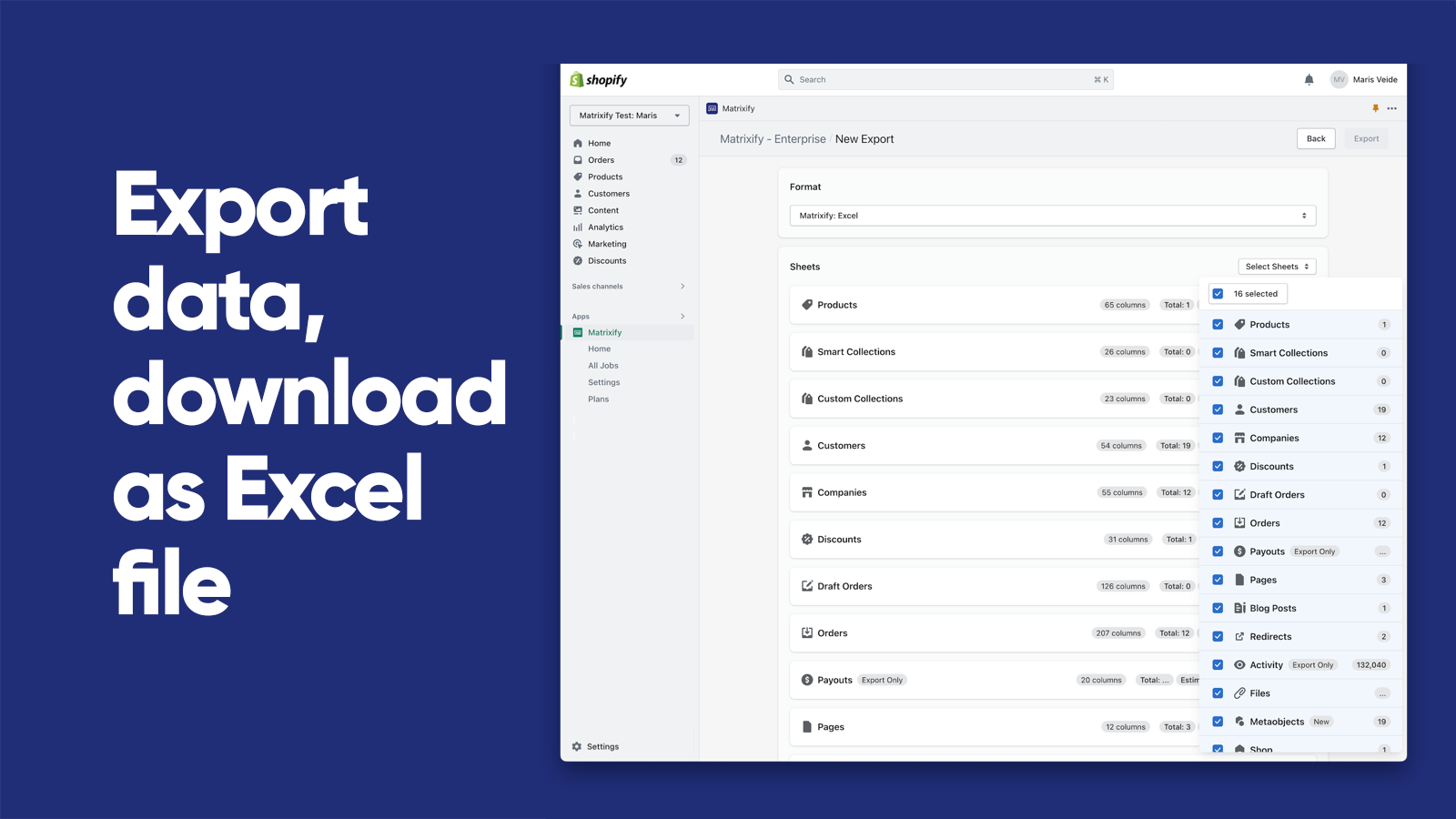
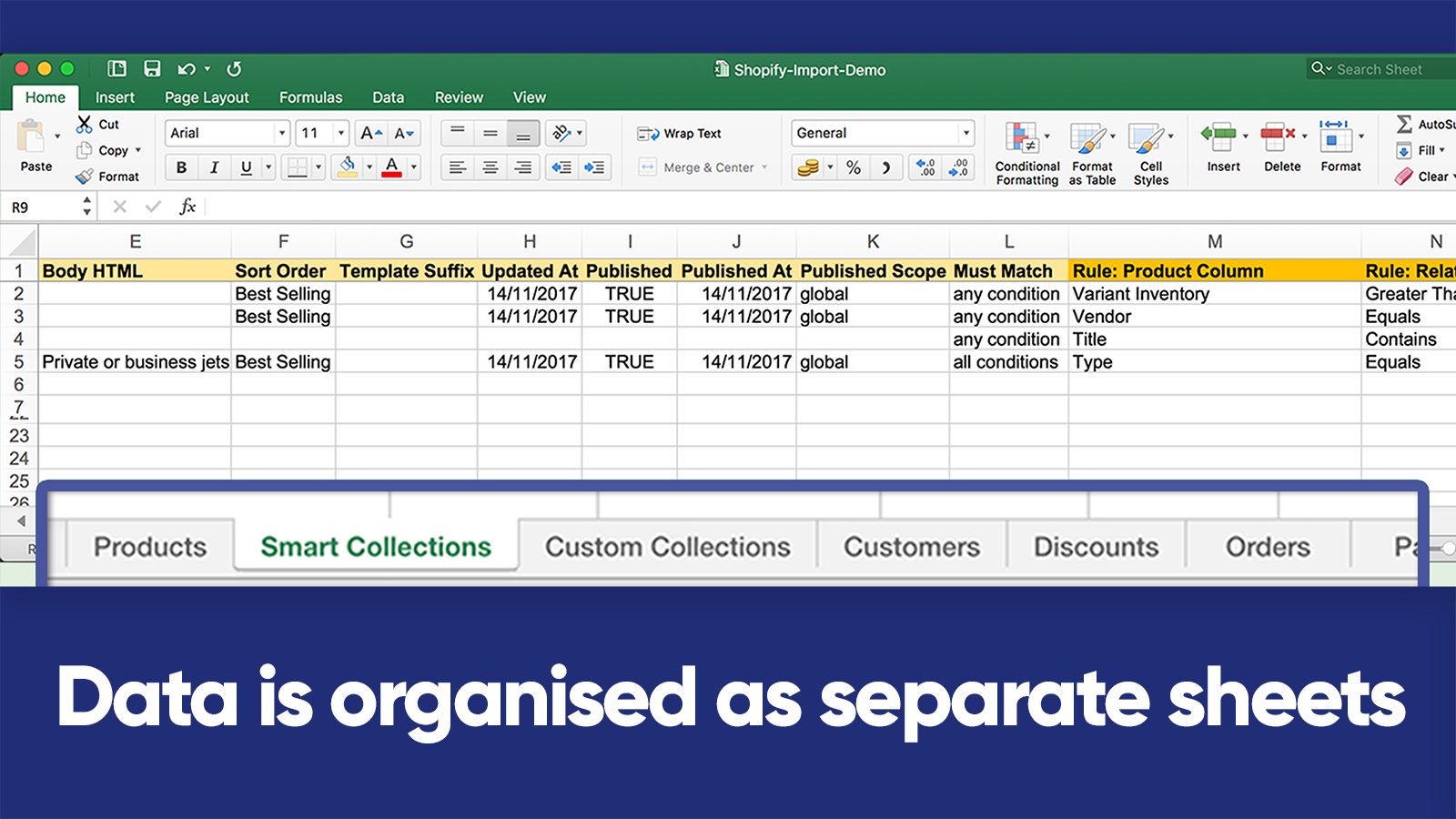
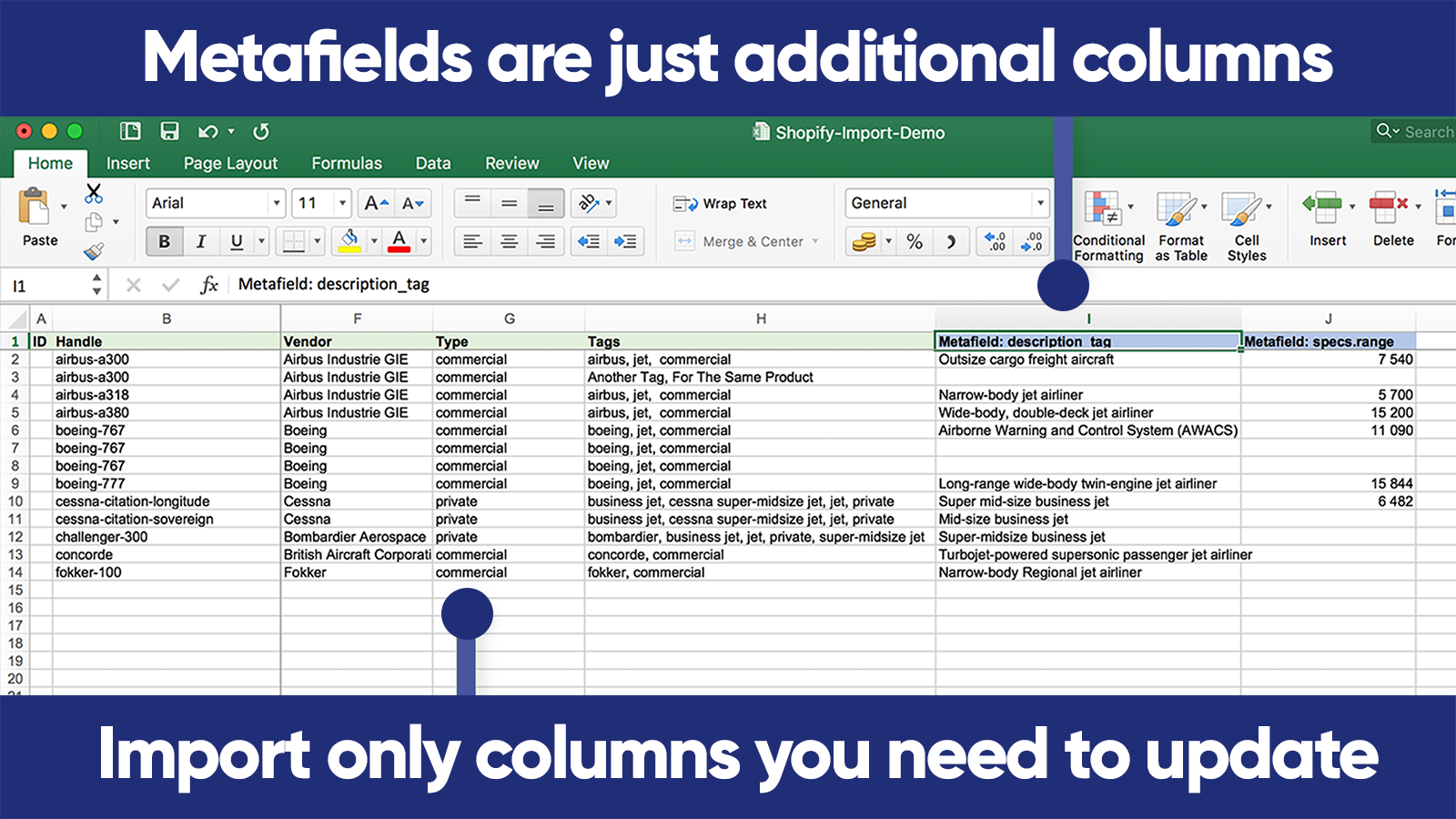
  • Data Import/Export:Use Excel, Google Sheets or CSV files to import and export data.
  • E-commerce platform migration:Switch from platforms like Magento, WordPress/WooCommerce, BigCommerce, Lightspeed etc.
  • Data Recovery:Save and retrieve your information.
  • Automated data transfer:Set up automatic recurring import and export jobs.
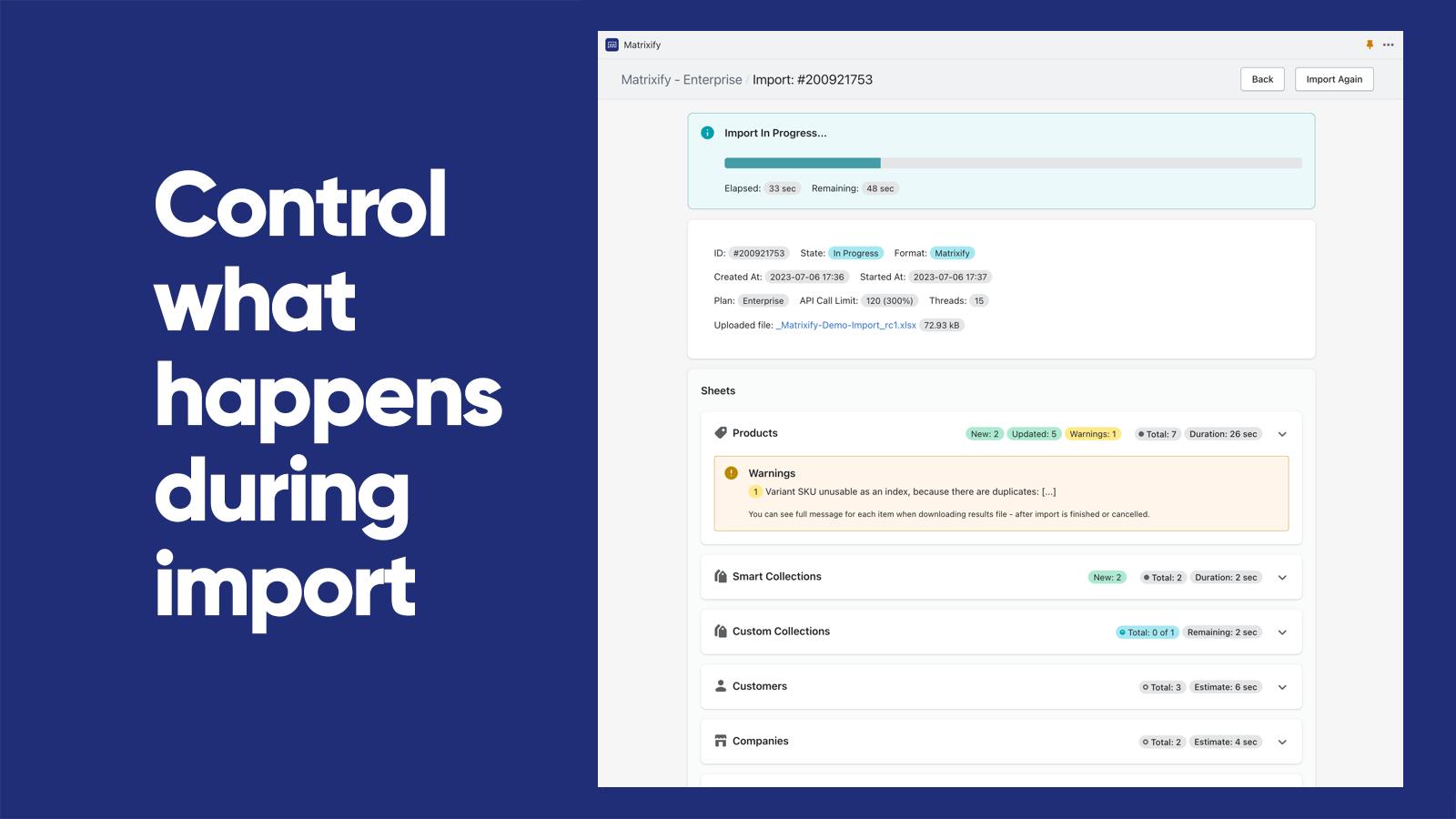
  • Export/Import Management:Track and manage export and import jobs in real-time and view their history.
Pricing Details

Matrixify: Data Export Import offers 1 free plan and 3 paid plans.

Considering installing this CSV import and export Shopify app? Explore the pricing details and discover if they align with your budget and needs.

  1. Demo · $0/month

    Included features: Per file:, 10 Products, 10 Collections, 10 Customers, 10 Companies, 10 Discounts, 10 Translations, 10 Orders & Draft Orders, 10 Payouts, 10 Pages, 10 Blog Posts, 10 Redirects, 2 Menus, 10 Activity, 10 Files, 10 Metaobjects, ∞ Metafields

  2. Basic · $20/month

    Included features: Per file:, 5K Products, 300 Collections, 2K Customers, 50 Companies, 300 Discounts, 10k Translations, 1K Orders & Draft Orders, 366 Payouts, 50 Pages, 50 Blog Posts, 10K Redirects, ∞ Menus, 10K Activity, 10K Files, 50 Metaobjects, ∞ Metafields

  3. Big · $50/month

    Included features: Per file:, 50K Products, 3K Collections, 20K Customers, 500 Companies, 3K Discounts, 100k Translations, 10K Orders & Draft Orders, 3660 Payouts, 500 Pages, 500 Blog Posts, 100K Redirects, ∞ Menus, 100K Activity, 100K Files, 500 Metaobjects,∞ Metafields

  4. Enterprise · $200/month

    Included features: Everything Unlimited, Batch import, Parallel threads in each job: 10+, Parallel manual jobs: 2

Pros and Cons

Delve into ShopDigest's expert insights on Matrixify: Data Export Import - a CSV import and export Shopify app. Our analysis of Shopify app store reviews presents unique pros and cons, allowing you to make informed decisions for your business.

Pros
  • Enables quick and seamless bulk updates for large product catalogs.
  • Highly responsive and helpful support team, often praised for quick resolutions.
  • Significantly reduces manual work, saving hours or even days on tasks.
  • Clear tutorials and guides that assist users in navigating the app’s features.
  • Simplifies complex migrations from other platforms to Shopify.
  • Intuitive design that makes bulk operations straightforward.
  • Consistently delivers fast and error-free imports/exports.
  • Supports a wide range of data manipulations, including metafields and custom exports.
  • Regular improvements and new features added without price hikes.
  • Convenient communication channel for real-time support.
Cons
  • Basic tier may be slow for extensive data, requiring a pricier plan.
  • Initial setup and feature mastery can be overwhelming for new users.
Talk to the developer

Install in Your Store Now

Your request goes to the team that built Matrixify: Data Export Import, not a support queue.

#2 of 96
NA Bulk Price Editor

NA Bulk Price Editor by Northern Apps

Price change notice, planned sale, quick sale, Black Friday.

Free Trial: 14 days
Pros
  • Enables quick and easy bulk price adjustments across large product catalogs.
  • Allows users to schedule price changes and reversals at specific times.
  • Clean, user-friendly design with clear navigation and preview features.
Cons
  • Some users reported partial price updates or glitches with specific variants.

What merchants said

“Terrific app. Greatly simplifies price changes across my entire catalog very simply and quickly.”
GS Plant Foods · United States · ★ 5.0 · 10/16/2026

Summary

Starting PriceFree
Free Trial14 days
Launch Date27 Oct 2020
DeveloperNorthern Apps
Ratings4.9 ★ (256)
View on ShopifyView charts
About the App

NA Bulk Price Editor, a CSV import and export Shopify app, has achieved 253 reviews and an average rating of 4.9 stars since its launch 6 years ago. Designed to assist Shopify merchants with - "Quickly adjust prices for multiple products at once. Plan special sales, raise or lower prices." it is a valuable addition to the CSV import and export app lineup.

Top Features:

CSV import and export Shopify apps can help elevate your e-commerce game. NA Bulk Price Editor offers a host of key features, including:

  • Price Adjustment:Raise/lower prices by a percentage or a fixed amount (like +10%, -$10, etc)
  • Price Modification:Add, remove, or update comparison prices (displayed with a line through them, applicable on Markets)
  • Product filtering options:Choose products or pick by group, label, supplier, type, title, and by market.
  • Planned price changes:Plan your price changes ahead of time - avoid rushing for sales at the last minute!
  • Setting Prices & Tags:Set your product prices using a CSV file or by unit cost/margin. Add tags to each product.
Pricing Details

NA Bulk Price Editor offers 1 free plan and 3 paid plans.

Considering installing this CSV import and export Shopify app? Explore the pricing details and discover if they align with your budget and needs.

  1. Free · $0/month

    Included features: 100 price changes per month

  2. Basic · $9.95/month

    Included features: 1,000 price changes per month

  3. Standard · $14.95/month

    Included features: 10,000 price changes per month

  4. Unlimited · $19.95/month

    Included features: Unlimited price changes

Pros and Cons

Delve into ShopDigest's expert insights on NA Bulk Price Editor - a CSV import and export Shopify app. Our analysis of Shopify app store reviews presents unique pros and cons, allowing you to make informed decisions for your business.

Pros
  • Enables quick and easy bulk price adjustments across large product catalogs.
  • Allows users to schedule price changes and reversals at specific times.
  • Clean, user-friendly design with clear navigation and preview features.
  • Highly praised for prompt, helpful, and personalized assistance.
  • Effectively handles price adjustments for different currencies and markets.
  • Significantly reduces manual effort for sales and promotions.
  • Offers flexible options for setting individual or percentage-based discounts.
  • Consistently delivers accurate and timely price updates.
  • Provides valuable functionality at no cost for smaller stores.
  • Works smoothly without requiring theme code modifications.
Cons
  • Some users reported partial price updates or glitches with specific variants.
  • Lacks the ability to set price changes based on different staff timezones.
Talk to the developer

Install in Your Store Now

Your request goes to the team that built NA Bulk Price Editor, not a support queue.

#3 of 96
Altera ‑ Export and Import

Altera ‑ Export and Import by Abnoba LLC

Import & export data with Excel or CSV. Matrixify compatible

Pricing Plans: Free, Free, $15/month
Key Features
  • Import and export your Matrixify Excel or CSV files as-is, zero changes
  • Translations, New Collection Sources, Metafield & Metaobject definitions
  • Automate imports and exports by Google Sheets, Google Drive, SFTP, WebDAV & FTP
  • Clone Shopify stores or migrate from WooCommerce, Magento, Etsy & more
  • Works with AI agents like ChatGPT & Claude Cowork with an MCP server or CLI

What merchants said

“J'apprécie vraiment cette app, très utile et rapide. C'est un must à mon avis lorsque l'on construit nos produits”
WymWolf · Canada · ★ 5.0 · 10/9/2026

Summary

Starting PriceFree
Free TrialFree plan
Launch Date21 Feb 2025
DeveloperAbnoba LLC
Ratings5.0 ★ (262)
View on ShopifyView charts
About the App

Altera ‑ Export and Import, a CSV import and export Shopify app, has achieved 254 reviews and an average rating of 5 stars since its launch 1 years ago. Designed to assist Shopify merchants with - "A modern bulk export & import tool for all store data, compatible with Matrixify files." it is a valuable addition to the CSV import and export app lineup.

Top Features:

CSV import and export Shopify apps can help elevate your e-commerce game. Altera ‑ Export and Import offers a host of key features, including:

  • Import and export your Matrixify Excel or CSV files as-is, zero changes
  • Translations, New Collection Sources, Metafield & Metaobject definitions
  • Automate imports and exports by Google Sheets, Google Drive, SFTP, WebDAV & FTP
  • Clone Shopify stores or migrate from WooCommerce, Magento, Etsy & more
  • Works with AI agents like ChatGPT & Claude Cowork with an MCP server or CLI
Pricing Details

Altera ‑ Export and Import offers 2 free plans and 1 paid plan.

Considering installing this CSV import and export Shopify app? Explore the pricing details and discover if they align with your budget and needs.

  1. Community · $0/month

    Included features: Import and export your data spreadsheets, 100 rows per file, Run 1 job at a time, Unlimited manual imports and exports, Standard data transformations, Parallel threads to speed up jobs, MCP access to reference materials

  2. Developer · $0/month

    Included features: Free for non-paying Shopify plans, Unlimited rows per file, Run 2 jobs at the same time, Command-line tool (CLI), Parallel threads to speed up jobs, Full access to MCP server

  3. Pro · $15/month

    Included features: Scheduled jobs, Unlimited rows per file, Run 4 jobs at the same time, Command-line tool (CLI), Custom data transformations, Parallel threads to speed up jobs, Full access to MCP server

Pros and Cons

Delve into ShopDigest's expert insights on Altera ‑ Export and Import - a CSV import and export Shopify app. Our analysis of Shopify app store reviews presents unique pros and cons, allowing you to make informed decisions for your business.

Pros
  • The app provides straightforward and effective tools for exporting large volumes of data.
  • Timely and helpful responses from the support team.
Talk to the developer

Install in Your Store Now

Your request goes to the team that built Altera ‑ Export and Import, not a support queue.

Keyword ranking

Top three ranked in Shopify App Store

Matrixify: Data Export Import

The Matrixify app lets you handle large amounts of store data by allowing you to import, export, update, and transfer it.

4.9 ★ (1,816)$20/mo onwards
View app data →
NA Bulk Price Editor

Quickly adjust prices for multiple products at once. Plan special sales, raise or lower prices.

4.9 ★ (256)$9.95/mo onwards
View app data →
Altera ‑ Export and Import

A modern bulk export & import tool for all store data, compatible with Matrixify files.

5.0 ★ (262)$15/mo onwards
View app data →
#4 of 96
Ablestar Bulk Product Editor

Ablestar Bulk Product Editor by Ablestar

Edit multiple products at once, import/export with CSV Excel, modify metafields.

Pros
  • The app excels at handling large-scale product edits quickly and accurately, saving significant time.
  • The interface is user-friendly, making it easy to navigate and perform complex tasks without extensive training.
  • Consistently fast and stable operation across various use cases and large product catalogs.
Cons
  • Some users noted slower processing times when handling extremely large product volumes (e.g., 30k+ products).

What merchants said

“J'adore cette application. Non seulement elle fait exactement ce qu'on lui demande, mais le support est rapide, efficace et sympathique. ”
Lothaire · France · ★ 5.0 · 10/13/2026

Summary

Starting PriceFree
Free TrialFree plan
Launch Date31 Jul 2017
DeveloperAblestar
Ratings4.9 ★ (930)
View on ShopifyView charts
About the App

Ablestar Bulk Product Editor, a CSV import and export Shopify app, has achieved 929 reviews and an average rating of 4.9 stars since its launch 9 years ago. Designed to assist Shopify merchants with - "Edit thousands of products all at once confidently through previews, undos, and personalised spreadsheets." it is a valuable addition to the CSV import and export app lineup.

Top Features:

CSV import and export Shopify apps can help elevate your e-commerce game. Ablestar Bulk Product Editor offers a host of key features, including:

  • Bulk Edit Enhancements:The bulk edit previews provide clear viewing and assurance, complete with progress and an option to undo changes.
  • Efficient bulk editing:Edit large amounts with your spreadsheets without having to change the format.
  • Fast data export:Easily convert products to formats such as CSV, Excel, and Matrixify/Excelify.
  • Powerful Product Editor:Bulk editing tool for Shopify products with robust filters and placeholders
  • Inventory Synchronization:Use Inventory Sync to keep your products updated through Google Drive, Dropbox, FTP, or URL.
Pricing Details

Ablestar Bulk Product Editor offers 1 free plan and 3 paid plans.

Considering installing this CSV import and export Shopify app? Explore the pricing details and discover if they align with your budget and needs.

  1. Starter · $0/month

    Included features: 10 Product Limit -Edits, Export & Import, Unlimited Edits, On a dev store? No limits until launch

  2. Basic · $30/month

    Included features: Unlimited Products per Task, 60-Day Bulk Edit History, 1 Inventory Sync Job, Scheduled Edits, Edit Multiple Fields at Once

  3. Advanced · $60/month

    Included features: 5 Recurring Edits, 90-Day Bulk Edit History, 5 Inventory Sync Jobs, 5 Scheduled Exports, 5 Automatic Product Rules, 1 Code Snippet

  4. Professional · $120/month

    Included features: 20 Recurring Edits, 180-Day Bulk Edit History, 10 Inventory Sync Jobs, 20 Scheduled Exports, 20 Automatic Product Rules, 5 Code Snippets

Pros and Cons

Delve into ShopDigest's expert insights on Ablestar Bulk Product Editor - a CSV import and export Shopify app. Our analysis of Shopify app store reviews presents unique pros and cons, allowing you to make informed decisions for your business.

Pros
  • The app excels at handling large-scale product edits quickly and accurately, saving significant time.
  • The interface is user-friendly, making it easy to navigate and perform complex tasks without extensive training.
  • Consistently fast and stable operation across various use cases and large product catalogs.
  • Responsive and helpful support team, often praised for quick resolutions and proactive assistance.
  • Offers a wide range of editing capabilities, including filtering, scheduling, and handling variants.
  • Reduces manual effort with features like bulk updates, CSV imports/exports, and live editing.
  • The free version provides substantial functionality, making it accessible for small stores.
  • Allows tailored edits to meet specific business needs, such as rounding prices or updating inventory.
  • Works flawlessly with Shopify, avoiding issues common with native import/export tools.
  • Advanced filtering options enable precise edits and error detection in large inventories.
Cons
  • Some users noted slower processing times when handling extremely large product volumes (e.g., 30k+ products).
Talk to the developer

Install in Your Store Now

Your request goes to the team that built Ablestar Bulk Product Editor, not a support queue.

#5 of 96
EditEngine Bulk Product Editor

EditEngine Bulk Product Editor by Profitonium

Key Features
  • Bulk Product Edit: edit prices, tags, inventory, SEO, URLs, and metafields
  • Target thousands of products by tag, vendor, collection, and status
  • Preview each product change before applying bulk edits
  • Undo completed bulk edits from operation history
  • Schedule sale, launch, and cleanup edits to run later

What merchants said

“Perfect tool for bulk import/export. That's exactly what I was looking for. No hassle with Excel now. ”
Cloud Orchard · Poland · ★ 5.0 · 9/26/2026

Summary

Starting PriceFree
Free TrialFree plan
Launch Date29 May 2025
DeveloperProfitonium
Ratings4.9 ★ (150)
View on ShopifyView charts
About the App

EditEngine Bulk Product Editor, a CSV import and export Shopify app, has achieved 151 reviews and an average rating of 4.9 stars since its launch 1 years ago. Designed to assist Shopify merchants with - "Bulk product edit made safe: preview, schedule, import/export CSV, and undo changes." it is a valuable addition to the CSV import and export app lineup.

Top Features:

CSV import and export Shopify apps can help elevate your e-commerce game. EditEngine Bulk Product Editor offers a host of key features, including:

  • Bulk Product Edit: edit prices, tags, inventory, SEO, URLs, and metafields
  • Target thousands of products by tag, vendor, collection, and status
  • Preview each product change before applying bulk edits
  • Undo completed bulk edits from operation history
  • Schedule sale, launch, and cleanup edits to run later
Pricing Details

EditEngine Bulk Product Editor offers 1 free plan and 3 paid plans.

Considering installing this CSV import and export Shopify app? Explore the pricing details and discover if they align with your budget and needs.

  1. Free Plan · $0/month

    Included features: Free unlimited for Partner dev stores, Unlimited bulk edit tasks, Unlimited import & export tasks, 100 products per task, 5 collections per task, Undo & rollback edits, Unlimited Import Advanced, Optional Backup add-on: $6.99–$59.99/mo

  2. Basic Plan · $9.99/month

    Included features: Unlimited bulk edit tasks, Unlimited import & export tasks, 500 products per task, 10 collections per task, Undo & rollback edits, Metafields export, Unlimited Import Advanced

  3. Standard Plan · $19.99/month

    Included features: Unlimited bulk edit tasks, Unlimited import & export tasks, 10,000 products per task, 100 collections per task, Undo & rollback edits, Metafields export, Schedule bulk edits, Unlimited Import Advanced

  4. Pro Plan · $49.99/month

    Included features: Unlimited bulk edit tasks, Unlimited import & export tasks, Unlimited products per task, Unlimited collections per task, Undo & rollback edits, Metafields export, Schedule bulk edits, Unlimited Import Advanced

Pros and Cons

Delve into ShopDigest's expert insights on EditEngine Bulk Product Editor - a CSV import and export Shopify app. Our analysis of Shopify app store reviews presents unique pros and cons, allowing you to make informed decisions for your business.

Pros
  • The app enables quick updates and edits, saving users significant time.
Talk to the developer

Install in Your Store Now

Your request goes to the team that built EditEngine Bulk Product Editor, not a support queue.

#6 of 96
PicManager Bulk Image Upload

PicManager Bulk Image Upload by Amasty

Boost upload image process with picture upload & optimization

Pricing Plans: Free, $4.99/month
Pros
  • The app significantly reduces time and effort for bulk image uploads, especially for large inventories.
  • The interface is user-friendly and easy to navigate, requiring minimal setup.
  • Users report quick processing and seamless matching of images to SKUs.
Cons
  • Some users report mismatches or failures in automatic SKU-to-image pairing.

What merchants said

“I have been using PicManager to help upload batches of pictures for the last couple weeks. So far it has worked flawlessly. It's made my life a lot easier to just upload a bunch of pictures at once and have it assigned to the proper product. I haven't subscribed to use the optimization yet, but I will likely try it.”
Cartoon Kingdom & Cedar Creek Hobbies · Canada · ★ 5.0 · 9/11/2026

Summary

Starting PriceFree
Free TrialFree plan
Launch Date21 Feb 2024
DeveloperAmasty
Ratings4.6 ★ (45)
View on ShopifyView charts
About the App

PicManager Bulk Image Upload, a CSV import and export Shopify app, has achieved 45 reviews and an average rating of 4.6 stars since its launch 2 years ago. Designed to assist Shopify merchants with - "Enjoy effortless bulk upload of product images and videos using a user-friendly image uploader" it is a valuable addition to the CSV import and export app lineup.

Top Features:

CSV import and export Shopify apps can help elevate your e-commerce game. PicManager Bulk Image Upload offers a host of key features, including:

  • Bulk upload images and videos. Add individually or as a ZIP, RAR or CSV file
  • Use image manager to assign images to specific products and validate matching
  • Manage bulk image import by matching images to products by SKU, barcode, or AI
  • Add image slider to product image gallery with zoom & looping. Remove background
  • After image upload, use image optimizer: compress, resize, crop, convert to WebP
Pricing Details

PicManager Bulk Image Upload offers 1 free plan and 1 paid plan.

Considering installing this CSV import and export Shopify app? Explore the pricing details and discover if they align with your budget and needs.

  1. Free · $0/month

    Included features: Unlimited image upload, Up to 1000 img/batch (max 1GB per batch), Automatic matching by SKU, Title, Manual matching, Alt text generation, Google Drive & Dropbox integration, 7-day revert

  2. Standard · $4.99/month

    Included features: All included in Free, Up to 5000 img/batch (max 5GB per batch), Video uploads; Images AI matching, Optimize 500 images/month:, Compress, Resize, Crop images, Convert PNG to JPG, WebP; JPG to WebP, Image slider: arrows, bullets, zoom, 30-day revert & restore

Pros and Cons

Delve into ShopDigest's expert insights on PicManager Bulk Image Upload - a CSV import and export Shopify app. Our analysis of Shopify app store reviews presents unique pros and cons, allowing you to make informed decisions for your business.

Pros
  • The app significantly reduces time and effort for bulk image uploads, especially for large inventories.
  • The interface is user-friendly and easy to navigate, requiring minimal setup.
  • Users report quick processing and seamless matching of images to SKUs.
  • Many users appreciate the app’s free tier, considering its high utility.
  • Customer support is noted for being responsive and helpful.
  • Automates repetitive tasks like image assignment, eliminating manual work.
Cons
  • Some users report mismatches or failures in automatic SKU-to-image pairing.
  • Issues include limits on manual uploads (e.g., 5 images) and incompatibility with special characters in filenames.
  • Occasional slow loading or failures when handling large batches or screenshots.
Talk to the developer

Install in Your Store Now

Your request goes to the team that built PicManager Bulk Image Upload, not a support queue.

#7 of 96
Hextom: Bulk Product Edit

Hextom: Bulk Product Edit by Hextom

Edit thousands of products at once, import and export bulk edits using CSV.

Pros
  • The app significantly reduces manual effort by enabling quick bulk edits and updates.
  • Intuitive design and ease of use make navigation and task execution straightforward.
  • Responsive and knowledgeable support team resolves issues promptly.
Cons
  • Some users report delays when processing extensive product variations.

What merchants said

“Easy to use and find instructions and it saves ALOT of time.”
Anaswear · United States · ★ 5.0 · 10/17/2026

Summary

Starting PriceFree
Free TrialFree plan
Launch Date05 Oct 2015
DeveloperHextom
Ratings4.9 ★ (1,166)
View on ShopifyView charts
About the App

Hextom: Bulk Product Edit, a CSV import and export Shopify app, has achieved 1164 reviews and an average rating of 4.9 stars since its launch 11 years ago. Designed to assist Shopify merchants with - "Edit large amounts of Products, Collections, Customers & Metafields all at once. Plan sales. Import and Export CSV files." it is a valuable addition to the CSV import and export app lineup.

Top Features:

CSV import and export Shopify apps can help elevate your e-commerce game. Hextom: Bulk Product Edit offers a host of key features, including:

  • Efficient Bulk Editing:Easily edit multiple products and other store data accurately and quickly with just a few clicks.
  • Inventory Management:Plan bulk updates, import/export sales via CSV, synchronize inventory, and product release.
  • Secure Editing: All modifications will be backed up, and bulk edits can be easily undone without any downtime.
  • User-Friendly:Simple to use for both tech-savvy and non-tech-savvy individuals.
  • No Obligation Demo Plan:You can try the app for free with our no-obligation demo plan.
Pricing Details

Hextom: Bulk Product Edit offers 1 free plan and 3 paid plans.

Considering installing this CSV import and export Shopify app? Explore the pricing details and discover if they align with your budget and needs.

  1. Demo Plan · $0/month

    Included features: Unlimited bulk & CSV import tasks, 10 Products per task, Revert any product edit, Edit all product details, 30 day backup

  2. Basic Plan · $9.99/month

    Included features: Unlimited bulk & CSV import tasks, 500 Products per task, Revert any product edit, Edit all product details, 60 day backup

  3. Professional Plan · $19.99/month

    Included features: Unlimited bulk & CSV import tasks, 5,000 Products per task, 10 active scheduled tasks, 90 day backup

  4. Advanced Plan · $49.99/month

    Included features: Unlimited bulk & CSV import tasks, 50,000 Products per task, 100 active scheduled tasks, 180 day backup

Pros and Cons

Delve into ShopDigest's expert insights on Hextom: Bulk Product Edit - a CSV import and export Shopify app. Our analysis of Shopify app store reviews presents unique pros and cons, allowing you to make informed decisions for your business.

Pros
  • The app significantly reduces manual effort by enabling quick bulk edits and updates.
  • Intuitive design and ease of use make navigation and task execution straightforward.
  • Responsive and knowledgeable support team resolves issues promptly.
  • Indispensable for managing extensive product catalogs efficiently.
  • Offers a wide range of features for bulk editing products, variants, and metadata.
  • Consistently delivers fast and accurate results without technical issues.
  • Users find the subscription price justified by the time and effort saved.
  • Powerful features for optimizing product listings and metadata in bulk.
  • Effectively handles growing product counts and complex inventory needs.
  • Allows users to test functionality before committing to a subscription.
Cons
  • Some users report delays when processing extensive product variations.
  • A few users find the pricing steep despite the app’s benefits.
  • Initial setup and feature discovery can be challenging for beginners.
  • The free version restricts the volume of edits, prompting upgrades.
Talk to the developer

Install in Your Store Now

Your request goes to the team that built Hextom: Bulk Product Edit, not a support queue.

#8 of 96
Pricer — Bulk Price Manager

Pricer — Bulk Price Manager by Studio Enchant

Bulk Pricing Operations

Pricing Plans: Free
Key Features
  • Bulk price edits across collections, products, or variants
  • Change prices by percentage or fixed amounts
  • Schedule price changes to run automatically at any time
  • Apply smart rounding rules for consistent pricing
  • Filter by SKU, product type, or manual selection

What merchants said

“This app works very fast and is excellent; thanks to the developer.”
LAHAVA · United States · ★ 5.0 · 10/2/2026

Summary

Starting PriceFree
Free TrialFree plan
Launch Date27 Apr 2026
Ratings5.0 ★ (10)
View on ShopifyView charts
About the App

Pricer — Bulk Price Manager, a CSV import and export Shopify app, has achieved 10 reviews and an average rating of 5 stars since its launch this year. Designed to assist Shopify merchants with - "Bulk edit product prices with smart rules, saving time and keeping pricing consistent." it is a valuable addition to the CSV import and export app lineup.

Top Features:

CSV import and export Shopify apps can help elevate your e-commerce game. Pricer — Bulk Price Manager offers a host of key features, including:

  • Bulk price edits across collections, products, or variants
  • Change prices by percentage or fixed amounts
  • Schedule price changes to run automatically at any time
  • Apply smart rounding rules for consistent pricing
  • Filter by SKU, product type, or manual selection
Pricing Details

Pricer — Bulk Price Manager offers 0 free plans and 0 paid plans.

Considering installing this CSV import and export Shopify app? Explore the pricing details and discover if they align with your budget and needs.

  1. · $0/month

Talk to the developer

Install in Your Store Now

Your request goes to the team that built Pricer — Bulk Price Manager, not a support queue.

#9 of 96
FeedFix | XML Import & Export

FeedFix | XML Import & Export by Entafix

Product XML Import & Custom XML Feed Export for Marketplaces

Free Trial: 7 days
Pros
  • The app is consistently praised for its intuitive and straightforward interface.
  • Fast, responsive, and helpful customer service, often highlighted by name (e.g., Engin).
  • Users appreciate the ability to create tailored XML feeds to meet specific needs.
Cons
  • Some users noted that advanced features lack detailed guides.

What merchants said

“Fantastic App. Has saved a significant amount of time and resource for us.Brilliant and speedy support.”
Production Solutions Group · United Kingdom · ★ 5.0 · 10/22/2026

Summary

Starting PriceFree
Free Trial7 days
Launch Date21 Sep 2023
DeveloperEntafix
Ratings5.0 ★ (289)
View on ShopifyView charts
About the App

FeedFix | XML Import & Export, a CSV import and export Shopify app, has achieved 281 reviews and an average rating of 5 stars since its launch 3 years ago. Designed to assist Shopify merchants with - "Export product feeds to Google, Meta and marketplaces. Import products from XML feeds or CSV files." it is a valuable addition to the CSV import and export app lineup.

Top Features:

CSV import and export Shopify apps can help elevate your e-commerce game. FeedFix | XML Import & Export offers a host of key features, including:

  • Build a custom product feed for any marketplace, not just the big channels.
  • Export a Google feed, Meta feed or TikTok feed from one product catalog.
  • Import CSV or XML feeds from your suppliers and keep the catalog in sync.
  • Set your own price rules and filters on every product import and export.
  • Export products in multiple languages, markets and currencies at once.
Pricing Details

FeedFix | XML Import & Export offers 1 free plan and 3 paid plans.

Considering installing this CSV import and export Shopify app? Explore the pricing details and discover if they align with your budget and needs.

  1. Export - Free · $0/month

    Included features: 1 Export Feed - 1 Import Feed, Available for stores for <500 variants, Minimum Update Frequency is 15 hours, 1-Click Update, Support with Live Chat

  2. Export - Plus · $7.99/month

    Included features: 5 Export Feeds - 3 Import Feeds, Available for stores for <5000 products, Minimum Update Frequency is 8 hours, 1-Click Update, Support with Live Chat

  3. Export - Advanced · $17.99/month

    Included features: 10 Export Feeds - 5 Import Feeds, Available for stores for <10000 products, Minimum Update Frequency is 3 hours, 1-Click Update, Personalized support

  4. Export - Unlimited · $49.99/month

    Included features: Unlimited Export & Import Feeds, Unlimited Products, Minimum Update Frequency is 2 hours, 1-Click Update, Personalized support

Pros and Cons

Delve into ShopDigest's expert insights on FeedFix | XML Import & Export - a CSV import and export Shopify app. Our analysis of Shopify app store reviews presents unique pros and cons, allowing you to make informed decisions for your business.

Pros
  • The app is consistently praised for its intuitive and straightforward interface.
  • Fast, responsive, and helpful customer service, often highlighted by name (e.g., Engin).
  • Users appreciate the ability to create tailored XML feeds to meet specific needs.
  • The app performs as expected, with minimal errors or disruptions.
  • Quick setup and fast feed generation, even with large product catalogs.
  • Competitive pricing and value for money compared to similar apps.
  • Capable of handling complex feed configurations beyond basic options.
  • Clean layout and simple navigation enhance the overall experience.
  • Bugs and feature requests are addressed promptly by the development team.
  • Availability of a free version or trial period is well-received.
Cons
  • Some users noted that advanced features lack detailed guides.
  • A few reviewers mentioned missing functionalities (e.g., merging fields).
Talk to the developer

Install in Your Store Now

Your request goes to the team that built FeedFix | XML Import & Export, not a support queue.

#10 of 96
Accentuate Custom Fields (ACF)

Accentuate Custom Fields (ACF) by Accentuate Digital

Features for managing content to make your website stand out

Pricing Plans: Free, $7/month, $25/month, $39/month
Free Trial: 15 days
Pros
  • Consistently praised for being quick, friendly, and highly knowledgeable, often going above and beyond to resolve issues.
  • Offers extensive flexibility and advanced features for managing metafields, enabling complex store customizations.
  • Intuitive design and ease of use, even for non-technical users, with a clean and straightforward UI.
Cons
  • Some users reported unexpected billing issues, such as being charged prematurely for renewed subscriptions.

What merchants said

“We've used this app for a number of years and it's been great for adding custom sections to our website. We recently had an issue following a Shopify update and the Accentuate support team investigated and resolved it for us straight away!”
Willow & Stone · United Kingdom · ★ 5.0 · 7/22/2026

Summary

Starting PriceFree
Free Trial15 days
Launch Date08 Nov 2016
Ratings4.9 ★ (174)
View on ShopifyView charts
About the App

Accentuate Custom Fields (ACF), a CSV import and export Shopify app, has achieved 173 reviews and an average rating of 4.9 stars since its launch 10 years ago. Designed to assist Shopify merchants with - "Upgrade your shop with a professional and tailor-made content solution to fit your business needs." it is a valuable addition to the CSV import and export app lineup.

Top Features:

CSV import and export Shopify apps can help elevate your e-commerce game. Accentuate Custom Fields (ACF) offers a host of key features, including:

  • Enhanced Metafield Editor:Better metafield editor experience. Complete compatibility with Shopify OS 2.0 types.
  • Custom Layouts:Create unique designs for certain product and pages to use in your theme.
  • Liquid Image Transformations:Direct image resizing, cropping, and transformation options in Liquid.
  • Excel data synchronization:Use Excel to update field definitions and move data between stores.
  • ACF Features:Visit our website to see all the features of ACF, including data versioning.
Pricing Details

Accentuate Custom Fields (ACF) offers 1 free plan and 3 paid plans.

Considering installing this CSV import and export Shopify app? Explore the pricing details and discover if they align with your budget and needs.

  1. Free · $0/month

    Included features: Pre-made Customizable Theme Blocks:, Products Promotion, SEO Keywords, Countdown Timer, Promotional Banner, Sticky Promo Bar, Falling Animated Effects, Page Redirect

  2. Starter · $7/month

    Included features: Everything in Free, 3 Scopes:, Product & Variants, 1 Merchant Chosen Scope, 50 Metafields Cap, All Field Types, Standard Support, AI Assistant

  3. Scale · $25/month

    Included features: Everything in Starter, All Scopes Unlocked, Import & Export, 200 Metafield Limit, Standard Support, AI Assistant

  4. Business · $39/month

    Included features: Everything in Scale, Unlimited Metafields, Unlimited Import & Export, Schedule Metafield Publishing, Reference Manager & Bulk Editor, Advanced Search & Filters, Deep Shopify Integration, AI Assistant

Pros and Cons

Delve into ShopDigest's expert insights on Accentuate Custom Fields (ACF) - a CSV import and export Shopify app. Our analysis of Shopify app store reviews presents unique pros and cons, allowing you to make informed decisions for your business.

Pros
  • Consistently praised for being quick, friendly, and highly knowledgeable, often going above and beyond to resolve issues.
  • Offers extensive flexibility and advanced features for managing metafields, enabling complex store customizations.
  • Intuitive design and ease of use, even for non-technical users, with a clean and straightforward UI.
  • Works seamlessly across stores, with minimal bugs or disruptions reported over long-term use.
  • Support team is frequently noted for resolving queries and implementing fixes within hours.
  • Simplifies managing large datasets by allowing bulk operations, saving time for merchants.
  • Regular updates and new features are added based on user feedback and needs.
  • Provides robust tools and liquid code integration for advanced customization by developers.
  • Easily replicates custom fields across multiple Shopify stores, streamlining workflows.
  • Well-documented features and clear instructions aid in setup and troubleshooting.
Cons
  • Some users reported unexpected billing issues, such as being charged prematurely for renewed subscriptions.
  • Occasional difficulties reported when adding new sizes or managing repetitive fields without developer assistance.
  • While versatile, a few users desired more streamlined support for non-product metafields (e.g., blogs, pages).
Talk to the developer

Install in Your Store Now

Your request goes to the team that built Accentuate Custom Fields (ACF), not a support queue.

Showing 1-10 out of 96

Best CSV import and export Apps in Shopify

CSV import and export apps are designed to address specific needs and challenges faced by Shopify store merchants. Whether you're looking to optimize your store's SEO, improve customer support, enhance product listings, or streamline your inventory management, there's an app for that.

Discover a wealth of cutting-edge tools and features offered by these remarkable CSV import and export Shopify apps, including Matrixify: Data Export Import, NA Bulk Price Editor, Altera ‑ Export and Import, and many more. Our app collection provides a comprehensive overview of the top apps in the CSV import and export category, enabling you to select the ones that will take your e-commerce venture to new heights.

Empower your Shopify store with the best CSV import and export apps the platform has to offer and elevate your online business.

Explore Apps by Criteria:

  1. Most Popular CSV import and export Apps
  2. Highest Reviewed CSV import and export Apps
  3. Top Rated CSV import and export Apps
  4. Newly Launched CSV import and export Apps

Overview of the Above Top CSV import and export Shopify Apps in October 2026

There are a number of CSV import and export apps in the Shopify app store designed to supercharge your e-commerce success. Whether you're a seasoned entrepreneur or just starting your online journey, the right apps can make all the difference. We have listed the top Shopify apps in the CSV import and export category, based on their popularity and average rating, to help you make informed decisions.

App NameCategoryDeveloperStarting PriceFree PlanReviews
Matrixify: Data Export ImportMatrixify: Data Export ImportBuilt for ShopifyCSV import and exportITissible$0/month● Available4.9 ★ (1775)
NA Bulk Price EditorNA Bulk Price EditorBuilt for ShopifyCSV import and exportNorthern Apps$0/month● Available4.9 ★ (253)
Altera ‑ Export and ImportAltera ‑ Export and ImportBuilt for ShopifyCSV import and exportAbnoba LLC$0/month● Available5.0 ★ (254)
Ablestar Bulk Product EditorAblestar Bulk Product EditorBuilt for ShopifyCSV import and exportAblestar$0/month● Available4.9 ★ (929)
EditEngine Bulk Product EditorEditEngine Bulk Product EditorBuilt for ShopifyCSV import and exportProfitonium$0/month● Available4.9 ★ (151)
PicManager Bulk Image UploadPicManager Bulk Image UploadBuilt for ShopifyCSV import and exportAmasty$0/month● Available4.6 ★ (45)
Hextom: Bulk Product EditHextom: Bulk Product EditCSV import and exportHextom$0/month● Available4.9 ★ (1164)
Pricer — Bulk Price ManagerPricer — Bulk Price ManagerBuilt for ShopifyCSV import and exportStudio Enchant$0/month● Unavailable5.0 ★ (10)
FeedFix | XML Import & ExportFeedFix | XML Import & ExportBuilt for ShopifyCSV import and exportEntafix$0/month● Available5.0 ★ (281)
Accentuate Custom Fields (ACF)Accentuate Custom Fields (ACF)Built for ShopifyCSV import and exportAccentuate Digital$0/month● Available4.9 ★ (173)

Have a Closer Look at the Best CSV import and export Apps

Now let us jump in and check out these Top 5 CSV import and export Shopify apps.

Matrixify: Data Export Import

1. Matrixify: Data Export Import

4.9 ★ (1,816)
Matrixify: Data Export Import screenshot 1
Matrixify: Data Export Import screenshot 2
Matrixify: Data Export Import screenshot 3
Matrixify: Data Export Import screenshot 4

Reviews

Most Recent Review

5.0 ★Amazing

Holy cr*p this makes cleaning up my inventory descriptions and bar codes easy!

Bluebonnet Walking & Running · United States · 22 Oct 2026

Recent Review

5.0 ★Amazing

Great Tool. Very easy to make bulk changes if you are comfortable with spreadsheets.

ilMio Jewelry · United States · 21 Oct 2026
Why is Matrixify: Data Export Import a top CSV import and export Shopify app?
With an impressive overall rating of 4.9 stars and 1,816 reviews, Matrixify: Data Export Import stands out as one of the top CSV import and export Shopify apps. The main objective of the app is - The Matrixify app lets you handle large amounts of store data by allowing you to import, export, update, and transfer it. Its purpose underscores its significance in enhancing your Shopify store experience.

ShopDigest selects the top Shopify apps in the CSV import and export category based on various parameters, including the number of installations across Shopify stores, the app's ranking in the Shopify App Store, the number of merchants' reviews, and its overall customer rating, among other factors.
Why integrate Matrixify: Data Export Import with your Shopify store?
By integrating a CSV import and export app with your Shopify store, you unlock a range of benefits. Matrixify: Data Export Import, a popular CSV import and export Shopify app, brings the following functionalities and value to a Shopify store, including:
  • Data Import/Export: Use Excel, Google Sheets or CSV files to import and export data.
  • E-commerce platform migration: Switch from platforms like Magento, WordPress/WooCommerce, BigCommerce, Lightspeed etc.
  • Data Recovery: Save and retrieve your information.
  • Automated data transfer: Set up automatic recurring import and export jobs.
  • Export/Import Management: Track and manage export and import jobs in real-time and view their history.
Learn more about the Matrixify: Data Export Import features in detail.

Shopify merchants highlight key advantages, such as Import and Export data using Excel, Google Sheets or CSV files., Migrate from Magento, WordPress/WooCommerce, BigCommerce, Lightspeed and others., and more,
What are some of the top alternatives for Matrixify: Data Export Import?
Looking for options? Dive into a selection of CSV import and export apps that rival Matrixify: Data Export Import, each offering unique features to enhance your Shopify store. Consider these top alternatives: which can match or even surpass the offerings of Matrixify: Data Export Import, giving you flexibility and choice.
profile picture 1profile picture 2profile picture 3profile picture 4

Install Now

Our experts are here to help you.

NA Bulk Price Editor

2. NA Bulk Price Editor

4.9 ★ (256)
NA Bulk Price Editor screenshot 1
NA Bulk Price Editor screenshot 2
NA Bulk Price Editor screenshot 3
NA Bulk Price Editor screenshot 4
NA Bulk Price Editor screenshot 5
NA Bulk Price Editor screenshot 6

Reviews

Most Recent Review

5.0 ★Amazing

Terrific app. Greatly simplifies price changes across my entire catalog very simply and quickly.

GS Plant Foods · United States · 16 Oct 2026

Recent Review

5.0 ★Amazing

Been using this app for a long time, and I have to say it can't be better than this. No hassle during sales and Black Friday.

Magic T · New Zealand · 15 Oct 2026
Why is NA Bulk Price Editor a top CSV import and export Shopify app?
With an impressive overall rating of 4.9 stars and 256 reviews, NA Bulk Price Editor stands out as one of the top CSV import and export Shopify apps. The main objective of the app is - Quickly adjust prices for multiple products at once. Plan special sales, raise or lower prices. Its purpose underscores its significance in enhancing your Shopify store experience.

ShopDigest selects the top Shopify apps in the CSV import and export category based on various parameters, including the number of installations across Shopify stores, the app's ranking in the Shopify App Store, the number of merchants' reviews, and its overall customer rating, among other factors.
Why integrate NA Bulk Price Editor with your Shopify store?
By integrating a CSV import and export app with your Shopify store, you unlock a range of benefits. NA Bulk Price Editor, a popular CSV import and export Shopify app, brings the following functionalities and value to a Shopify store, including:
  • Price Adjustment: Raise/lower prices by a percentage or a fixed amount (like +10%, -$10, etc)
  • Price Modification: Add, remove, or update comparison prices (displayed with a line through them, applicable on Markets)
  • Product filtering options: Choose products or pick by group, label, supplier, type, title, and by market.
  • Planned price changes: Plan your price changes ahead of time - avoid rushing for sales at the last minute!
  • Setting Prices & Tags: Set your product prices using a CSV file or by unit cost/margin. Add tags to each product.
Learn more about the NA Bulk Price Editor features in detail.

Shopify merchants highlight key advantages, such as Increase/decrease prices by percentage or flat amount (eg +10%, -$10, etc), Add/remove/update compare at prices (shown with strikethrough, works on Markets), and more,
What are some of the top alternatives for NA Bulk Price Editor?
Looking for options? Dive into a selection of CSV import and export apps that rival NA Bulk Price Editor, each offering unique features to enhance your Shopify store. Consider these top alternatives: which can match or even surpass the offerings of NA Bulk Price Editor, giving you flexibility and choice.
profile picture 1profile picture 2profile picture 3profile picture 4

Install Now

Our experts are here to help you.

Altera ‑ Export and Import

3. Altera ‑ Export and Import

5.0 ★ (262)
Altera ‑ Export and Import screenshot 1
Altera ‑ Export and Import screenshot 2
Altera ‑ Export and Import screenshot 3
Altera ‑ Export and Import screenshot 4
Altera ‑ Export and Import screenshot 5
Altera ‑ Export and Import screenshot 6

Reviews

Most Recent Review

5.0 ★Amazing

J'apprécie vraiment cette app, très utile et rapide. C'est un must à mon avis lorsque l'on construit nos produits

WymWolf · Canada · 09 Oct 2026

Recent Review

5.0 ★Amazing

The support for Altera is excellent. I have contacted support via the live chat feature a couple of times and have received a prompt response / resolution within minutes each time.

UPVC Spares4Repairs · United Kingdom · 14 Sep 2026
Why is Altera ‑ Export and Import a top CSV import and export Shopify app?
With an impressive overall rating of 5 stars and 262 reviews, Altera ‑ Export and Import stands out as one of the top CSV import and export Shopify apps. The main objective of the app is - A modern bulk export & import tool for all store data, compatible with Matrixify files. Its purpose underscores its significance in enhancing your Shopify store experience.

ShopDigest selects the top Shopify apps in the CSV import and export category based on various parameters, including the number of installations across Shopify stores, the app's ranking in the Shopify App Store, the number of merchants' reviews, and its overall customer rating, among other factors.
Why integrate Altera ‑ Export and Import with your Shopify store?
By integrating a CSV import and export app with your Shopify store, you unlock a range of benefits. Altera ‑ Export and Import, a popular CSV import and export Shopify app, brings the following functionalities and value to a Shopify store, including:
  • Import and export your Matrixify Excel or CSV files as-is, zero changes
  • Translations, New Collection Sources, Metafield & Metaobject definitions
  • Automate imports and exports by Google Sheets, Google Drive, SFTP, WebDAV & FTP
  • Clone Shopify stores or migrate from WooCommerce, Magento, Etsy & more
  • Works with AI agents like ChatGPT & Claude Cowork with an MCP server or CLI
Learn more about the Altera ‑ Export and Import features in detail.

Shopify merchants highlight key advantages, such as Import and export your Matrixify Excel or CSV files as-is, zero changes, Translations, New Collection Sources, Metafield & Metaobject definitions, and more,
What are some of the top alternatives for Altera ‑ Export and Import?
Looking for options? Dive into a selection of CSV import and export apps that rival Altera ‑ Export and Import, each offering unique features to enhance your Shopify store. Consider these top alternatives: which can match or even surpass the offerings of Altera ‑ Export and Import, giving you flexibility and choice.
profile picture 1profile picture 2profile picture 3profile picture 4

Install Now

Our experts are here to help you.

Ablestar Bulk Product Editor

4. Ablestar Bulk Product Editor

4.9 ★ (930)
Ablestar Bulk Product Editor screenshot 1
Ablestar Bulk Product Editor screenshot 2
Ablestar Bulk Product Editor screenshot 3
Ablestar Bulk Product Editor screenshot 4
Ablestar Bulk Product Editor screenshot 5
Ablestar Bulk Product Editor screenshot 6
Ablestar Bulk Product Editor screenshot 7

Reviews

Most Recent Review

5.0 ★Amazing

J'adore cette application. Non seulement elle fait exactement ce qu'on lui demande, mais le support est rapide, efficace et sympathique.

Lothaire · France · 13 Oct 2026

Recent Review

5.0 ★Amazing

Such an essential app if you have a decent sized catalogue. Amazing help from Alison at Ablestar. Went out of the way to help out with an out of the box task that saved many manual hours. Thanks so much!

Surfboard Empire · Australia · 31 Aug 2026
Why is Ablestar Bulk Product Editor a top CSV import and export Shopify app?
With an impressive overall rating of 4.9 stars and 930 reviews, Ablestar Bulk Product Editor stands out as one of the top CSV import and export Shopify apps. The main objective of the app is - Edit thousands of products all at once confidently through previews, undos, and personalised spreadsheets. Its purpose underscores its significance in enhancing your Shopify store experience.

ShopDigest selects the top Shopify apps in the CSV import and export category based on various parameters, including the number of installations across Shopify stores, the app's ranking in the Shopify App Store, the number of merchants' reviews, and its overall customer rating, among other factors.
Why integrate Ablestar Bulk Product Editor with your Shopify store?
By integrating a CSV import and export app with your Shopify store, you unlock a range of benefits. Ablestar Bulk Product Editor, a popular CSV import and export Shopify app, brings the following functionalities and value to a Shopify store, including:
  • Bulk Edit Enhancements: The bulk edit previews provide clear viewing and assurance, complete with progress and an option to undo changes.
  • Efficient bulk editing: Edit large amounts with your spreadsheets without having to change the format.
  • Fast data export: Easily convert products to formats such as CSV, Excel, and Matrixify/Excelify.
  • Powerful Product Editor: Bulk editing tool for Shopify products with robust filters and placeholders
  • Inventory Synchronization: Use Inventory Sync to keep your products updated through Google Drive, Dropbox, FTP, or URL.
Learn more about the Ablestar Bulk Product Editor features in detail.

Shopify merchants highlight key advantages, such as Visibility and confidence with bulk edit previews, progress and an undo option, Bulk edit with your own spreadsheets, no need to reformat, and more,
What are some of the top alternatives for Ablestar Bulk Product Editor?
Looking for options? Dive into a selection of CSV import and export apps that rival Ablestar Bulk Product Editor, each offering unique features to enhance your Shopify store. Consider these top alternatives: which can match or even surpass the offerings of Ablestar Bulk Product Editor, giving you flexibility and choice.
profile picture 1profile picture 2profile picture 3profile picture 4

Install Now

Our experts are here to help you.

EditEngine Bulk Product Editor

5. EditEngine Bulk Product Editor

4.9 ★ (150)
EditEngine Bulk Product Editor screenshot 1
EditEngine Bulk Product Editor screenshot 2
EditEngine Bulk Product Editor screenshot 3
EditEngine Bulk Product Editor screenshot 4
EditEngine Bulk Product Editor screenshot 5

Reviews

Most Recent Review

5.0 ★Amazing

Perfect tool for bulk import/export. That's exactly what I was looking for. No hassle with Excel now.

Cloud Orchard · Poland · 26 Sep 2026

Recent Review

5.0 ★Amazing

Great app, very easy bulk editing when you have 500 variants per product.

Northspec Built · Canada · 23 Sep 2026
Why is EditEngine Bulk Product Editor a top CSV import and export Shopify app?
With an impressive overall rating of 4.9 stars and 150 reviews, EditEngine Bulk Product Editor stands out as one of the top CSV import and export Shopify apps. The main objective of the app is - Bulk product edit made safe: preview, schedule, import/export CSV, and undo changes. Its purpose underscores its significance in enhancing your Shopify store experience.

ShopDigest selects the top Shopify apps in the CSV import and export category based on various parameters, including the number of installations across Shopify stores, the app's ranking in the Shopify App Store, the number of merchants' reviews, and its overall customer rating, among other factors.
Why integrate EditEngine Bulk Product Editor with your Shopify store?
By integrating a CSV import and export app with your Shopify store, you unlock a range of benefits. EditEngine Bulk Product Editor, a popular CSV import and export Shopify app, brings the following functionalities and value to a Shopify store, including:
  • Bulk Product Edit: edit prices, tags, inventory, SEO, URLs, and metafields
  • Target thousands of products by tag, vendor, collection, and status
  • Preview each product change before applying bulk edits
  • Undo completed bulk edits from operation history
  • Schedule sale, launch, and cleanup edits to run later
Learn more about the EditEngine Bulk Product Editor features in detail.

Shopify merchants highlight key advantages, such as Bulk Product Edit: edit prices, tags, inventory, SEO, URLs, and metafields, Target thousands of products by tag, vendor, collection, and status, and more,
What are some of the top alternatives for EditEngine Bulk Product Editor?
Looking for options? Dive into a selection of CSV import and export apps that rival EditEngine Bulk Product Editor, each offering unique features to enhance your Shopify store. Consider these top alternatives: which can match or even surpass the offerings of EditEngine Bulk Product Editor, giving you flexibility and choice.
profile picture 1profile picture 2profile picture 3profile picture 4

Install Now

Our experts are here to help you.

How We Selected the Top Shopify Apps in CSV import and export

Our team employs a comprehensive evaluation process that takes into account various factors to ensure you are presented with only the best options. Here's how we do it:

  • By Reviews: We understand the value of peer recommendations, and that's why we've sorted these top Shopify apps in CSV import and export based on the highest praise received from users, ensuring you get tried-and-tested solutions. The top listed apps here have earned the trust of fellow Shopify merchants. Jump to Highest Reviewed CSV import and export Shopify Apps.
  • By Price: Budget consideration is important while choosing a Shopify app for your store. That's why we have also categorized these top Shopify apps in CSV import and export by price, enabling you to find the perfect solutions that align with your financial goals without compromising on quality. Jump to Top Paid CSV import and export Shopify Apps.
  • By Launch Date: To keep you updated about the latest innovations, we've organized these Shopify apps based on their launch date. You can check the list of recently launched top apps in CSV import and export that could bring innovative solutions to your Shopify store. Jump to Newly Launched CSV import and export Shopify Apps.
  • By Popularity: We feature the CSV import and export apps that are making waves among Shopify store owners, helping you stay ahead of the curve. These apps have captured the attention of ecommerce owners and are listed as the top in the popularity section of the Shopify app store. Jump to Most Popular CSV import and export Shopify Apps.
  • By Ratings: We prioritize apps that have consistently earned high ratings, reflecting their impact and user satisfaction. These CSV import and export apps with excellent ratings stand out from their competitors, making them a solid choice for your business needs. Jump to Top Rated CSV import and export Shopify Apps.
  • By Best Match: We harness the power of Shopify's own recommendations! Our selection considers apps that Shopify suggests as a strong fit for CSV import and export, ensuring you access the platform's expert insights. Jump to Best Match CSV import and export Shopify Apps.

With these criteria in mind, we strive to present you with a diverse and well-rounded selection of the top CSV import and export Shopify apps in 2026. Rest assured, our selection process is designed to assist you in finding the most suitable solutions for your Shopify store needs.

How to Choose the Best CSV import and export Shopify App For Your Store

Choosing the right CSV import and export Shopify App for your store depends on various factors specific to your business goals. To make an informed decision, follow these steps:

  • Identify Your Requirements: Begin by understanding the specific goals and challenges your store faces. List the key features and functionalities you need in a CSV import and export app to address these requirements effectively.
  • Read User Reviews: Explore user reviews and ratings for the CSV import and export apps you are considering. Real-hand experiences from other Shopify merchants can provide valuable insights into how each app performs.
  • Compare Features: Use our app comparison page, where you can add the CSV import and export apps of your choice and perform a side-by-side comparison. This page allows you to evaluate each app's features, pricing, support, and other essential factors to help you find the best fit for your store.
  • Consider Budget: While some apps offer free plans with basic functionalities, others may require a paid subscription for access to advanced features. You can check out our complete list of Top Paid CSV import and export Shopify apps, and choose an app that aligns with your budget and can grow with your store as it expands.
  • Support and Documentation: Check the documentation and customer support resources of the app. A well-supported CSV import and export app that offers comprehensive documentation can help you implement and use it more effectively.
  • Integration Compatibity: Ensure that the CSV import and export app you choose can seamlessly integrate with your existing apps and theme to avoid compatibility issues.
  • Trial Periods: Some CSV import and export apps offer a free trial period that enables you to test the app's capabilities before purchasing a subscription.

Each Shopify store is different, and the best CSV import and export app for your store will be one that aligns closely with your specific business requirements.

More Information on CSV import and export Shopify Apps

Now let us jump in and check out these Top 10 CSV import and export Shopify apps.

In this comprehensive guide, we've provided you with a complete collection of CSV import and export Shopify apps that can help streamline your ecommerce journey. These CSV import and export Shopify apps cover a wide spectrum of needs to take your store forward. From 96 outstanding apps, we've covered every facet of CSV import and export, ensuring you have access to a vast range of tools to enhance your Shopify store.

However, choosing the perfect CSV import and export app for your specific requirements is key. Consider your specific goals, read user reviews, and compare features to find the ideal match for your Shopify store. Our Shopify app comparison page simplifies this process by allowing you to create side-by-side comparisons for any CSV import and export apps of your choice. ShopDigest guides you through the selection process, making it easier to find and install the perfect CSV import and export app that aligns with your goals.

Shopify CSV import and export App Installation

There are thousands of CSV import and export Shopify apps with different installation instructions, integration complexities, and customization levels. Our team at ShopDigest is here to assist you every step of the way. Installing your chosen app is a breeze with our service, ensuring a seamless integration into your store's ecosystem.

What's included

  • Safely install/uninstall Shopify app of your choice
  • App integration with any theme as per specification
  • Configurations & setup
  • Assured support and guidance
  • Get discount offers (not guaranteed)

What's not included

  • Shopify app subscription cost
Keyword charts

Explore key insights for CSV import and export apps

Market share, rank movement, install geography and review pace — tracked across all 96 apps. Open the full charts for history and app-level detail.

Open CSV import and export charts

Market share leaders

Oct 2026
Matrixify: Data Export Import86.4%
Altera ‑ Export and Import5.3%
Ablestar Bulk Product Editor3.5%
NA Bulk Price Editor2.6%
EditEngine Bulk Product Editor0.9%

The top two apps hold 91.7% of tracked installs.

Rank movers, 30 days

Top 10 tracked
Pricer — Bulk Price ManagerPricer — Bulk Price Manager▲ 4#8
Accentuate Custom Fields (ACF)Accentuate Custom Fields (ACF)▲ 3#10
NA Bulk Price EditorNA Bulk Price Editor▲ 2#2
Ablestar Bulk Product EditorAblestar Bulk Product Editor▼ 2#4
Hextom: Bulk Product EditHextom: Bulk Product Edit▲ 1#7

4 apps climbed and 1 dropped among the top 10 tracked.

Where installs come from

Keyword-wide
🇺🇸United States43.3%
🇬🇧United Kingdom9.2%
🇦🇺Australia6.1%
🇨🇦Canada5.5%
🇩🇪Germany4.2%

United States and United Kingdom merchants drive 52.5% of installs.

Reviews added, 30 days

Top tracked apps
Matrixify: Data Export Import+129
Altera ‑ Export and Import+20
Ablestar Bulk Product Editor+15
Hextom: Bulk Product Edit+12
FeedFix | XML Import & Export+10

205 new reviews across the top 10 tracked apps in the last 30 days.

Key Insights:
  • Matrixify: Data Export Import commands 86.4% market share, 83.8pp ahead of NA Bulk Price Editor — a concentrated csv import and export category.
  • In the last 30 days, 4 apps climbed and 1 dropped in ranking among the top 10 tracked csv import and export apps.
  • Matrixify: Data Export Import added the most new reviews this month (+129) — strong adoption momentum.

Frequently Asked Questions for CSV import and export Shopify Apps

1. What are some of the top Shopify apps under the CSV import and export category?

Here are some of the top Shopify apps under the CSV import and export category:

  • Matrixify: Data Export Import
  • NA Bulk Price Editor
  • Altera ‑ Export and Import
  • Ablestar Bulk Product Editor
  • EditEngine Bulk Product Editor
  • PicManager Bulk Image Upload
  • Hextom: Bulk Product Edit
  • Pricer — Bulk Price Manager
  • FeedFix | XML Import & Export
  • Accentuate Custom Fields (ACF)

Each of these apps offers unique features and functionalities tailored to boost your CSV import and export efforts and optimize your store's performance. Explore these top choices and find the perfect fit for your business needs.

2. How do I install a CSV import and export Shopify app?

Installing a CSV import and export Shopify app is simple. Navigate to the Shopify App Store, search for the specific app you want to install, and click on the "Install Now" button. Follow the on-screen instructions to integrate the app seamlessly into your Shopify store. If you need our expert guidance to help you install CSV import and export apps on your Shopify store, feel free to contact us now.

3. Are there free apps available in the CSV import and export category?

Yes, the CSV import and export category offers a variety of free apps that can be integrated into your Shopify store at no cost. These free apps come with a range of basic features and functionalities to assist you in managing various aspects of your ecommerce business.

4. Are there any trial options available for paid apps in the CSV import and export category?

Many paid apps in the CSV import and export category offer free trial periods, allowing you to explore their features and assess their compatibility for your business. Take advantage of these trial periods to determine if the app aligns with your needs before opting for a paid plan.

5. How can I determine which CSV import and export Shopify app is best for my store?

Determining the best CSV import and export Shopify app for your store requires careful consideration of your business requirements and goals. To make an informed decision, we recommend visiting our App Comparison Page. There, you can easily add the apps of your choice and conduct a side-by-side comparison of their features, functionalities, pricing, and user reviews.

Some popular CSV import and export Shopify apps are:

  • Matrixify: Data Export Import
  • NA Bulk Price Editor
  • Altera ‑ Export and Import
  • Ablestar Bulk Product Editor
  • EditEngine Bulk Product Editor
  • PicManager Bulk Image Upload
  • Hextom: Bulk Product Edit
  • Pricer — Bulk Price Manager
  • FeedFix | XML Import & Export
  • Accentuate Custom Fields (ACF)
6. Can I use multiple CSV import and export Shopify apps simultaneously?

You can use multiple CSV import and export Shopify apps at the same time to create a powerful ecosystem for your store. Just ensure that the apps complement each other and do not conflict in their functionalities.

7. How can I find the latest and trending Shopify apps in the CSV import and export category?

To discover the latest and trending Shopify apps in the CSV import and export category, visit:

Newly launched CSV import and export Shopify apps
Most popular CSV import and export Shopify apps

These lists showcase recently added Shopify apps and those gaining popularity among users.

8. Are there any discounts or promotions available for CSV import and export Shopify apps?

At times, app developers may offer special promotions or discounts. Keep an eye on the app details and the Shopify app store for any ongoing deals or exclusive offers.

Alternatively, contact our team if you're looking for discounts on CSV import and export app pricing plans, we can help secure better deals on the CSV import and export app exclusively for you.

*Disclaimer: Please note that ShopDigest doesn't guarantee discounts on the apps as any changes to the pricing plans are ultimately up to the discretion of the developer.

About ShopDigest

The Shopify ecosystem, shown through the work

ShopDigest is an independent directory of Shopify work. Developers, agencies and experts publish the projects they’ve actually shipped — migrations, rebuilds, custom apps, headless storefronts — with the results attached.

For merchants, that means judging a partner on evidence instead of a sales page: browse real builds in your category and budget, then reach out directly. For builders, it means one profile that keeps working after the project ships.

No commissions, no pay-to-rank placements. The best work rises because people save and follow it.

More about ShopDigest
About ShopDigest

Show the work.
Win the work.

A portfolio directory for the Shopify ecosystem — builders publish, merchants browse, nobody buys a better position.

More about ShopDigest