Top 96 Hover effects Shopify Apps in October 2026

Check out all Hover effects apps tailor-made for your Shopify store. Whether you are seeking free or paid solutions, Shopify offers a diverse range of 96 top-notch apps catering to businesses of all sizes. These apps are designed to boost your Shopify store's performance and make managing your business a breeze. Explore the collection and discover how these Hover effects apps can take your Shopify store to the next level! We meticulously handpicked these top Hover effects apps by evaluating various parameters, including ratings, reviews, price, popularity, launch date, and best matches, to ensure they offer the best value and experience to our users. Read full information here. Check out all Hover effects apps tailor-made for your Shopify store. Whether you're seeking free plans or premium solutions, Shopify offers a diverse range of 96 top-notch apps catering to businesses of all sizes. Discover the perfect tools to elevate your' e-commerce experience today!

Instafeed ‑ Instagram Feed leads Hover effects apps with 81.9% market share, ahead of Rubik Variant Images & Swatch at 12.8%. A concentrated field — one app holds most of the tracked installs.

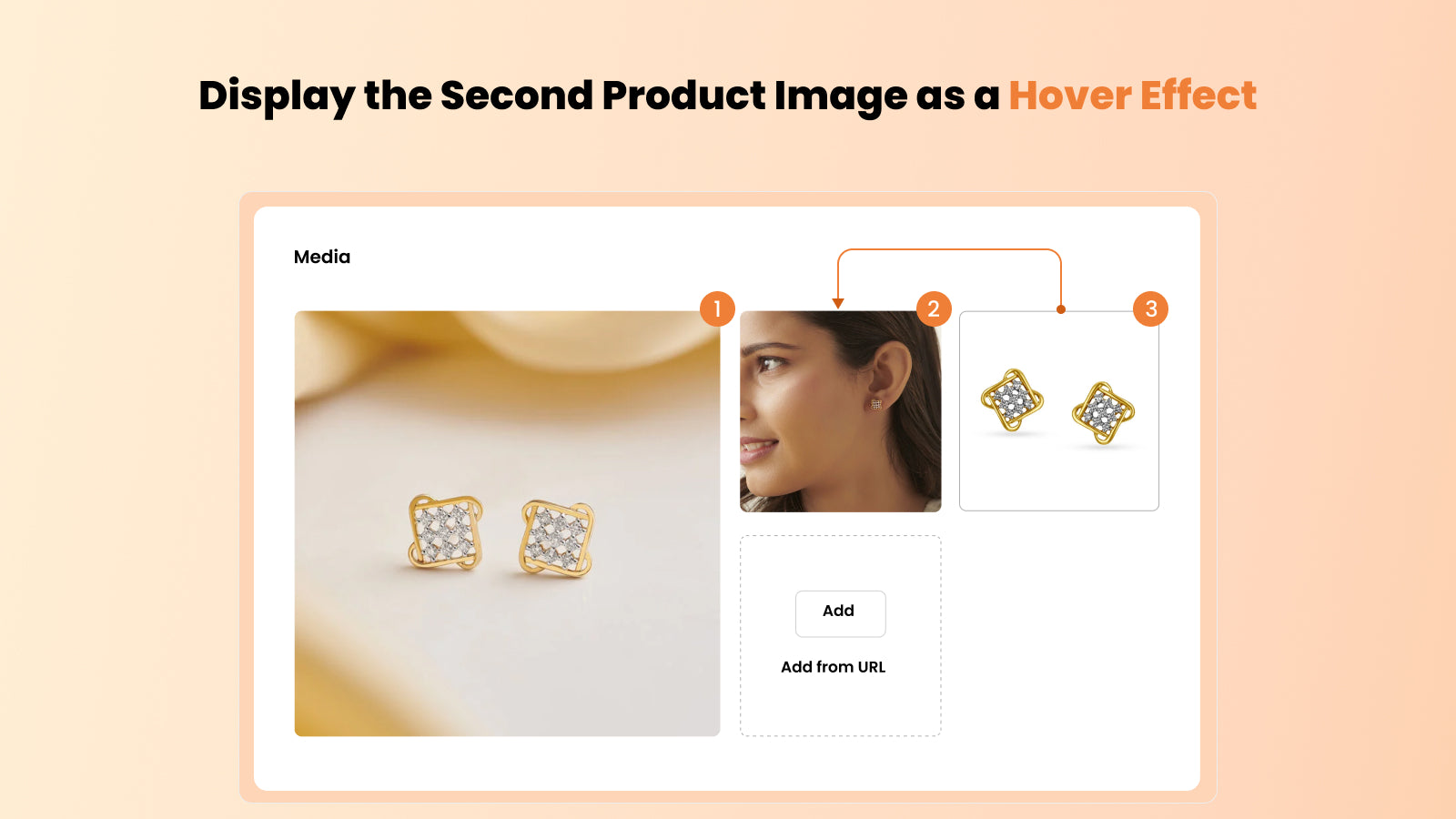
96 apps trackedUpdated 30 October 2026

Find the right app for your store

Sign in and we shortlist the Hover effects apps that fit your setup.

Continue with Google
Top ranked · #1 of 96
Instafeed ‑ Instagram Feed

Instafeed ‑ Instagram Feed by Mintt Studio

Attractive and purchasable official Instagram feeds that generate sales.

Pricing Plans: Free, $8/month, $20/month
Free Trial: 7 days
Pros
  • Quick and straightforward setup process, often completed in minutes.
  • The free version is highly functional and meets basic needs effectively.
  • Fast, helpful, and efficient resolution of issues, often praised by users.
Cons
  • Some users noted restrictions in customizing the feed for mobile views.

What merchants said

“Había calificado previamente mal a Instafeed porque mi tema, por ser un tema clásico no me permitía enlazarlo a mi página de inicio, pero lo han solucionado y ahora puedo tenerlo en mi home. ¡Muchas gracias! Son una app muy eficiente.”
Punto de Moda CR · Costa Rica · ★ 5.0 · 10/28/2026

Summary

Starting PriceFree
Free Trial7 days
Launch Date30 Sep 2016
DeveloperMintt Studio
Ratings4.9 ★ (2,249)
Install NowView charts
About the App

Instafeed ‑ Instagram Feed, a Hover effects Shopify app, has achieved 2211 reviews and an average rating of 4.9 stars since its launch 10 years ago. Designed to assist Shopify merchants with - "Show personalized Instagram Feeds that you can buy from on your store. Turn your store visitors into buyers." it is a valuable addition to the Hover effects app lineup.

Top Features:

Hover effects Shopify apps can help elevate your e-commerce game. Instafeed ‑ Instagram Feed offers a host of key features, including:

  • Grid/Slider Layout: Multi-Media Display:Display posts (pictures, Reels, videos) in a grid or sliding format (blocks or segments).
  • Layout Optimization:Layout optimized manually or automatically
  • Mobile Formatting:Customize rows and columns for mobile.
  • Shoppable Instagram posts: Tag lots of products in your posts to make Instagram shoppable.
  • Hashtag Filtering:Sort your posts using hashtags.
Pricing Details

Instafeed ‑ Instagram Feed offers 1 free plan and 2 paid plans.

Considering installing this Hover effects Shopify app? Explore the pricing details and discover if they align with your budget and needs.

  1. Starter · $0/month

    Included features: Fully responsive grid or slider layout, Instagram Reels & photo posts, Customize pop-ups, Unlimited views, No branding or watermarks, Hourly auto-sync, For all devices & themes, API access

  2. Pro · $8/month

    Included features: Tag products & collections, Shop now & add to cart buttons, Instagram Stories & carousel posts, Product reviews & prices, Up to 3 different feeds, SEO & AI discoverability, Embed feed in marketing emails

  3. Plus · $20/month

    Included features: Auto-tag products, Product & collection feeds, UGC - Instagram tagged posts, Custom media uploads, Hide, pin, reorder & filter by hashtags, Performance analytics, Unlimited feeds, Shoppable videos on the Shop app

Pros and Cons

Delve into ShopDigest's expert insights on Instafeed ‑ Instagram Feed - a Hover effects Shopify app. Our analysis of Shopify app store reviews presents unique pros and cons, allowing you to make informed decisions for your business. Read our full Instafeed ‑ Instagram Feed Hover effects App review.

Pros
  • Quick and straightforward setup process, often completed in minutes.
  • The free version is highly functional and meets basic needs effectively.
  • Fast, helpful, and efficient resolution of issues, often praised by users.
  • Works flawlessly with websites, enhancing aesthetics without technical hurdles.
  • The app’s layout is visually appealing and professional, enhancing website credibility.
  • Users appreciate the ability to tweak the feed’s appearance to match their site.
  • No noticeable impact on site speed or performance.
  • Consistently delivers as promised, with minimal disruptions.
  • Paid features are reasonably priced compared to competitors.
  • Intuitive and simple to navigate, even for non-technical users.
Cons
  • Some users noted restrictions in customizing the feed for mobile views.
  • Occasional challenges with older or specific Shopify themes.
  • A few users experienced delays in the feed appearing on their live site.
Talk to the developer

Install in Your Store Now

Your request goes to the team that built Instafeed ‑ Instagram Feed, not a support queue.

#2 of 96
Rubik Variant Images & Swatch

Rubik Variant Images & Swatch by Craftshift

Clean multiple variant images gallery & variant color swatches

Pricing Plans: Free, $25/month, $50/month, $75/month
Free Trial: 7 days
Pros
  • Rapid, personalized, and proactive assistance from the team, often resolving issues within minutes.
  • Effortless setup and compatibility with Shopify, including custom themes.
  • Intuitive design and straightforward configuration, requiring no coding knowledge.
Cons
  • A few users encountered minor configuration issues, often requiring brief support intervention.

What merchants said

“Overall the app works as intended. Had a small issue updating a variation but Zulf from customer service was able to fix it quickly and i'll be using the app more going forward. Thanks”
Filthy Rich Apparel · United States · ★ 5.0 · 10/28/2026

Summary

Starting PriceFree
Free Trial7 days
Launch Date18 Oct 2024
DeveloperCraftshift
Ratings5.0 ★ (497)
Install NowView charts
About the App

Rubik Variant Images & Swatch, a Hover effects Shopify app, has achieved 489 reviews and an average rating of 5 stars since its launch 2 years ago. Designed to assist Shopify merchants with - "Set multiple variant images, display only correct images. Show color swatches with image variants" it is a valuable addition to the Hover effects app lineup.

Top Features:

Hover effects Shopify apps can help elevate your e-commerce game. Rubik Variant Images & Swatch offers a host of key features, including:

  • Assign multiple photos per variant. Auto assign variant images with AI or MCP
  • Show multiple varient images for clean variant image gallery & product swatches
  • Show variant picker with variant image swatches, color swatches, image variants
  • Works seamless with all themes & page builder apps with no impact on page speed
  • Clear product image swatch, variant photos help reduce return rates effectively.
Pricing Details

Rubik Variant Images & Swatch offers 1 free plan and 3 paid plans.

Considering installing this Hover effects Shopify app? Explore the pricing details and discover if they align with your budget and needs.

  1. Free Plan · $0/month

    Included features: Set up total 1 product, Auto-assign with AI (50 images monthly), Variant image swatches (variant picker), Multiple variant options (color + style), Assign common images without duplication, Free setup for all themes, Live chat & email support, Video, 3D model support

  2. Starter Plan · $25/month

    Included features: Set up total 100 products, Auto-assign with AI (1k images monthly), Variant image swatches (variant picker), Multiple variant options (color + style), Assign common images without duplication, Free setup for all themes, Live chat & email support, Video, 3D model support

  3. Advanced Plan · $50/month

    Included features: Set up total 1000 products, Auto-assign with AI (5k images monthly), Variant image swatches (variant picker), Multiple variant options (color + style), Assign common images without duplication, Free setup for all themes, Live chat & email support, Video, 3D model support

  4. Premium Plan · $75/month

    Included features: Set up unlimited products, Auto-assign with AI (50k images monthly), Variant image swatches (variant picker), Multiple variant options (color + style), Assign common images without duplication, Free setup for all themes, Live chat & email support, Video, 3D model support

Pros and Cons

Delve into ShopDigest's expert insights on Rubik Variant Images & Swatch - a Hover effects Shopify app. Our analysis of Shopify app store reviews presents unique pros and cons, allowing you to make informed decisions for your business. Read our full Rubik Variant Images & Swatch Hover effects App review.
Pros
  • Rapid, personalized, and proactive assistance from the team, often resolving issues within minutes.
  • Effortless setup and compatibility with Shopify, including custom themes.
  • Intuitive design and straightforward configuration, requiring no coding knowledge.
  • Consistently delivers as advertised with smooth functionality and no unnecessary features.
  • Adapts to unique store needs, including custom theme adjustments and feature requests.
  • Improves product page aesthetics and functionality, boosting conversion rates.
  • Direct outreach from developers offering guidance and live support.
  • Eliminates manual work and simplifies variant image management.
  • Works with various themes and third-party apps like Instant.so and Gempages.
Cons
  • A few users encountered minor configuration issues, often requiring brief support intervention.
  • Some users needed guidance for optimal use of advanced customization options.
Talk to the developer

Install in Your Store Now

Your request goes to the team that built Rubik Variant Images & Swatch, not a support queue.

#3 of 96
SB Product Image Hover Effect

SB Product Image Hover Effect by SetuBridge

Hover Effect for Images on All Pages - Display Second Image When Hovered

Pricing Plans: Free
Pros
  • Quick and helpful assistance, often via WhatsApp, with issues resolved promptly.
  • The app is frequently praised for its cost-effectiveness and value for money.
  • Simple installation and intuitive functionality, requiring no coding knowledge.
Cons
  • A few reviews noted the app caused disruptions to existing site functionality.

What merchants said

“As a streetwear brand, showcasing both the front and back design of our products is essential. This app does exactly that with ease. Simple, clean, and functions perfectly. With just one hover, our audience can instantly view both sides of our apparel, improving the shopping experience and helping customers make quicker decisions. It’s a small feature with a big impact. Highly recommended for any brand that needs to visually highlight product details without complicating the layout.”
Stoned & Co Group · Malaysia · ★ 5.0 · 7/25/2025

Summary

Starting PriceFree
Free TrialFree plan
Launch Date30 Dec 2019
DeveloperSetuBridge
Ratings4.8 ★ (17)
View on ShopifyView charts
About the App

SB Product Image Hover Effect, a Hover effects Shopify app, has achieved 17 reviews and an average rating of 4.8 stars since its launch 7 years ago. Designed to assist Shopify merchants with - "The "Flip Image on Hover" effect retains users on a product, delivering a superior user experience." it is a valuable addition to the Hover effects app lineup.

Top Features:

Hover effects Shopify apps can help elevate your e-commerce game. SB Product Image Hover Effect offers a host of key features, including:

  • Hover effect:Hover effect with various images
  • Hover Animation Replacement:Automatically updating your existing hover animation
  • Back Image Flip Effect:Apply the image flip effect to both listing and product pages simultaneously.
  • Hover Animation:Hover animation effects available: Fade and Zoom-out.
  • Animation Speeds:Select the animation speed - slow, medium, or high.
Pricing Details

SB Product Image Hover Effect offers 0 free plans and 0 paid plans.

Considering installing this Hover effects Shopify app? Explore the pricing details and discover if they align with your budget and needs.

  1. · $0/month

Pros and Cons

Delve into ShopDigest's expert insights on SB Product Image Hover Effect - a Hover effects Shopify app. Our analysis of Shopify app store reviews presents unique pros and cons, allowing you to make informed decisions for your business.

Pros
  • Quick and helpful assistance, often via WhatsApp, with issues resolved promptly.
  • The app is frequently praised for its cost-effectiveness and value for money.
  • Simple installation and intuitive functionality, requiring no coding knowledge.
  • Flexibility in adjusting features like transition styles and speeds to suit user needs.
  • Consistently works as intended, enhancing store visuals without technical issues.
  • Helps customers visualize products better, improving the shopping experience.
  • Developers often reach out post-installation to offer support and address questions.
Cons
  • A few reviews noted the app caused disruptions to existing site functionality.
Talk to the developer

Install in Your Store Now

Your request goes to the team that built SB Product Image Hover Effect, not a support queue.

Keyword ranking

Top three ranked in Shopify App Store

Instafeed ‑ Instagram Feed

Show personalized Instagram Feeds that you can buy from on your store. Turn your store visitors into buyers.

4.9 ★ (2,249)$8/mo onwards
View app data →
Rubik Variant Images & Swatch

Set multiple variant images, display only correct images. Show color swatches with image variants

5.0 ★ (497)$25/mo onwards
View app data →
SB Product Image Hover Effect

The "Flip Image on Hover" effect retains users on a product, delivering a superior user experience.

4.8 ★ (17)Free
View app data →
#4 of 96
Pros
  • The app is consistently described as intuitive and easy to navigate.
  • Many users highlight quick, professional, and personalized assistance from the support team.
  • Offers extensive flexibility in design, including hotspot features and layout choices.
Cons
  • Some note the lack of zoom functionality for mobile layouts.

What merchants said

“Really great app, customer service is brilliant as well. Thank you so much Lookfy!”
Casa by Josephine Jenno · United Kingdom · ★ 5.0 · 10/1/2026

Summary

Starting PriceFree
Free Trial7 days
Launch Date09 Oct 2023
DeveloperKiteApps
Ratings4.8 ★ (230)
Install NowView charts
About the App

Lookfy Lookbook: Image Gallery, a Hover effects Shopify app, has achieved 230 reviews and an average rating of 4.8 stars since its launch 3 years ago. Designed to assist Shopify merchants with - "The easy and fast solution for creating captivating image gallery, lookbook, portfolio and carousel" it is a valuable addition to the Hover effects app lineup.

Top Features:

Hover effects Shopify apps can help elevate your e-commerce game. Lookfy Lookbook: Image Gallery offers a host of key features, including:

  • Tag multiple products with hotspots and redirect users from the image gallery
  • Group products together and smart filters. Load more images for large galleries
  • Multiple layouts gallery like row, carousel, masonry, list, shop the look & grid
  • Bulk upload unlimited photos and arrange photo positions quickly. Save more time
  • Compatible with Shopify 2.0, B2B features, and page builder. HTML embed anywhere
Pricing Details

Lookfy Lookbook: Image Gallery offers 1 free plan and 3 paid plans.

Considering installing this Hover effects Shopify app? Explore the pricing details and discover if they align with your budget and needs.

  1. Free · $0/month

    Included features: Create 1 Gallery, 50 Photos Each Gallery, Souce: Images, Lifetime Free, Multiple layouts, Shop The Look, Email & Live Chat Support, No brandmark

  2. Starter · $5.99/month

    Included features: All in Free plan, Create 10 Galleries, 250 Photos Each Gallery, Souce: Product, Collection, Premium Templates, Email & 24/7 Live Chat Support, Not available in shopify plus

  3. Growth · $12.99/month

    Included features: All in Starter plan, Create 25 Galleries, Full customization, Lightbox, Load More, Priority Chat support, Advanced Analytics, Not available in shopify plus

  4. Enterprise · $34.99/month

    Included features: All in Growth plan, Unlimited Galleries, All Unlimited Features, Priority Live Chat Support, Priority technical support, High-volume & Shopify Plus stores

Pros and Cons

Delve into ShopDigest's expert insights on Lookfy Lookbook: Image Gallery - a Hover effects Shopify app. Our analysis of Shopify app store reviews presents unique pros and cons, allowing you to make informed decisions for your business. Read our full Lookfy Lookbook: Image Gallery Hover effects App review.

Pros
  • The app is consistently described as intuitive and easy to navigate.
  • Many users highlight quick, professional, and personalized assistance from the support team.
  • Offers extensive flexibility in design, including hotspot features and layout choices.
  • The app runs smoothly and integrates well with Shopify stores.
  • Users frequently praise the clean, stylish, and professional-looking galleries.
  • The in-app chat support is noted for its efficiency and helpfulness.
  • Even the free tier provides robust functionality and support.
  • Technical problems are addressed promptly and effectively.
  • Includes advanced functionalities like "shop the look" and multi-market pricing.
  • Several users report increased customer engagement and sales.
Cons
  • Some note the lack of zoom functionality for mobile layouts.
  • A small number of users request additional design options, like rounded images.
Talk to the developer

Install in Your Store Now

Your request goes to the team that built Lookfy Lookbook: Image Gallery, not a support queue.

#5 of 96
GSC Instagram Feed, Instafeed

GSC Instagram Feed, Instafeed by Getsitecontrol

Add Instagram feed with shoppable videos, Instagram reels, UGC

Pricing Plans: Free, $9/month, $29/month
Free Trial: 7 days
Pros
  • Quick and effective assistance from the support team, often resolving issues within hours.
  • The app offers robust functionality at no cost, including customization and auto-refresh features.
  • Intuitive design and easy setup process, making it accessible for all users.
Cons
  • Some users reported needing multiple attempts to configure display settings to their preference.

What merchants said

“I looked at several instagram feed apps before settling on GSC. It's bar far the best in terms of quality - form the setup to the final look and feel, it's premium. What you get for free is really incredible and has allowed us to make a great start. We will definitely be looking to upgrade when the time is right and when we do we would naturally go for CSG. Thank you guys for not doing what others do and hide most features behind a premium door - it means a lot and allows people to experience to produce to the fullest and earns big trust.”
&Fermenta · Japan · ★ 5.0 · 10/27/2026

Summary

Starting PriceFree
Free Trial7 days
Launch Date09 Dec 2024
Ratings4.9 ★ (306)
Install NowView charts
About the App

GSC Instagram Feed, Instafeed, a Hover effects Shopify app, has achieved 296 reviews and an average rating of 4.9 stars since its launch 2 years ago. Designed to assist Shopify merchants with - "Showcase your Instagram feed, reels & UGC in modern layouts, or tag products and make it shoppable" it is a valuable addition to the Hover effects app lineup.

Top Features:

Hover effects Shopify apps can help elevate your e-commerce game. GSC Instagram Feed, Instafeed offers a host of key features, including:

  • Shoppable Instagram feed with tagged products and UGC
  • Instagram shop with shoppable videos and shopping feed
  • Tag products in Instagram reels and posts to drive more sales with shopping feed
  • Turn Instagram posts, reels, and UGC into a shopping experience with insta feed
  • Display Instagram gallery, UGC, and shoppable videos in one instafeed widget
Pricing Details

GSC Instagram Feed, Instafeed offers 1 free plan and 2 paid plans.

Considering installing this Hover effects Shopify app? Explore the pricing details and discover if they align with your budget and needs.

  1. Free · $0/month

    Included features: 5 tagged media per widget, Unlimited feeds & uploads, Product & collection tagging, Product recommendations, Instagram reels, posts & UGC, Sticky video popup, Orders & revenue attribution, Live chat support

  2. Shoppable · $9/month

    Included features: Everything in Free, 20 tagged media per widget

  3. Unlimited · $29/month

    Included features: Everything in Shoppable, Unlimited tagged media

Pros and Cons

Delve into ShopDigest's expert insights on GSC Instagram Feed, Instafeed - a Hover effects Shopify app. Our analysis of Shopify app store reviews presents unique pros and cons, allowing you to make informed decisions for your business. Read our full GSC Instagram Feed, Instafeed Hover effects App review.

Pros
  • Quick and effective assistance from the support team, often resolving issues within hours.
  • The app offers robust functionality at no cost, including customization and auto-refresh features.
  • Intuitive design and easy setup process, making it accessible for all users.
  • Extensive options for personalizing display settings and features across devices.
  • Consistently smooth operation with minimal setup time, meeting user expectations.
Cons
  • Some users reported needing multiple attempts to configure display settings to their preference.
Talk to the developer

Install in Your Store Now

Your request goes to the team that built GSC Instagram Feed, Instafeed, not a support queue.

#6 of 96
Pros
  • Consistently praised for quick, knowledgeable, and personalized assistance.
  • Regular feature additions and improvements noted by users.
  • Seamless installation and intuitive configuration process.
Cons
  • Minor issues reported, though quickly resolved by support.

What merchants said

“I am seeing my instagram, facebook, and TiKToK on my storefront. It helps validate my business and that's a good thing!”
Happy Birdie Hunting · United States · ★ 5.0 · 10/14/2026

Summary

Starting PriceFree
Free TrialFree plan
Launch Date27 Mar 2024
DeveloperShopplaza
Ratings4.9 ★ (240)
Install NowView charts
About the App

MP Instagram Feed ‑ Instafeed, a Hover effects Shopify app, has achieved 241 reviews and an average rating of 4.9 stars since its launch 2 years ago. Designed to assist Shopify merchants with - "Turn your Instagram feed, Reels, TikTok & UGC into a shoppable video gallery" it is a valuable addition to the Hover effects app lineup.

Top Features:

Hover effects Shopify apps can help elevate your e-commerce game. MP Instagram Feed ‑ Instafeed offers a host of key features, including:

  • Shoppable Instagram feed - tag unlimited products, shop the look in a tap
  • Instagram Reels, Stories, TikTok & UGC in one gallery with video autoplay
  • 11 Instagram gallery layouts - grid, slider, masonry, collage, stories bar
  • Upload your own photos & videos, then pin, hide & reorder any post
  • Product reviews, ratings & prices on your feed, plus Instagram feed analytics
Pricing Details

MP Instagram Feed ‑ Instafeed offers 0 free plans and 0 paid plans.

Considering installing this Hover effects Shopify app? Explore the pricing details and discover if they align with your budget and needs.

  1. · $0/month

Pros and Cons

Delve into ShopDigest's expert insights on MP Instagram Feed ‑ Instafeed - a Hover effects Shopify app. Our analysis of Shopify app store reviews presents unique pros and cons, allowing you to make informed decisions for your business. Read our full MP Instagram Feed ‑ Instafeed Hover effects App review.

Pros
  • Consistently praised for quick, knowledgeable, and personalized assistance.
  • Regular feature additions and improvements noted by users.
  • Seamless installation and intuitive configuration process.
  • Flexible adjustments to match brand aesthetics, often with free custom edits.
  • High value for a free app, including advanced functionalities.
  • Smooth operation and quick feed updates.
  • Clean design and straightforward navigation.
  • Effortless compatibility and seamless embedding.
  • Active engagement with user suggestions and feedback.
  • Effective display of Instagram content to boost engagement.
Cons
  • Minor issues reported, though quickly resolved by support.
  • Some non-technical users required initial support for setup.
Talk to the developer

Install in Your Store Now

Your request goes to the team that built MP Instagram Feed ‑ Instafeed, not a support queue.

#7 of 96
Instafeed for Instagram Feed

Instafeed for Instagram Feed by Adevole

Instafeed Gallery with Stories and Highlights for Social Evidence

Pricing Plans: Free, $8/month, $20/month
Pros
  • Rapid response times and effective issue resolution.
  • Simple setup process requiring no technical expertise.
  • Smooth display of feeds, stories, and highlights on websites.
Cons
  • Some users reported incomplete feed visibility.

What merchants said

“Just downloaded and already loving it so much!!Vishwesh helped me customize the layout and the placement of the widget right away and it just works perfectly. Best product, best customer support. Thank you so much!!! ”
WOOING by Connie Woo · United States · ★ 5.0 · 6/4/2026

Summary

Starting PriceFree
Free TrialFree plan
Launch Date04 Mar 2019
DeveloperAdevole
Ratings4.9 ★ (392)
Install NowView charts
About the App

Instafeed for Instagram Feed, a Hover effects Shopify app, has achieved 394 reviews and an average rating of 4.9 stars since its launch 7 years ago. Designed to assist Shopify merchants with - "Display an attractive Instagram Feed Gallery with Stories & Highlights on your store effortlessly." it is a valuable addition to the Hover effects app lineup.

Top Features:

Hover effects Shopify apps can help elevate your e-commerce game. Instafeed for Instagram Feed offers a host of key features, including:

  • Instagram Integration:Display your Instagram photo gallery on your website.
  • Integrate Instagram Stories:Display your Instagram Stories or Highlights on your website.
  • Instafeed Layout Options:Select from Instagram slider or various Instagram grid designs for Instafeed.
  • Influencer Conversion:Promote on Instagram/ give shoutouts to turn visitors into small-scale influencers.
  • Chat support customization:Customizing the look and feel of your Instagram Feed manually through chat support.
Pricing Details

Instafeed for Instagram Feed offers 1 free plan and 2 paid plans.

Considering installing this Hover effects Shopify app? Explore the pricing details and discover if they align with your budget and needs.

  1. Free Preview · $0/month

    Included features: Free up to 1,000 storefront visits, Every layout and shoppable posts, 10 AI image credits each month

  2. Sell · $8/month

    Included features: Unlimited storefront visits, Shoppable posts, stories, highlights, Grid, carousel, collage and more, Multiple feeds, each on its own pages, Link in bio page with click tracking, Judge.me star ratings on posts, Feed and link-in-bio insights, Custom CSS, no Instafeed branding

  3. Growth · $20/month

    Included features: Everything in Sell, 100 AI image credits each month, AI product photos with captions, Spotlight reviews as AI posts, Priority support

Pros and Cons

Delve into ShopDigest's expert insights on Instafeed for Instagram Feed - a Hover effects Shopify app. Our analysis of Shopify app store reviews presents unique pros and cons, allowing you to make informed decisions for your business. Read our full Instafeed for Instagram Feed Hover effects App review.

Pros
  • Rapid response times and effective issue resolution.
  • Simple setup process requiring no technical expertise.
  • Smooth display of feeds, stories, and highlights on websites.
  • Willingness to accommodate specific branding or layout requests.
  • Enhances website aesthetics with modern, professional widgets.
  • Intuitive interface and straightforward navigation.
  • Quick fixes for technical or customization problems.
  • No extra charges for key functionalities like branding removal.
  • Effective tool for showcasing customer engagement.
  • Supports posts, stories, and highlights in one widget.
Cons
  • Some users reported incomplete feed visibility.
  • A few users noted missing functionalities like product tagging.
Talk to the developer

Install in Your Store Now

Your request goes to the team that built Instafeed for Instagram Feed, not a support queue.

#8 of 96
Essential Grid Gallery & video

Essential Grid Gallery & video by ShopiDevs

Shoppable Lookbook+UGC, Image Gallery & YouTube Video Carousel

Free Trial: 7 days
Pros
  • Consistently praised for fast, professional, and helpful responses, often resolving issues within minutes.
  • Offers extensive customization options for galleries, grids, and layouts, meeting diverse user needs.
  • Intuitive design and ease of setup, with drag-and-drop functionality for quick gallery creation.
Cons
  • Some users found the interface initially confusing or scattered, requiring a learning curve.

What merchants said

“Excelente atencion neesitaba una personalizacion y me ayudaran en todo , muchas gracias”
Jerseylazo · Mexico · ★ 5.0 · 10/20/2026

Summary

Starting PriceFree
Free Trial7 days
Launch Date12 Oct 2023
DeveloperShopiDevs
Ratings4.9 ★ (220)
Install NowView charts
About the App

Essential Grid Gallery & video, a Hover effects Shopify app, has achieved 219 reviews and an average rating of 4.9 stars since its launch 3 years ago. Designed to assist Shopify merchants with - "Create Portfolio, Shoppable Lookbook, Photo Gallery,YouTube Video carousel, Instagram galeria." it is a valuable addition to the Hover effects app lineup.

Top Features:

Hover effects Shopify apps can help elevate your e-commerce game. Essential Grid Gallery & video offers a host of key features, including:

  • 80+ High-Converting product Gallery Templates with advanced analytics & report
  • Image Gallery: Grid, Masonry, Portfolio & Collage Style photo gallery
  • Shoppable Video Gallery: YouTube Shorts, UGC,Instagram reels or Shopify-Uploaded
  • Video Gallery: Shopify, Vimeo, Instagram feed & YouTube Video carousel
  • Lookbook: Shop the look by tagging products from lifestyle gallery hotspots
Pricing Details

Essential Grid Gallery & video offers 1 free plan and 3 paid plans.

Considering installing this Hover effects Shopify app? Explore the pricing details and discover if they align with your budget and needs.

  1. FREE · $0/month

    Included features: 1 Gallery, 4 Templates, 8 Skins Style, Max 12 Images, File Source: Image, Image caption, link & sorting, Lightbox, SEO alt tag, No brandmark

  2. BASIC · $5.99/month

    Included features: Create 5 Grid Gallery, 15 Template & 12 Skin, Gallery Analytics, Unlimited Image, Source: Product, Collection, Blog, Video: YouTube, Vimeo, Shopify Media, Shoppable Video Gallery, Instagram Feed, 30 Hotspot Product Tags (Lookbook)

  3. STANDARD · $12.99/month

    Included features: Create 15 Gallery, 40 Template & 38 Skin Style, Gallery Analytics: Clicks, Cart & Orders, Shoppable Video Gallery, Source: Product, Collection, Video, Blog, Video: YouTube, Vimeo, Shopify Media, Instagram Feed/Reels, or Post Embed, Unlimited Hotspot Tags (Lookbook)

  4. BUSINESS · $29.99/month

    Included features: Unlimited Grid Gallery, Unlimited Templates, Unlimited Skins, All Unlimited Feature, Priority Technical Support, Unlimited Lookbook Galleries

Pros and Cons

Delve into ShopDigest's expert insights on Essential Grid Gallery & video - a Hover effects Shopify app. Our analysis of Shopify app store reviews presents unique pros and cons, allowing you to make informed decisions for your business. Read our full Essential Grid Gallery & video Hover effects App review.

Pros
  • Consistently praised for fast, professional, and helpful responses, often resolving issues within minutes.
  • Offers extensive customization options for galleries, grids, and layouts, meeting diverse user needs.
  • Intuitive design and ease of setup, with drag-and-drop functionality for quick gallery creation.
  • Support team efficiently troubleshoots and resolves technical or setup problems.
  • Produces sleek, elegant galleries that enhance website aesthetics.
  • Immediate assistance via live chat, often available outside standard hours.
  • Provides significant functionality even in the free tier, including generous image limits.
  • Stable and fast operation with minimal bugs or disruptions.
  • Clear guides and support materials aid in setup and troubleshooting.
  • Smooth installation and initial setup, often completed within minutes.
Cons
  • Some users found the interface initially confusing or scattered, requiring a learning curve.
  • Occasional glitches or odd behaviors reported, though not critical to functionality.
  • A few users encountered display problems on mobile devices, though quickly resolved by support.
  • Extensive customization options may feel overwhelming to casual users.
Talk to the developer

Install in Your Store Now

Your request goes to the team that built Essential Grid Gallery & video, not a support queue.

#9 of 96
Storista Shoppable Videos UGC

Storista Shoppable Videos UGC by Storista LLC

Social proof gallery, shopping feature in stories, Instagram feed for User-Generated Content.

Free Trial: 14 days
Pros
  • Consistently praised for responsiveness, expertise, and willingness to customize solutions.
  • Smooth and easy setup with Shopify, requiring minimal technical effort.
  • Effective tools for showcasing Instagram reels, videos, and UGC to boost conversions.
Cons
  • Some users criticized the impression-based billing as unfair for high-traffic sites.

What merchants said

“Excellent app, always so responsive and able to accomodate”
Skincare Edit · United Arab Emirates · ★ 5.0 · 12/17/2025

Summary

Starting PriceFree
Free Trial14 days
Launch Date19 Feb 2021
DeveloperStorista LLC
Ratings4.9 ★ (55)
Install NowView charts
About the App

Storista Shoppable Videos UGC, a Hover effects Shopify app, has achieved 54 reviews and an average rating of 4.9 stars since its launch 5 years ago. Designed to assist Shopify merchants with - "Increase sales by using Instagram Reels, Feed galleries, Stories, and Highlights to showcase your products." it is a valuable addition to the Hover effects app lineup.

Top Features:

Hover effects Shopify apps can help elevate your e-commerce game. Storista Shoppable Videos UGC offers a host of key features, including:

  • Instagram E-commerce:Instagram Reels and Posts galleries you can shop from
  • Currency and Localization Support:Built-in support for multiple currencies and localization.
  • Layout Comparison:Layouts for mobile and desktop
  • Auto-sync Instagram content:Link your Instagram account to automatically sync all content.
  • Optimized Widgets:Our widgets are designed to perform well without damaging your SEO rankings.
Pricing Details

Storista Shoppable Videos UGC offers 1 free plan and 3 paid plans.

Considering installing this Hover effects Shopify app? Explore the pricing details and discover if they align with your budget and needs.

  1. Free · $0/month

    Included features: Unlimited videos & views, Shop app integration, Manual Import from Instagram, TikTok, Storista branding

  2. Starter · $15/month

    Included features: Everything in Free, plus, GEO/SEO optimization, Multiple products per video, Manual videos for PDP, Remove Storista branding, Auto sync from Instagram/TikTok, Manual captions uploads

  3. Growth · $49/month

    Included features: Everything in Starter, plus:, AI Smart Tagging, Advanced analytics, Auto captions for 40 languages, A/B tests to track performance, Smart videos to PDP

  4. Scale · $199/month

    Included features: Everything in Growth, plus, Advanced analytics, VIP Support, Multiple stores, Custom widgets

Pros and Cons

Delve into ShopDigest's expert insights on Storista Shoppable Videos UGC - a Hover effects Shopify app. Our analysis of Shopify app store reviews presents unique pros and cons, allowing you to make informed decisions for your business. Read our full Storista Shoppable Videos UGC Hover effects App review.

Pros
  • Consistently praised for responsiveness, expertise, and willingness to customize solutions.
  • Smooth and easy setup with Shopify, requiring minimal technical effort.
  • Effective tools for showcasing Instagram reels, videos, and UGC to boost conversions.
  • Highly adaptable widgets and layouts to match brand aesthetics and specific needs.
  • Quick loading times and efficient video compression for better user experience.
  • Notable improvements in engagement, conversions, and revenue reported by multiple users.
  • Intuitive design and clear tutorials for effortless navigation.
  • Regular auto-sync functionality for fresh content without manual intervention.
Cons
  • Some users criticized the impression-based billing as unfair for high-traffic sites.
  • Requests for automatic video playback to enhance engagement were noted.
Talk to the developer

Install in Your Store Now

Your request goes to the team that built Storista Shoppable Videos UGC, not a support queue.

#10 of 96
Uploadify ‑ Customer Gallery

Uploadify ‑ Customer Gallery by Switch Apps

Boost social proof with a customer image gallery

Pricing Plans: Free, $4.99/month, $12.99/month
Free Trial: 7 days
Pros
  • Quick response times and helpful assistance for user inquiries and feature requests.
  • Offers advanced capabilities like product tagging, customer email integration, and customizable galleries.
  • Simple installation process and intuitive interface for seamless user experience.
Cons
  • Some users expressed curiosity about future updates due to the app being relatively new.

What merchants said

“After contacting support about one editing tool within the app, they explained a workaround, which worked...but then, within 5 minutes, they contacted me explaining they did a small update and I was able to edit an image more easily.They listen! Thankyou.”
Really Into Dogs · Australia · ★ 5.0 · 8/5/2026

Summary

Starting PriceFree
Free Trial7 days
Launch Date19 Dec 2024
DeveloperSwitch Apps
Ratings4.7 ★ (23)
View on ShopifyView charts
About the App

Uploadify ‑ Customer Gallery, a Hover effects Shopify app, has achieved 23 reviews and an average rating of 4.7 stars since its launch 2 years ago. Designed to assist Shopify merchants with - "Build trust with a stunning filterable & shoppable customer image gallery" it is a valuable addition to the Hover effects app lineup.

Top Features:

Hover effects Shopify apps can help elevate your e-commerce game. Uploadify ‑ Customer Gallery offers a host of key features, including:

  • Collect UGC - Customers upload images and videos directly on your gallery page
  • Product gallery - Customers add relevant products on each gallery post
  • Automatically display relevant images & videos on each product gallery
  • Customers filter by products & custom fields to find what they're looking for
  • Easily import existing content from Instagram feeds, TikTok and Judge.me
Pricing Details

Uploadify ‑ Customer Gallery offers 1 free plan and 2 paid plans.

Considering installing this Hover effects Shopify app? Explore the pricing details and discover if they align with your budget and needs.

  1. Starter · $0/month

    Included features: 1 Gallery, 10 Approved Posts, Unlimited Custom Fields & Filters, Grid & Masonry Layouts, Product Tagging, Judge.me Photo Imports, Discount & Reward Incentives, Product Page Gallery

  2. Basic · $4.99/month

    Included features: Everything in Starter plus:, 30 Approved Posts per Month, Comments on Posts

  3. Premium · $12.99/month

    Included features: Everything in Basic plus:, Unlimited Approved Posts per Month, Unlimited Galleries, Automated AI Moderation, Video Uploads, Instagram and TikTok Photo/Video Imports

Pros and Cons

Delve into ShopDigest's expert insights on Uploadify ‑ Customer Gallery - a Hover effects Shopify app. Our analysis of Shopify app store reviews presents unique pros and cons, allowing you to make informed decisions for your business.

Pros
  • Quick response times and helpful assistance for user inquiries and feature requests.
  • Offers advanced capabilities like product tagging, customer email integration, and customizable galleries.
  • Simple installation process and intuitive interface for seamless user experience.
Cons
  • Some users expressed curiosity about future updates due to the app being relatively new.
Talk to the developer

Install in Your Store Now

Your request goes to the team that built Uploadify ‑ Customer Gallery, not a support queue.

Showing 1-10 out of 96

Best Hover effects Apps in Shopify

Hover effects apps are designed to address specific needs and challenges faced by Shopify store merchants. Whether you're looking to optimize your store's SEO, improve customer support, enhance product listings, or streamline your inventory management, there's an app for that.

Discover a wealth of cutting-edge tools and features offered by these remarkable Hover effects Shopify apps, including Instafeed ‑ Instagram Feed, Rubik Variant Images & Swatch, SB Product Image Hover Effect, and many more. Our app collection provides a comprehensive overview of the top apps in the Hover effects category, enabling you to select the ones that will take your e-commerce venture to new heights.

Empower your Shopify store with the best Hover effects apps the platform has to offer and elevate your online business.

Explore Apps by Criteria:

  1. Most Popular Hover effects Apps
  2. Highest Reviewed Hover effects Apps
  3. Top Rated Hover effects Apps
  4. Newly Launched Hover effects Apps

Overview of the Above Top Hover effects Shopify Apps in October 2026

There are a number of Hover effects apps in the Shopify app store designed to supercharge your e-commerce success. Whether you're a seasoned entrepreneur or just starting your online journey, the right apps can make all the difference. We have listed the top Shopify apps in the Hover effects category, based on their popularity and average rating, to help you make informed decisions.

App NameCategoryDeveloperStarting PriceFree PlanReviews
Instafeed ‑ Instagram FeedInstafeed ‑ Instagram FeedBuilt for ShopifyHover effectsMintt Studio$0/month● Available4.9 ★ (2211)
Rubik Variant Images & SwatchRubik Variant Images & SwatchBuilt for ShopifyHover effectsCraftshift$0/month● Available5.0 ★ (489)
SB Product Image Hover EffectSB Product Image Hover EffectBuilt for ShopifyHover effectsSetuBridge$0/month● Unavailable4.8 ★ (17)
Lookfy Lookbook: Image GalleryLookfy Lookbook: Image GalleryBuilt for ShopifyHover effectsKiteApps$0/month● Available4.8 ★ (230)
GSC Instagram Feed, InstafeedGSC Instagram Feed, InstafeedBuilt for ShopifyHover effectsGetsitecontrol$0/month● Available4.9 ★ (296)
MP Instagram Feed ‑ InstafeedMP Instagram Feed ‑ InstafeedBuilt for ShopifyHover effectsShopplaza$0/month● Unavailable4.9 ★ (241)
Instafeed for Instagram FeedInstafeed for Instagram FeedHover effectsAdevole$0/month● Available4.9 ★ (394)
Essential Grid Gallery & videoEssential Grid Gallery & videoBuilt for ShopifyHover effectsShopiDevs$0/month● Available4.9 ★ (219)
Storista Shoppable Videos UGCStorista Shoppable Videos UGCBuilt for ShopifyHover effectsStorista LLC$0/month● Available4.9 ★ (54)
Uploadify ‑ Customer GalleryUploadify ‑ Customer GalleryBuilt for ShopifyHover effectsSwitch Apps$0/month● Available4.7 ★ (23)

Have a Closer Look at the Best Hover effects Apps

Now let us jump in and check out these Top 5 Hover effects Shopify apps.

Instafeed ‑ Instagram Feed screenshot 1
Instafeed ‑ Instagram Feed screenshot 2
Instafeed ‑ Instagram Feed screenshot 3
Instafeed ‑ Instagram Feed screenshot 4
Instafeed ‑ Instagram Feed screenshot 5
Instafeed ‑ Instagram Feed screenshot 6
Instafeed ‑ Instagram Feed screenshot 7
Instafeed ‑ Instagram Feed screenshot 8
Instafeed ‑ Instagram Feed screenshot 9

Reviews

Most Recent Review

5.0 ★Amazing

Había calificado previamente mal a Instafeed porque mi tema, por ser un tema clásico no me permitía enlazarlo a mi página de inicio, pero lo han solucionado y ahora puedo tenerlo en mi home. ¡Muchas gracias! Son una app muy eficiente.

Punto de Moda CR · Costa Rica · 28 Oct 2026

Recent Review

5.0 ★Amazing

It was good. I’m excited to start with the upgrade.

Girl Power Gear · United States · 28 Oct 2026
Why is Instafeed ‑ Instagram Feed a top Hover effects Shopify app?
With an impressive overall rating of 4.9 stars and 2,249 reviews, Instafeed ‑ Instagram Feed stands out as one of the top Hover effects Shopify apps. The main objective of the app is - Show personalized Instagram Feeds that you can buy from on your store. Turn your store visitors into buyers. Its purpose underscores its significance in enhancing your Shopify store experience.

ShopDigest selects the top Shopify apps in the Hover effects category based on various parameters, including the number of installations across Shopify stores, the app's ranking in the Shopify App Store, the number of merchants' reviews, and its overall customer rating, among other factors.
Why integrate Instafeed ‑ Instagram Feed with your Shopify store?
By integrating a Hover effects app with your Shopify store, you unlock a range of benefits. Instafeed ‑ Instagram Feed, a popular Hover effects Shopify app, brings the following functionalities and value to a Shopify store, including:
  • Grid/Slider Layout: Multi-Media Display: Display posts (pictures, Reels, videos) in a grid or sliding format (blocks or segments).
  • Layout Optimization: Layout optimized manually or automatically
  • Mobile Formatting: Customize rows and columns for mobile.
  • Shoppable Instagram posts: Tag lots of products in your posts to make Instagram shoppable.
  • Hashtag Filtering: Sort your posts using hashtags.
Learn more about the Instafeed ‑ Instagram Feed features in detail.

Shopify merchants highlight key advantages, such as Show posts (photos, Reels, videos) in grid or slider layout (squares or tiles), Manual or auto optimized layout, and more,
What are some of the top alternatives for Instafeed ‑ Instagram Feed?
Looking for options? Dive into a selection of Hover effects apps that rival Instafeed ‑ Instagram Feed, each offering unique features to enhance your Shopify store. Consider these top alternatives: which can match or even surpass the offerings of Instafeed ‑ Instagram Feed, giving you flexibility and choice.
profile picture 1profile picture 2profile picture 3profile picture 4

Install Now

Our experts are here to help you.

Rubik Variant Images & Swatch screenshot 1
Rubik Variant Images & Swatch screenshot 2
Rubik Variant Images & Swatch screenshot 3
Rubik Variant Images & Swatch screenshot 4
Rubik Variant Images & Swatch screenshot 5
Rubik Variant Images & Swatch screenshot 6
Rubik Variant Images & Swatch screenshot 7

Reviews

Most Recent Review

5.0 ★Amazing

Overall the app works as intended. Had a small issue updating a variation but Zulf from customer service was able to fix it quickly and i'll be using the app more going forward. Thanks

Filthy Rich Apparel · United States · 28 Oct 2026

Recent Review

5.0 ★Amazing

Great app. Uploading without this application would last ages.

PHOTOSTONE · Germany · 26 Oct 2026
Why is Rubik Variant Images & Swatch a top Hover effects Shopify app?
With an impressive overall rating of 5 stars and 497 reviews, Rubik Variant Images & Swatch stands out as one of the top Hover effects Shopify apps. The main objective of the app is - Set multiple variant images, display only correct images. Show color swatches with image variants Its purpose underscores its significance in enhancing your Shopify store experience.

ShopDigest selects the top Shopify apps in the Hover effects category based on various parameters, including the number of installations across Shopify stores, the app's ranking in the Shopify App Store, the number of merchants' reviews, and its overall customer rating, among other factors.
Why integrate Rubik Variant Images & Swatch with your Shopify store?
By integrating a Hover effects app with your Shopify store, you unlock a range of benefits. Rubik Variant Images & Swatch, a popular Hover effects Shopify app, brings the following functionalities and value to a Shopify store, including:
  • Assign multiple photos per variant. Auto assign variant images with AI or MCP
  • Show multiple varient images for clean variant image gallery & product swatches
  • Show variant picker with variant image swatches, color swatches, image variants
  • Works seamless with all themes & page builder apps with no impact on page speed
  • Clear product image swatch, variant photos help reduce return rates effectively.
Learn more about the Rubik Variant Images & Swatch features in detail.

Shopify merchants highlight key advantages, such as Assign multiple photos per variant. Auto assign variant images with AI or MCP, Show multiple varient images for clean variant image gallery & product swatches, and more,
What are some of the top alternatives for Rubik Variant Images & Swatch?
Looking for options? Dive into a selection of Hover effects apps that rival Rubik Variant Images & Swatch, each offering unique features to enhance your Shopify store. Consider these top alternatives: which can match or even surpass the offerings of Rubik Variant Images & Swatch, giving you flexibility and choice.
profile picture 1profile picture 2profile picture 3profile picture 4

Install Now

Our experts are here to help you.

SB Product Image Hover Effect

3. SB Product Image Hover Effect

4.8 ★ (17)
SB Product Image Hover Effect screenshot 1
SB Product Image Hover Effect screenshot 2
SB Product Image Hover Effect screenshot 3
SB Product Image Hover Effect screenshot 4
SB Product Image Hover Effect screenshot 5

Reviews

Most Recent Review

5.0 ★Amazing

As a streetwear brand, showcasing both the front and back design of our products is essential. This app does exactly that with ease. Simple, clean, and functions perfectly. With just one hover, our audience can instantly view both sides of our apparel, improving the shopping experience and helping customers make quicker decisions. It’s a small feature with a big impact. Highly recommended for any brand that needs to visually highlight product details without complicating the layout.

Stoned & Co Group · Malaysia · 25 Jul 2025

Recent Review

5.0 ★Amazing

I initially gave a 2-star rating due to an issue in the Frequently Bought Together (FBT) section — videos or GIFs would autoplay on hover or light touch, especially on mobile, interfering with the "Add to Cart" button and disrupting the user experience.However, I was happy by how quickly the development team responded to my concern. They were helpful, professional, and proactive in assisting me with a solution.Thanks to the prompt support, I'm updating my rating to 5 stars. Great customer service makes all the difference!

House of Kuttikat · Canada · 23 Jul 2025
Why is SB Product Image Hover Effect a top Hover effects Shopify app?
With an impressive overall rating of 4.8 stars and 17 reviews, SB Product Image Hover Effect stands out as one of the top Hover effects Shopify apps. The main objective of the app is - The "Flip Image on Hover" effect retains users on a product, delivering a superior user experience. Its purpose underscores its significance in enhancing your Shopify store experience.

ShopDigest selects the top Shopify apps in the Hover effects category based on various parameters, including the number of installations across Shopify stores, the app's ranking in the Shopify App Store, the number of merchants' reviews, and its overall customer rating, among other factors.
Why integrate SB Product Image Hover Effect with your Shopify store?
By integrating a Hover effects app with your Shopify store, you unlock a range of benefits. SB Product Image Hover Effect, a popular Hover effects Shopify app, brings the following functionalities and value to a Shopify store, including:
  • Hover effect: Hover effect with various images
  • Hover Animation Replacement: Automatically updating your existing hover animation
  • Back Image Flip Effect: Apply the image flip effect to both listing and product pages simultaneously.
  • Hover Animation: Hover animation effects available: Fade and Zoom-out.
  • Animation Speeds: Select the animation speed - slow, medium, or high.
Learn more about the SB Product Image Hover Effect features in detail.

Shopify merchants highlight key advantages, such as Multiple images on hover effect, Automatically replacing your current hover animation, and more,
What are some of the top alternatives for SB Product Image Hover Effect?
Looking for options? Dive into a selection of Hover effects apps that rival SB Product Image Hover Effect, each offering unique features to enhance your Shopify store. Consider these top alternatives: which can match or even surpass the offerings of SB Product Image Hover Effect, giving you flexibility and choice.
profile picture 1profile picture 2profile picture 3profile picture 4

Install Now

Our experts are here to help you.

Lookfy Lookbook: Image Gallery screenshot 1
Lookfy Lookbook: Image Gallery screenshot 2
Lookfy Lookbook: Image Gallery screenshot 3
Lookfy Lookbook: Image Gallery screenshot 4
Lookfy Lookbook: Image Gallery screenshot 5
Lookfy Lookbook: Image Gallery screenshot 6
Lookfy Lookbook: Image Gallery screenshot 7

Reviews

Most Recent Review

5.0 ★Amazing

Really great app, customer service is brilliant as well. Thank you so much Lookfy!

Casa by Josephine Jenno · United Kingdom · 01 Oct 2026

Recent Review

5.0 ★Amazing

This app is very easy to use, and I would tell anyone to use it!

K's Body Kare · Canada · 23 Aug 2026
Why is Lookfy Lookbook: Image Gallery a top Hover effects Shopify app?
With an impressive overall rating of 4.8 stars and 230 reviews, Lookfy Lookbook: Image Gallery stands out as one of the top Hover effects Shopify apps. The main objective of the app is - The easy and fast solution for creating captivating image gallery, lookbook, portfolio and carousel Its purpose underscores its significance in enhancing your Shopify store experience.

ShopDigest selects the top Shopify apps in the Hover effects category based on various parameters, including the number of installations across Shopify stores, the app's ranking in the Shopify App Store, the number of merchants' reviews, and its overall customer rating, among other factors.
Why integrate Lookfy Lookbook: Image Gallery with your Shopify store?
By integrating a Hover effects app with your Shopify store, you unlock a range of benefits. Lookfy Lookbook: Image Gallery, a popular Hover effects Shopify app, brings the following functionalities and value to a Shopify store, including:
  • Tag multiple products with hotspots and redirect users from the image gallery
  • Group products together and smart filters. Load more images for large galleries
  • Multiple layouts gallery like row, carousel, masonry, list, shop the look & grid
  • Bulk upload unlimited photos and arrange photo positions quickly. Save more time
  • Compatible with Shopify 2.0, B2B features, and page builder. HTML embed anywhere
Learn more about the Lookfy Lookbook: Image Gallery features in detail.

Shopify merchants highlight key advantages, such as Tag multiple products with hotspots and redirect users from the image gallery, Group products together and smart filters. Load more images for large galleries, and more,
What are some of the top alternatives for Lookfy Lookbook: Image Gallery?
Looking for options? Dive into a selection of Hover effects apps that rival Lookfy Lookbook: Image Gallery, each offering unique features to enhance your Shopify store. Consider these top alternatives: which can match or even surpass the offerings of Lookfy Lookbook: Image Gallery, giving you flexibility and choice.
profile picture 1profile picture 2profile picture 3profile picture 4

Install Now

Our experts are here to help you.

GSC Instagram Feed, Instafeed screenshot 1
GSC Instagram Feed, Instafeed screenshot 2
GSC Instagram Feed, Instafeed screenshot 3
GSC Instagram Feed, Instafeed screenshot 4
GSC Instagram Feed, Instafeed screenshot 5
GSC Instagram Feed, Instafeed screenshot 6
GSC Instagram Feed, Instafeed screenshot 7
GSC Instagram Feed, Instafeed screenshot 8
GSC Instagram Feed, Instafeed screenshot 9
GSC Instagram Feed, Instafeed screenshot 10
GSC Instagram Feed, Instafeed screenshot 11
GSC Instagram Feed, Instafeed screenshot 12

Reviews

Most Recent Review

5.0 ★Amazing

I looked at several instagram feed apps before settling on GSC. It's bar far the best in terms of quality - form the setup to the final look and feel, it's premium. What you get for free is really incredible and has allowed us to make a great start. We will definitely be looking to upgrade when the time is right and when we do we would naturally go for CSG. Thank you guys for not doing what others do and hide most features behind a premium door - it means a lot and allows people to experience to produce to the fullest and earns big trust.

&Fermenta · Japan · 27 Oct 2026

Recent Review

5.0 ★Amazing

It has awesome features! I love how I can customize so many details.

Tea Summit Club · Canada · 12 Oct 2026
Why is GSC Instagram Feed, Instafeed a top Hover effects Shopify app?
With an impressive overall rating of 4.9 stars and 306 reviews, GSC Instagram Feed, Instafeed stands out as one of the top Hover effects Shopify apps. The main objective of the app is - Showcase your Instagram feed, reels & UGC in modern layouts, or tag products and make it shoppable Its purpose underscores its significance in enhancing your Shopify store experience.

ShopDigest selects the top Shopify apps in the Hover effects category based on various parameters, including the number of installations across Shopify stores, the app's ranking in the Shopify App Store, the number of merchants' reviews, and its overall customer rating, among other factors.
Why integrate GSC Instagram Feed, Instafeed with your Shopify store?
By integrating a Hover effects app with your Shopify store, you unlock a range of benefits. GSC Instagram Feed, Instafeed, a popular Hover effects Shopify app, brings the following functionalities and value to a Shopify store, including:
  • Shoppable Instagram feed with tagged products and UGC
  • Instagram shop with shoppable videos and shopping feed
  • Tag products in Instagram reels and posts to drive more sales with shopping feed
  • Turn Instagram posts, reels, and UGC into a shopping experience with insta feed
  • Display Instagram gallery, UGC, and shoppable videos in one instafeed widget
Learn more about the GSC Instagram Feed, Instafeed features in detail.

Shopify merchants highlight key advantages, such as Shoppable Instagram feed with tagged products and UGC, Instagram shop with shoppable videos and shopping feed, and more,
What are some of the top alternatives for GSC Instagram Feed, Instafeed?
Looking for options? Dive into a selection of Hover effects apps that rival GSC Instagram Feed, Instafeed, each offering unique features to enhance your Shopify store. Consider these top alternatives: which can match or even surpass the offerings of GSC Instagram Feed, Instafeed, giving you flexibility and choice.
profile picture 1profile picture 2profile picture 3profile picture 4

Install Now

Our experts are here to help you.

How We Selected the Top Shopify Apps in Hover effects

Our team employs a comprehensive evaluation process that takes into account various factors to ensure you are presented with only the best options. Here's how we do it:

  • By Reviews: We understand the value of peer recommendations, and that's why we've sorted these top Shopify apps in Hover effects based on the highest praise received from users, ensuring you get tried-and-tested solutions. The top listed apps here have earned the trust of fellow Shopify merchants. Jump to Highest Reviewed Hover effects Shopify Apps.
  • By Price: Budget consideration is important while choosing a Shopify app for your store. That's why we have also categorized these top Shopify apps in Hover effects by price, enabling you to find the perfect solutions that align with your financial goals without compromising on quality. Jump to Top Paid Hover effects Shopify Apps.
  • By Launch Date: To keep you updated about the latest innovations, we've organized these Shopify apps based on their launch date. You can check the list of recently launched top apps in Hover effects that could bring innovative solutions to your Shopify store. Jump to Newly Launched Hover effects Shopify Apps.
  • By Popularity: We feature the Hover effects apps that are making waves among Shopify store owners, helping you stay ahead of the curve. These apps have captured the attention of ecommerce owners and are listed as the top in the popularity section of the Shopify app store. Jump to Most Popular Hover effects Shopify Apps.
  • By Ratings: We prioritize apps that have consistently earned high ratings, reflecting their impact and user satisfaction. These Hover effects apps with excellent ratings stand out from their competitors, making them a solid choice for your business needs. Jump to Top Rated Hover effects Shopify Apps.
  • By Best Match: We harness the power of Shopify's own recommendations! Our selection considers apps that Shopify suggests as a strong fit for Hover effects, ensuring you access the platform's expert insights. Jump to Best Match Hover effects Shopify Apps.

With these criteria in mind, we strive to present you with a diverse and well-rounded selection of the top Hover effects Shopify apps in 2026. Rest assured, our selection process is designed to assist you in finding the most suitable solutions for your Shopify store needs.

How to Choose the Best Hover effects Shopify App For Your Store

Choosing the right Hover effects Shopify App for your store depends on various factors specific to your business goals. To make an informed decision, follow these steps:

  • Identify Your Requirements: Begin by understanding the specific goals and challenges your store faces. List the key features and functionalities you need in a Hover effects app to address these requirements effectively.
  • Read User Reviews: Explore user reviews and ratings for the Hover effects apps you are considering. Real-hand experiences from other Shopify merchants can provide valuable insights into how each app performs.
  • Compare Features: Use our app comparison page, where you can add the Hover effects apps of your choice and perform a side-by-side comparison. This page allows you to evaluate each app's features, pricing, support, and other essential factors to help you find the best fit for your store.
  • Consider Budget: While some apps offer free plans with basic functionalities, others may require a paid subscription for access to advanced features. You can check out our complete list of Top Paid Hover effects Shopify apps, and choose an app that aligns with your budget and can grow with your store as it expands.
  • Support and Documentation: Check the documentation and customer support resources of the app. A well-supported Hover effects app that offers comprehensive documentation can help you implement and use it more effectively.
  • Integration Compatibity: Ensure that the Hover effects app you choose can seamlessly integrate with your existing apps and theme to avoid compatibility issues.
  • Trial Periods: Some Hover effects apps offer a free trial period that enables you to test the app's capabilities before purchasing a subscription.

Each Shopify store is different, and the best Hover effects app for your store will be one that aligns closely with your specific business requirements.

More Information on Hover effects Shopify Apps

Now let us jump in and check out these Top 10 Hover effects Shopify apps.

In this comprehensive guide, we've provided you with a complete collection of Hover effects Shopify apps that can help streamline your ecommerce journey. These Hover effects Shopify apps cover a wide spectrum of needs to take your store forward. From 96 outstanding apps, we've covered every facet of Hover effects, ensuring you have access to a vast range of tools to enhance your Shopify store.

However, choosing the perfect Hover effects app for your specific requirements is key. Consider your specific goals, read user reviews, and compare features to find the ideal match for your Shopify store. Our Shopify app comparison page simplifies this process by allowing you to create side-by-side comparisons for any Hover effects apps of your choice. ShopDigest guides you through the selection process, making it easier to find and install the perfect Hover effects app that aligns with your goals.

Shopify Hover effects App Installation

There are thousands of Hover effects Shopify apps with different installation instructions, integration complexities, and customization levels. Our team at ShopDigest is here to assist you every step of the way. Installing your chosen app is a breeze with our service, ensuring a seamless integration into your store's ecosystem.

What's included

  • Safely install/uninstall Shopify app of your choice
  • App integration with any theme as per specification
  • Configurations & setup
  • Assured support and guidance
  • Get discount offers (not guaranteed)

What's not included

  • Shopify app subscription cost
Keyword charts

Explore key insights for Hover effects apps

Market share, rank movement, install geography and review pace — tracked across all 96 apps. Open the full charts for history and app-level detail.

Open Hover effects charts

Market share leaders

Oct 2026
Instafeed ‑ Instagram Feed81.9%
Rubik Variant Images & Swatch12.8%
GSC Instagram Feed, Instafeed3.7%
Lookfy Lookbook: Image Gallery1.0%
MP Instagram Feed ‑ Instafeed0.2%

The top two apps hold 94.8% of tracked installs.

Rank movers, 30 days

Top 10 tracked
MP Instagram Feed ‑ InstafeedMP Instagram Feed ‑ Instafeed▲ 6#6
Essential Grid Gallery & videoEssential Grid Gallery & video▼ 2#8
Rubik Variant Images & SwatchRubik Variant Images & Swatch▲ 1#2
SB Product Image Hover EffectSB Product Image Hover Effect▼ 1#3
Lookfy Lookbook: Image GalleryLookfy Lookbook: Image Gallery▲ 1#4

3 apps climbed and 5 dropped among the top 10 tracked.

Where installs come from

Keyword-wide
🇺🇸United States29.5%
🇮🇳India8.4%
🇬🇧United Kingdom6.8%
🇦🇺Australia6.6%
🇫🇷France3.9%

United States and India merchants drive 37.9% of installs.

Reviews added, 30 days

Top tracked apps
Instafeed ‑ Instagram Feed+70
GSC Instagram Feed, Instafeed+16
Rubik Variant Images & Swatch+9
Lookfy Lookbook: Image Gallery+7
MP Instagram Feed ‑ Instafeed+6

112 new reviews across the top 10 tracked apps in the last 30 days.

Key Insights:
  • Instafeed ‑ Instagram Feed commands 81.9% market share, 69.1pp ahead of Rubik Variant Images & Swatch — a concentrated hover effects category.
  • In the last 30 days, 3 apps climbed and 5 dropped in ranking among the top 10 tracked hover effects apps.
  • Instafeed ‑ Instagram Feed added the most new reviews this month (+70) — strong adoption momentum.

Frequently Asked Questions for Hover effects Shopify Apps

1. What are some of the top Shopify apps under the Hover effects category?

Here are some of the top Shopify apps under the Hover effects category:

Each of these apps offers unique features and functionalities tailored to boost your Hover effects efforts and optimize your store's performance. Explore these top choices and find the perfect fit for your business needs.

2. How do I install a Hover effects Shopify app?

Installing a Hover effects Shopify app is simple. Navigate to the Shopify App Store, search for the specific app you want to install, and click on the "Install Now" button. Follow the on-screen instructions to integrate the app seamlessly into your Shopify store. If you need our expert guidance to help you install Hover effects apps on your Shopify store, feel free to contact us now.

3. Are there free apps available in the Hover effects category?

Yes, the Hover effects category offers a variety of free apps that can be integrated into your Shopify store at no cost. These free apps come with a range of basic features and functionalities to assist you in managing various aspects of your ecommerce business.

4. Are there any trial options available for paid apps in the Hover effects category?

Many paid apps in the Hover effects category offer free trial periods, allowing you to explore their features and assess their compatibility for your business. Take advantage of these trial periods to determine if the app aligns with your needs before opting for a paid plan.

5. How can I determine which Hover effects Shopify app is best for my store?

Determining the best Hover effects Shopify app for your store requires careful consideration of your business requirements and goals. To make an informed decision, we recommend visiting our App Comparison Page. There, you can easily add the apps of your choice and conduct a side-by-side comparison of their features, functionalities, pricing, and user reviews.

Some popular Hover effects Shopify apps are:

6. Can I use multiple Hover effects Shopify apps simultaneously?

You can use multiple Hover effects Shopify apps at the same time to create a powerful ecosystem for your store. Just ensure that the apps complement each other and do not conflict in their functionalities.

7. How can I find the latest and trending Shopify apps in the Hover effects category?

To discover the latest and trending Shopify apps in the Hover effects category, visit:

Newly launched Hover effects Shopify apps
Most popular Hover effects Shopify apps

These lists showcase recently added Shopify apps and those gaining popularity among users.

8. Are there any discounts or promotions available for Hover effects Shopify apps?

At times, app developers may offer special promotions or discounts. Keep an eye on the app details and the Shopify app store for any ongoing deals or exclusive offers.

Alternatively, contact our team if you're looking for discounts on Hover effects app pricing plans, we can help secure better deals on the Hover effects app exclusively for you.

*Disclaimer: Please note that ShopDigest doesn't guarantee discounts on the apps as any changes to the pricing plans are ultimately up to the discretion of the developer.

SB Product Image Hover EffectBuilt for Shopify
by SetuBridge

Hover Effect for Images on All Pages - Display Second Image When Hovered

Free
★ 4.8 (17)
About ShopDigest

The Shopify ecosystem, shown through the work

ShopDigest is an independent directory of Shopify work. Developers, agencies and experts publish the projects they’ve actually shipped — migrations, rebuilds, custom apps, headless storefronts — with the results attached.

For merchants, that means judging a partner on evidence instead of a sales page: browse real builds in your category and budget, then reach out directly. For builders, it means one profile that keeps working after the project ships.

No commissions, no pay-to-rank placements. The best work rises because people save and follow it.

More about ShopDigest
About ShopDigest

Show the work.
Win the work.

A portfolio directory for the Shopify ecosystem — builders publish, merchants browse, nobody buys a better position.

More about ShopDigest