Hextom: Bulk Product Edit Shopify App by Hextom

Edit large amounts of Products, Collections, Customers & Metafields all at once. Plan sales. Import and Export CSV files. Edit thousands of products at once, import and export bulk edits using CSV.

4.9 1,199 reviewsFreePaid from $9.99/month

Install in your Shopify store We pass your name, email and store domain to the Hextom team so they can help install and configure the app on your store.

.myshopify.com

Pros and cons

Pros and cons of Hextom: Bulk Product Edit
Pros
  • Time-Saving Efficiency: The app significantly reduces manual effort by enabling quick bulk edits and updates.
  • User-Friendly Interface: Intuitive design and ease of use make navigation and task execution straightforward.
  • Outstanding Customer Support: Responsive and knowledgeable support team resolves issues promptly.
  • Essential for Large Inventories: Indispensable for managing extensive product catalogs efficiently.
Cons
  • Slow Bulk Edits for Large Datasets: Some users report delays when processing extensive product variations.
  • High Subscription Cost: A few users find the pricing steep despite the app’s benefits.

Screenshots

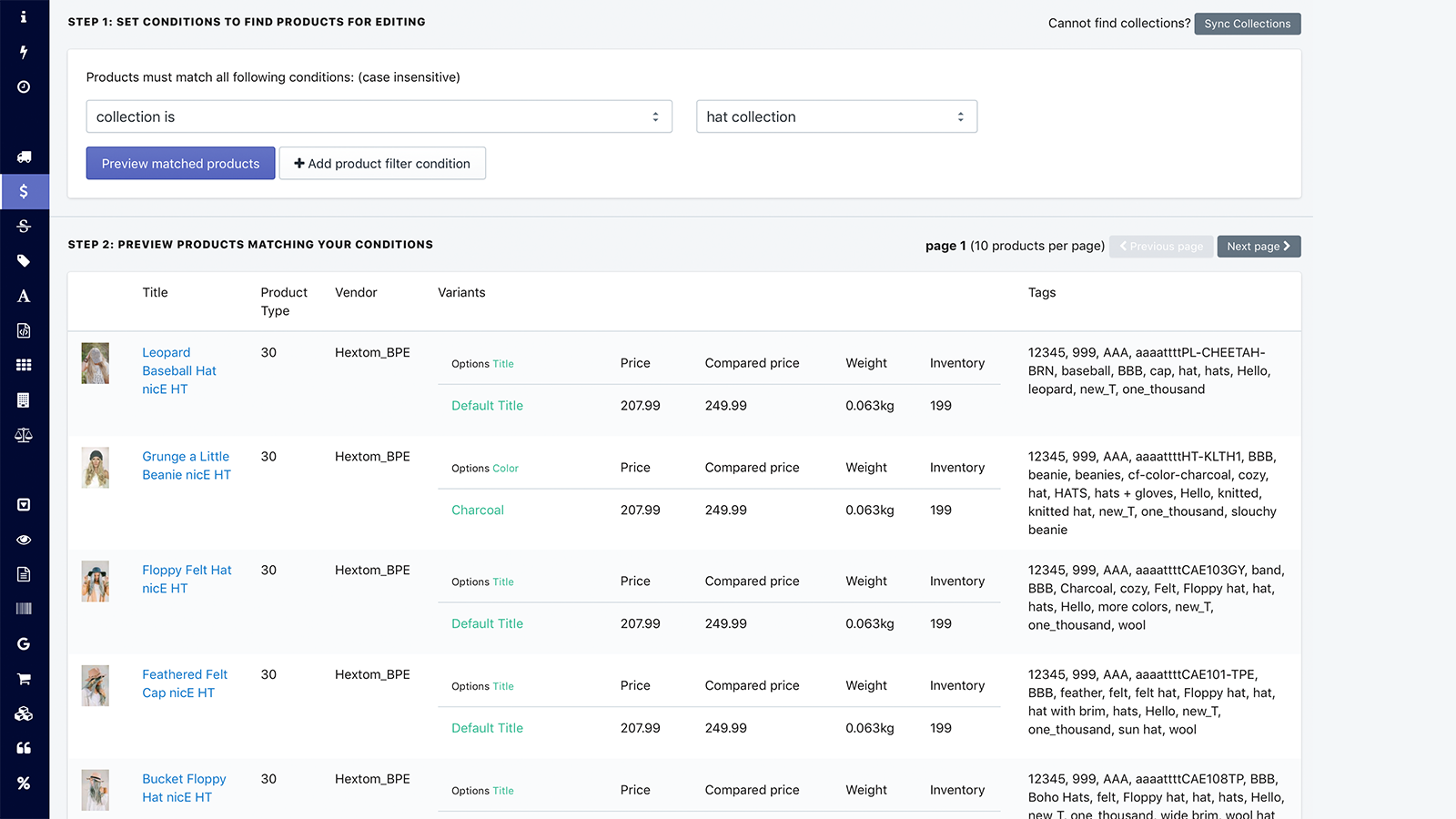
Hextom: Bulk Product Edit Shopify app screenshot 1
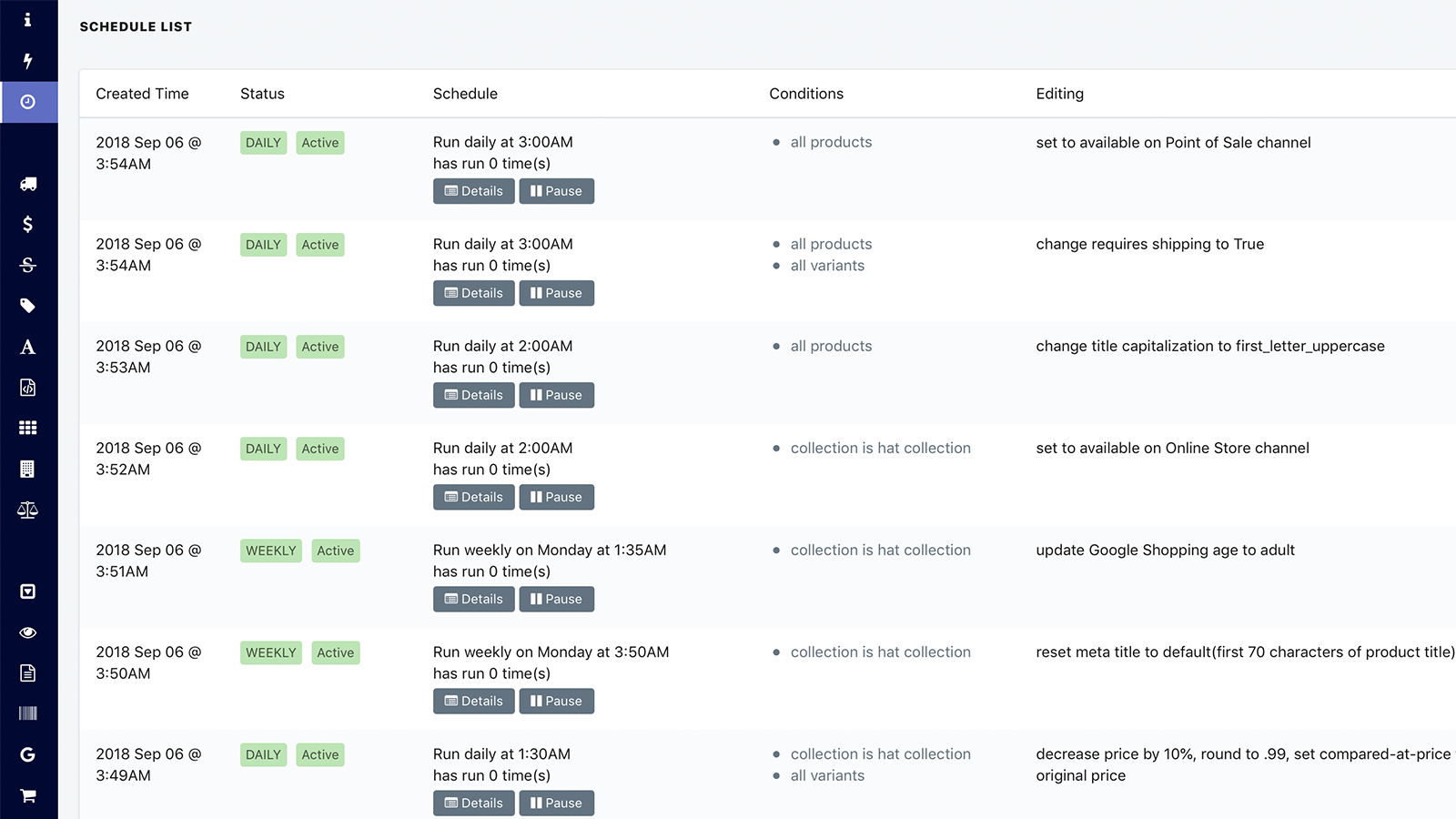
Hextom: Bulk Product Edit Shopify app screenshot 2
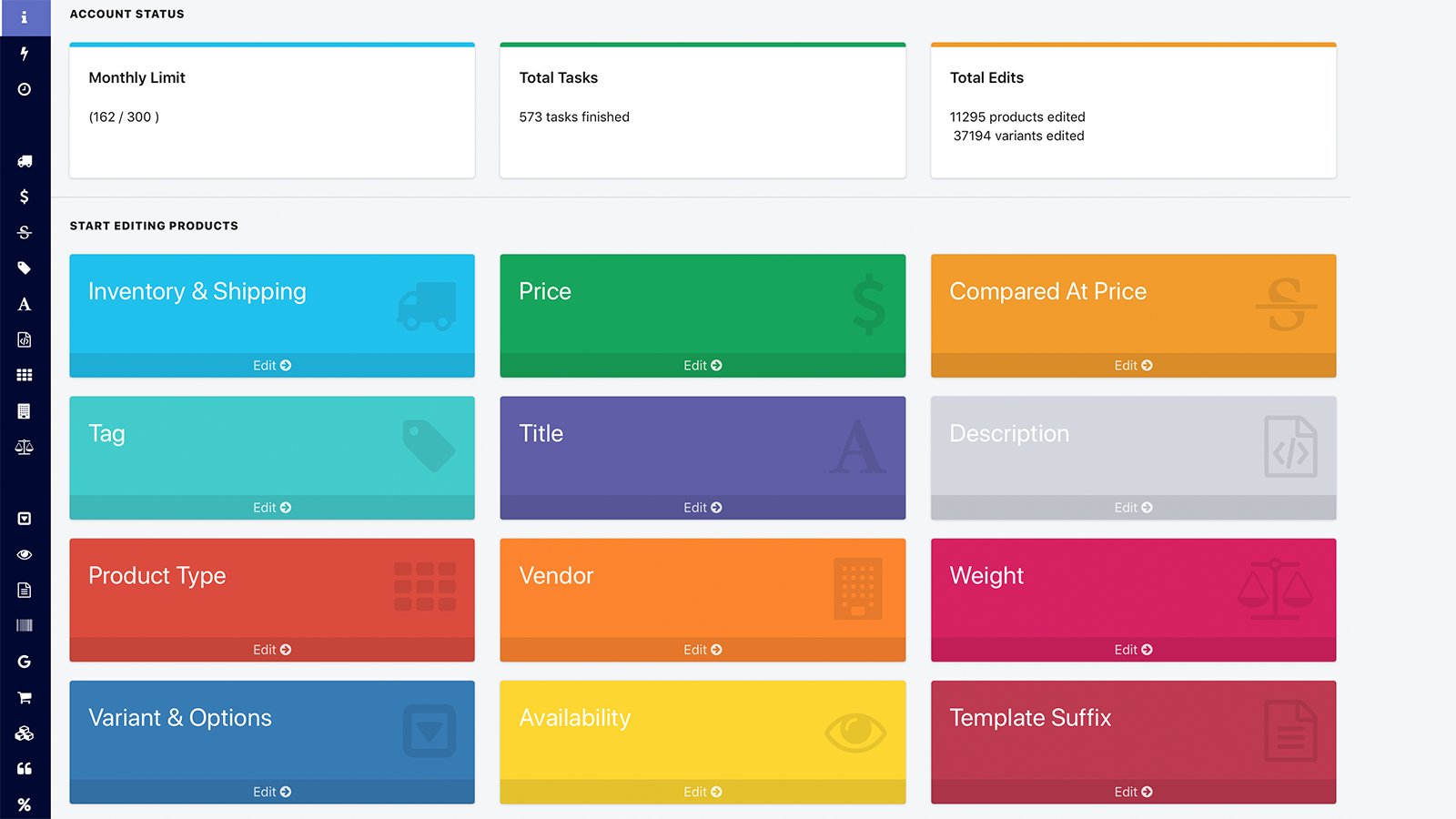
Hextom: Bulk Product Edit Shopify app screenshot 3
Hextom: Bulk Product Edit Shopify app screenshot 4
Hextom: Bulk Product Edit Shopify app screenshot 5
Hextom: Bulk Product Edit Shopify app screenshot 6

About the app

Edit thousands of products at once, import and export bulk edits using CSV.

  • Efficient Bulk Editing: Easily edit multiple products and other store data accurately and quickly with just a few clicks.
  • Inventory Management: Plan bulk updates, import/export sales via CSV, synchronize inventory, and product release.
  • Secure Editing: All modifications will be backed up, and bulk edits can be easily undone without any downtime.
  • User-Friendly: Simple to use for both tech-savvy and non-tech-savvy individuals.
  • No Obligation Demo Plan: You can try the app for free with our no-obligation demo plan.

Install in your Shopify store We pass your name, email and store domain to the Hextom team so they can help install and configure the app on your store.

Keywords

Bulk edit products Shopify appsCSV import export Shopify appsBulk edit collections Shopify appsSchedule bulk edits Shopify appsInventory sync Shopify appsProduct launch Shopify appsBulk edit orders Shopify appsBulk edit customers Shopify appsRevert bulk edits Shopify appsEasy bulk edits Shopify appsNon-technical bulk edits Shopify appsBulk edit metafields Shopify appsBulk data management Shopify appsShopify bulk CSV importShopify bulk CSV export

Key features

  • Edit thousands of products, variants, and metafields in just a few clicks.
  • Schedule bulk edits for future dates or recurring tasks like sales.
  • Import and export data via CSV for seamless inventory and price updates.

Pricing

Hextom: Bulk Product Edit pricing plans

Demo Plan
$0 /month
  • Unlimited bulk & CSV import tasks
  • 10 Products per task
  • Revert any product edit
  • Edit all product details
  • 30 day backup
Basic Plan
$9.99 /month
  • Unlimited bulk & CSV import tasks
  • 500 Products per task
  • Revert any product edit
  • Edit all product details
  • 60 day backup
Professional Plan
$19.99 /month
  • Unlimited bulk & CSV import tasks
  • 5,000 Products per task
  • 10 active scheduled tasks
  • 90 day backup
Advanced Plan
$49.99 /month
  • Unlimited bulk & CSV import tasks
  • 50,000 Products per task
  • 100 active scheduled tasks
  • 180 day backup

Not sure which plan to pick? Discuss Demo Plan or Basic Plan plans with us, learn about custom pricing, or get a demo.

Here’s an overview of Hextom: Bulk Product Edit costs for each of the plan(s)

The app has 4 pricing plans: 1 free and 3 paid. The free plan offered by Hextom: Bulk Product Edit is Demo Plan. The paid plans offered by Hextom: Bulk Product Edit are Basic Plan, Professional Plan, Advanced Plan.

The details of the plans are outlined below.

  • Demo Plan: this plan is free forever, incurring no subscription costs. It offers a wide range of features like Unlimited bulk & CSV import tasks, 10 Products per task, Revert any product edit, Edit all product details, 30 day backup.
  • Basic Plan: the Basic Plan plan costs $9.99 and has no free trial period. The plan offers a host of features, including Unlimited bulk & CSV import tasks, 500 Products per task, Revert any product edit, Edit all product details, 60 day backup.
  • Professional Plan: the Professional Plan plan costs $19.99 and has no free trial period. The plan offers a host of features, including Unlimited bulk & CSV import tasks, 5,000 Products per task, 10 active scheduled tasks, 90 day backup.
  • Advanced Plan: the Advanced Plan plan costs $49.99 and has no free trial period. The plan offers a host of features, including Unlimited bulk & CSV import tasks, 50,000 Products per task, 100 active scheduled tasks, 180 day backup.

Hextom: Bulk Product Edit price summary

Pricing summaryFree plan available
Total pricing plan(s)4
Number of free plan(s)1
Number of paid plan(s)3
Cost of paid plan(s)$9.99, $19.99, $49.99
Free trial availableNo

For further information regarding Hextom: Bulk Product Edit pricing plans, see the official website.

Install in your Shopify store We pass your name, email and store domain to the Hextom team so they can help install and configure the app on your store.

Comparison

Top Hextom: Bulk Product Edit alternatives — detailed comparison

The table below highlights the crucial differences between Hextom: Bulk Product Edit and similar other Shopify apps based on parameters like ratings, reviews, features, pricing, etc.

Apps
Add app
General information
Ratings4.9 ★ (1,164 reviews)4.7 ★ (168 reviews)4.9 ★ (28 reviews)
Developed byHextomSyncioeCommix
Launch date5 October 201511 December 20171 March 2024
PricingFree, $9.99/month, $19.99/month, $49.99/monthFree, $19/month, $29/month, $39/monthFree, $9.99/month, $29.99/month, $49.99/month
ObjectiveEdit thousands of products at once, import and export bulk edits using CSV.Live Inventory Update, Product Update, and Order SubmissionSync Google Sheets, bulk edit products, orders and inventory
CategoriesBulk editor, Inventory syncBulk editor, Inventory syncInventory sync, Bulk editor
Key features & highlights
PurposeEdit large amounts of Products, Collections, Customers & Metafields all at once. Plan sales. Import and Export CSV files.Import and synchronize inventory, product information, orders, and payments from various stores.Google Sheets spreadsheets to sync and bulk import, export, update inventory, orders, and more!
Features list
  • Edit thousands of products, variants, and metafields in just a few clicks.
  • Schedule bulk edits for future dates or recurring tasks like sales.
  • Import and export data via CSV for seamless inventory and price updates.
  • Sync inventory in real-time across multiple stores to prevent overselling.
  • Customize product details like prices, tags, and images during synchronization.
  • Automatically sync orders and fulfillment data between connected stores.
  • Export products, orders, and inventory data directly to Google Sheets.
  • Bulk edit prices and inventory quantities in Google Sheets effortlessly.
  • Automatically sync store data hourly, daily, or weekly for accuracy.
Highlights
  • Based in Canada
——
User reviews and ratings
Recommended97.6%94.3%96.7%
Pros
  • The app significantly reduces manual effort by enabling quick bulk edits and updates.
  • Intuitive design and ease of use make navigation and task execution straightforward.
  • Responsive and knowledgeable support team resolves issues promptly.
  • Indispensable for managing extensive product catalogs efficiently.
  • Offers a wide range of features for bulk editing products, variants, and metadata.
  • Consistently delivers fast and accurate results without technical issues.
  • Users find the subscription price justified by the time and effort saved.
  • Powerful features for optimizing product listings and metadata in bulk.
  • Effectively handles growing product counts and complex inventory needs.
  • Allows users to test functionality before committing to a subscription.
  • Seamlessly syncs inventory and product data across multiple stores in real-time, reducing manual effort.
  • Highly responsive and knowledgeable support team, often praised for quick resolutions and personalized assistance.
  • Simple and intuitive setup process, allowing users to connect stores quickly without technical expertise.
  • Significantly reduces time spent on manual inventory updates and order processing.
  • Consistently delivers accurate and real-time updates, minimizing stock discrepancies.
  • Offers flexible settings to tailor syncing preferences, including selective product and inventory updates.
  • Handles high volumes of products and orders efficiently, suitable for growing businesses.
  • Enhances sales and operational efficiency by ensuring accurate stock levels across stores.
  • Regularly introduces new features and improvements based on user feedback.
  • Effectively supports businesses with multiple Shopify stores, including international and wholesale/retail setups.
  • The app excels in handling large SKU volumes through seamless spreadsheet interaction.
  • Timely updates and improvements are made based on user feedback.
  • The app offers a wide range of features suitable for diverse business needs.
  • Users highlight the effectiveness and responsiveness of technical assistance.
Cons
  • Some users report delays when processing extensive product variations.
  • A few users find the pricing steep despite the app’s benefits.
  • Initial setup and feature discovery can be challenging for beginners.
  • The free version restricts the volume of edits, prompting upgrades.
  • Some users find the app expensive, especially with additional fees for source and destination stores.
  • Lacks auto-sync by collections and struggles with complex inventory scenarios like bundled products.
  • Occasional bugs reported, such as inventory not syncing correctly or unexpected product deletions.
  • Manual syncing required for large inventories, making it less efficient for stores with thousands of products.
  • Frequent changes to fields and permissions disrupt ongoing operations.
  • Some users experience crashes and login failures, hindering access to their accounts.
Pricing and plans
Total pricing plans444
Free planAvailableAvailableAvailable
Free trialNoYes, for 15 day(s)Yes, for 7 day(s)
Technical information
Rating4.9 ★4.7 ★4.9 ★
Total reviews1,19917430
Launch date5 October 201511 December 20171 March 2024

More details about Hextom: Bulk Product Edit

Product description

BPE is a tool that allows quick and accurate bulk editing for store data such as products, metafields, customers, and orders. It saves time and reduces errors with features like advanced filtering and CSV export/import, enabling the adjustment of thousands of product prices in a few clicks.

AI summary

This Shopify app is a powerful bulk-editing tool designed to streamline product, inventory, and catalog management for stores with large inventories. Its core functionality enables efficient bulk updates to product details, variants, prices, descriptions, SEO metadata, and customer profiles, significantly reducing manual effort. The app integrates seamlessly with Shopify’s interface, offering intuitive filters and batch-editing capabilities that surpass Shopify’s native bulk-editing limitations. Key strengths include its time-saving efficiency, user-friendly interface, and robust support for complex tasks like mass price adjustments, variant management, and Google Merchant Center integrations. The app also provides responsive and knowledgeable customer support, often highlighted for quick issue resolution. However, some users note occasional delays in bulk-processing speeds for very large catalogs, and a few mention the subscription cost as a consideration, though many justify it by the time saved. The app is particularly valuable for high-volume stores, offering scalability and features like automated tasks and bulk SEO optimization, making it a staple for merchants managing extensive inventories.

Support

For any questions, concerns, or assistance with Hextom: Bulk Product Edit, the dedicated support team is readily available to help. To reach out to the support team, users can send an email to [email protected]. Additionally, Hextom: Bulk Product Edit offers a comprehensive FAQ section to address common inquiries and provide self-help resources in their app FAQ section.

Language support

Details of the Hextom: Bulk Product Edit are available in various languages on the Shopify app store, including English.

Hextom: Bulk Product Edit support information in a nutshell
Support emailhelp@hextom.com
Contact number(s)Not available
FAQ pageFAQ details
Privacy policyPrivacy details
Language supportEnglish
Integration

The list of top Shopify apps, features or software tools that Hextom: Bulk Product Edit seamlessly integrates with are given below.

Shopify Admin
Developer
NameHextom
ProfileSee all apps by Hextom
WebsiteView developer profile
AddressRichmond Hill, ON

Installation

How to install Hextom: Bulk Product Edit on your Shopify store

1

Send your details

Your name, email and store domain go straight to the Hextom team.

2

The developer gets in touch

Hextom contacts you directly to arrange setup for your store.

3

Install at your own pace

Perfect your store’s functionality without the pressure to move on until you’re ready.

Customer reviews

4.9
★★★★★
1,199 total reviews
51,110
460
36
24
119

Hextom: Bulk Product Edit has an overall rating of 4.9 stars from a total of 1,199 reviews on the Shopify app store. Of these, 1,170 (97.6%) are positive, 6 (0.5%) are neutral, and 23 (1.9%) are negative*.

*Ratings above four stars fall under positive review, three star reviews fall under neutral, and anything less than two stars falls under negative.

★★★★★Grace and Iron Co.from United States · 11 November 2026

I am a 56 yr old abuela no experince in online commerse shop editing or even designing but this edit app has saved me more time then I can admit especially when the AI helper gets you where you need to go

★★★★★Quiet Withinfrom United States · 10 November 2026

This is a great opportunity to work so much faster.

★★★★★Lovecarsfrom New Zealand · 9 November 2026

Allows us to respond quickly to ensure we always have the most competitive pricing

★★★★★Every Morning Cofrom United States · 8 November 2026

It is easy to use and saves a ton of time editing.

★★★★★Jenny Meadowfrom Canada · 8 November 2026

I can't believe how easy it has been to bulk edit prices, descriptions and more.

Install in your Shopify store We pass your name, email and store domain to the Hextom team so they can help install and configure the app on your store.

Performance on the App Store

Rankings, review momentum and install geography, refreshed weekly. Open the full charts for history, benchmarks and keyword detail.

Category rank
#3
bulk edit inventory
Total reviews
1,201
▲ 31 vs 30 days ago
Average rating
4.9 ★
0.00 vs 30 days ago
Top market
US
46.8% of installs · ▲ 0.58%

Category & keyword rankings

Position and market share today

Keywordbulk edit inventory#323.8% ▼55.9
Keywordbulk edit description#423.8% ▼46.0
Keywordbulk editor#45.4% ▼5.1
Keywordbulk edit variants#522.8% ▼37.3

Reviews trend

Cumulative reviews · last 6 months

1,078 → 1,201 reviews · rating steady at 4.9★
Ranks #3 in 1 of 10 App Store groups tracked.Open full charts →

Hextom: Bulk Product Edit FAQs

How do I install the Hextom: Bulk Product Edit Shopify app?
To install Hextom: Bulk Product Edit on your Shopify store, click on the Hextom: Bulk Product Edit installation link. Login to the Shopify store on which you want to install the app and follow the onboarding process. If you need our expert guidance to help you install Hextom: Bulk Product Edit on your Shopify store, then contact us now.
What are the key features of Hextom: Bulk Product Edit?

The key features offered by Hextom: Bulk Product Edit to Shopify store owners are:

  • Accurately & quickly bulk edit products and other store data with a few clicks
  • Schedule bulk edit, CSV import export for sales, inventory sync, product launch
  • Bulk edit and CSV import/export collections, orders, and customers data
  • All changes are backed up, allowing bulk edits to be safely reverted without any
  • Easy to use for people with or without technical skills
Does Hextom: Bulk Product Edit integrate with other Shopify apps or tools?

Yes, Hextom: Bulk Product Edit seamlessly integrates with other Shopify apps or tools, such as Easily edit multiple products and other store data accurately and quickly with just a few clicks., Plan bulk updates, import/export sales via CSV, synchronize inventory, and product release., All modifications will be backed up, and bulk edits can be easily undone without any downtime..

Is there a free trial available for Hextom: Bulk Product Edit?

No, Hextom: Bulk Product Edit does not offer any free trial.

What are the pricing plans for Hextom: Bulk Product Edit?

The app has 4 pricing plans: 1 free and 3 paid. The paid plans cost $9.99/month, $19.99/month, $49.99/month and have no free trial period.

How does billing work for Hextom: Bulk Product Edit?

Hextom: Bulk Product Edit uses USD for billing, with recurring and usage-based charges invoiced usually every 30 days.

Can I cancel or upgrade my subscription plan at any time?

Yes, Hextom: Bulk Product Edit allows its subscribers to cancel or upgrade their subscription plan at any time.

Does Hextom: Bulk Product Edit offer customer support?

Yes, Hextom: Bulk Product Edit offers a dedicated support team for any kind of app-related assistance. To reach out to the support team, users can send an email to [email protected]. Additionally, Hextom: Bulk Product Edit offers a comprehensive FAQ section to address common inquiries and provide self-help resources.

Is Hextom: Bulk Product Edit compatible with my Shopify theme?

Please reach out to their support team at [email protected] to confirm its compatibility with your specific Shopify theme.

Most popular

Most popular Shopify apps on the market

Install in your Shopify store We pass your name, email and store domain to the Hextom team so they can help install and configure the app on your store.

.myshopify.com
4.9★★★★★1,199 reviews · 97.6% positive

Writing reviews on ShopDigest is coming soon.

  • GA
    Grace and Iron Co.United States · 11 Nov 2026
    ★★★★★

    I am a 56 yr old abuela no experince in online commerse shop editing or even designing but this edit app has saved me more time then I can admit especially when the AI helper gets you where you need to go

  • QW
    Quiet WithinUnited States · 10 Nov 2026
    ★★★★★

    This is a great opportunity to work so much faster.

  • LO
    LovecarsNew Zealand · 9 Nov 2026
    ★★★★★

    Allows us to respond quickly to ensure we always have the most competitive pricing

  • EM
    Every Morning CoUnited States · 8 Nov 2026
    ★★★★★

    It is easy to use and saves a ton of time editing.

  • JM
    Jenny MeadowCanada · 8 Nov 2026
    ★★★★★

    I can't believe how easy it has been to bulk edit prices, descriptions and more.

  • SR
    Small Ritual Co.United States · 7 Nov 2026
    ★★★★★

    This app is invaluable. I also love the AI assistant. It makes bulk editing even easier.

  • AC
    Ampersand Candles + OilsUnited States · 6 Nov 2026
    ★★★★★

    AMAZING app. It makes changing hundreds of products at a time sooo much easier!

  • C&
    Chalk & Chapel Co.United States · 5 Nov 2026
    ★★★★★

    The app is super helpful managing my Shopify POD storefront!

About ShopDigest

The Shopify ecosystem, shown through the work

ShopDigest is an independent directory of Shopify work. Developers, agencies and experts publish the projects they’ve actually shipped — migrations, rebuilds, custom apps, headless storefronts — with the results attached.

For merchants, that means judging a partner on evidence instead of a sales page: browse real builds in your category and budget, then reach out directly. For builders, it means one profile that keeps working after the project ships.

No commissions, no pay-to-rank placements. The best work rises because people save and follow it.

More about ShopDigest
About ShopDigest

Show the work.
Win the work.

A portfolio directory for the Shopify ecosystem — builders publish, merchants browse, nobody buys a better position.

More about ShopDigest