

Headless
by Shopify
Use the Storefront API to simply create headless commerce for any platform, using any framework.
Free
Compare different versions of your theme to easily view or update any changes before you publish. Stop losing theme changes on publish by comparing first
Pros and cons of DiffMate ‑ Asset Compare Tool

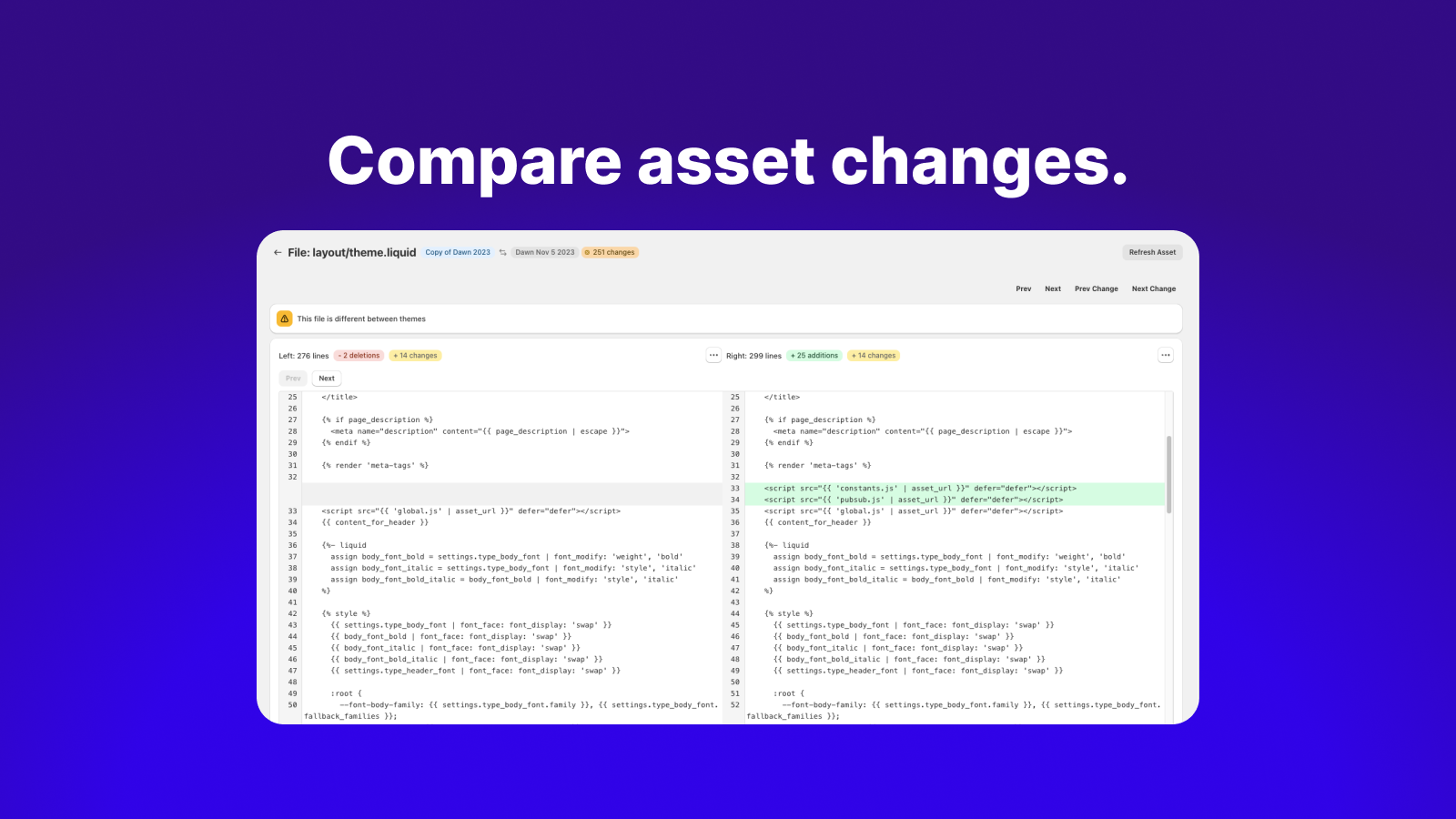

Stop losing theme changes on publish by comparing first
DiffMate ‑ Asset Compare Tool pricing plans
Not sure which plan to pick? Discuss plans with us, learn about custom pricing, or get a demo.
The app has 1 pricing plan: 1 free and 0 paid. The free plan offered by DiffMate ‑ Asset Compare Tool is .
The details of the plans are outlined below.
| Pricing summary | Free |
| Total pricing plan(s) | 1 |
| Number of free plan(s) | 1 |
| Number of paid plan(s) | 0 |
| Free trial available | No |
The table below highlights the crucial differences between DiffMate ‑ Asset Compare Tool and similar other Shopify apps based on parameters like ratings, reviews, features, pricing, etc.
| Apps | Add app | |||
| General information | ||||
| Ratings | 4.3 ★ (14 reviews) | 5.0 ★ (5 reviews) | 4.9 ★ (2,975 reviews) | |
| Developed by | 84Labs | Shopify | Section Store | |
| Launch date | 6 December 2023 | 31 January 2023 | 29 March 2022 | |
| Pricing | Free | Free | Free, $15/month | |
| Objective | Stop losing theme changes on publish by comparing first | — | Library Section. Include adjustable sections to any theme & page. | |
| Categories | Storefronts - Other | Storefronts - Other | Page builder, Storefronts - Other | |
| Key features & highlights | ||||
| Purpose | Compare different versions of your theme to easily view or update any changes before you publish. | Use the Storefront API to simply create headless commerce for any platform, using any framework. | Explore our library to find and add sections to any theme and edit them from the theme editor. | |
| Features list |
|
|
| |
| Highlights | — |
|
| |
| User reviews and ratings | ||||
| Recommended | 92.9% | 100.0% | 97.1% | |
| Pros |
|
|
| |
| Cons |
|
|
| |
| Pricing and plans | ||||
| Total pricing plans | 0 | 0 | 2 | |
| Free plan | Not available | Not available | Available | |
| Free trial | No | No | Yes, for 14 day(s) | |
| Technical information | ||||
| Rating | 4.3 ★ | 5.0 ★ | 4.9 ★ | |
| Total reviews | 14 | 6 | 3,035 | |
| Launch date | 6 December 2023 | 31 January 2023 | 29 March 2022 | |
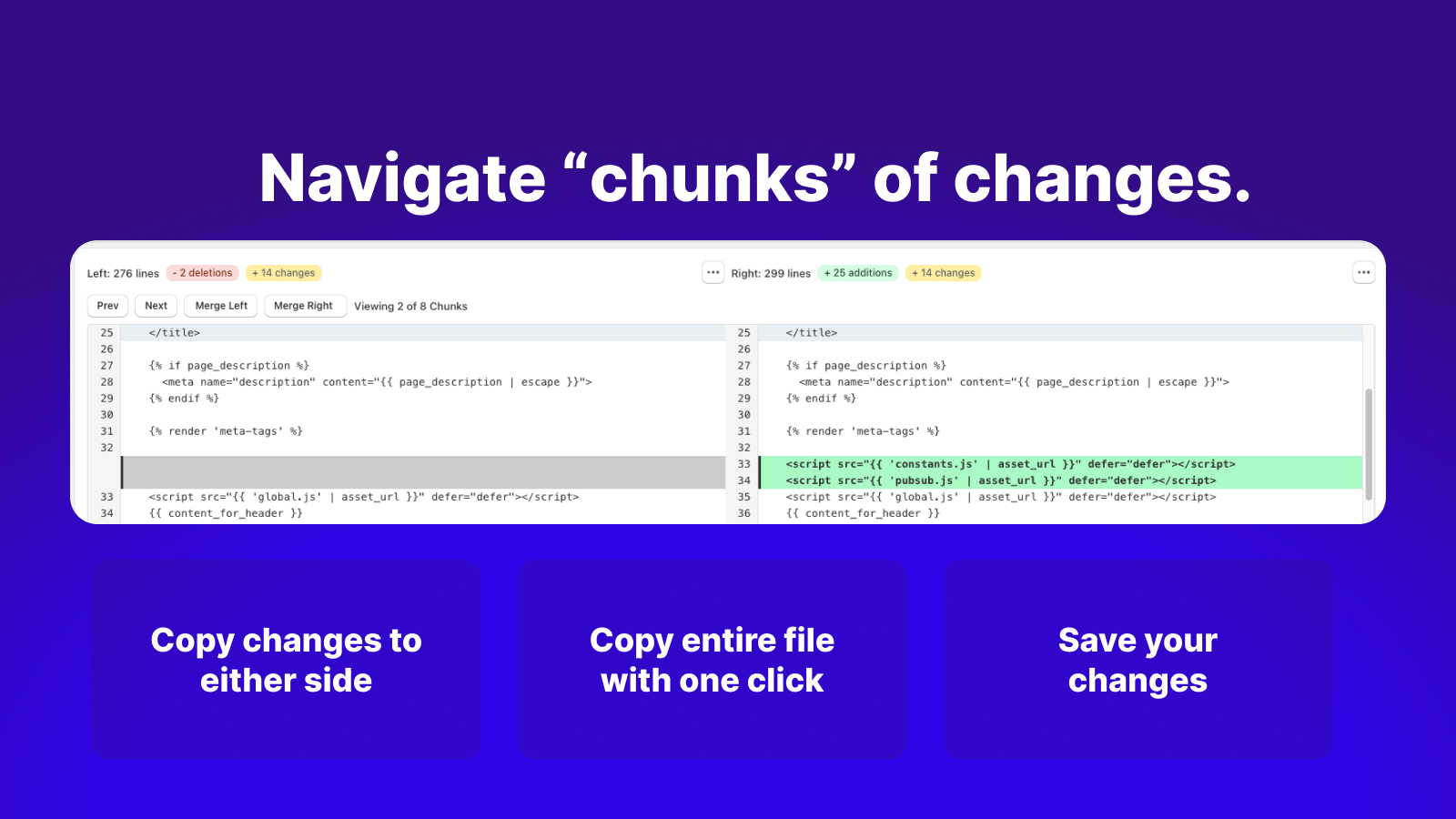
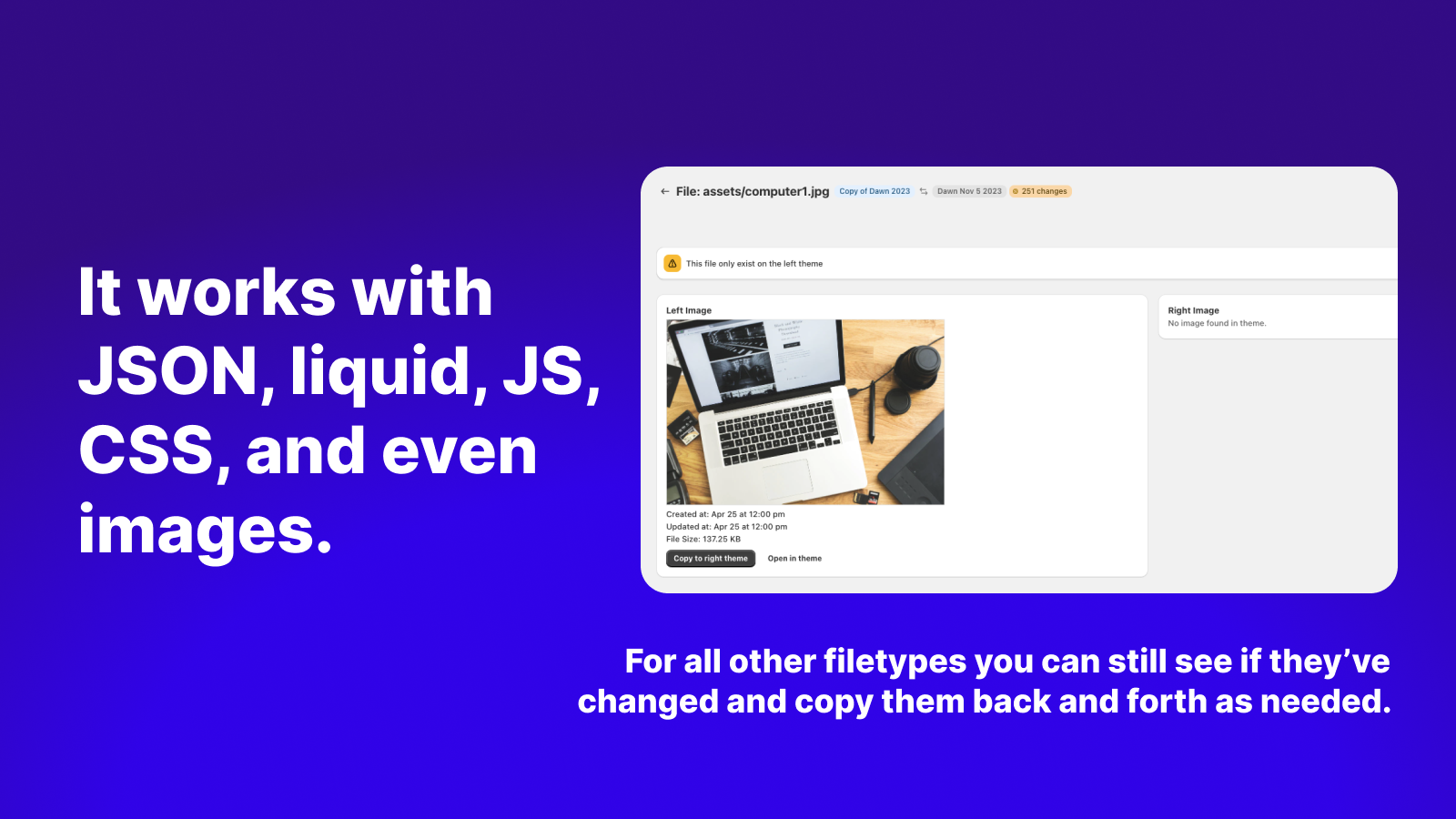
DiffMate is a convenient way to see the asset differences between different versions of your theme. Filter to see only assets that have changed, all assets, or if they exists on one but not both. Our diff-editor allows you to copy specific changes (or entire files) from one theme to another. Whenever you deploy a new version of your store DiffMate reduces the stress of losing edits or forgetting template assets not copied over and much, much more.
This Shopify app is a specialized tool designed to simplify theme updates by identifying and comparing code changes between different versions of a theme. It provides a clear, side-by-side view of modifications, including additions, deletions, and missing files, streamlining the process of merging customizations during upgrades. The app integrates seamlessly with Shopify’s admin interface, eliminating the need to manually download or compare files externally. Its intuitive interface and real-time functionality make it particularly useful for developers and teams managing theme customizations or collaborating on site updates. A notable strength is its ability to highlight discrepancies that could otherwise break layouts during theme transitions, significantly reducing troubleshooting time. While the tool is free and highly effective for basic comparisons, its feature set remains straightforward, lacking advanced customization options. Some users suggest its functionality should be native to Shopify, underscoring its utility. The app performs reliably but does not address broader structural limitations in Shopify’s theme architecture, such as the absence of a parent/child system for easier updates. Overall, it fills a critical gap for theme management with efficiency and ease of use.
For any questions, concerns, or assistance with DiffMate ‑ Asset Compare Tool, the dedicated support team is readily available to help. To reach out to the support team, users can send an email to [email protected].
Details of the DiffMate ‑ Asset Compare Tool are available in various languages on the Shopify app store, including English.
| Support email | support |
| Contact number(s) | Not available |
| FAQ page | Not available |
| Privacy policy | Privacy details |
| Language support | English |
The list of top Shopify apps, features or software tools that DiffMate ‑ Asset Compare Tool seamlessly integrates with are given below.
| Name | 84Labs |
| Profile | See all apps by 84Labs |
| Website | View developer profile |
| Address | 1611-720 Spadina Ave, Toronto, ON, M5S2T9 |
How to install DiffMate ‑ Asset Compare Tool on your Shopify store
Your name, email and store domain go straight to the 84Labs team.
84Labs contacts you directly to arrange setup for your store.
Perfect your store’s functionality without the pressure to move on until you’re ready.
DiffMate ‑ Asset Compare Tool has an overall rating of 4.8 stars from a total of 14 reviews on the Shopify app store. Of these, 13 (92.9%) are positive, 0 (0.0%) are neutral, and 1 (7.1%) are negative*.
*Ratings above four stars fall under positive review, three star reviews fall under neutral, and anything less than two stars falls under negative.
Excellent app that will save you loads of time, and its FREE so win win. Very easy to install and use A++++++
Eine der Apps die jeder Shopify Entwickler installiert haben sollte.
Truly such a helpful and amazing tool! Makes theme updates a breeze and works perfectly. Kudos to the developers for releasing such an awesome tool for free.
Game changer! This tool saves me so much time when upgrading themes. Shopify theme upgrades are a nightmare and this tool makes it so much easier and ensures I don't miss anything. Its very basic, but hey, its free... so no complaints. I particularly like the new feature that can create any additional missing codes files not contained in the original theme by just copying left to right. Freak'in awesome app thank you!!
It's exactly what I've been looking for to track down the changes that were made in the theme code. This should be included as a standard feature as part of Shopify, IMHO. Thank you for providing this useful tool to us!
Rankings, review momentum and install geography, refreshed weekly. Open the full charts for history, benchmarks and keyword detail.
Position and market share today
| KeywordProtected assets | #3 | 0.0% |
| KeywordDeveloper tools | #15 | 0.0% |
| KeywordPrevention tools | #42 | — |
| KeywordComparison tools | #43 | — |
Cumulative reviews · last 6 months
The key features offered by DiffMate ‑ Asset Compare Tool to Shopify store owners are:
DiffMate ‑ Asset Compare Tool has not made any official mention of integrating with other Shopify apps or tools. To obtain further information, kindly reach out to their support team or consult your Shopify developer.
No, DiffMate ‑ Asset Compare Tool does not offer any free trial.
The app offers 1 plan that is forever-free.
DiffMate ‑ Asset Compare Tool is completely free to install and use. Additional charges may or may not apply.
Yes, DiffMate ‑ Asset Compare Tool allows its subscribers to cancel or upgrade their subscription plan at any time.
Yes, DiffMate ‑ Asset Compare Tool offers a dedicated support team for any kind of app-related assistance. To reach out to the support team, users can send an email to [email protected].
Please reach out to their support team at [email protected] to confirm its compatibility with your specific Shopify theme.
Use the Storefront API to simply create headless commerce for any platform, using any framework.

Library Section. Include adjustable sections to any theme & page.

Handle passwords for every developer working on your themes.
Most popular Shopify apps on the market

Product reviews with pictures and videos for credibility and search engine optimization.

Display your products to billions of TikTok users.

Simplify all tasks and focus on your business.

Increase your brand visibility and communicate with customers on Shop.
Writing reviews on ShopDigest is coming soon.
Excellent app that will save you loads of time, and its FREE so win win. Very easy to install and use A++++++
Eine der Apps die jeder Shopify Entwickler installiert haben sollte.
Truly such a helpful and amazing tool! Makes theme updates a breeze and works perfectly. Kudos to the developers for releasing such an awesome tool for free.
Game changer! This tool saves me so much time when upgrading themes. Shopify theme upgrades are a nightmare and this tool makes it so much easier and ensures I don't miss anything. Its very basic, but hey, its free... so no complaints. I particularly like the new feature that can create any additional missing codes files not contained in the original theme by just copying left to right. Freak'in awesome app thank you!!
It's exactly what I've been looking for to track down the changes that were made in the theme code. This should be included as a standard feature as part of Shopify, IMHO. Thank you for providing this useful tool to us!
This is a mind-bogglingly awesome tool for anyone who customizes their themes. The fact that Shopify codes their themes so that customizations break automatic upgrading is idiotic. They should use a parent/child system like WordPress. This app functions like any other diff tool, but it's built right into your Shopify admin like it was coded there by default (and should be). No need to download theme files and find differences, this tool does it all right in the Shopify admin, and will even open files in the Shopify online code editor if need be. Cannot thank the developers enough for this tool. Upgrading my theme was a major pain in the neck because of some slight theme edits. This tool has made that process immensely easier. Please add a tip jar to the app!
Incredibly simple and easy to use. Clearly shows all code, what's changed, how's it changed, and where it's changed at. The perfect companion for checking your theme, especially if you have custom code and are doing a theme upgrade. Huge thanks to the developers!
This app is essential for teams with multiple people working on a site, making changes in the theme customizer while we have developers working on code. It should really be OOB Shopify functionality.
ShopDigest is an independent directory of Shopify work. Developers, agencies and experts publish the projects they’ve actually shipped — migrations, rebuilds, custom apps, headless storefronts — with the results attached.
For merchants, that means judging a partner on evidence instead of a sales page: browse real builds in your category and budget, then reach out directly. For builders, it means one profile that keeps working after the project ships.
No commissions, no pay-to-rank placements. The best work rises because people save and follow it.
More about ShopDigestA portfolio directory for the Shopify ecosystem — builders publish, merchants browse, nobody buys a better position.