

by Shopify
A single app for top-selling platforms worldwide.
Free
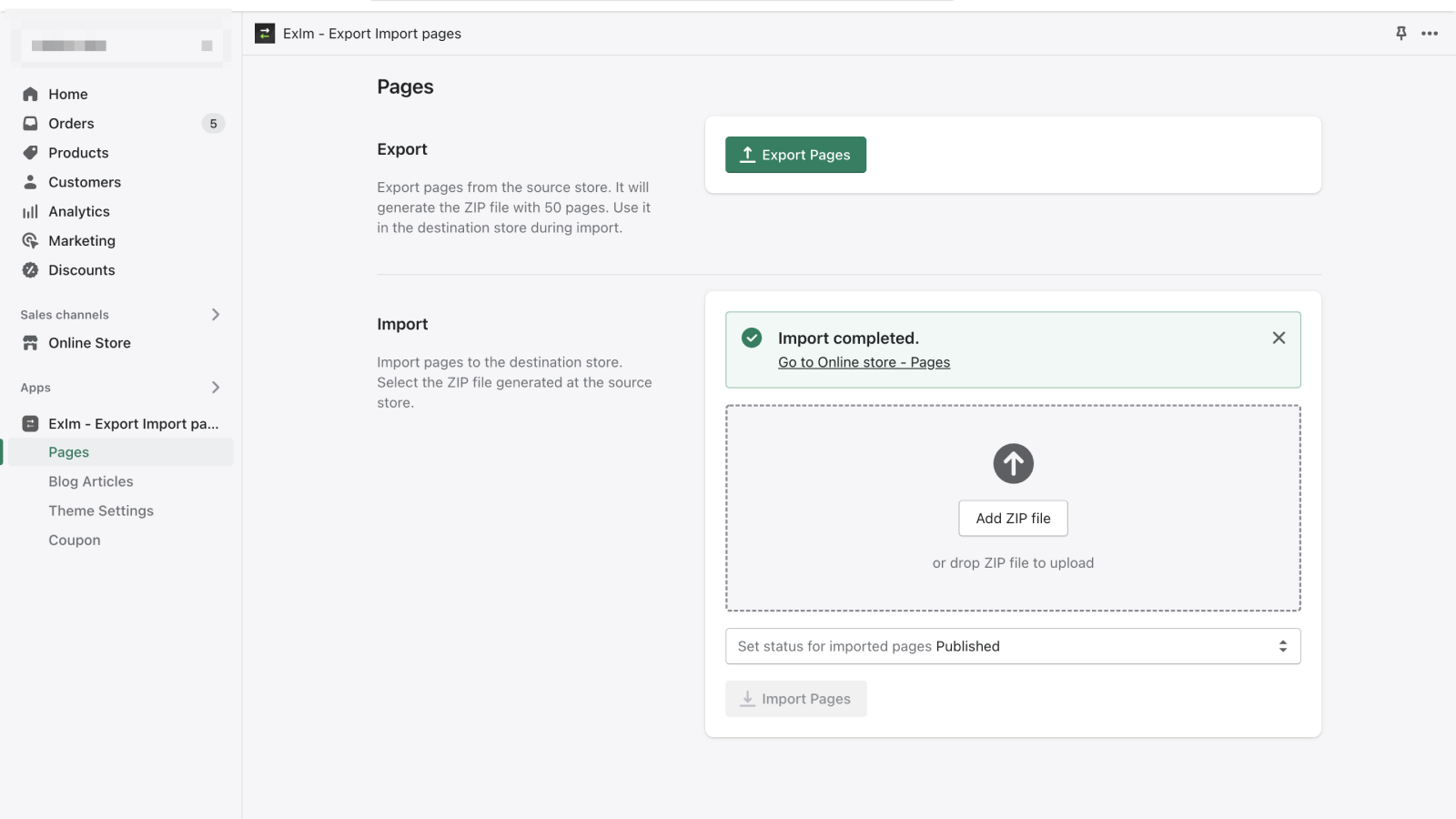
Transfer page, blog, and theme settings from your staging, testing, or demo store over to your main store. export and import pages, blog posts, articles, and theme settings
Pros and cons of ExIm ‑ Export Import pages


export and import pages, blog posts, articles, and theme settings
ExIm ‑ Export Import pages pricing plans
Not sure which plan to pick? Discuss Free or Basic plans with us, learn about custom pricing, or get a demo.
The app has 3 pricing plans: 1 free and 2 paid. The free plan offered by ExIm ‑ Export Import pages is Free. The paid plans offered by ExIm ‑ Export Import pages are Basic, Grow.
The details of the plans are outlined below.
| Pricing summary | Free plan available. Free trial available. |
| Total pricing plan(s) | 3 |
| Number of free plan(s) | 1 |
| Number of paid plan(s) | 2 |
| Cost of paid plan(s) | $0.99, $2.99 |
| Free trial available | Yes, for 7 day(s) |
The table below highlights the crucial differences between ExIm ‑ Export Import pages and similar other Shopify apps based on parameters like ratings, reviews, features, pricing, etc.
| Apps | Add app | |||
| General information | ||||
| Ratings | 2.8 ★ (13 reviews) | 4.1 ★ (2,122 reviews) | 4.9 ★ (1,775 reviews) | |
| Developed by | LOO | Shopify | ITissible | |
| Launch date | 26 September 2018 | 19 September 2017 | 7 July 2017 | |
| Pricing | Free, $0.99/month, $2.99/month | Free | Free, $20/month, $50/month, $200/month | |
| Objective | export and import pages, blog posts, articles, and theme settings | A single app for top-selling platforms worldwide. | Easily transfer, update or move large data amounts. | |
| Categories | Store data importer | Marketplaces, Store data importer | Bulk editor, Store data importer | |
| Key features & highlights | ||||
| Purpose | Transfer page, blog, and theme settings from your staging, testing, or demo store over to your main store. | Sell on the largest marketplaces. Handle and complete all orders within Shopify. | The Matrixify app lets you handle large amounts of store data by allowing you to import, export, update, and transfer it. | |
| Features list |
|
|
| |
| Highlights |
|
|
| |
| User reviews and ratings | ||||
| Recommended | 57.1% | 81.8% | 97.5% | |
| Pros |
|
|
| |
| Cons |
|
|
| |
| Pricing and plans | ||||
| Total pricing plans | 3 | 1 | 4 | |
| Free plan | Available | Available | Available | |
| Free trial | Yes, for 7 day(s) | No | No | |
| Technical information | ||||
| Rating | 2.8 ★ | 4.1 ★ | 4.9 ★ | |
| Total reviews | 14 | 2,152 | 1,925 | |
| Launch date | 26 September 2018 | 19 September 2017 | 7 July 2017 | |
The Exim app is a tool that eases the process of setting up a store by allowing the copying of pages and blog posts from other stores. It is especially beneficial for theme developers as it allows them to build multiple demo stores and efficiently load theme settings to the customer store.
The app facilitates the export and import of Shopify store content, including pages, blogs, and theme settings, streamlining the process of syncing or migrating data between stores. Its primary strengths include ease of use, speed, and cost-effectiveness, as it performs core functions efficiently without charge. The app is particularly valued for handling bulk transfers, such as large volumes of blogs or pages, and for replicating theme designs across multiple stores. However, limitations include inconsistent performance with certain content types, such as collection or product page layouts, and occasional technical issues like failed installations or incomplete imports. Some users report difficulties with editing imported content or encountering errors during transfers, particularly with large datasets exceeding 250 blog posts. Support responsiveness varies, with some users receiving prompt assistance while others experience delays. Despite these challenges, the app remains a practical solution for store owners seeking to avoid manual content duplication.
For any questions, concerns, or assistance with ExIm ‑ Export Import pages, the dedicated support team is readily available to help. To reach out to the support team, users can send an email to [email protected].
Details of the ExIm ‑ Export Import pages are available in various languages on the Shopify app store, including English.
| Support email | codefan18 |
| Contact number(s) | Not available |
| FAQ page | Not available |
| Privacy policy | Privacy details |
| Language support | English |
The list of top Shopify apps, features or software tools that ExIm ‑ Export Import pages seamlessly integrates with are given below.
| Name | LOO |
| Profile | See all apps by LOO |
| Website | View developer profile |
| Address | Nikolska 25, office 77, Nikolaev, 54000 |
How to install ExIm ‑ Export Import pages on your Shopify store
Your name, email and store domain go straight to the LOO team.
LOO contacts you directly to arrange setup for your store.
Perfect your store’s functionality without the pressure to move on until you’re ready.
ExIm ‑ Export Import pages has an overall rating of 3.2 stars from a total of 14 reviews on the Shopify app store. Of these, 8 (57.1%) are positive, 0 (0.0%) are neutral, and 6 (42.9%) are negative*.
*Ratings above four stars fall under positive review, three star reviews fall under neutral, and anything less than two stars falls under negative.
Exactly what I needed to keep a staging store and prod store in sync. Thanks so much!
Supported this app from when it was first released. Works well for me updating theme / importing pages pretty quickly
Setting up a new DEV store, didn't want to recreate 50 pages. App was quick and did what I needed it to do. Kudos!
Excellent free app! Works very well! There is no default functionality from Shopify to migrate pages (which is ridiculous) and this app is very useful in that regard.
Needed to take all of our blogs from one store to another, worked like a charm. Pretty amazing. Haven't tested out the other stuff, but can confirm the blog functionality works! Both for export and for import
Rankings, review momentum and install geography, refreshed weekly. Open the full charts for history, benchmarks and keyword detail.
Position and market share today
| KeywordArchiving | #21 | 0.0% |
| KeywordTwo-way sync | #38 | — |
| KeywordBulk export | #67 | — |
| KeywordMetaobjects | #68 | — |
Cumulative reviews · last 6 months
The key features offered by ExIm ‑ Export Import pages to Shopify store owners are:
Yes, ExIm ‑ Export Import pages seamlessly integrates with other Shopify apps or tools, such as One click. Quickly export/import pages, blogs, and theme settings in bulk., Copy pages and blogs. Take them from the current store. Place them in the new store., Create pre-set setups for your clients. This is beneficial for web developers..
Yes, ExIm ‑ Export Import pages offers a 7-day free trial on all its paid plans.
The app has 3 pricing plans: 1 free and 2 paid. The paid plans cost $0.99/month, $2.99/month, and come with a 7-day free trial period.
ExIm ‑ Export Import pages uses USD for billing, with recurring and usage-based charges invoiced usually every 30 days.
Yes, ExIm ‑ Export Import pages allows its subscribers to cancel or upgrade their subscription plan at any time.
Yes, ExIm ‑ Export Import pages offers a dedicated support team for any kind of app-related assistance. To reach out to the support team, users can send an email to [email protected].
Please reach out to their support team at [email protected] to confirm its compatibility with your specific Shopify theme.
A single app for top-selling platforms worldwide.

Easily transfer, update or move large data amounts.
Most popular Shopify apps on the market

Product reviews with pictures and videos for credibility and search engine optimization.

Display your products to billions of TikTok users.

Simplify all tasks and focus on your business.

Increase your brand visibility and communicate with customers on Shop.
Used ExIm ‑ Export Import pages? Share your experience with other merchants.
Exactly what I needed to keep a staging store and prod store in sync. Thanks so much!
Supported this app from when it was first released. Works well for me updating theme / importing pages pretty quickly
Setting up a new DEV store, didn't want to recreate 50 pages. App was quick and did what I needed it to do. Kudos!
Thank you.
Excellent free app! Works very well! There is no default functionality from Shopify to migrate pages (which is ridiculous) and this app is very useful in that regard.
Thank you.
Needed to take all of our blogs from one store to another, worked like a charm. Pretty amazing. Haven't tested out the other stuff, but can confirm the blog functionality works! Both for export and for import
Thank you.
Amazing product! Totally does its job and I used it to duplicate part of my store to a new one. Thank you so much for making it free :)
Thank you!
This app is fantastic. Does exactly what it says it will, and it's free! The app developer is also helpful + responsive (had a quick ? that I needed help with, and they got back to me right away). Great experience.
Thank you!
Ported our blogs over easily with no problem, but once the blogs were in the new store we were unable to edit them in Shopify for a few days. Contacted support who assisted and reinstalling the app seemed to correct the problem! Thanks for your help.
Hi Luna,I replied on the same day - https://monosnap.com/file/wBIGyjU892uHhIC9Z7EVMG0zYveJf9I can't reproduce the issue you describe. It may be not an app-related issue.Please provide more detail or create a staff account for me.Best regards
ShopDigest is an independent directory of Shopify work. Developers, agencies and experts publish the projects they’ve actually shipped — migrations, rebuilds, custom apps, headless storefronts — with the results attached.
For merchants, that means judging a partner on evidence instead of a sales page: browse real builds in your category and budget, then reach out directly. For builders, it means one profile that keeps working after the project ships.
No commissions, no pay-to-rank placements. The best work rises because people save and follow it.
More about ShopDigestA portfolio directory for the Shopify ecosystem — builders publish, merchants browse, nobody buys a better position.