
Stockbot Low Stock Alert Shopify App
by StoreBuilderPredict your customer's needs and accurately determine how much to reorder. Also, set alerts for when stock is low. Predict the quantity for reordering and establish alerts for low stock.
4.9
(58)
Hello Norden, United States
Wonderful and easy way to manage your inventory! Used it for years.
Install in your Shopify Store

Stockbot Low Stock Alert Charts
Track Stockbot Low Stock Alert's ranking, reviews, and performance over time with interactive charts. See how it compares to similar apps in the same category.
Pros and Cons
Pros and Cons of Stockbot Low Stock Alert
Pros
Accurate Forecasting: The app provides precise inventory forecasting based on past sales data, helping businesses avoid stockouts.
Customizable Alerts: Users can set personalized thresholds for low stock notifications, ensuring timely reordering.
Daily/Weekly Reports: Automated email reports offer clear, at-a-glance updates on inventory levels.
Responsive Customer Support: The support team is praised for quick, helpful, and personalized assistance.
Cons
Limited Historical Data: Forecasting is restricted to the last year of sales data, missing older trends.
Forced Paid Plan: Some users encountered issues accessing the free plan during setup.
Screenshots
About the App
Predict the quantity for reordering and establish alerts for low stock.
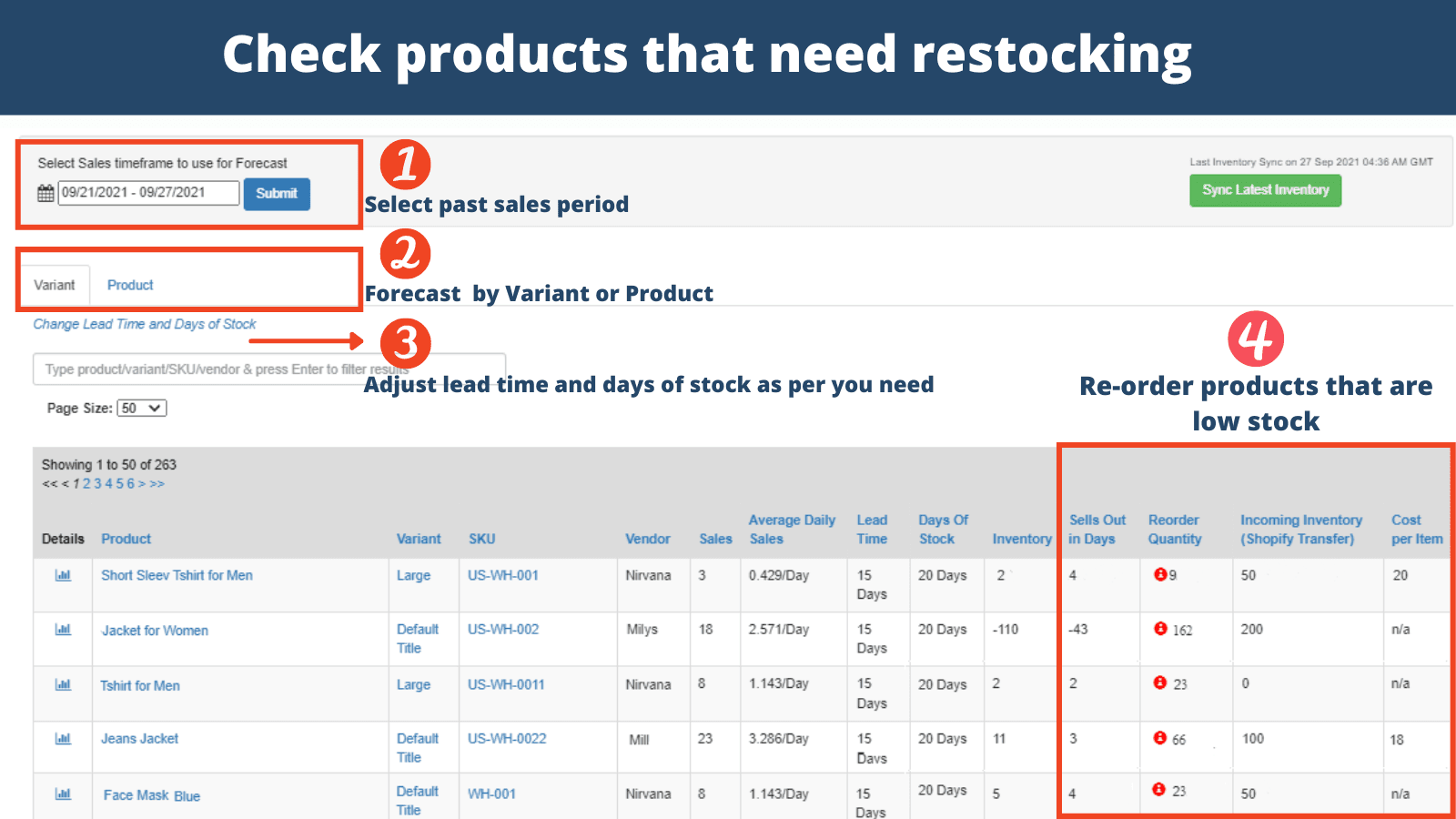
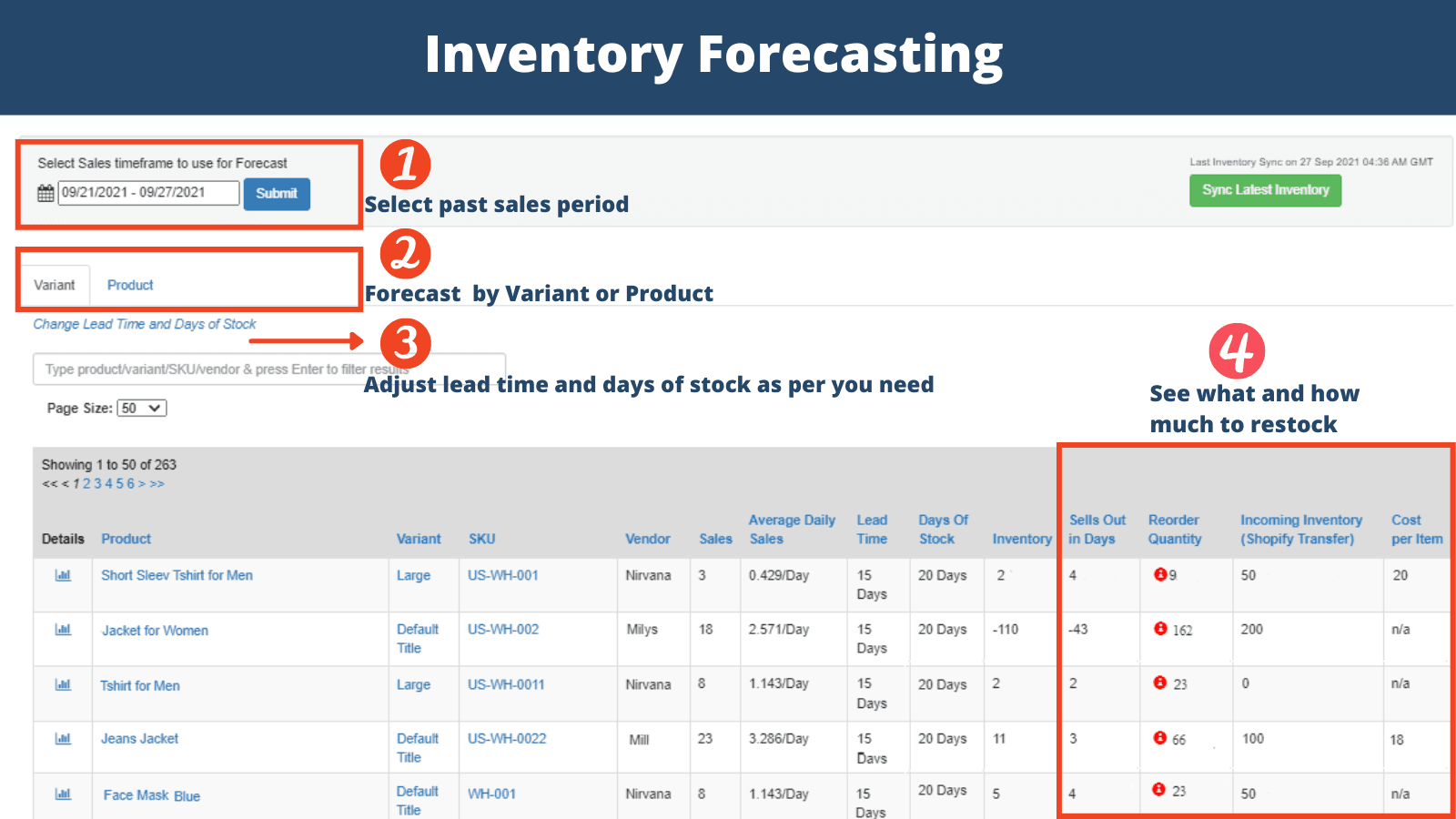
- Inventory Forecasting: Predict refill amounts
- Slow-moving products: Identify products that are not selling quickly.
- Alert setup: Set notifications for specific stores, products, and variants.
- Email updates: Receive emails every day/hour/week.
- Web Analytics: Live Internet Update
Keywords
Key Features
- Predict refill amounts to optimize inventory levels.
- Identify slow-moving products to reduce dead stock.
- Set alerts for low stock at store, product, or variant levels.
Pricing
Stockbot Low Stock Alert Pricing Plans
Free Alerts
$0/month
Only a store-wide low stock alert
Daily/Weekly low stock e-mail Alert
Real-time web report
For stores with less than 200 products
Alerts Plan
$9/month
Store-wide low stock alert
Alerts on specific products & variants
Alerts on specific collections
Alerts on specific locations
Daily/Weekly/Hourly email alert
Forecasting plan
$25/month
Demand Forecasting
Replenishment qty recommendation
Plus, all the Alerts plan features
Up to 10,000 products
Not sure which plan to pick? Discuss Free Alerts or Alerts Plan plans with us, learn about custom pricing, or get a demo.
Here's an overview of Stockbot Low Stock Alert costs for each of the plan(s):
The app has 3 pricing plans: 1 free and 2 paid. The free plan(s) offered by Stockbot Low Stock Alert: (Free Alerts). The paid plan(s) offered by Stockbot Low Stock Alert: (Alerts Plan, Forecasting plan).
The details of the plan(s) are outlined below:
Free Alerts: This plan is free forever, incurring no subscription costs. It offers a wide range of features like Only a store-wide low stock alert, Daily/Weekly low stock e-mail Alert, Real-time web report, For stores with less than 200 products.
Alerts Plan: The Alerts Plan plan costs $9 and comes with a 14-day free trial period. The plan offers a host of features, including Store-wide low stock alert, Alerts on specific products & variants, Alerts on specific collections, Alerts on specific locations, Daily/Weekly/Hourly email alert, Real-time low stock web report, Up to 10,000 products.
Forecasting plan: The Forecasting plan plan costs $25 and comes with a 14-day free trial period. The plan offers a host of features, including Demand Forecasting, Replenishment qty recommendation, Plus, all the Alerts plan features, Up to 10,000 products.
Stockbot Low Stock Alert Price Summary
| Pricing summary | Free plan available. Free trial available. |
| Total Pricing Plan(s) | 3 |
| Number of free plan(s) | 1 |
| Number of paid plan(s) | 2 |
| Cost of Paid Plan(s) | $9, $25 |
| Free trial available | Yes, for 14 day(s) |
Stockbot Low Stock Alert Shopify App Discounts
If you are looking for discounts on Stockbot Low Stock Alert app pricing plans, feel free to contact our team - we'd be happy to help! Additionally, if you are an agency or a shop merchant with multiple Shopify stores, we can work directly with StoreBuilder to secure better deals on the Stockbot Low Stock Alert app exclusively for you.
*Disclaimer: Please note that ShopDigest doesn't guarantee discounts on apps as any changes to the pricing plans are ultimately up to the discretion of the developer.
Testimonials
What our users say about Stockbot Low Stock Alert
“Wonderful and easy way to manage your inventory! Used it for years. ”
“This is the best inventory app I have found. It is MUCH better than the new ones with graphs and fancy charts. This tells you every piece of data you need to reorder and make decisions. NONE of the other ones have all of this data. So happy I found this software. All info is in one chart and you can sort by any metric. Very affordable too! Please continue to support this app.”
“Happy with the free version. Good for small businesses. ”
Trusted By
Trusted by the best Shopify stores
Hello Norden
United States
Prime Peptides™
United States
Rizvan
Australia
Atomic Defense
United States
VAPE DEALER ONLINE
Germany
Carbon Knife Co
United States
Ipothecary
United States
Aumni Crafts
India
Predict your customer's needs and accurately determine how much to reorder. Also, set alerts for when stock is low.
Warnings for Low Stock
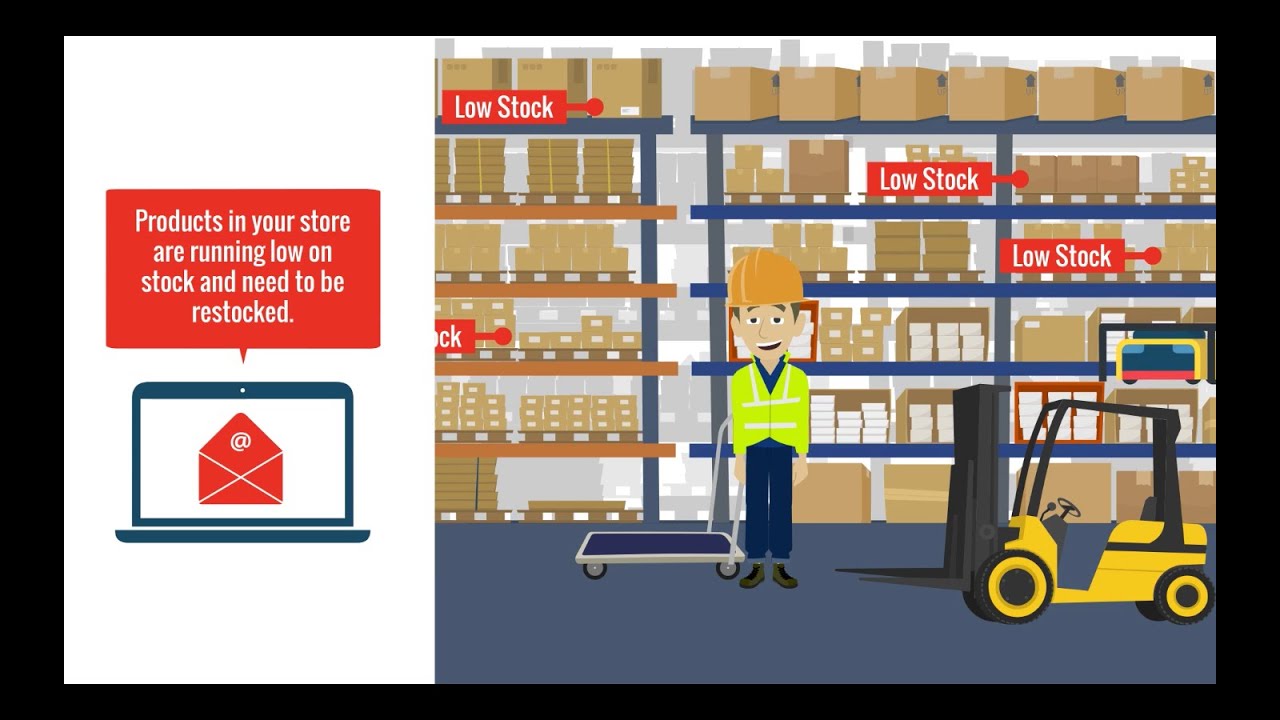
Receive an email report listing items that have fallen below your set low stock level. You can set alerts for specific products, variations, or collections.
By different products and their variations
Set up alerts for products, variations, collections, or the entire store. Receive an email notification when any variation's stock falls below your set level.
Live Web Report
Use the live online report to check your low stock items whenever you want.
Comparison
Top Stockbot Low Stock Alert Alternatives Detailed Comparison
The table below highlights the crucial differences between Stockbot Low Stock Alert and similar other Shopify apps based on parameters like ratings, reviews, features, pricing, etc.
Add App | |||
|---|---|---|---|
| General Information | |||
| Ratings | 4.9(41 reviews) | 4.8(97 reviews) | |
| Developed by | StoreBuilder | Xeon Apps | |
| Launch Date | 7/5/2013 | 3/28/2019 | |
| Pricing | Free, $9/month, $25/month | Free, $2.99/month, $4.99/month, $9.99/month | |
| Objective | Predict the quantity for reordering and establish alerts for low stock. | Get inventory alerts through email or Slack, with rules you can set yourself. | |
| Categories | Inventory optimization, Stock alerts | Inventory optimization, Stock alerts | |
| Key Features & Highlights | |||
| Purpose | Predict your customer's needs and accurately determine how much to reorder. Also, set alerts for when stock is low. | Set up automatic email or slack notifications for low stock of products or variants. | |
| Features List |
|
| |
| Highlights | - | - | |
| User Reviews and Ratings | |||
| Recommended % | 95.1% | 98.0% | |
| Pros |
|
| |
| Cons |
|
| |
| Pricing and Plans | |||
| Total Pricing Plans | 3 | 4 | |
| Free Plan | Available | Available | |
| Free Trial | Yes, for 14 day(s) | Yes, for 14 day(s) | |
| Technical Information | |||
| Rating | 4.9 | 4.8 | |
| Total Reviews | 58 | 78 | |
| Launch Date | 7/5/2013 | 3/28/2019 | |
| SD Points | N/A | 21 | |
More Details About Stockbot Low Stock Alert
Product Description
The app aids in efficient inventory tracking and forecasting, identifying slow products, and setting low stock alerts at various levels. It automates tasks, saves time and money, and effectively prevents issues like dead stock and overstocking.
AI Summary
The app is a Shopify inventory management tool designed to help businesses monitor stock levels, forecast demand, and automate reorder alerts. Its core features include customizable low-stock notifications, sales-based forecasting, and daily or weekly email reports summarizing inventory status. The app excels in simplicity, providing clear, actionable data without unnecessary complexity, making it suitable for businesses of varying sizes. Strengths include accurate forecasting based on historical sales, flexible alert thresholds, and strong customer support that is responsive to feedback and quick to resolve issues. However, the app has some limitations, such as a dated interface and restricted data analysis—forecasting is limited to the past year’s sales, and some advanced features like purchase order creation are absent. While a free plan exists, some users report difficulty accessing it, as the app occasionally defaults to paid tiers. Despite its utilitarian design, the app is valued for its reliability, affordability, and ability to streamline inventory management, particularly for businesses with high SKU counts or fast-moving products.
Support
For any questions, concerns, or assistance with Stockbot Low Stock Alert, the dedicated support team is readily available to help.To reach out to the support team, users can send an email to [email protected]. Additionally, Stockbot Low Stock Alert offers a comprehensive FAQ section to address common inquiries and provide self-help resources in their app FAQ section.
Stockbot Low Stock Alert Support Information In A Nutshell:
| Support Email: | [email protected] |
| Contact Number(s): | Not available |
| FAQ Page: | FAQ details |
| Privacy Policy: | Privacy details |
| Language Support: | English |
Integration
The list of top Shopify apps or features or software tools that Stockbot Low Stock Alert seamlessly integrates are given below:
No integration details available.
Developer
Name: StoreBuilder
Website: /partners/storebuilder
Address: 440 N BARRANCA AVE #3243, Covina, CA, 91723
Looking to install Stockbot Low Stock Alert app on your store?
ShopDigest helps businesses upgrade their Shopify stores by offering easy app installation services.
Why Choose ShopDigest?
- Highly experienced and vetted team for successful app installation
- Assured support and guidance throughout the installation and beyond
- Customized services to meet unique business needs
- 30-day no questions asked refund policy
- Lowest pricing guaranteed (starts at just $10/hour)
Customer Reviews
Stockbot Low Stock Alert has an overall rating of 4.8 stars from a total of 58 reviews on the Shopify app store. Of these, 56 (96.6%) are positive, 0 (0.0%) are neutral, and 2 (3.4%) are negative*.
*Ratings above four stars fall under positive review, three stars reviews fall under neutral, and anything less than two stars falls under negative.
Wonderful and easy way to manage your inventory! Used it for years.
This is the best inventory app I have found. It is MUCH better than the new ones with graphs and fancy charts. This tells you every piece of data you need to reorder and make decisions. NONE of the other ones have all of this data. So happy I found this software. All info is in one chart and you can sort by any metric. Very affordable too! Please continue to support this app.
This is the best inventory app I have found. It is MUCH better than the new ones with graphs and fancy charts. This tells you every piece of data you need to reorder and make decisions. NONE of the other ones have all of this data. So happy I found this software. All info is in one chart and you can sort by any metric. Very affordable too! Please continue to support this app.
Happy with the free version. Good for small businesses.
Very helpful for forecasting inventory and allows us to order an accurate amount. The customer service has been responsive and helpful so far and they've been able to take care of our questions/issues.
First of all, i tried all apps for forecasting that are below 300€ per month.This app isnt the most beautiful one, maybe it is in the top 3 of ugly designed apps ive ever used before in shopify. BUT it is exactly doing what it should and im absolute happy with the functions and the price, so im fine with using it even its not a design award winner!thanks for that app!
First of all, i tried all apps for forecasting that are below 300€ per month.This app isnt the most beautiful one, maybe it is in the top 3 of ugly designed apps ive ever used before in shopify. BUT it is exactly doing what it should and im absolute happy with the functions and the price, so im fine with using it even its not a design award winner!thanks for that app!
Video Demo and Screenshots
Product Video
Product Screenshots
Installation Steps
How to install Stockbot Low Stock Alert on your Shopify store
Find your app
Use filters like pricing, availability, and features to find the perfect match for your store's needs.
Get a personalized setup plan
Our team will create an installation plan based on your current store setup, goals, and requirements.
Install at your own pace
Perfect your store's functionality without the pressure to move on until you're ready.
Install in your Shopify Store
Stockbot Low Stock Alert FAQ's
How do I install the Stockbot Low Stock Alert Shopify app?
To install Stockbot Low Stock Alert app on your Shopify store, click on the Stockbot Low Stock Alert installation link. Login to the Shopify store on which you want to install the app and follow the onboarding process.
If you need our expert guidance to help you install Stockbot Low Stock Alert on your Shopify store, then contact us now.
What are the key features of Stockbot Low Stock Alert?
The key features offered by Stockbot Low Stock Alert to Shopify store owners are:
- ✅Set alerts at store, product, variant level
- ✅Get Daily/Hourly/Weekly emails
- ✅Realtime Web Report
- ✅Forecast Replenishment Quantities
- ✅Identify slow-moving products
Does Stockbot Low Stock Alert integrate with other Shopify apps or tools?
Yes, Stockbot Low Stock Alert seamlessly integrates with other Shopify apps or tools, such as Predict refill amounts, Identify products that are not selling quickly., Set notifications for specific stores, products, and variants..
Is there a free trial available for Stockbot Low Stock Alert?
Yes, Stockbot Low Stock Alert offers 14 days free trial on all its paid plans.
What are the pricing plans for Stockbot Low Stock Alert?
The app has 3 pricing plans: 1 free and 2 paid. The paid plans cost $9/month, $25/month, and come with a 14-day free trial period.
How does billing work for Stockbot Low Stock Alert?
Stockbot Low Stock Alert uses USD for billing, with recurring and usage-based charges invoiced usually every 30 days.
Can I cancel or upgrade my subscription plan at any time?
Yes, Stockbot Low Stock Alert allows its subscribers to cancel or upgrade their subscription plan at any time.
Does Stockbot Low Stock Alert offer customer support? How can I get assistance?
Yes, Stockbot Low Stock Alert offers a dedicated support team for any kind of app-related assistance. To reach out to the support team, users can send an email to [email protected].
Additionally, Stockbot Low Stock Alert offers a comprehensive FAQ section to address common inquiries and provide self-help resources.
Is Stockbot Low Stock Alert compatible with my Shopify theme?
Please reach out to their support team at [email protected] to confirm its compatibility with your specific Shopify theme.
Alternatives
See all Alternatives to Stockbot Low Stock Alert Shopify App.






Most Popular
Most popular Shopify apps on the market




