
Power Tools Bulk Edit Tags Shopify App
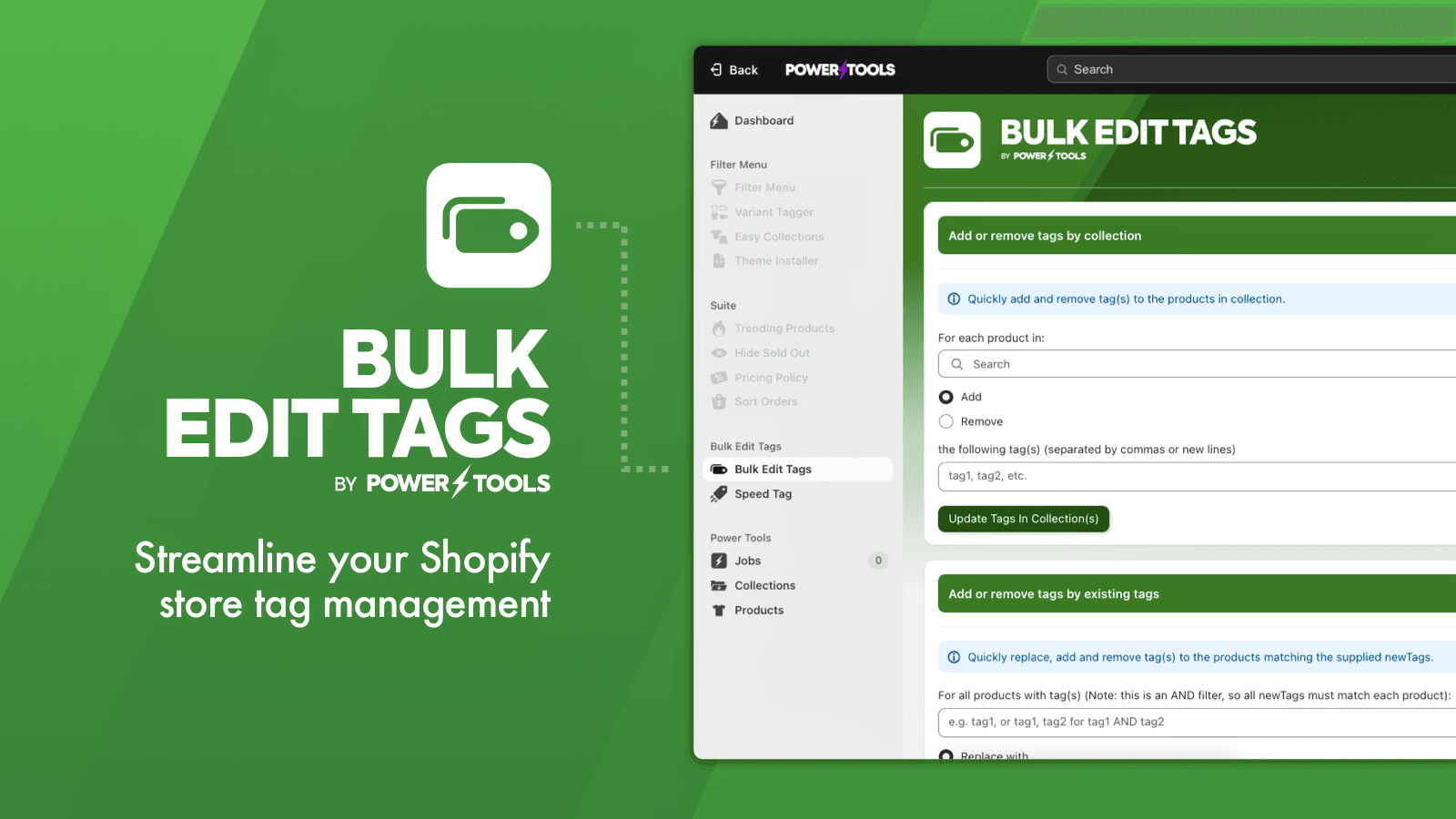
by Power ToolsSimply add or remove tags from your products based on collections, tags, and other guidelines. Easily add, delete or change your product tags all at once.
4.4
(103)
Turku Kārums, Latvia
Easy to use and fast. We don't use everyday but when we need it helps a lot.
Install in your Shopify Store

Power Tools Bulk Edit Tags Charts
Track Power Tools Bulk Edit Tags's ranking, reviews, and performance over time with interactive charts. See how it compares to similar apps in the same category.
Pros and Cons
Pros and Cons of Power Tools Bulk Edit Tags
Pros
Time-Saving Efficiency: The app significantly reduces the time required for bulk tag editing compared to manual methods.
Ease of Use: Intuitive interface and straightforward functionality make it accessible for users of all skill levels.
Free Plan Value: The free version offers robust features, making it highly cost-effective for users.
Bulk Editing Capabilities: Supports adding, removing, and replacing tags across large product catalogs efficiently.
Cons
Limited Tag Renaming: Inability to directly edit or rename existing tags, only replace them.
Hidden Paywall Features: Advanced functionalities require paid add-ons, which some users find expensive.
Screenshots
About the App
Easily add, delete or change your product tags all at once.
- Bulk tag editing: Save time at work by editing tags all at once.
- Tag Modification: Change all your tags in a collection with just one click.
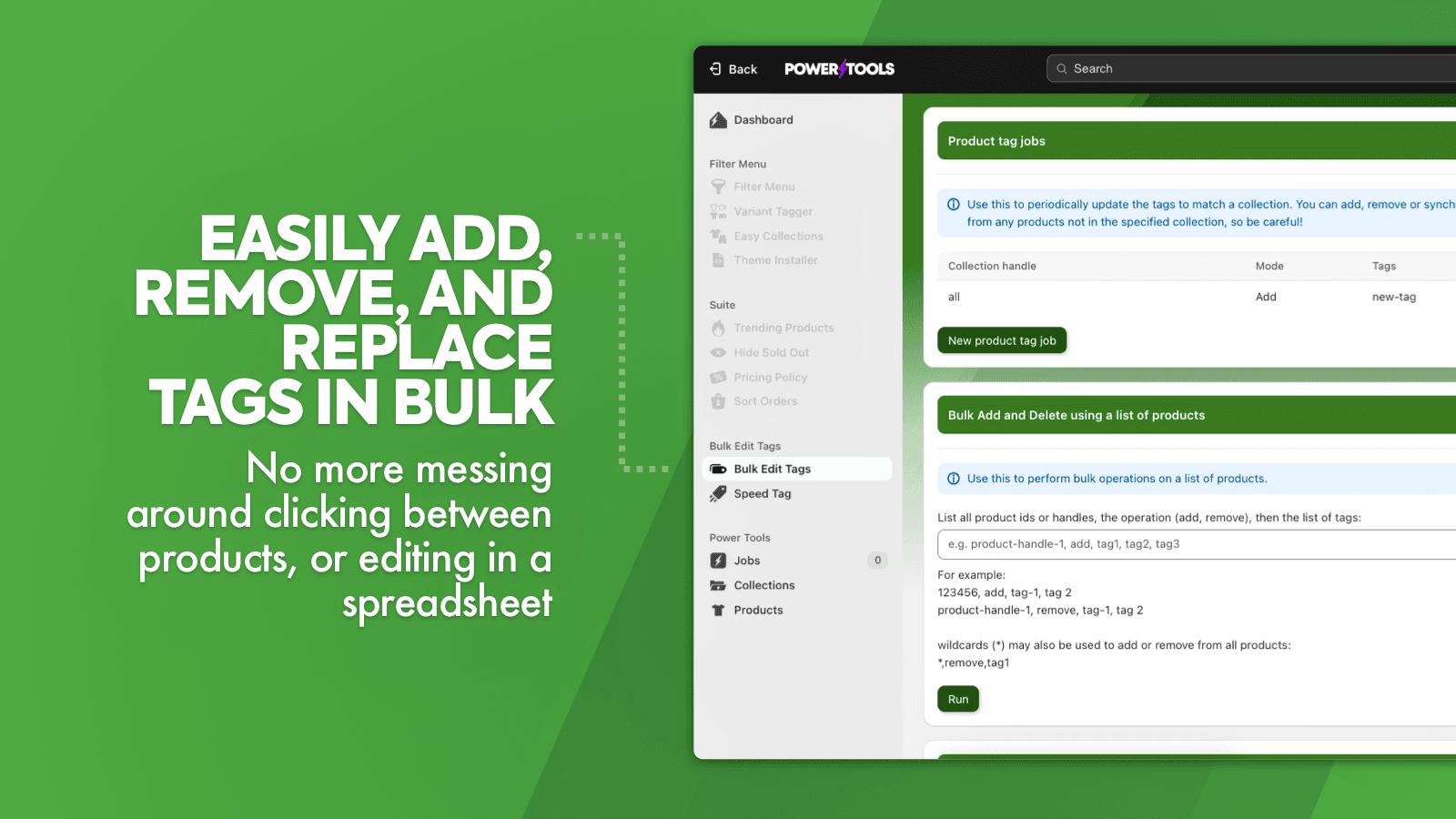
- Bulk tag operations: Delete multiple tags at once or change tags based on other tag combinations.
Keywords
Key Features
- Edit multiple product tags simultaneously to save time.
- Add or remove tags across entire collections with one click.
- Delete unwanted tags from all products instantly.
Pricing
Power Tools Bulk Edit Tags Pricing Plans
$0/month
Here's an overview of Power Tools Bulk Edit Tags costs for each of the plan(s):
The app offers 1 free plan(s). The free plan(s) offered by Power Tools Bulk Edit Tags: ().
The plan encompasses all the features provided by the app.
Power Tools Bulk Edit Tags Price Summary
| Pricing summary | Free |
| Total Pricing Plan(s) | 1 |
| Number of free plan(s) | 1 |
| Number of paid plan(s) | 0 |
| Free trial available | No |
Power Tools Bulk Edit Tags Shopify App Discounts
If you are looking for discounts on Power Tools Bulk Edit Tags app pricing plans, feel free to contact our team - we'd be happy to help! Additionally, if you are an agency or a shop merchant with multiple Shopify stores, we can work directly with Power Tools to secure better deals on the Power Tools Bulk Edit Tags app exclusively for you.
*Disclaimer: Please note that ShopDigest doesn't guarantee discounts on apps as any changes to the pricing plans are ultimately up to the discretion of the developer.
Testimonials
What our users say about Power Tools Bulk Edit Tags
“Easy to use and fast. We don't use everyday but when we need it helps a lot.”
“This app has saved my sanity. I would remove incorrect or obsolete tags from my products, but I could still see them on the list just staring at me, triggering my OCD something fierce.Now, I tag like a boss and my shop is clean. Bonus, no more voices in my head telling me to go back to Woo. I guess I'm gonna have to get the whole Power Tools Suite so I can be a total boss girl.”
“This app has saved me SO much time. I needed to add some new tags to align with a product quiz and this app made it so much easier to do so and in bulk. Highly recommend.”
Trusted By
Trusted by the best Shopify stores
Turku Kārums
Latvia
Missy Reno Smith
United States
Romantique Books
United States
rainbowofcrazy
Canada
Ludisphere
France
UB2 | Urban Baby Bonnets
United States
Pretavoir
United Kingdom
//\rt \>y ]|\/\[
United States
Simply add or remove tags from your products based on collections, tags, and other guidelines.
Accomplish More With Mass Editing
Save time at work by editing tags all at once.
Description and Collection Labels
Change tags for whole collections with a single click. Also, you can add or remove tags depending on product details.
Complex Mixtures
Remove or modify tags in mass, using other tag combinations as a basis.
Comparison
Top Power Tools Bulk Edit Tags Alternatives Detailed Comparison
The table below highlights the crucial differences between Power Tools Bulk Edit Tags and similar other Shopify apps based on parameters like ratings, reviews, features, pricing, etc.
Add App | |||
|---|---|---|---|
| General Information | |||
| Ratings | 4.4(36 reviews) | 4.9(802 reviews) | |
| Developed by | Power Tools | Ablestar | |
| Launch Date | 11/20/2013 | 7/31/2017 | |
| Pricing | Free | Free, $30/month, $60/month, $120/month | |
| Objective | Easily add, delete or change your product tags all at once. | Edit multiple products at once, import/export with CSV Excel, modify metafields. | |
| Categories | Bulk editor, Metafields | Bulk editor, Metafields | |
| Key Features & Highlights | |||
| Purpose | Simply add or remove tags from your products based on collections, tags, and other guidelines. | Edit thousands of products all at once confidently through previews, undos, and personalised spreadsheets. | |
| Features List |
|
| |
| Highlights |
|
| |
| User Reviews and Ratings | |||
| Recommended % | 94.3% | 98.0% | |
| Pros |
|
| |
| Cons |
|
| |
| Pricing and Plans | |||
| Total Pricing Plans | 0 | 4 | |
| Free Plan | Not available | Available | |
| Free Trial | No | No | |
| Technical Information | |||
| Rating | 4.4 | 4.9 | |
| Total Reviews | 103 | 625 | |
| Launch Date | 11/20/2013 | 7/31/2017 | |
| SD Points | 1 | 975 | |
More Details About Power Tools Bulk Edit Tags
Product Description
Power Tools Bulk Edit Tags offers a simplified way to add, remove and sync product tags more efficiently. It comes with features like bulk deletion of tags, adding tags by collections, and the Speed Tag feature for quick tag addition, thus negating the need to navigate between products or use spreadsheets.
AI Summary
The app is a bulk tag editor designed to streamline product tag management on Shopify, offering efficient bulk addition, removal, and replacement of tags across products or collections. Its core functionality includes filtering by product attributes (e.g., title, description) and performing batch operations, significantly reducing manual effort. Strengths include ease of use, time-saving capabilities, and reliable performance, particularly for large catalogs. The app is free, with no apparent limitations on basic features, and includes responsive support. However, it lacks the ability to directly rename or edit existing tags—only adding, removing, or replacing them—which may require workarounds for certain use cases. Some users report occasional delays in processing or incomplete jobs, though these instances appear infrequent. The app is widely regarded as a necessity for stores with extensive tagging needs, filling a gap in Shopify’s native functionality. A few users note that advanced features, such as conditional tag updates or integration with vendor data, may require paid add-ons. Overall, it is a practical tool for bulk tag management but may not fully address niche requirements like tag renaming or complex conditional logic.
Support
For any questions, concerns, or assistance with Power Tools Bulk Edit Tags, the dedicated support team is readily available to help.To reach out to the support team, users can send an email to [email protected].
Power Tools Bulk Edit Tags Support Information In A Nutshell:
| Support Email: | [email protected] |
| Contact Number(s): | Not available |
| FAQ Page: | Not available |
| Privacy Policy: | Privacy details |
| Language Support: | English |
Integration
The list of top Shopify apps or features or software tools that Power Tools Bulk Edit Tags seamlessly integrates are given below:
Developer
Name: Power Tools
Website: /partners/power-tools
Address: Level 2, 20-24 Subiaco Square Road, Subiaco, WA, 6008
Looking to install Power Tools Bulk Edit Tags app on your store?
ShopDigest helps businesses upgrade their Shopify stores by offering easy app installation services.
Why Choose ShopDigest?
- Highly experienced and vetted team for successful app installation
- Assured support and guidance throughout the installation and beyond
- Customized services to meet unique business needs
- 30-day no questions asked refund policy
- Lowest pricing guaranteed (starts at just $10/hour)
Power Tools Bulk Edit Tags Q&A
How does this app help manage product tags?
It lets you add, remove, or update tags in bulk across products or collections with a single click, saving hours of manual editing or spreadsheet work.
Can I delete multiple tags at once?
Yes, you can bulk delete tags from all products instantly, eliminating the need to edit each product individually.
Does it support tagging by collections?
Absolutely! You can apply or remove tags based on entire collections, making large-scale organization quick and efficient.
What is the Speed Tag feature?
It allows you to rapidly assign tags by selecting them from a list of products, streamlining the tagging process without manual input.
Who would benefit most from this app?
Store owners or managers handling large inventories who need to organize products faster without repetitive manual tagging.
Can I update tags based on existing tags?
Yes, you can modify tags in bulk using combinations of existing tags, ensuring consistent categorization across your store.
Is this app suitable for small businesses?
Yes, it simplifies tag management for stores of any size, but it’s especially useful for those with growing product catalogs.
Does it require spreadsheet editing?
No, all edits happen directly in the app, removing the need for cumbersome spreadsheet imports or exports.
How fast can I edit tags for hundreds of products?
Bulk actions take seconds, whether adding, removing, or syncing tags, regardless of the number of products.
Can I sync tags across products automatically?
Yes, the app lets you sync tags based on rules like collections or descriptions, keeping your catalog organized effortlessly.
Customer Reviews
Power Tools Bulk Edit Tags has an overall rating of 4.8 stars from a total of 103 reviews on the Shopify app store. Of these, 96 (93.2%) are positive, 1 (1.0%) are neutral, and 6 (5.8%) are negative*.
*Ratings above four stars fall under positive review, three stars reviews fall under neutral, and anything less than two stars falls under negative.
Easy to use and fast. We don't use everyday but when we need it helps a lot.
This app has saved my sanity. I would remove incorrect or obsolete tags from my products, but I could still see them on the list just staring at me, triggering my OCD something fierce.Now, I tag like a boss and my shop is clean. Bonus, no more voices in my head telling me to go back to Woo. I guess I'm gonna have to get the whole Power Tools Suite so I can be a total boss girl.
This app has saved me SO much time. I needed to add some new tags to align with a product quiz and this app made it so much easier to do so and in bulk. Highly recommend.
This has been invaluable. Easy to use and has saved me so much time. Thank you so much
M'a permis de modifier en masse des tags, même ceux que je ne soupçonné pas ajoutés par des applications de test. Impeccable
Video Demo and Screenshots
Product Video

Product Screenshots
Installation Steps
How to install Power Tools Bulk Edit Tags on your Shopify store
Find your app
Use filters like pricing, availability, and features to find the perfect match for your store's needs.
Get a personalized setup plan
Our team will create an installation plan based on your current store setup, goals, and requirements.
Install at your own pace
Perfect your store's functionality without the pressure to move on until you're ready.
Install in your Shopify Store
Power Tools Bulk Edit Tags FAQ's
How do I install the Power Tools Bulk Edit Tags Shopify app?
To install Power Tools Bulk Edit Tags app on your Shopify store, click on the Power Tools Bulk Edit Tags installation link. Login to the Shopify store on which you want to install the app and follow the onboarding process.
If you need our expert guidance to help you install Power Tools Bulk Edit Tags on your Shopify store, then contact us now.
What are the key features of Power Tools Bulk Edit Tags?
The key features offered by Power Tools Bulk Edit Tags to Shopify store owners are:
- ✅Save yourself hours in the office by editing tags in bulk.
- ✅Modify your tags across entire collections with just a click.
- ✅Bulk delete tags, or update tags based on combinations of other tags.
Does Power Tools Bulk Edit Tags integrate with other Shopify apps or tools?
Yes, Power Tools Bulk Edit Tags seamlessly integrates with other Shopify apps or tools, such as Save time at work by editing tags all at once., Change all your tags in a collection with just one click., Delete multiple tags at once or change tags based on other tag combinations..
Is there a free trial available for Power Tools Bulk Edit Tags?
No, Power Tools Bulk Edit Tags does not offer any free trial.
What are the pricing plans for Power Tools Bulk Edit Tags?
The app offers 0 plans that are forever-free.
How does billing work for Power Tools Bulk Edit Tags?
Power Tools Bulk Edit Tags is completely free to install and use. Additional charges may or may not apply.
Can I cancel or upgrade my subscription plan at any time?
Yes, Power Tools Bulk Edit Tags allows its subscribers to cancel or upgrade their subscription plan at any time.
Does Power Tools Bulk Edit Tags offer customer support? How can I get assistance?
Yes, Power Tools Bulk Edit Tags offers a dedicated support team for any kind of app-related assistance. To reach out to the support team, users can send an email to [email protected].
Is Power Tools Bulk Edit Tags compatible with my Shopify theme?
Please reach out to their support team at [email protected] to confirm its compatibility with your specific Shopify theme.
Alternatives
See all Alternatives to Power Tools Bulk Edit Tags Shopify App.






Most Popular
Most popular Shopify apps on the market




