
O: Auto Tag & Flow Automation by Flowise
Automatically add tags to orders and customers based on your chosen conditions. Achieve more work in less time through automation. Automatically add tags to orders and customers using automated systems.
4.7
(101)
Unknown Store, Unknown Country
Since i write the review after feedback requests have been implemented, i can state the following.So, after some weeks of testing:1. Great light app. 2. Nice clean menus on dashboard. 3. Feedback requests have been implemented (yes, i have said that before but its not to take for sure it will happen) and was fast. Accidental? i don't know, i think more have gave feedback for some features to be added (like being able to name our flows and not only show a number). Shows to me that they listen. Was coincidence? We will see in the future. 4. Price: i can't imagine someone is complaining. More than reasonable pricing.-Suggested Improvements: 1. I would really like to be able to change the flow positions higher or lower so they can be somewhat "grouped" (e.g. to me it would be great to be able to have tier flows one after another then all order related flows). Maybe having some tabs that can be named to allow us to have flows grouped by function? If not possible then repositioning and some separators? Tiny suggestions that make things visually easier for us (for me at least). 2. A condition that makes a flow active for a period of time its a much much desired feature. I hope it can be done. 3. Add multiple tags and separate them by commas: Nothing huge here, but consider the tag to be active even if we don't have a space before the tag's name.I these features are added, then its a clear 5/5 for me. lets say for now its 4.5/5. Since i cant do that, 5 stars. 4 stars seems low rating to me.
Install in your Shopify Store

O: Auto Tag & Flow Automation Charts
Track O: Auto Tag & Flow Automation's ranking, reviews, and performance over time with interactive charts. See how it compares to similar apps in the same category.
Pros and Cons
Pros and Cons of O: Auto Tag & Flow Automation
Pros
Exceptional Customer Support: Frequent praise for responsive, knowledgeable, and helpful support staff.
Intuitive Interface: The app is consistently described as user-friendly and easy to navigate.
Powerful Tagging Features: Users highlight the app’s ability to automate and customize order and customer tagging.
Seamless Integrations: Positive feedback on smooth integration with platforms like Shopify, Gmail, and Klaviyo.
Cons
Limited Historical Data: Some users report the app only checks the past 60 days of data, unsuitable for long-term needs.
Language Support Issues: Non-English characters (e.g., accents, "ñ") are not fully supported, affecting Latin American users.
Screenshots
About the App
Automatically add tags to orders and customers using automated systems.
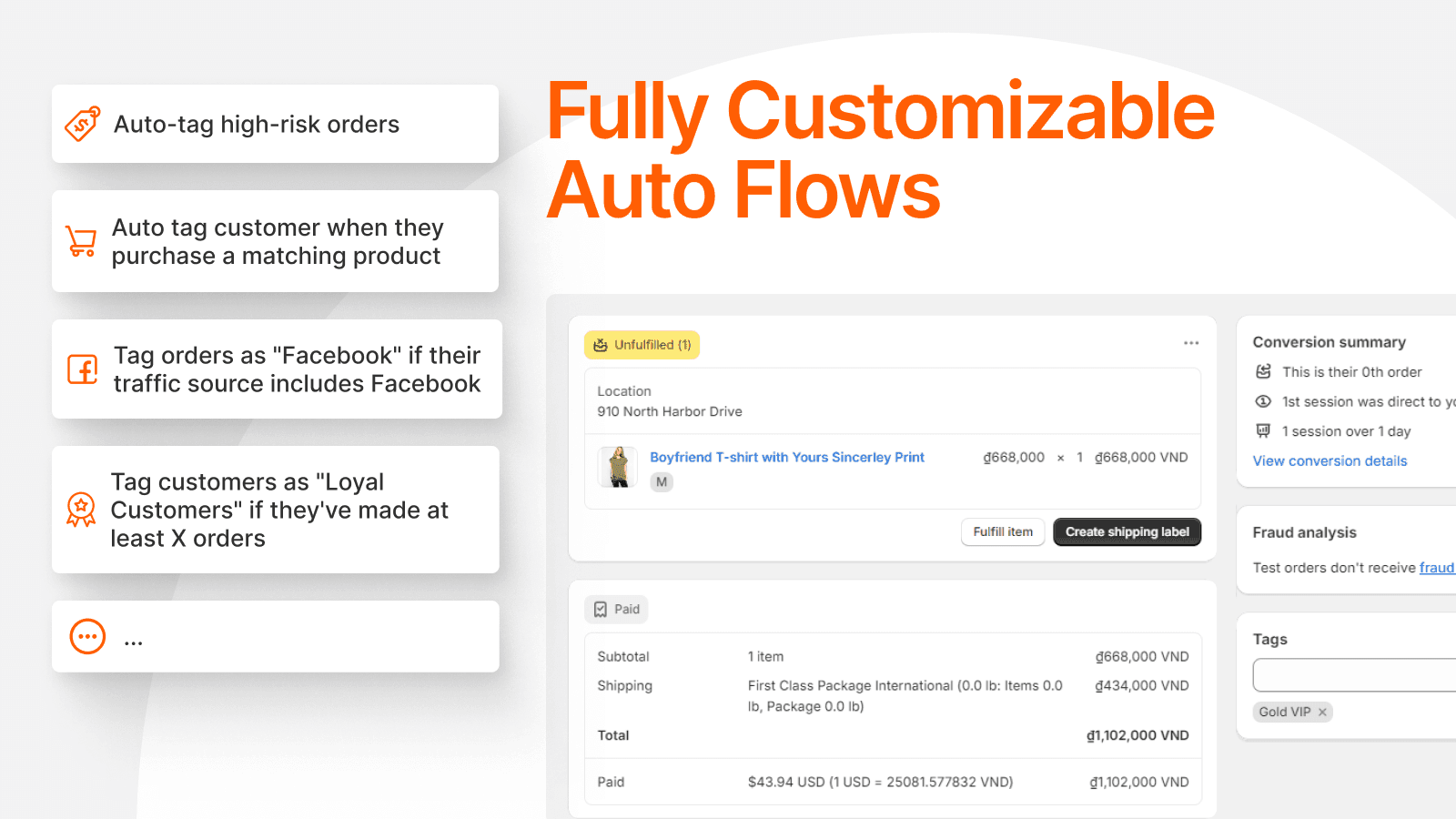
- Automated order tagging: Automatically add or remove as many tags as you want from orders and customers.
- Business Workflow: Make any necessary workflows to operate your business.
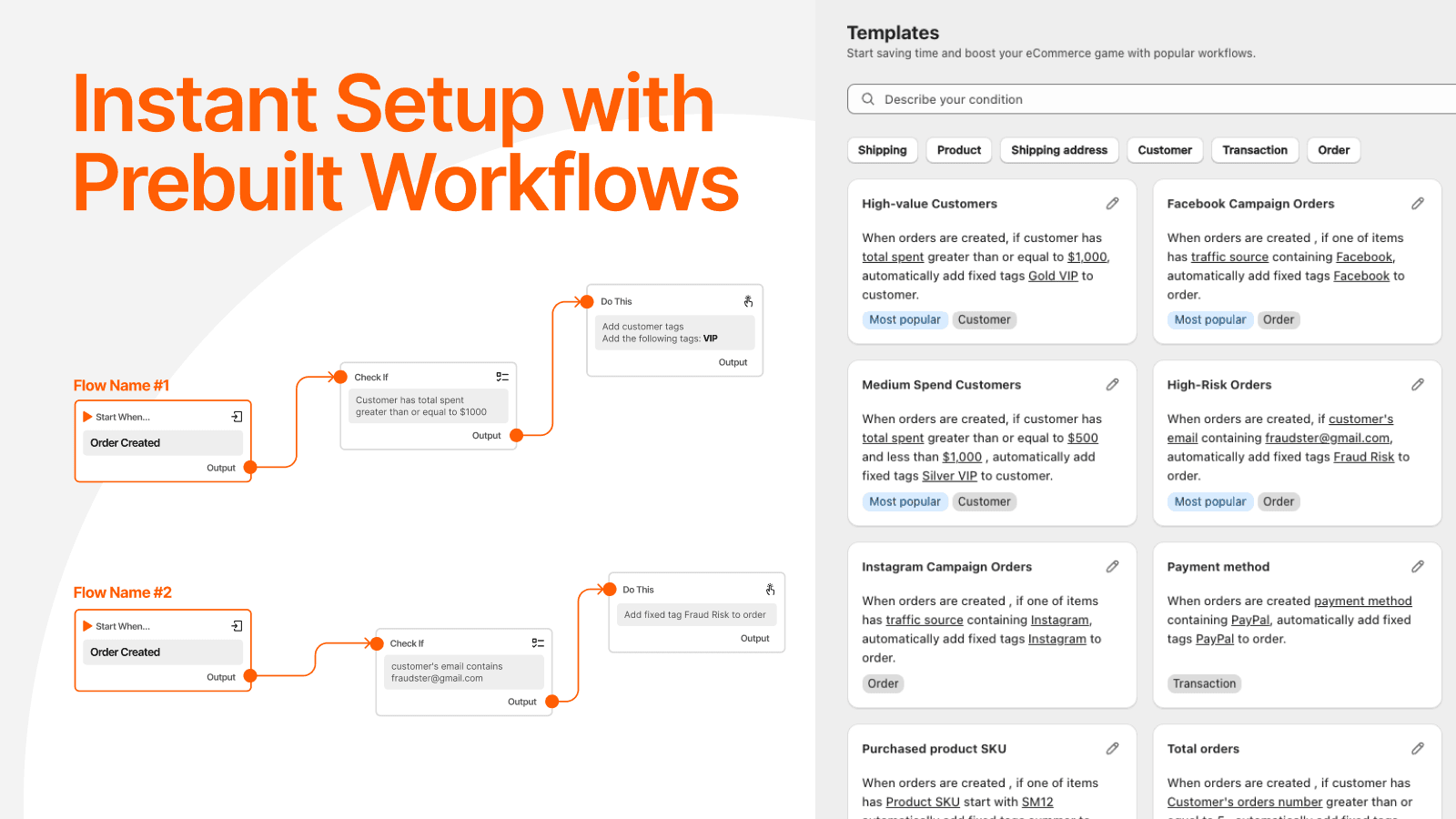
- Proven eCommerce Flow Templates: Begin with widely-used templates that have been proven effective by eCommerce users.
- Dynamic Tags: Add flexible labels - labels alter with each order and customer.
- Edit order tags: Adjust tags on all your past orders.
Keywords
Key Features
- Automatically add or remove unlimited tags for orders, customers, and products.
- Apply dynamic tags that adjust based on dates, fees, or discounts.
- Use pre-built workflows to simplify order and customer management.
Pricing
O: Auto Tag & Flow Automation Pricing Plans
Free
$0/month
Unlimited workflows
Free add tag to 100 old orders
100 order tags/month
100 customer tags/month
100 product tags/month
Basic
$7.99/month
Unlimited workflows
Free add tag to 100 old orders
1000 order tags/month
1000 customer tags/month
Shopify Flow Connector
Standard
$13.99/month
Basic plan +
Unlimited order tags/month
Unlimited customer tags/month
Unlimited tag removals/month
Set up delay in tagging
Pro
$16.99/month
Standard plan +
Dynamic tags
Shopify Flow Connector
Superior support
Not sure which plan to pick? Discuss Free or Basic plans with us, learn about custom pricing, or get a demo.
Here's an overview of O: Auto Tag & Flow Automation costs for each of the plan(s):
The app has 4 pricing plans: 1 free and 3 paid. The free plan(s) offered by O: Auto Tag & Flow Automation: (Free). The paid plan(s) offered by O: Auto Tag & Flow Automation: (Basic, Standard, Pro).
The details of the plan(s) are outlined below:
Free: This plan is free forever, incurring no subscription costs. It offers a wide range of features like Unlimited workflows, Free add tag to 100 old orders, 100 order tags/month, 100 customer tags/month, 100 product tags/month.
Basic: The Basic plan costs $7.99 and comes with a 7-day free trial period. The plan offers a host of features, including Unlimited workflows, Free add tag to 100 old orders, 1000 order tags/month, 1000 customer tags/month, Shopify Flow Connector.
Standard: The Standard plan costs $13.99 and comes with a 7-day free trial period. The plan offers a host of features, including Basic plan +, Unlimited order tags/month, Unlimited customer tags/month, Unlimited tag removals/month, Set up delay in tagging.
Pro: The Pro plan costs $16.99 and comes with a 7-day free trial period. The plan offers a host of features, including Standard plan +, Dynamic tags, Shopify Flow Connector, Superior support.
O: Auto Tag & Flow Automation Price Summary
| Pricing summary | Free to install. Free trial available. |
| Total Pricing Plan(s) | 4 |
| Number of free plan(s) | 1 |
| Number of paid plan(s) | 3 |
| Cost of Paid Plan(s) | $7.99, $13.99, $16.99 |
| Free trial available | Yes, for 7 day(s) |
For further information regarding O: Auto Tag & Flow Automation app pricing plans, see the official website.
O: Auto Tag & Flow Automation Shopify App Discounts
If you are looking for discounts on O: Auto Tag & Flow Automation app pricing plans, feel free to contact our team - we'd be happy to help! Additionally, if you are an agency or a shop merchant with multiple Shopify stores, we can work directly with Flowise to secure better deals on the O: Auto Tag & Flow Automation app exclusively for you.
*Disclaimer: Please note that ShopDigest doesn't guarantee discounts on apps as any changes to the pricing plans are ultimately up to the discretion of the developer.
Testimonials
What our users say about O: Auto Tag & Flow Automation
“Since i write the review after feedback requests have been implemented, i can state the following.So, after some weeks of testing:1. Great light app. 2. Nice clean menus on dashboard. 3. Feedback requests have been implemented (yes, i have said that before but its not to take for sure it will happen) and was fast. Accidental? i don't know, i think more have gave feedback for some features to be added (like being able to name our flows and not only show a number). Shows to me that they listen. Was coincidence? We will see in the future. 4. Price: i can't imagine someone is complaining. More than reasonable pricing.-Suggested Improvements: 1. I would really like to be able to change the flow positions higher or lower so they can be somewhat "grouped" (e.g. to me it would be great to be able to have tier flows one after another then all order related flows). Maybe having some tabs that can be named to allow us to have flows grouped by function? If not possible then repositioning and some separators? Tiny suggestions that make things visually easier for us (for me at least). 2. A condition that makes a flow active for a period of time its a much much desired feature. I hope it can be done. 3. Add multiple tags and separate them by commas: Nothing huge here, but consider the tag to be active even if we don't have a space before the tag's name.I these features are added, then its a clear 5/5 for me. lets say for now its 4.5/5. Since i cant do that, 5 stars. 4 stars seems low rating to me.”
“Customer service communication is very timely and problem solving is very professional!!!”
“Very helpful, walked me thru the automation process in just a few minutes.”
Trusted By
Trusted by the best Shopify stores
Sofary Lighting
United States
The World's Greatest Rejuvenation
United States
Salty Sews
United States
Electragrid Solutions Online Store
United States
ShopStarluxe
United States
משק פנחס
Israel
keyshop-il
Israel
Automatically add tags to orders and customers based on your chosen conditions. Achieve more work in less time through automation.
Save time using order tagging.
Automatically add or delete order tags or customer tags that meet certain conditions. Use dynamic tags that can adjust based on variables.
Improve handling of orders and customers.
Improve order/customer filtering using the order tagger. Establish different customer segments with workflows.
Retag old orders for reprocessing.
Recheck all past orders and customers using workflows and re-tag them. Include a delay period for tagging orders.
Comparison
Top O: Auto Tag & Flow Automation Alternatives Detailed Comparison
The table below highlights the crucial differences between O: Auto Tag & Flow Automation and similar other Shopify apps based on parameters like ratings, reviews, features, pricing, etc.
Add App | ||
|---|---|---|
| General Information | ||
| Ratings | 4.7(84 reviews) | |
| Developed by | Flowise | |
| Launch Date | 11/17/2017 | |
| Pricing | Free, $7.99/month, $13.99/month, $16.99/month | |
| Objective | Automatically add tags to orders and customers using automated systems. | |
| Categories | Workflow automation | |
| Key Features & Highlights | ||
| Purpose | Automatically add tags to orders and customers based on your chosen conditions. Achieve more work in less time through automation. | |
| Features List |
| |
| Highlights |
| |
| User Reviews and Ratings | ||
| Recommended % | 94.4% | |
| Pros |
| |
| Cons |
| |
| Pricing and Plans | ||
| Total Pricing Plans | 4 | |
| Free Plan | Available | |
| Free Trial | Yes, for 7 day(s) | |
| Technical Information | ||
| Rating | 4.7 | |
| Total Reviews | 101 | |
| Launch Date | 11/17/2017 | |
| SD Points | 19 | |
More Details About O: Auto Tag & Flow Automation
Looking to install O: Auto Tag & Flow Automation app on your store?
ShopDigest helps businesses upgrade their Shopify stores by offering easy app installation services.
Why Choose ShopDigest?
- Highly experienced and vetted team for successful app installation
- Assured support and guidance throughout the installation and beyond
- Customized services to meet unique business needs
- 30-day no questions asked refund policy
- Lowest pricing guaranteed (starts at just $10/hour)
O: Auto Tag & Flow Automation Q&A
Customer Reviews
O: Auto Tag & Flow Automation has an overall rating of 4.8 stars from a total of 101 reviews on the Shopify app store. Of these, 95 (94.1%) are positive, 4 (4.0%) are neutral, and 2 (2.0%) are negative*.
*Ratings above four stars fall under positive review, three stars reviews fall under neutral, and anything less than two stars falls under negative.
Since i write the review after feedback requests have been implemented, i can state the following.So, after some weeks of testing:1. Great light app. 2. Nice clean menus on dashboard. 3. Feedback requests have been implemented (yes, i have said that before but its not to take for sure it will happen) and was fast. Accidental? i don't know, i think more have gave feedback for some features to be added (like being able to name our flows and not only show a number). Shows to me that they listen. Was coincidence? We will see in the future. 4. Price: i can't imagine someone is complaining. More than reasonable pricing.-Suggested Improvements: 1. I would really like to be able to change the flow positions higher or lower so they can be somewhat "grouped" (e.g. to me it would be great to be able to have tier flows one after another then all order related flows). Maybe having some tabs that can be named to allow us to have flows grouped by function? If not possible then repositioning and some separators? Tiny suggestions that make things visually easier for us (for me at least). 2. A condition that makes a flow active for a period of time its a much much desired feature. I hope it can be done. 3. Add multiple tags and separate them by commas: Nothing huge here, but consider the tag to be active even if we don't have a space before the tag's name.I these features are added, then its a clear 5/5 for me. lets say for now its 4.5/5. Since i cant do that, 5 stars. 4 stars seems low rating to me.
Since i write the review after feedback requests have been implemented, i can state the following.So, after some weeks of testing:1. Great light app. 2. Nice clean menus on dashboard. 3. Feedback requests have been implemented (yes, i have said that before but its not to take for sure it will happen) and was fast. Accidental? i don't know, i think more have gave feedback for some features to be added (like being able to name our flows and not only show a number). Shows to me that they listen. Was coincidence? We will see in the future. 4. Price: i can't imagine someone is complaining. More than reasonable pricing.-Suggested Improvements: 1. I would really like to be able to change the flow positions higher or lower so they can be somewhat "grouped" (e.g. to me it would be great to be able to have tier flows one after another then all order related flows). Maybe having some tabs that can be named to allow us to have flows grouped by function? If not possible then repositioning and some separators? Tiny suggestions that make things visually easier for us (for me at least). 2. A condition that makes a flow active for a period of time its a much much desired feature. I hope it can be done. 3. Add multiple tags and separate them by commas: Nothing huge here, but consider the tag to be active even if we don't have a space before the tag's name.I these features are added, then its a clear 5/5 for me. lets say for now its 4.5/5. Since i cant do that, 5 stars. 4 stars seems low rating to me.
Customer service communication is very timely and problem solving is very professional!!!
Very helpful, walked me thru the automation process in just a few minutes.
Very helpful, walked me thru the automation process in just a few minutes.
Niel was super helpful with figuring out the app and getting it up and running!! So far it seems to be working as needed:)
Niel was super helpful with figuring out the app and getting it up and running!! So far it seems to be working as needed:)
I wish that the flows would fire quicker, but all in all a good app. The support is great!
I wish that the flows would fire quicker, but all in all a good app. The support is great!
Video Demo and Screenshots
Product Screenshots
Installation Steps
How to install O: Auto Tag & Flow Automation on your Shopify store
Find your app
Use filters like pricing, availability, and features to find the perfect match for your store's needs.
Get a personalized setup plan
Our team will create an installation plan based on your current store setup, goals, and requirements.
Install at your own pace
Perfect your store's functionality without the pressure to move on until you're ready.
Install in your Shopify Store
O: Auto Tag & Flow Automation FAQ's
Most Popular
Most popular Shopify apps on the market