
Bonify Custom Fields Shopify App by Bonify

Tell your story in your own style using personalized data fields and theme widgets that are compatible with any theme. Edit tabs, sliders and more with Metafield Editor & Page Builder!

4.7 111 reviewsFreePaid from $14/month

Install in your Shopify store We pass your name, email and store domain to the Bonify team so they can help install and configure the app on your store.

.myshopify.com

Pros and cons

Pros and cons of Bonify Custom Fields
Pros
  • Excellent Customer Support: Consistently praised for quick, knowledgeable, and personalized assistance.
  • High Customization Capabilities: Enables extensive product page enhancements and flexible data management.
  • User-Friendly for Non-Developers: Intuitive interface with helpful documentation for non-technical users.
  • Reliable Performance: Functions as advertised with minimal technical issues reported.
Cons
  • Limited Free Plan Features: Users note restrictions like capped fields or lack of advanced list formatting.
  • UI Challenges on Large Files: Slows or glitches during bulk imports exceeding 1,000 lines.

Screenshots

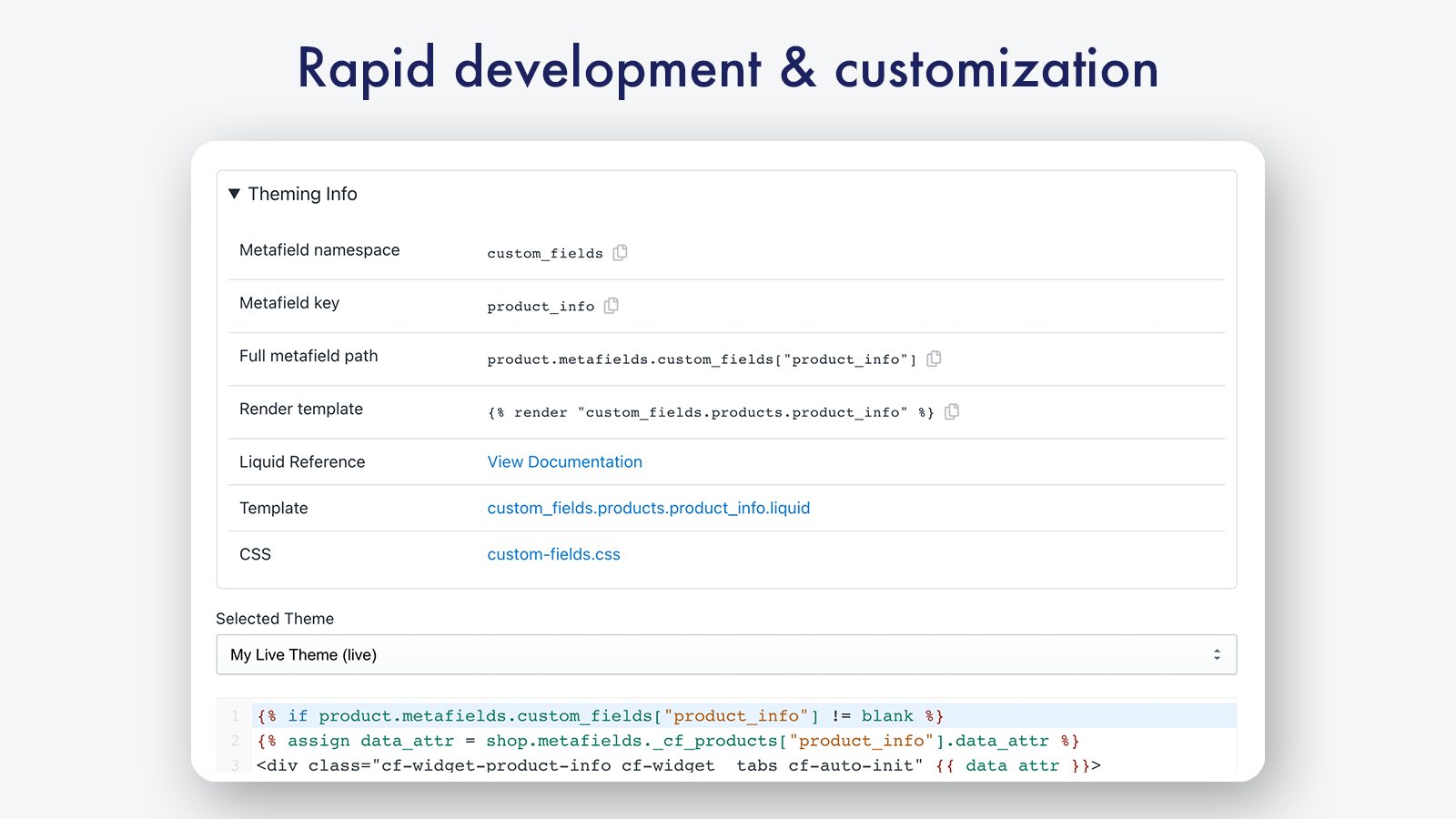
Bonify Custom Fields Shopify app screenshot 1
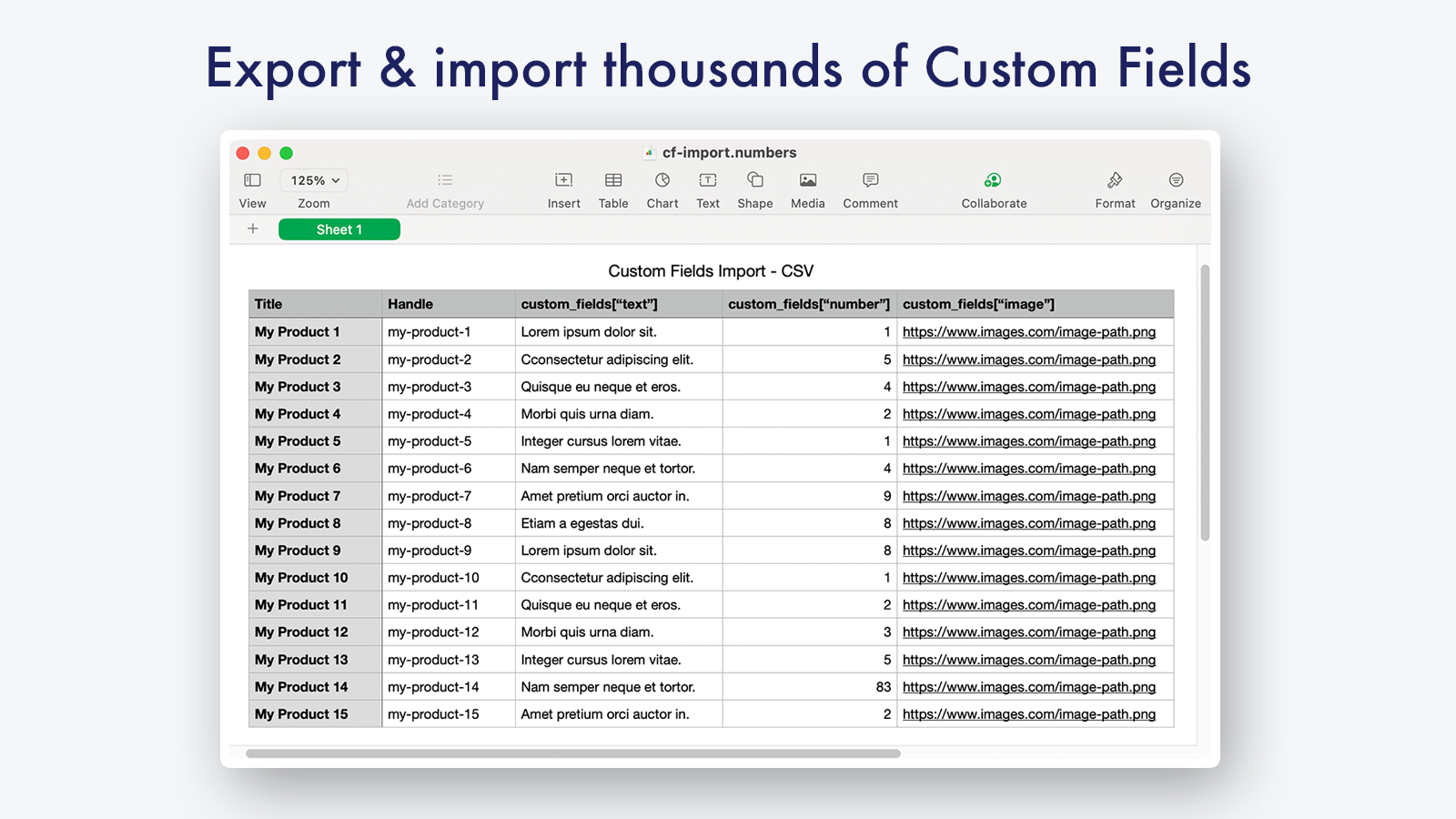
Bonify Custom Fields Shopify app screenshot 2
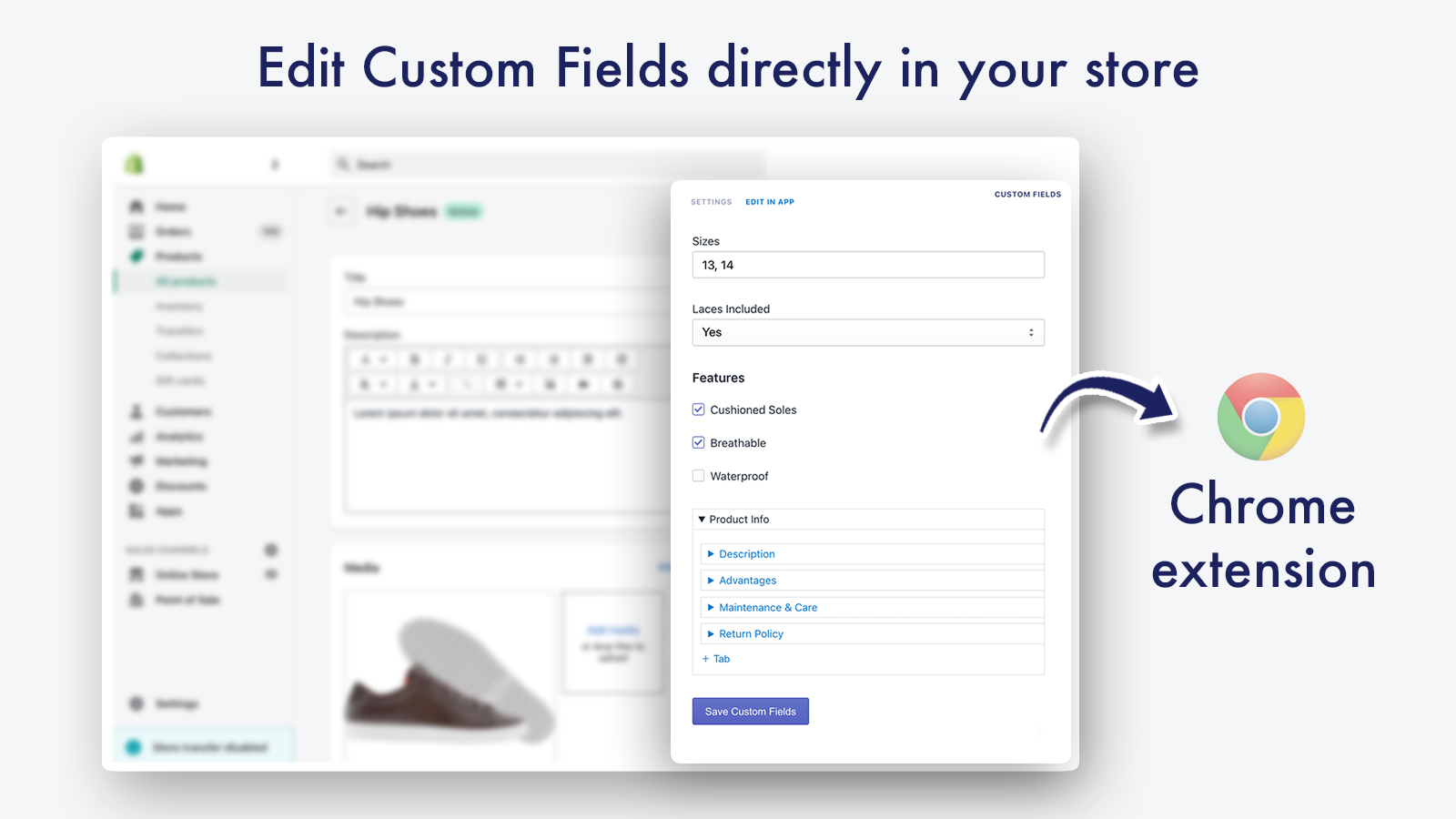
Bonify Custom Fields Shopify app screenshot 3
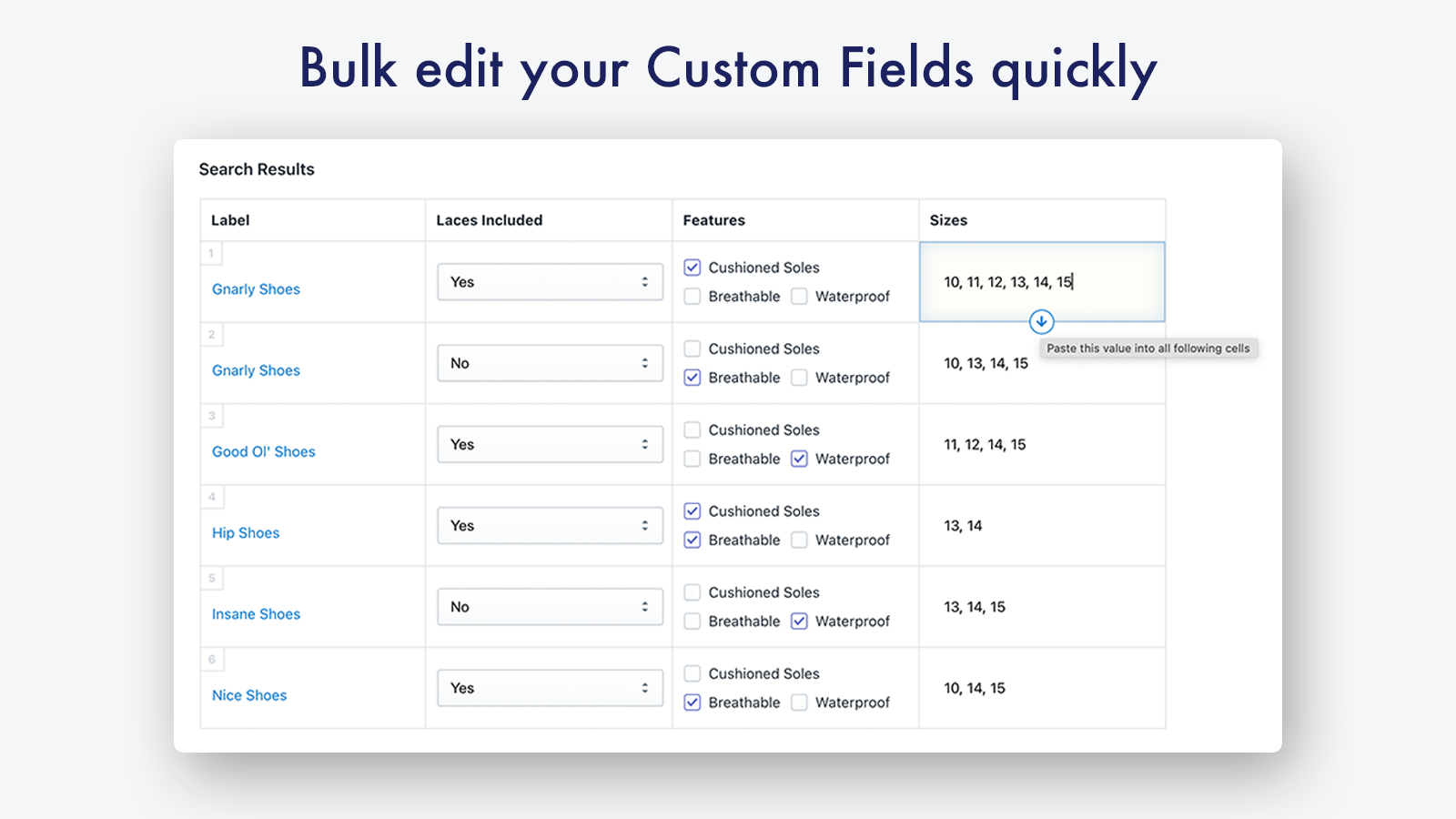
Bonify Custom Fields Shopify app screenshot 4
Bonify Custom Fields Shopify app screenshot 5
Bonify Custom Fields Shopify app screenshot 6
Bonify Custom Fields Shopify app screenshot 7
Bonify Custom Fields Shopify app screenshot 8

About the app

Edit tabs, sliders and more with Metafield Editor & Page Builder!

  • Data Importing: Imports data such as files, images, and all kinds of metafield data.
  • Shopify Metafield Management: Works with every Shopify metafield data type and includes unique field types.
  • Nested Field Groups: Create complex groups of fields that include nested fields.
  • Automated metafield imports.: Automatically adds any existing metafield settings.
  • Batch Editing: Editors that can quickly change several items simultaneously.

Install in your Shopify store We pass your name, email and store domain to the Bonify team so they can help install and configure the app on your store.

Keywords

custom data fields Shopify appsShopify metafield data appstheme widgets Shopify appsdata imports Shopify appsbulk editors Shopify appsnested fields Shopify appsfile imports Shopify appsimage imports Shopify appscomplex field groups Shopify appsmetafield configurations Shopify apps

Key features

  • Import files, images, and all metafield data types effortlessly.
  • Supports all Shopify metafield types plus exclusive custom field options.
  • Create nested field groups for complex data structures.

Pricing

Bonify Custom Fields pricing plans

Free for Devs
$0 /month
  • Free for Development Stores
Pro
$14 /month
  • All features included
  • All field types & widgets included
  • Unlimited fields
  • Amazing support
Pro Plus
$19 /month
  • All features, field types & widgets
  • Unlimited fields
  • Amazing support
  • FREE for development stores
  • Multi-store discounts available

Not sure which plan to pick? Discuss Free for Devs or Pro plans with us, learn about custom pricing, or get a demo.

Here’s an overview of Bonify Custom Fields costs for each of the plan(s)

The app has 3 pricing plans: 1 free and 2 paid. The free plan offered by Bonify Custom Fields is Free for Devs. The paid plans offered by Bonify Custom Fields are Pro, Pro Plus.

The details of the plans are outlined below.

  • Free for Devs: this plan is free forever, incurring no subscription costs. It offers a wide range of features like Free for Development Stores.
  • Pro: the Pro plan costs $14 and comes with a 14-day free trial period. The plan offers a host of features, including All features included, All field types & widgets included, Unlimited fields, Amazing support.
  • Pro Plus: the Pro Plus plan costs $19 and comes with a 14-day free trial period. The plan offers a host of features, including All features, field types & widgets, Unlimited fields, Amazing support, FREE for development stores, Multi-store discounts available.

Bonify Custom Fields price summary

Pricing summaryFree plan available. Free trial available.
Total pricing plan(s)3
Number of free plan(s)1
Number of paid plan(s)2
Cost of paid plan(s)$14, $19
Free trial availableYes, for 14 day(s)

Install in your Shopify store We pass your name, email and store domain to the Bonify team so they can help install and configure the app on your store.

Comparison

Top Bonify Custom Fields alternatives — detailed comparison

The table below highlights the crucial differences between Bonify Custom Fields and similar other Shopify apps based on parameters like ratings, reviews, features, pricing, etc.

Apps
Add app
General information
Ratings4.6 ★ (111 reviews)3.9 ★ (5,766 reviews)4.5 ★ (5,529 reviews)
Developed byBonifyMetaGoogle LLC
Launch date6 April 20164 October 201828 November 2017
PricingFree, $14/month, $19/monthFreeFree
ObjectiveEdit tabs, sliders and more with Metafield Editor & Page Builder!Sell your products on Facebook and Instagram.Advertise where people use Google and YouTube.

CategoriesMetafields, MarketplacesAds, MarketplacesMarketplaces, Ads
Key features & highlights
PurposeTell your story in your own style using personalized data fields and theme widgets that are compatible with any theme.Sell on Facebook and Instagram easily while managing your business in one location with Shopify.Show your products to new buyers seeking what you offer.
Features list
  • Import files, images, and all metafield data types effortlessly.
  • Supports all Shopify metafield types plus exclusive custom field options.
  • Create nested field groups for complex data structures.
  • Automatically sync products to Facebook and Instagram shops for seamless selling.
  • Track shop performance with insights on top-selling and most-tagged items.
  • Improve ad results by setting up a conversion pixel for better targeting.
  • Sync products to Google Merchant Center for seamless listing across Google platforms.
  • Run Performance Max ad campaigns to boost sales using Google’s AI technology.
  • Sell products directly through YouTube videos with integrated shopping features.
Highlights—
  • Based in United States
  • Based in United States
User reviews and ratings
Recommended93.7%66.9%84.1%
Pros
  • Consistently praised for quick, knowledgeable, and personalized assistance.
  • Enables extensive product page enhancements and flexible data management.
  • Intuitive interface with helpful documentation for non-technical users.
  • Functions as advertised with minimal technical issues reported.
  • Efficiently handles large datasets, saving time for stores with extensive catalogs.
  • Streamlines workflow by allowing direct edits within Shopify admin.
  • Clear guides and examples aid in setup and advanced customization.
  • Developers actively implement user-suggested improvements.
  • Offers valuable functionality without upfront cost, appreciated by small stores.
  • Reduces manual data entry through global fields and conditional logic.
  • The app simplifies connecting Shopify stores to Facebook and Instagram, with many users reporting a seamless setup process.
  • Many reviewers highlighted the app’s intuitive design and straightforward navigation.
  • Multiple users praised the app for its fast and hassle-free installation and configuration.
  • The app is valued for its ability to enhance product visibility and streamline ad management.
  • Several users noted the app works consistently well once properly set up.
  • The app is appreciated for leveling the playing field for small and new businesses.
  • Many users reported increased sales and customer engagement after using the app.
  • The app offers a range of functionalities, including product syncing and performance tracking.
  • First-time users often found the app easy to understand and use.
  • The app is praised for its seamless connection with Shopify, making it a valuable tool for e-commerce.
  • The app is straightforward to install and configure, with clear instructions guiding users through the process.
  • Users report smooth linking between Shopify and Google Merchant Center, enabling automatic product syncing.
  • Many users experienced a noticeable boost in sales and traffic after using the app.
  • The app’s intuitive design makes it accessible even for beginners.
  • Users appreciate the ability to list products on Google Shopping without additional costs.
  • Some users noted fast approval times for their products after setup.
  • The app keeps product information up-to-date in Google Merchant Center without manual intervention.
  • Clear guidance and tutorials assist users in navigating the app’s features.
  • The app facilitates cross-selling by making products visible on Google Shopping.
  • For some users, the app works flawlessly after initial setup, with no recurring issues.
Cons
  • Users note restrictions like capped fields or lack of advanced list formatting.
  • Slows or glitches during bulk imports exceeding 1,000 lines.
  • Some manual code adjustments required for non-standard themes.
  • Non-developers may struggle with complex liquid/html integrations.
  • Confusion arises when free options aren’t immediately visible during signup.
  • Many users reported a lack of responsive or helpful support from both Shopify and Facebook.
  • Numerous reviews mentioned bugs, crashes, and connectivity problems, especially after updates.
  • Several users experienced sudden account suspensions or restrictions with little explanation or recourse.
  • Some users noted the app works intermittently, with features failing without warning.
  • Frequent problems with product synchronization between Shopify and Google Merchant Center, leading to disapprovals or pending statuses.
  • Users report inadequate assistance from both Shopify and Google, with blame-shifting and delayed responses.
  • Many faced sudden account suspensions due to vague "misrepresentation" or policy violations without clear resolution paths.
  • The app is prone to technical glitches, such as incorrect data feeds or random product expirations.
  • Strict Google Merchant Center policies (e.g., GTIN codes) create hurdles, especially for custom or small-scale sellers.
Pricing and plans
Total pricing plans311
Free planAvailableAvailableAvailable
Free trialYes, for 14 day(s)NoNo
Technical information
Rating4.6 ★3.9 ★4.5 ★
Total reviews1115,9215,658
Launch date6 April 20164 October 201828 November 2017

More details about Bonify Custom Fields

Product description

Bonify Custom Fields is a feature-rich app that enables easy customization and management of metafield data on Shopify. It allows users to place widgets without coding and alter their appearance. Furthermore, it offers tools for importing and exporting complex data types for those who have difficulty managing metafield data.

AI summary

The app is a Shopify tool designed to enhance product page customization through advanced metafield management, enabling features like custom tabs, dynamic content, and bulk data editing. Its strengths include robust functionality for creating and managing custom fields, seamless integration with Shopify’s admin interface, and a user-friendly Chrome extension for direct editing. The app excels in customer support, with prompt, personalized assistance for setup, troubleshooting, and theme compatibility issues. However, limitations include occasional performance slowdowns with large datasets (e.g., files exceeding 1,000 lines), a somewhat outdated interface, and a learning curve for non-technical users. Some users report confusion over advertised free plans not being readily accessible. Despite these drawbacks, the app is widely regarded as a powerful solution for extending Shopify’s native capabilities, particularly for stores requiring detailed product customization or bulk operations.

Support

For any questions, concerns, or assistance with Bonify Custom Fields, the dedicated support team is readily available to help. To reach out to the support team, users can send an email to [email protected]. Additionally, Bonify Custom Fields offers a comprehensive FAQ section to address common inquiries and provide self-help resources in their app FAQ section.

Language support

Details of the Bonify Custom Fields are available in various languages on the Shopify app store, including English, German, and French.

Bonify Custom Fields support information in a nutshell
Support emailcustomfields@bonify.io
Contact number(s)Not available
FAQ pageFAQ details
Privacy policyPrivacy details
Language supportEnglish, German, and French
Integration

The list of top Shopify apps, features or software tools that Bonify Custom Fields seamlessly integrates with are given below.

Amazon S3eBayGoogle Chrome (Browser Extension)
Developer
NameBonify
ProfileSee all apps by Bonify
WebsiteView developer profile
Address83 Amherst Street, FL 2, Manchester, NH, 03101

Installation

How to install Bonify Custom Fields on your Shopify store

1

Send your details

Your name, email and store domain go straight to the Bonify team.

2

The developer gets in touch

Bonify contacts you directly to arrange setup for your store.

3

Install at your own pace

Perfect your store’s functionality without the pressure to move on until you’re ready.

Customer reviews

4.7
★★★★★
111 total reviews
597
47
31
21
15

Bonify Custom Fields has an overall rating of 4.7 stars from a total of 111 reviews on the Shopify app store. Of these, 104 (93.7%) are positive, 1 (0.9%) are neutral, and 6 (5.4%) are negative*.

*Ratings above four stars fall under positive review, three star reviews fall under neutral, and anything less than two stars falls under negative.

★★★★★AAA Travel Storefrom United States · 12 November 2025

Really helpful customer service! Got my issue solved in a couple minutes =)

★★★★★platypod.comfrom United States · 11 November 2025

Support helped me right away with some customization!

★★★★★Abbyson.comfrom United States · 12 August 2025

While Bonify has been a great benefit to us, we are moving away from the service that it offers. It has been a great tool and we had a positive experience.Thank you

★★★★★Trove Warehousefrom United States · 16 September 2024

Highly recommend this app to help enhance our website. We have had Bonify Custom Fields installed on our Shopify website for years and use it to give us more customization on different product pages. Recently, we accidentally deleted the app from our store and their customer service team was amazing to work with. They were able to very quickly reinstate all of our original coding to allow us to use the app like before. We have been very pleased and look forward to continue using it!

★★★★★Progurt Australiafrom Australia · 30 May 2024

Very fast response to technical issue form staff. They resolved immediately for us. Good customer service.

Install in your Shopify store We pass your name, email and store domain to the Bonify team so they can help install and configure the app on your store.

Performance on the App Store

Rankings, review momentum and install geography, refreshed weekly. Open the full charts for history, benchmarks and keyword detail.

Category rank
#9
custom fields
Total reviews
111
No change vs 30 days ago
Average rating
4.7 ★
0.00 vs 30 days ago
Top market
US
64.8% of installs

Category & keyword rankings

Position and market share today

Keywordcustom fields#90.0% ▲0.0
Keywordhelium customer fields#100.0% ▼0.0
Keywordmetafields editor#110.0% ▼0.0
Keywordadvanced custom fields#120.0% ▼0.0

Reviews trend

Cumulative reviews · last 6 months

110 → 111 reviews · rating steady at 4.7★
Ranks #9 in 1 of 10 App Store groups tracked.Open full charts →

Bonify Custom Fields FAQs

How do I install the Bonify Custom Fields Shopify app?
To install Bonify Custom Fields on your Shopify store, click on the Bonify Custom Fields installation link. Login to the Shopify store on which you want to install the app and follow the onboarding process. If you need our expert guidance to help you install Bonify Custom Fields on your Shopify store, then contact us now.
What are the key features of Bonify Custom Fields?

The key features offered by Bonify Custom Fields to Shopify store owners are:

  • Data imports including file/image imports and all types of metafield data
  • Works with all Shopify metafield data types and includes exclusive field types
  • Build out complex custom field groups with nested fields and object areas
  • Automatically import metafield configurations like eBay item-specific fields
  • Edit metafields directly in Admin, or bulk edit to change multiple items at once
Does Bonify Custom Fields integrate with other Shopify apps or tools?

Yes, Bonify Custom Fields seamlessly integrates with other Shopify apps or tools, such as Imports data such as files, images, and all kinds of metafield data., Works with every Shopify metafield data type and includes unique field types., Create complex groups of fields that include nested fields..

Is there a free trial available for Bonify Custom Fields?

Yes, Bonify Custom Fields offers a 14-day free trial on all its paid plans.

What are the pricing plans for Bonify Custom Fields?

The app has 3 pricing plans: 1 free and 2 paid. The paid plans cost $14/month, $19/month, and come with a 14-day free trial period.

How does billing work for Bonify Custom Fields?

Bonify Custom Fields uses USD for billing, with recurring and usage-based charges invoiced usually every 30 days.

Can I cancel or upgrade my subscription plan at any time?

Yes, Bonify Custom Fields allows its subscribers to cancel or upgrade their subscription plan at any time.

Does Bonify Custom Fields offer customer support?

Yes, Bonify Custom Fields offers a dedicated support team for any kind of app-related assistance. To reach out to the support team, users can send an email to [email protected]. Additionally, Bonify Custom Fields offers a comprehensive FAQ section to address common inquiries and provide self-help resources.

Is Bonify Custom Fields compatible with my Shopify theme?

Please reach out to their support team at [email protected] to confirm its compatibility with your specific Shopify theme.

Most popular

Most popular Shopify apps on the market

Install in your Shopify store We pass your name, email and store domain to the Bonify team so they can help install and configure the app on your store.

.myshopify.com
4.7★★★★★111 reviews · 93.7% positive

Used Bonify Custom Fields? Share your experience with other merchants.

  • AT
    AAA Travel StoreUnited States · 12 Nov 2025
    ★★★★★

    Really helpful customer service! Got my issue solved in a couple minutes =)

  • PL
    platypod.comUnited States · 11 Nov 2025
    ★★★★★

    Support helped me right away with some customization!

  • AB
    Abbyson.comUnited States · 12 Aug 2025
    ★★★★★

    While Bonify has been a great benefit to us, we are moving away from the service that it offers. It has been a great tool and we had a positive experience.Thank you

  • TW
    Trove WarehouseUnited States · 16 Sep 2024
    ★★★★★

    Highly recommend this app to help enhance our website. We have had Bonify Custom Fields installed on our Shopify website for years and use it to give us more customization on different product pages. Recently, we accidentally deleted the app from our store and their customer service team was amazing to work with. They were able to very quickly reinstate all of our original coding to allow us to use the app like before. We have been very pleased and look forward to continue using it!

  • PA
    Progurt AustraliaAustralia · 30 May 2024
    ★★★★★

    Very fast response to technical issue form staff. They resolved immediately for us. Good customer service.

  • HN
    Hand NutritionUnited States · 26 Oct 2023
    ★★★★★

    Great communication, and thorough job. My representative was efficient and polite. Thanks guys!

  • WO
    White Oak PasturesUnited States · 11 Apr 2023
    ★★★★★

    This has been a very helpful tool for our store, especially since we carry perishable goods. This app works as advertised!

  • RE
    RP ElectronicsPanama · 14 Oct 2022
    ★★★★★

    We use this app on a daily basis for our products metafields. The support team is very helpful too. Highly recommended.

About ShopDigest

The Shopify ecosystem, shown through the work

ShopDigest is an independent directory of Shopify work. Developers, agencies and experts publish the projects they’ve actually shipped — migrations, rebuilds, custom apps, headless storefronts — with the results attached.

For merchants, that means judging a partner on evidence instead of a sales page: browse real builds in your category and budget, then reach out directly. For builders, it means one profile that keeps working after the project ships.

No commissions, no pay-to-rank placements. The best work rises because people save and follow it.

More about ShopDigest
About ShopDigest

Show the work.
Win the work.

A portfolio directory for the Shopify ecosystem — builders publish, merchants browse, nobody buys a better position.

More about ShopDigest