

by Adevole
Instafeed Gallery with Stories and Highlights for Social Evidence
Free plan · From $8/mo
Grow with ShopDigest. Programs for experts, developers and store owners.
A slideshow gallery for your store Sell popular products using a slideshow gallery of product images.
Pros and cons of Ada IQ: Slideshow Image Slider

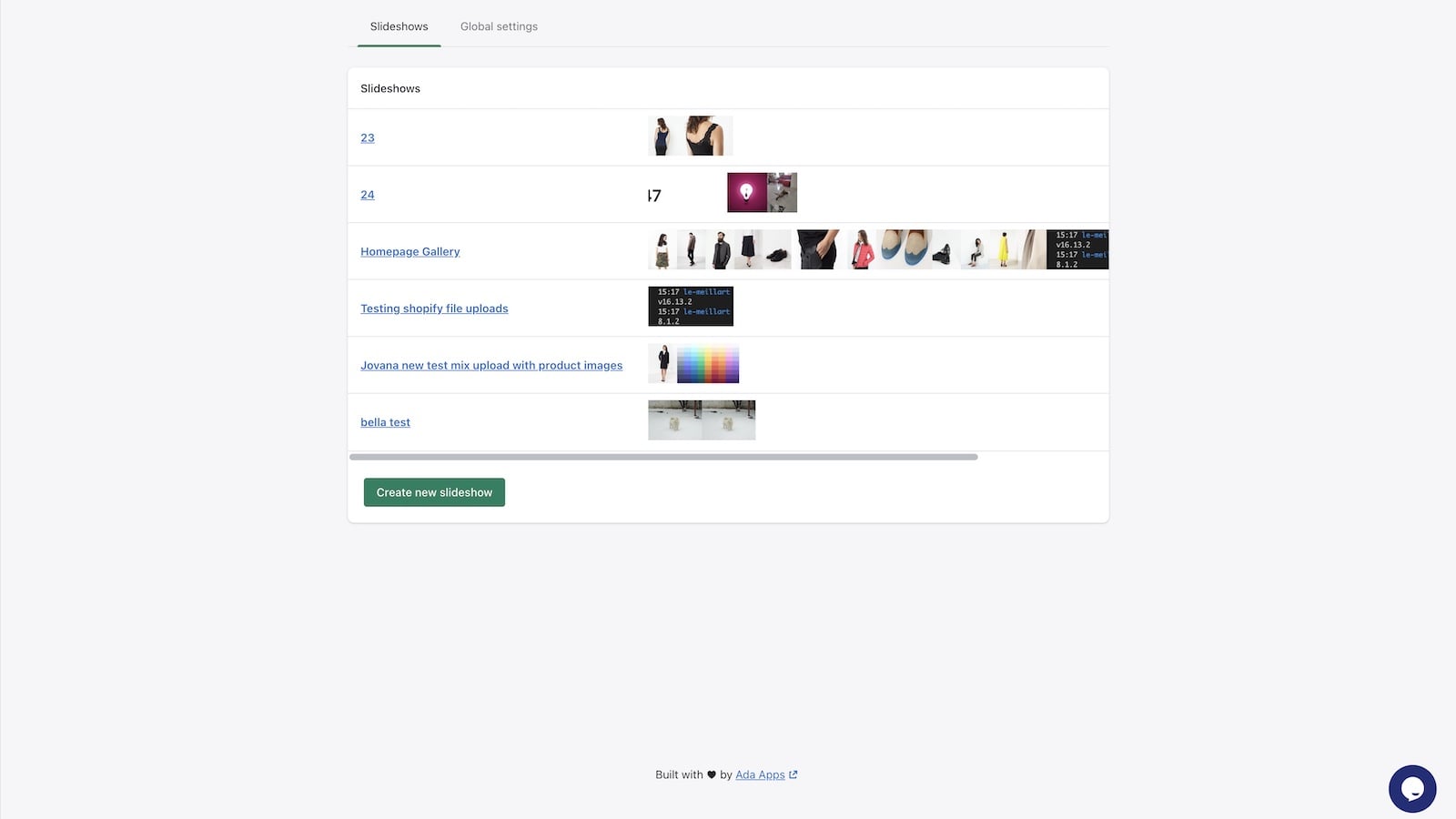
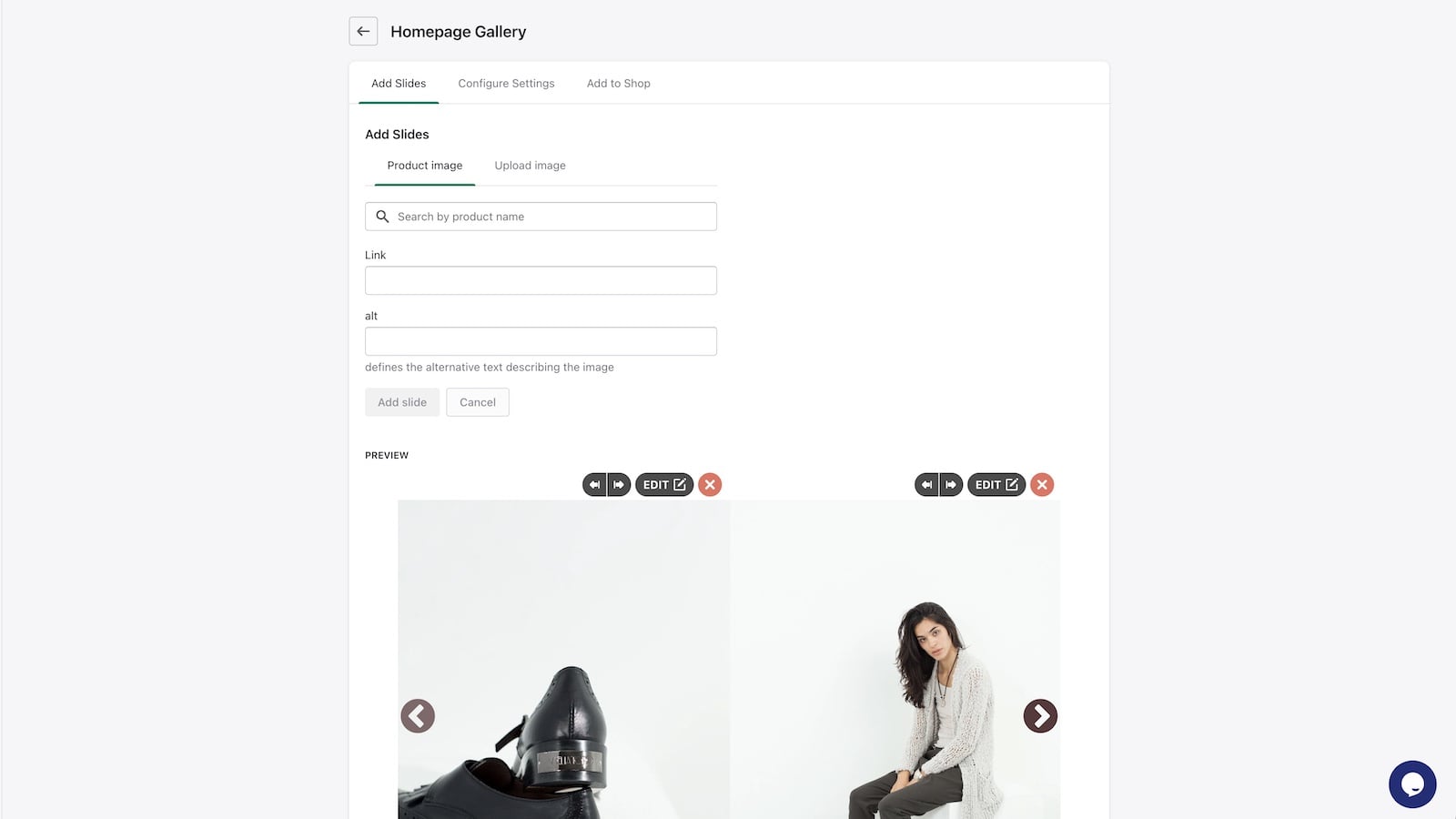
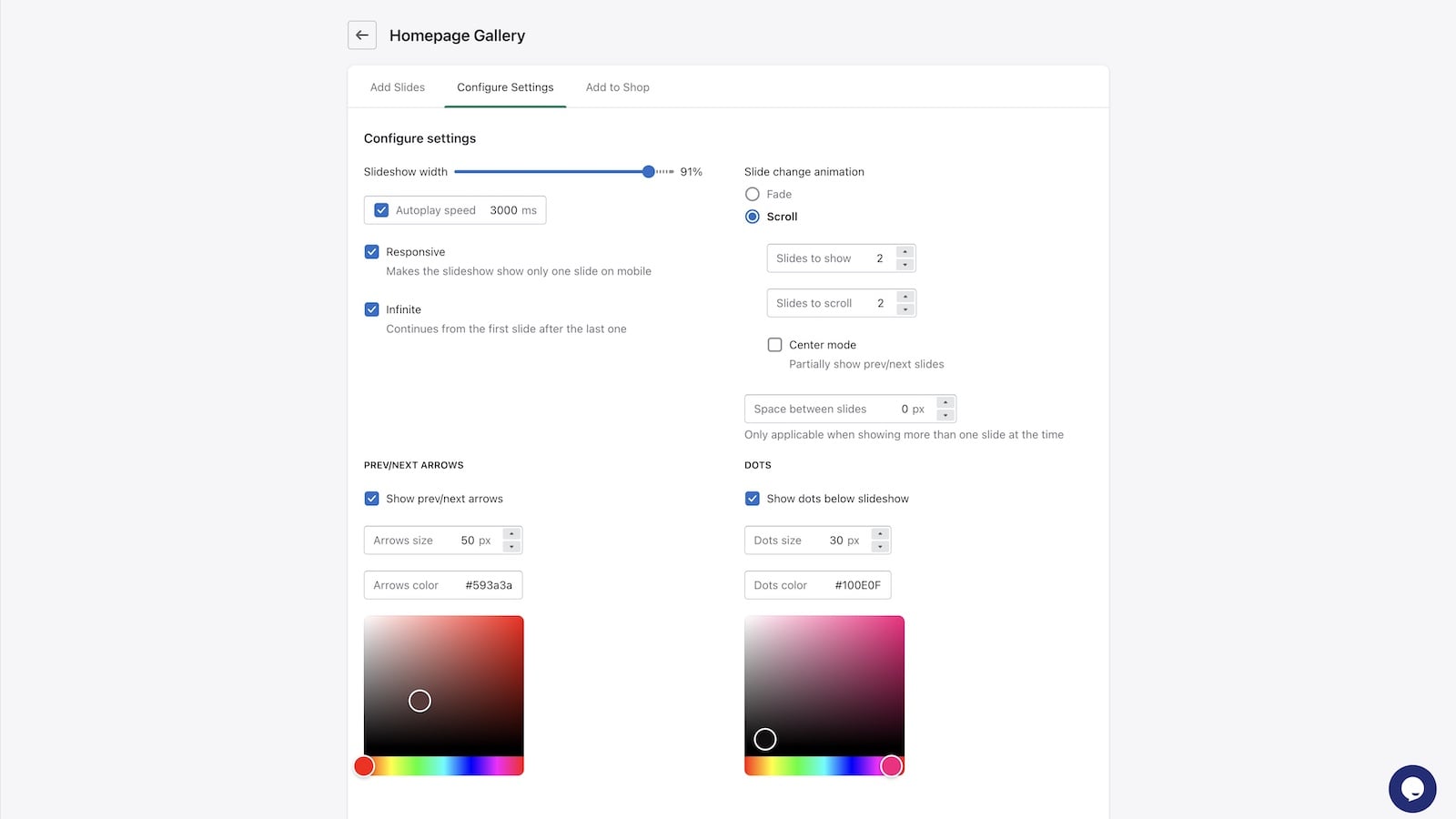
Sell popular products using a slideshow gallery of product images.
Ada IQ: Slideshow Image Slider pricing plans
Not sure which plan to pick? Discuss Unlimited Plan plans with us, learn about custom pricing, or get a demo.
The app has 1 pricing plan: 0 free and 1 paid. The paid plan offered by Ada IQ: Slideshow Image Slider is Unlimited Plan.
The details of the plans are outlined below.
| Pricing summary | $2.99/month. Free trial available. |
| Total pricing plan(s) | 1 |
| Number of free plan(s) | 0 |
| Number of paid plan(s) | 1 |
| Cost of paid plan(s) | $2.99 |
| Free trial available | Yes, for 10 day(s) |
The table below highlights the crucial differences between Ada IQ: Slideshow Image Slider and similar other Shopify apps based on parameters like ratings, reviews, features, pricing, etc.
| Apps | Add app | |||
| General information | ||||
| Ratings | 4.8 ★ (21 reviews) | 4.9 ★ (394 reviews) | 4.9 ★ (2,211 reviews) | |
| Developed by | Ada Apps | Adevole | Mintt Studio | |
| Launch date | 18 July 2017 | 4 March 2019 | 30 September 2016 | |
| Pricing | $2.99/month | Free, $8/month, $20/month | Free, $8/month, $20/month | |
| Objective | Sell popular products using a slideshow gallery of product images. | Instafeed Gallery with Stories and Highlights for Social Evidence | Attractive and purchasable official Instagram feeds that generate sales. | |
| Categories | Image gallery | Image gallery, Social proof | Social proof, Image gallery | |
| Key features & highlights | ||||
| Purpose | A slideshow gallery for your store | Display an attractive Instagram Feed Gallery with Stories & Highlights on your store effortlessly. | Show personalized Instagram Feeds that you can buy from on your store. Turn your store visitors into buyers. | |
| Features list |
|
|
| |
| Highlights | — | — | — | |
| User reviews and ratings | ||||
| Recommended | 95.2% | 95.9% | 98.2% | |
| Pros |
|
|
| |
| Cons |
|
|
| |
| Pricing and plans | ||||
| Total pricing plans | 1 | 3 | 3 | |
| Free plan | Not available | Available | Available | |
| Free trial | Yes, for 10 day(s) | No | Yes, for 7 day(s) | |
| Technical information | ||||
| Rating | 4.8 ★ | 4.9 ★ | 4.9 ★ | |
| Total reviews | 21 | 392 | 2,270 | |
| Launch date | 18 July 2017 | 4 March 2019 | 30 September 2016 | |
You can upload or search for product images from your computer, which are saved in your store's Files. This storage method allows for convenient use of these images throughout your shop.
The app is a Shopify slideshow solution designed to replace or enhance the platform’s default slideshow feature. It allows for the creation of separate slideshows optimized for desktop and mobile formats, ensuring responsive display across devices. Key features include customizable sliders, clickable banners without additional buttons, and seamless integration with themes. The app is noted for its simplicity, affordability, and lack of forced branding, making it accessible for users seeking a cost-effective alternative to pricier options. Support is highly responsive, with quick resolution for theme compatibility issues and customization requests. However, some limitations include the inability to add captions to images or fully disable slideshows on specific device types (e.g., mobile-only or desktop-only displays). While generally reliable, occasional theme conflicts may arise, though these are often addressed promptly by support. The app is well-suited for users prioritizing ease of use, responsive design, and strong customer service.
For any questions, concerns, or assistance with Ada IQ: Slideshow Image Slider, the dedicated support team is readily available to help. To reach out to the support team, users can send an email to [email protected].
Details of the Ada IQ: Slideshow Image Slider are available in various languages on the Shopify app store, including English.
| Support email | iq-slider |
| Contact number(s) | Not available |
| FAQ page | Not available |
| Privacy policy | Privacy details |
| Language support | English |
The list of top Shopify apps, features or software tools that Ada IQ: Slideshow Image Slider seamlessly integrates with are given below.
| Name | Ada Apps |
| Profile | See all apps by Ada Apps |
| Website | View developer profile |
| Address | Rokova 48, Split, 21000 |
How to install Ada IQ: Slideshow Image Slider on your Shopify store
Your name, email and store domain go straight to the Ada Apps team.
Ada Apps contacts you directly to arrange setup for your store.
Perfect your store’s functionality without the pressure to move on until you’re ready.
Ada IQ: Slideshow Image Slider has an overall rating of 4.8 stars from a total of 21 reviews on the Shopify app store. Of these, 20 (95.2%) are positive, 0 (0.0%) are neutral, and 1 (4.8%) are negative*.
*Ratings above four stars fall under positive review, three star reviews fall under neutral, and anything less than two stars falls under negative.
This is a great app, the best part is that you can create separate slideshows with different images for desktop and mobile formats for the same website. The app is designed in a way that it's extremely simple to use while at the same time is very versatile. Viktor, the app’s developer, is extremely quick to respond to inquiries and is very proactive. I'm very happy with the result and my website now looks great. This is an excellent product.
This app is great!! I spent hours and hours trying to make the default Shopify slideshow to show the images correctly but it was impossible (what a pitty). Then I searched for many apps and found shit Ada IQ Slideshow that is really simple to use and just works!! It even adjusts the images on the slideshow to show properly in desktop and in mobile.The only thing I would improve is to give the chance to show a slideshow in desktop only and not in mobile and viceversa (in a way that two could be created with specific photos to fit each format better).Thanks for building it!
Very happy with this app! The built-in slideshow feature in Shopify is horrendous, with simple features missing like making the banner clickable without a button. I spent 2 days fighting with it, and my banners would always be resized in annoying ways and I found it impossible to create a banner that looked good on mobile and desktop. I tried several other slideshow apps first, most of them cost too much or charge you to remove their logo from your banner. This app is affordable and just works. I create my banner in my desired size and upload it, and it just displays on my site and looks good in both mobile and desktop. My only recommendation would be to add a feature to allow for different banners on mobile/desktop.
Easy to use. It's a simple app that does what it says, and Viktor provides great and quick support.
I ran into an issue with my theme and the included slideshow feature being buggy. All the other slideshow apps out there were too expensive or just didn't work right. Then I ran across this one and not only was the price right - it worked perfectly. I had to contact customer support and they were quick to respond and very helpful. Love the lower price and best of all - no more glitchy, buggy slideshows! Definitely would give 10 stars to this app. Highly recommended.
Rankings, review momentum and install geography, refreshed weekly. Open the full charts for history, benchmarks and keyword detail.
Position and market share today
| Keywordslideshow | #6 | 0.0% |
| KeywordImage slider | #10 | 0.0% |
| Keywordslider | #74 | — |
Cumulative reviews · last 6 months
The key features offered by Ada IQ: Slideshow Image Slider to Shopify store owners are:
Yes, Ada IQ: Slideshow Image Slider seamlessly integrates with other Shopify apps or tools, such as Manage slideshows easily - upload or search for existing product images., Add a slideshow to your store using the Theme Editor UI or a single line of code., Showcase top products - Display your best sellers and make them prominent..
Yes, Ada IQ: Slideshow Image Slider offers a 10-day free trial on all its paid plans.
The app offers 1 paid plan, which cost $2.99/month, and comes with a 10-day free trial period.
Ada IQ: Slideshow Image Slider uses USD for billing, with recurring and usage-based charges invoiced usually every 30 days.
Yes, Ada IQ: Slideshow Image Slider allows its subscribers to cancel or upgrade their subscription plan at any time.
Yes, Ada IQ: Slideshow Image Slider offers a dedicated support team for any kind of app-related assistance. To reach out to the support team, users can send an email to [email protected].
Please reach out to their support team at [email protected] to confirm its compatibility with your specific Shopify theme.
Instafeed Gallery with Stories and Highlights for Social Evidence

Attractive and purchasable official Instagram feeds that generate sales.

Most popular Shopify apps on the market

Product reviews with pictures and videos for credibility and search engine optimization.

Display your products to billions of TikTok users.

Simplify all tasks and focus on your business.

Increase your brand visibility and communicate with customers on Shop.
Writing reviews on ShopDigest is coming soon.
This is a great app, the best part is that you can create separate slideshows with different images for desktop and mobile formats for the same website. The app is designed in a way that it's extremely simple to use while at the same time is very versatile. Viktor, the app’s developer, is extremely quick to respond to inquiries and is very proactive. I'm very happy with the result and my website now looks great. This is an excellent product.
This app is great!! I spent hours and hours trying to make the default Shopify slideshow to show the images correctly but it was impossible (what a pitty). Then I searched for many apps and found shit Ada IQ Slideshow that is really simple to use and just works!! It even adjusts the images on the slideshow to show properly in desktop and in mobile.The only thing I would improve is to give the chance to show a slideshow in desktop only and not in mobile and viceversa (in a way that two could be created with specific photos to fit each format better).Thanks for building it!
Very happy with this app! The built-in slideshow feature in Shopify is horrendous, with simple features missing like making the banner clickable without a button. I spent 2 days fighting with it, and my banners would always be resized in annoying ways and I found it impossible to create a banner that looked good on mobile and desktop. I tried several other slideshow apps first, most of them cost too much or charge you to remove their logo from your banner. This app is affordable and just works. I create my banner in my desired size and upload it, and it just displays on my site and looks good in both mobile and desktop. My only recommendation would be to add a feature to allow for different banners on mobile/desktop.
Hey, thank you so much for the review!And I hear you. I think being able to have different desktop and mobile slideshows would be super useful feature to have. I'll make sure to add it. The good news is that, in the meantime, I can already do this for you by adding a tiny code snippet to your theme (the code snippet won't affect page speed as it's a few lines of CSS styles). Message me through the in-app chat or just send me an email and I'll make this work for you.
Easy to use. It's a simple app that does what it says, and Viktor provides great and quick support.
I ran into an issue with my theme and the included slideshow feature being buggy. All the other slideshow apps out there were too expensive or just didn't work right. Then I ran across this one and not only was the price right - it worked perfectly. I had to contact customer support and they were quick to respond and very helpful. Love the lower price and best of all - no more glitchy, buggy slideshows! Definitely would give 10 stars to this app. Highly recommended.
Loving this app! Had a small problem with the way it was displaying, (specific to my site), and I emailed help. They got back to me within a business day, were very helpful and responsive, and made a change to my site that had the app working perfectly!
Amazing app and amazing support! Simple to use and Viktor went above and beyond with requests I have for how I want to slideshow to be displayed on our website. Very satisfied!
Works great! Really useful to display some user generated content on the description and increase the conversion rate!
ShopDigest is an independent directory of Shopify work. Developers, agencies and experts publish the projects they’ve actually shipped — migrations, rebuilds, custom apps, headless storefronts — with the results attached.
For merchants, that means judging a partner on evidence instead of a sales page: browse real builds in your category and budget, then reach out directly. For builders, it means one profile that keeps working after the project ships.
No commissions, no pay-to-rank placements. The best work rises because people save and follow it.
More about ShopDigestA portfolio directory for the Shopify ecosystem — builders publish, merchants browse, nobody buys a better position.